Table of Contents |
Digital tools are part of many everyday tasks. You might search for information, send a message, submit an assignment, or organize files without thinking much about how these actions work.
Think about the last time you looked something up online. You likely typed a few words into a search bar, scanned the results, and chose what to open. You may have decided which information seemed most useful, organized what you found, or shared it with someone else. Although these actions may feel simple, they involve a set of skills that help people use technology effectively in different situations.
Digital literacy is the ability to find, evaluate, create, and communicate information using digital technology. These skills allow people to complete everyday digital tasks with confidence and make informed decisions when using technology.
In this course, you will build digital literacy skills that apply across many tools and situations. Rather than focusing on a single program, you will learn how to navigate digital systems and manage information effectively.
This lesson explores what digital literacy means and how it appears in everyday situations. It also examines how digital literacy differs from learning specific software and how these skills support effective participation in digital environments.
Digital literacy appears in many routine digital activities, such as searching for information, deciding whether a website is trustworthy, creating documents, or communicating through digital platforms.
The following table summarizes several common digital literacy skills.
| Digital Literacy Skill | Description | Example |
|---|---|---|
| Finding information | Searching effectively and selecting useful results | Typing words related to a topic into a search bar to find information |
| Evaluating information | Determining whether information is trustworthy | Checking different sources to decide which information to use |
| Creating content | Writing and managing digital materials | Writing and organizing a document |
| Communicating | Using appropriate tone and format | Sending a clear message to a classmate |
| Protecting information | Maintaining habits that help keep accounts secure | Keeping login information private |
IN CONTEXT
Zoya is working on a class assignment that requires them to gather information and create a short response. They open a search page and type in a few words related to their topic, then scan the results to find information that seems useful.
As they read, they notice that some sources explain the topic more clearly than others. They decide which information to use based on what makes the most sense and seems reliable. After that, they write their response, organizing the information so it is easy to follow. They check their work to make sure the ideas are clear. They then message a classmate to share what they have completed. They take a moment to make sure the message is clear so the classmate understands what to do next.
Before finishing, they make sure they are signed out of their account on the device they are using to keep their information secure.
Through these everyday actions, Zoya is using digital tools to find information, make decisions about what to use, create content, communicate clearly, and protect their information.
People often build digital literacy gradually while performing everyday tasks such as sending messages, organizing files, and sharing information online. These experiences make it easier to recognize patterns and navigate unfamiliar digital tools. While these activities may seem straightforward, they rely on broader skills that apply across many different digital tools.
Many people believe that being digitally literate means knowing how to use a particular program. However, this ability is better described as a software skill, which is the ability to perform tasks within a specific application.
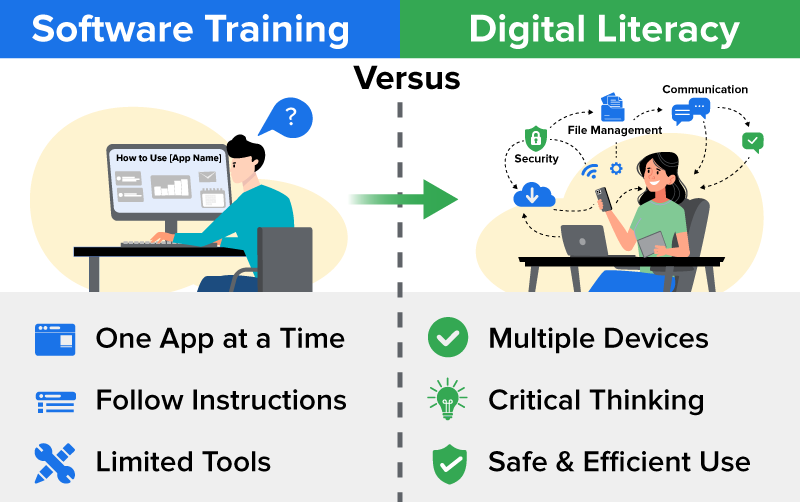
Software training usually focuses on learning how to complete tasks within a single program by following step-by-step instructions. While this knowledge is useful, it does not always transfer easily to other tools.
Digital literacy is broader. In addition to using tools, it involves recognizing patterns that appear across many digital systems. These patterns help users understand how new tools are organized.
Technology also changes frequently through software updates, which are modifications made to programs to improve performance, fix problems, or add new features. Updates sometimes change how a tool is organized or where certain features appear. Users who rely only on memorized steps may struggle when these changes occur, while users who recognize patterns can adapt more easily.
The following table highlights the difference between software skills and digital literacy.
| Software Skill | Digital Literacy |
|---|---|
| Focuses on one program | Applies across many tools |
| Memorizes steps | Recognizes patterns |
| May struggle after updates | Adapts to change |
| Uses tool-specific skills | Involves transferable habits |
EXAMPLE
Jiho works at a small accounting firm that recently switched to a new software program. Some coworkers felt confused due to the layout differing from the previous system. Instead of focusing on the exact steps they had memorized, Jiho paid attention to how the new program was organized. By recognizing familiar patterns in how tools and options were arranged, Jiho was able to adjust quickly and continue completing tasks without difficulty.The following image illustrates the difference between learning a single application and developing transferable digital literacy skills.
Understanding the difference between software skills and digital literacy highlights the importance of developing habits that can be applied across many digital environments.
Understanding digital literacy conceptually is only the first step. In practice, digital literacy appears through everyday decisions and habits. Actions such as verifying information before sharing it, protecting accounts with strong passwords, or organizing files clearly demonstrate strong digital awareness.
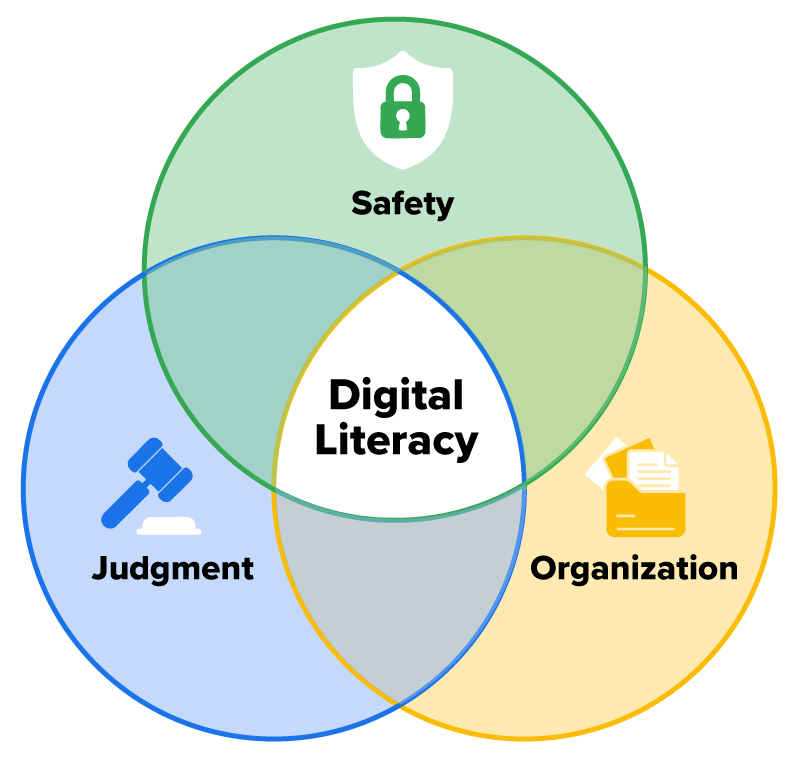
Three connected habits support effective digital participation: judgment, safety, and organization.
Some digital practices support safety and organization more directly. For example, creating a backup means saving a separate copy of files in another location. Backups are important because devices can fail, files can be deleted accidentally, or systems may become unavailable. Keeping a backup ensures that important information can be recovered if the original file is lost.
Many schools and workplaces also use shared drives, which are storage spaces, often cloud-based, where multiple people can access, store, and collaborate on files from any device. Organized folders and clear filenames help teams locate information quickly in these shared spaces.
These habits appear in many everyday digital tasks. The following table illustrates how judgment, safety, and organization can appear in practical situations.
| Area | Examples in Action |
|---|---|
| Judgment | Verifying an unexpected attachment; questioning a site that asks for personal information before granting access |
| Safety | Using strong passwords; creating a backup so files can be recovered if lost |
| Organization | Using clear filenames and consistent folders; using shared drives for collaborative work |
Digital literacy also involves recognizing how everyday decisions affect digital outcomes. Some actions demonstrate strong digital awareness, while others may create unnecessary risks. The following table compares habits that reflect strong digital literacy with habits that can create unnecessary risks.
| Digitally Literate Habits | Digitally Risky Habits |
|---|---|
| Verifying the sender of an unexpected message | Opening links without checking the sender |
| Using unique passwords for accounts | Reusing the same password for multiple sites |
| Organizing files into labeled folders | Saving files without a clear structure |
| Checking information before sharing | Sharing information without reviewing the source |
Small habits such as verifying information or organizing files clearly can make digital work more efficient and reliable. These habits appear across many parts of daily life, including school, work, and personal activities.
For instance, in academic environments, students evaluate credible sources, which are sources of information that are trustworthy and supported by evidence. The following table illustrates how digital literacy supports activities across different parts of life.
| Setting | How Digital Literacy Appears | Why It Matters |
|---|---|---|
| Academic | Submitting assignments and evaluating credible sources | Supports responsible research and learning |
| Workplace | Managing shared documents and communicating professionally | Supports collaboration |
| Personal | Managing finances and organizing digital records | Supports everyday organization |
EXAMPLE
Marcus is a part-time college student who also works evenings at a retail store. When researching a paper, Marcus checks whether sources are credible. At work, they review shared documents before making changes. At home, they organize personal files and pay bills online. These habits demonstrate digital literacy across several areas of life.Digital literacy helps people navigate technology confidently, evaluate information responsibly, and manage digital tasks across many areas of life. These activities take place through the digital devices and systems people use every day, including smartphones, laptops, tablets, and Chromebooks.
Source: THIS TUTORIAL WAS AUTHORED BY SOPHIA LEARNING. PLEASE SEE OUR TERMS OF USE.
REFERENCES
American Library Association. (n.d.). Digital literacy. literacy.ala.org/digital-literacy/



