Table of Contents |
The SUM command allows you to calculate the sum (total) of numerical values within a column. This is particularly useful when aggregating data and obtaining cumulative values. For example, you can use SUM to calculate a dataset's total sales, revenue, or quantities.
Calculating the sum of values is essential for data analysis. It enables you to understand numerical data's overall magnitude, scale, or distribution. By aggregating values, you can gain insights into your dataset's patterns, trends, or anomalies. The SUM command is often used for financial calculations. It enables you to calculate total monetary values such as sales amounts, expenses, or profits. This is vital for financial reporting, budgeting, and decision making.
SUM is useful for calculating performance metrics or key performance indicators (KPIs). It enables you to aggregate performance-related data, such as scores, ratings, or durations, to measure and evaluate performance against predefined targets or benchmarks. SUM is also essential for budgeting and forecasting processes. It enables you to aggregate budgeted or forecasted values to calculate overall budgets, projected revenues, or expected expenses. This helps you monitor financial targets, assess performance, and make informed decisions.
SUM is an aggregate function that returns the sum of all of the numeric values in a column. You can optionally apply a filter to the dataset with clauses such as WHERE, GROUP BY, or HAVING. Like the COUNT function, the SUM function ignores NULL values in a column.
SELECT SUM(total)
FROM invoice;
This would SUM the values in the total column that are not NULL, which would give the following result:
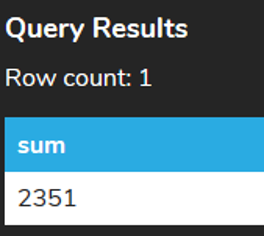
We may also want to SUM based on certain criteria by using the WHERE clause. For example, we could find the SUM of the total column for all invoices where the billing_country column's value is USA:
SELECT SUM(total)
FROM invoice
WHERE billing_country = 'USA';
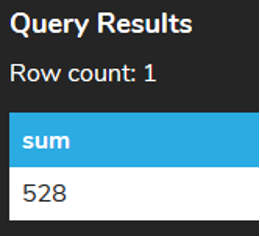
Anything that we can filter with the WHERE clause, we can then aggregate to find the SUM for.
If we tried to use the SUM function on a non-numeric column, it would result in an error:
SELECT SUM(billing_country)
FROM invoice;

If the query returns only NULL values, or if no rows are returned, the SUM returns NULL rather than 0. For example, if we’re looking for the SUM of all of the invoices that have the invoice_id < 1 (which does not exist), as follows:
SELECT SUM(total)
FROM invoice
WHERE invoice_id < 1;
The result will look like this:

The SQL DISTINCT keyword removes all duplicate records and retrieves only unique records.
For example, suppose you want a list of the customer IDs for all customers who have placed an order, but you don't want any duplicates on that list. You could run the following query on the invoice table to get one. Notice that this example uses ORDER BY to sort the list by the customer_id column.
SELECT DISTINCT customer_id
FROM invoice
ORDER BY customer_id;
DISTINCT can also be used in SUM functions to omit records containing duplicate values for a certain column. You might do this to eliminate redundant data.
Recall the example earlier in this lesson where we summed the values in the total column of the invoice table:
SELECT SUM(total)
FROM invoice;
Now suppose you wanted to omit records that have the same customer_id as another record that has already been included because you suspect those of being duplicates. You would modify the query like so:
SELECT SUM(DISTINCT customer_id)
total FROM customer;
A NULL value can be assigned to any entry in any column in a SQL database, regardless of the data type. Obviously, some columns will be mandatory (non-nullable), but this is determined by the database designer, not the type itself.
The COALESCE() function returns the first non-null expression in a list. You can think of it as a set of contingencies—if the first item on the list is non-null, it is returned; otherwise, the second item on the list is checked and returned if non-null. It continues through its contingencies until it finds one that works, or until it runs out of contingencies.
The substitutions that the COALESCE () function perform are not permanent; the change persists only for the one SELECT statement in which it is used. This is a handy way of putting in temporary values to make the data easier to read or to use in another program.
In the invoice table, there should not be a value less than 1 for the invoice_id column. If we wanted to return a 0 instead of NULL in this case, we would use the COALESCE function. This function returns the second argument if the first argument is NULL. In the following example, if the total column is not null, its actual value is returned. But if it is null, a 0 is returned.
SELECT COALESCE (SUM(total),0)
FROM invoice
WHERE invoice_id < 1;
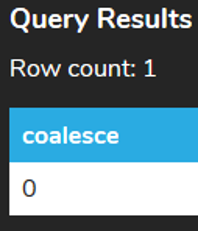
A more complex COALESCE would be the following:
SELECT track,
  COALESCE (subcategory,'No Subcategory') AS subcategory,
  COALESCE (category,'No Category') AS category,
  COALESCE (family,'No Family') AS family
FROM artist
This would enable us to go and find out what rows are incomplete here so we could go back and validate the data for the TRACK information for each ARTIST.
Source: THIS TUTORIAL WAS AUTHORED BY DR. VINCENT TRAN, PHD (2020) AND Faithe Wempen (2024) FOR SOPHIA LEARNING. PLEASE SEE OUR TERMS OF USE.



