Table of Contents |
Now that you have your physical network locked down tight, it is time to review the security configuration of your network. The same concepts that apply to physical security apply here, too.
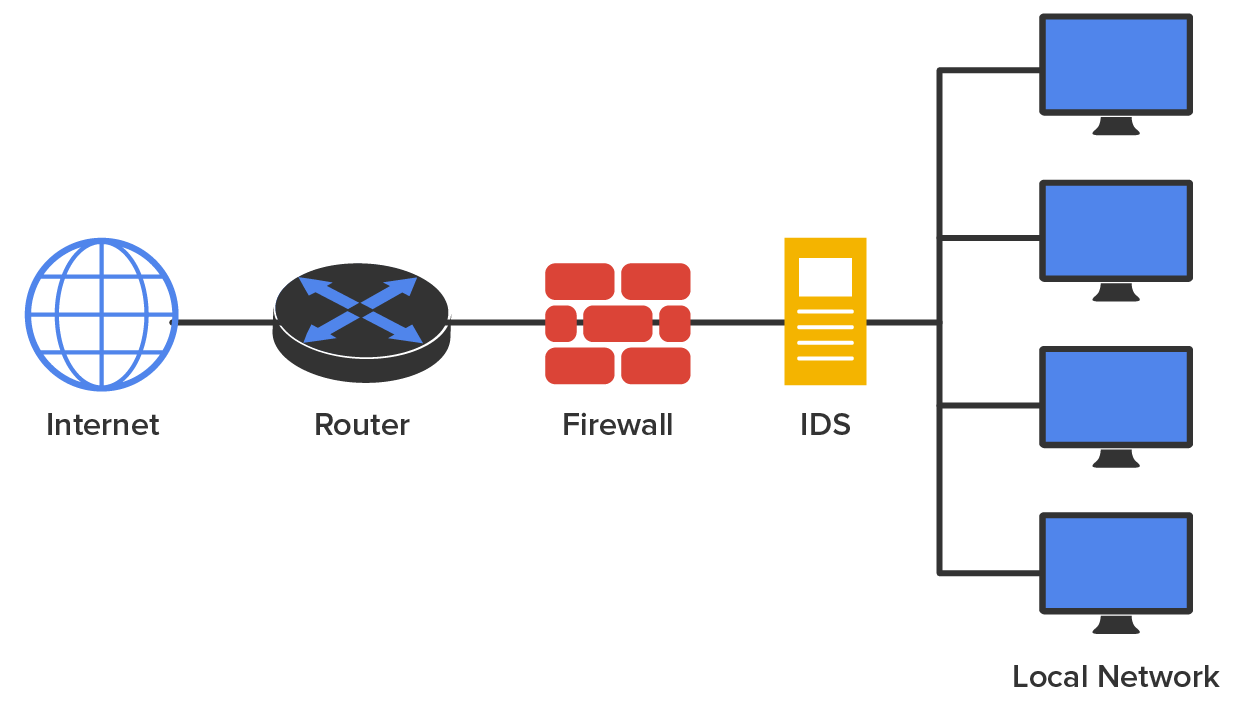
First, you want to ensure that your network has an outside barrier and/or a perimeter defense. This is usually achieved by having a solid firewall, and it is best to have an IDS or IPS of some sort as well. The diagram below shows an example of what this might look like.
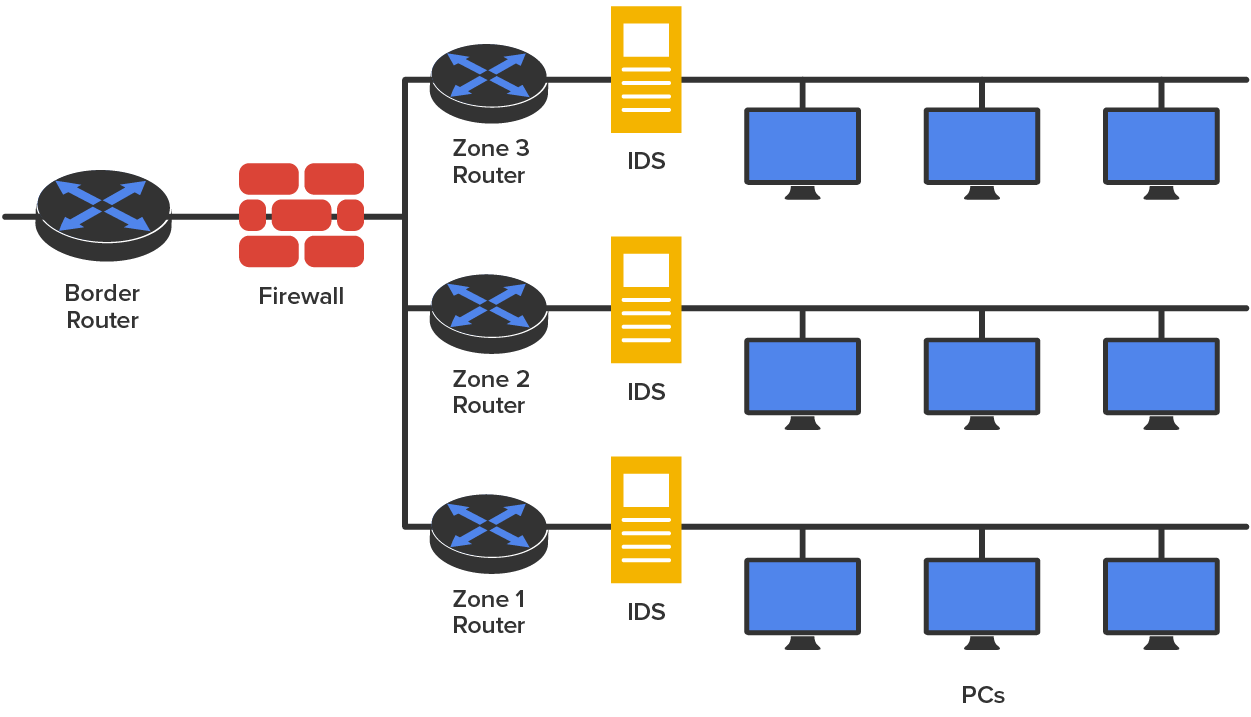
That may be enough for your network, but maybe not. Let us say that your network serves several distinct departments at your company. You can divide up your internal network into smaller administrative zones. Maybe your network would logically look like the one shown below.

Finally, your network might be similar to the one shown above but just larger. Maybe traffic is heavy and you need to break up physical segments. Perhaps different groups are in different buildings or on different floors of a building and you want to effectively segment them. There could be any number of reasons for you to physically separate your network into different groups, effectively partitioning your network by using multiple routers, as shown in the diagram below.
All organizations should identify and analyze the risks to network security they face. This is called risk management. In the following sections, you’ll find a survey of topics that relate in some way to mitigating risks.
Power is the lifeblood of the enterprise and continued access to it is essential. In this section we will look at a few mitigations or countermeasures.
Battery Backups/UPS- One risk that all organizations should prepare for is the loss of power. All infrastructure systems should be connected to uninterruptible power supplies (UPSes). These devices can immediately supply power from a battery backup when a loss of power is detected. You should keep in mind, however, that these devices are not designed as a long-term solution. They are designed to provide power long enough for you to either shut the system down gracefully or turn on a power generator. In scenarios where long-term backup power is called for, a diesel-powered generator should be installed.
Redundant circuits- Data centers usually deploy redundant power sources to maintain constant power. Redundancy can be provided in several ways.
A disaster is an emergency that goes beyond the normal response of resources. The causes of disasters are categorized into three main areas according to origin:
One of the parts of a DRP is a plan to keep the business operational while the organization recovers from the disaster, known as a business continuity plan (BCP). Continuity planning deals with identifying the impact of any disaster and ensuring that a viable recovery plan for each function and system is implemented. By prioritizing each process and its supporting technologies, the company can ensure that mission-critical systems are recovered first and systems that are considered luxuries can be recovered as time allows.
Although a secondary site that is identical in every way to the main site with data kept synchronized up to the minute would be ideal, many organizations cannot justify the cost of such a system. Cost-benefit analysis must be applied to every business issue, even disaster recovery. We are going to explore three options for recovery sites.
A cold site is a leased facility that contains only electrical and communications wiring, air conditioning, plumbing, and raised flooring. No communications equipment, networking hardware, or computers are installed at a cold site until it is necessary to bring the site to full operation. For this reason, a cold site takes much longer to bring up to speed than a hot or warm site. A cold site provides the slowest recovery, but it is the least expensive to maintain. It is also the most difficult to test.
A warm site is a leased facility that contains electrical and communications wiring, full utilities, and networking equipment. In most cases, the only thing that needs to be restored is the software and the data. It is the most widely implemented alternate leased location. Although it is easier to test a warm site than a cold site, a warm site requires much more effort for testing than a hot site and takes more time to bring up to full functionality.
A hot site is a leased facility that contains all the resources needed for full operation. This environment includes computers, raised flooring, full utilities, electrical and communications wiring, networking equipment, and uninterruptible power supplies (UPSes). The only resource that must be restored at a hot site is the organization’s data, usually only partially. It should only take a few minutes to bring a hot site to full operation. Although a hot site provides the quickest recovery, it is the most expensive to maintain.
Using special backup utilities, you can also perform what are called snapshot backups. These are lists of pointers or references to the data and are somewhat like a detailed table of contents about the data at a specific point in time. They can speed the data recovery process when it is needed. There are two types of snapshots: copy-on-write and split mirror. Keep in mind that snapshots are not a replacement for regular backups. In many cases the snapshot is stored on the same volume as the data so if the drive goes bad you will also lose the snapshot.
A copy-on-write snapshot is taken every time a user enters data or changes data, and it includes only the changed data. It allows for rapid recovery from a loss of data, but it requires you to have access to all previous snapshots during recovery. As changes are made, multiple copies of snapshots will be created. Some will contain changes not present in others. There will also be some data that remains unchanged in all of them.
A split-mirror snapshot also is created every time a change is made, but it is a snapshot of everything rather than just the changes. However, as you can imagine it takes significant storage space and the restore process is slower.
Service-level agreements (SLAs) are contracts about the ability of the support system to respond to problems within a certain time frame while providing an agreed level of service. These agreements can be internal between departments or external, with a service provider. Agreeing on the quickness with which various problems are addressed introduces some predictability to the response to problems; this ultimately supports the maintenance of access to resources.
One of the metrics used in planning both SLAs and IT operations in general is mean time to repair (MTTR). This value describes the average length of time it takes a vendor to repair a device or component. By building MTTRinto SLAs, IT can assure that the time taken to repair a component or device will not be a factor that causes them to violate the SLA’s requirements.
Another valuable metric typically provided is the mean time between failures (MTBF), which describes the average amount of time that elapses between one failure and the next. Mathematically, this is the sum of mean time to failure (MTTF) and MTTR, thereby calculating the total time required to get the device fixed and back online.
One of the issues related to the risk involved in security incidents and disasters over which the company has some control is the amount of preparation spent on training users. Regardless of whether the incident is as small as the mistaken deletion of a key document or as large as a fire destroying the entire building, users should be trained in how to respond to every eventuality.
IN CONTEXT
It would be even better if recovery teams were created to address the stages of disaster recovery. The following teams should be assembled and trained before a disaster occurs:Each team should rehearse its response to various scenarios. One exercise that seems to work well is called a tabletop exercise. A tabletop exercise is an informal brainstorming session that encourages participation from business leaders and other key employees. In a tabletop exercise, the participants agree to a particular disaster scenario upon which they will focus.
- Damage assessment team
- Legal team
- Media relations team
- Recovery team
- Relocation team
- Restoration team
- Salvage team
- Security team
One concept that makes any IT technician nervous is the existence of a single point of failure anywhere in the network. During the process of creating the BCP, all single points of failure should be identified. The process begins as described in the following sections, with the identification of critical assets and nodes, which is followed by providing redundancy where indicated.
Critical nodes are individual systems or groups of systems without which the organization cannot operate. The process of identifying these systems should begin with prioritization of the business processes that each supports. Once this has been done, it is simple to identify the servers and other systems that are required to allow that process to continue to function. If this investigation reveals a system that is critical and a single point of failure, action should be taken to provide some form of redundancy to the node.
While critical nodes need to be identified and provided with additional support to prepare for disasters and smaller issues, some critical business processes depend on access to assets such as data that may reside in a database or in connections to vendors and partners. These assets also need to be identified and an action plan developed that recognizes their importance. In almost all cases, the solution is some form of redundancy, as covered in the next section.
Redundancy occurs when an organization has a secondary component, system, or device that takes over when the primary unit fails. Redundancy can be implemented in many forms. The organization should assess any systems that have been identified as critical to determine if it is cost effective to implement redundant systems. Redundant systems include redundant servers, redundant routers, redundant internal hardware, and even redundant backbones.
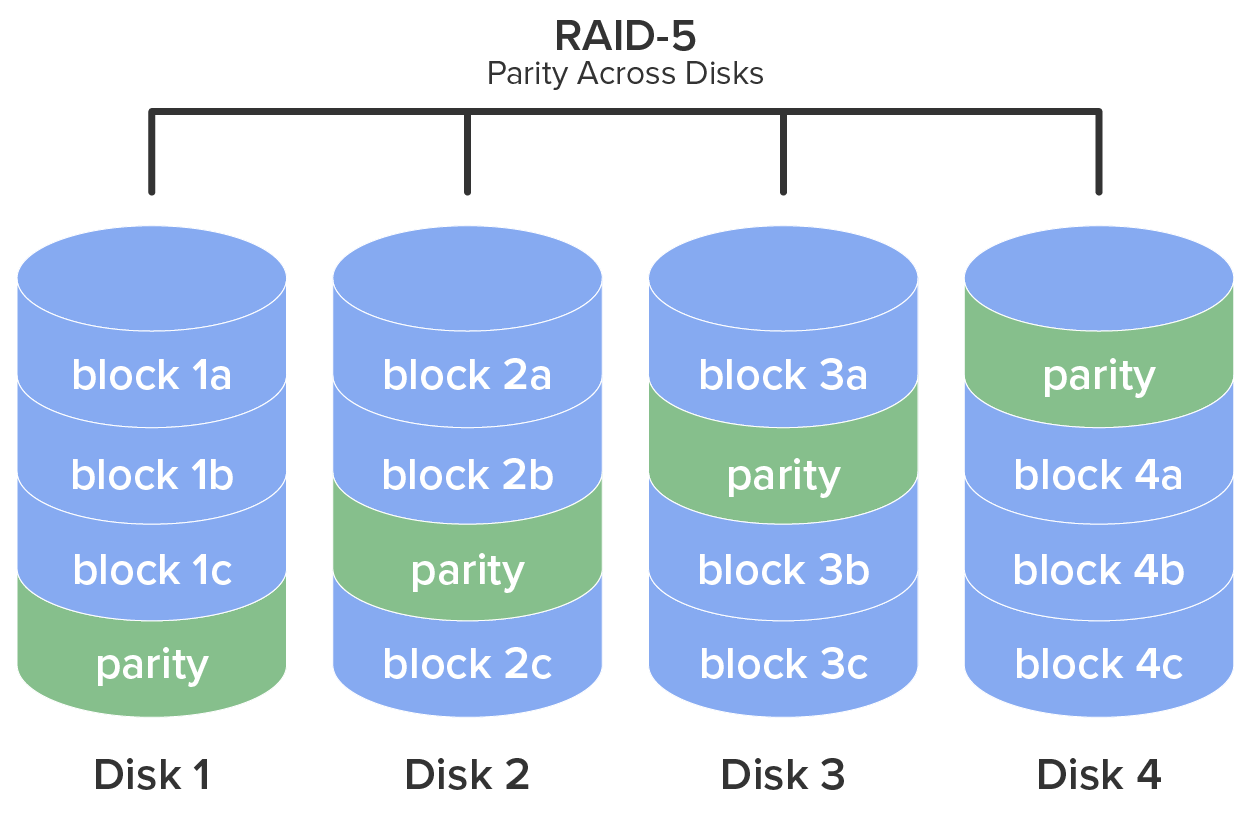
One form of fault tolerance that can be provided to a system is redundant array of independent disks (RAID). This technology allows for automatic recovery from a hard drive failure in a system. The major forms of RAID are as follows:
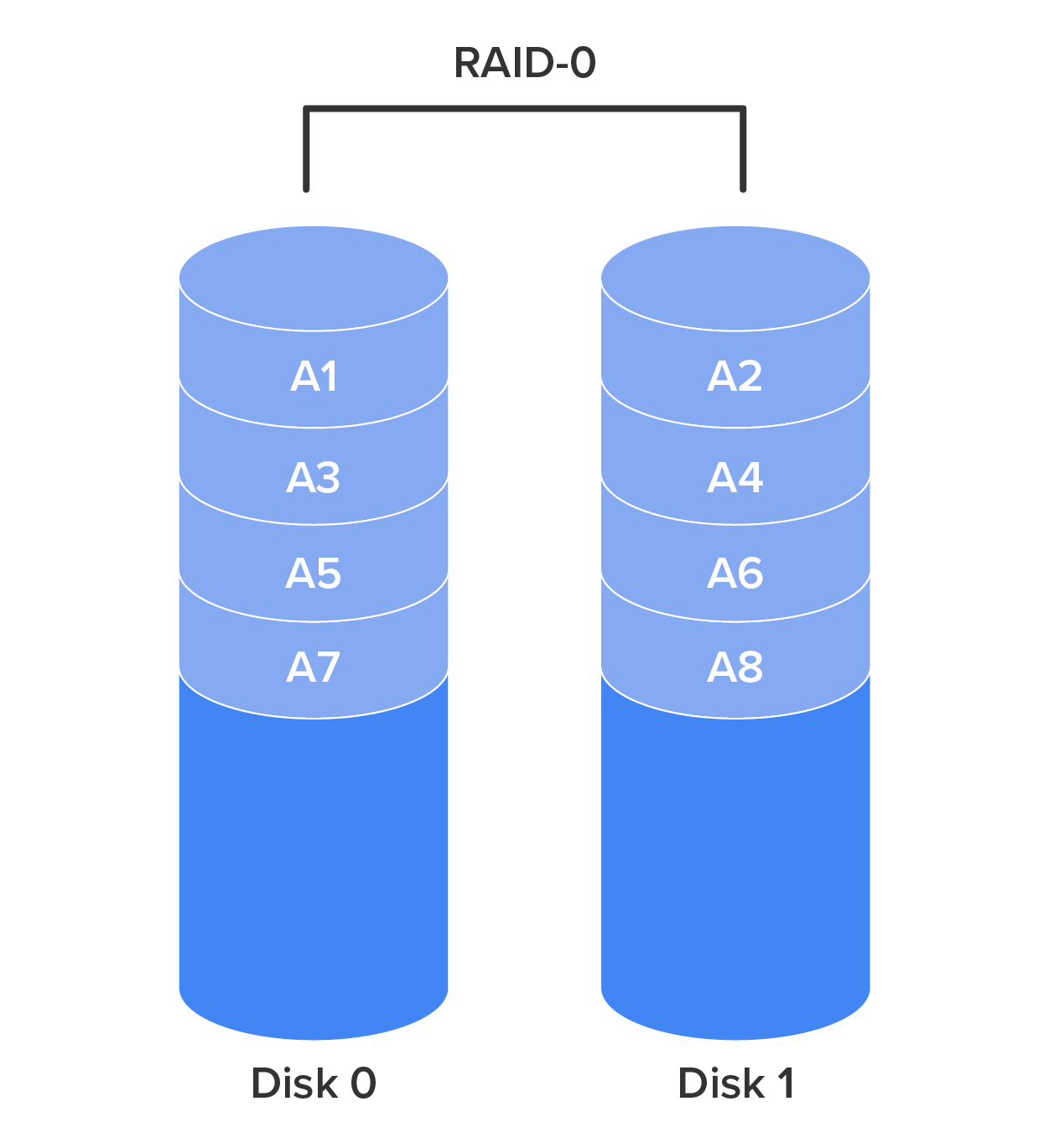
RAID-0- Also called disk striping, this method writes the data across multiple drives. While it improves performance, it does not provide fault tolerance. RAID-0 is depicted in the diagram below.
RAID-1
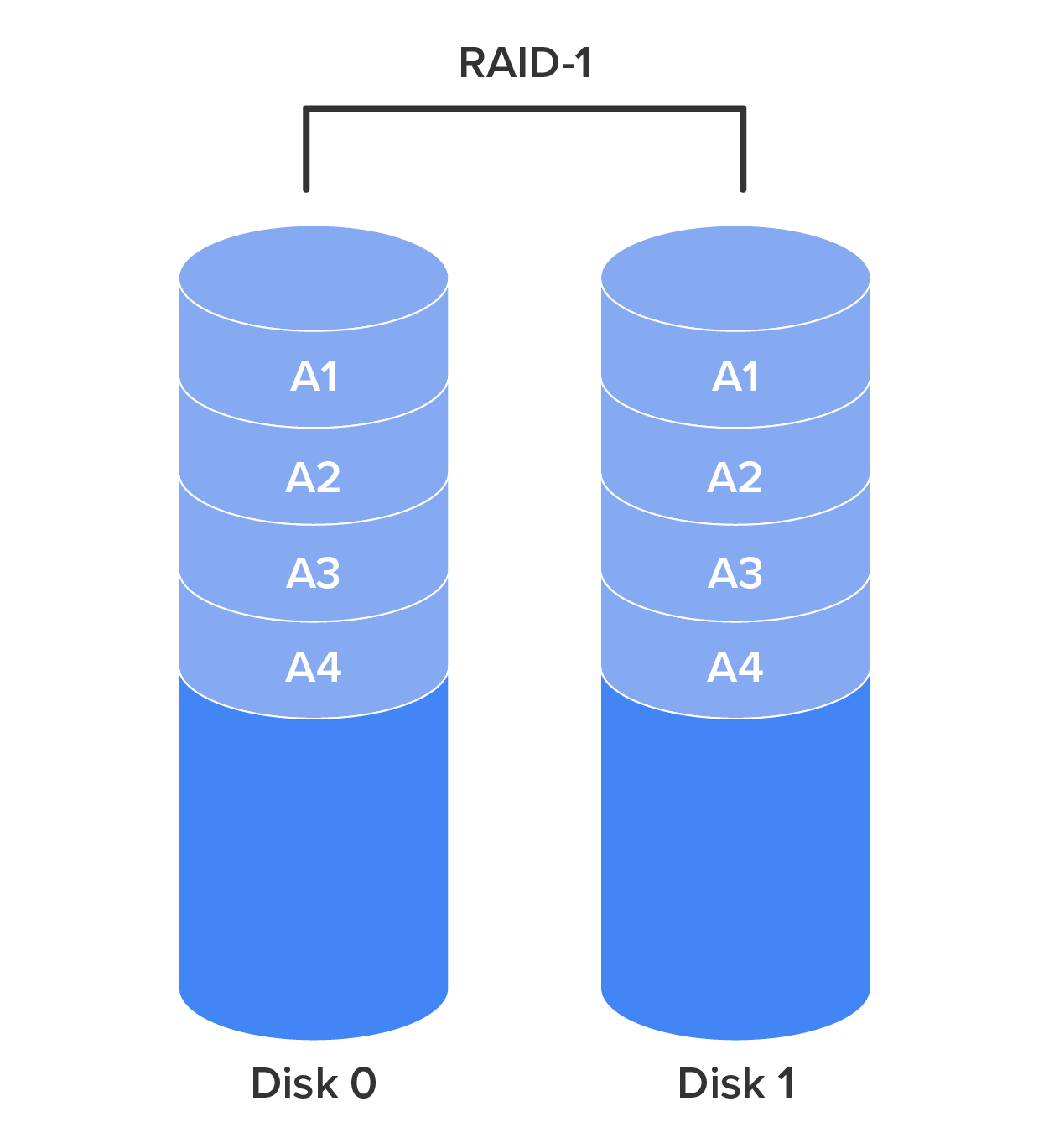
Also called disk mirroring, RAID-1 uses two disks and writes a copy of the data to both disks, providing fault tolerance in the case of a single drive failure. RAID-1 is depicted in the diagram below.
RAID-5
Requiring at least three drives, this method writes the data across all drives like striping, and then parity information is also written across all drives. With hardware RAID-5, the spare drives that replace the failed drives are usually hot swappable, meaning they can be replaced on the server while it is running. RAID-5 is depicted in the diagram below.
Source: This content and supplemental material has been adapted from CompTIA Network+ Study Guide: Exam N10-007, 4th Edition. Source Lammle: CompTIA Network+ Study Guide: Exam N10-007, 4th Edition - Instructor Companion Site (wiley.com)



