Use Sophia to knock out your gen-ed requirements quickly and affordably. Learn more
×

Safety

Author: Sophia
what's covered
In this lesson, you will learn about tools and practices for preventing injuries and damage to equipment and safeguarding employees from various types of hazards.

Specifically, this lesson will cover the following:

Table of Contents

1. Electrical Safety

In the course of doing business, it’s the company’s responsibility to protect its workers, customers, vendors, and business partners. This lesson considers some of the issues that affect safety, along with best practices and guidelines for preventing injuries and damage to equipment.

IT personnel spend a great deal of time dealing with electrical devices. Therefore, electrical safety should be stressed in all procedures. In this section, we’ll look at key issues involved with electrical safety, relevant to preventing injuries and for preventing damage to computer equipment.

1a. Grounding

Almost every network-related piece of equipment uses electricity. And as you probably already know, electricity can harm you if you don’t take the proper precautions.

Electricity flows through a wire because it has no other choice; it has to flow somewhere, and the path along the wire is the only option. Given a choice, electricity will prefer flowing to the ground, though. Grounding is the electrical term for providing a path for an electrical charge to follow to return to earth.

Electricity takes the path of least resistance as it travels through any conduit. Water is a path of very little resistance, for example. When a human body (which is mostly water) interrupts the flow of electricity by coming into contact with a wire that carries it, the electricity will prefer taking a route through the human’s body to the ground. The result? Electric shock to the person.

To prevent an electric shock, you need to avoid placing your body along the electrical path. At the most basic level, that means not touching live wires carrying electricity (including power cables with breaks or splits in their casing), not sticking metal tools into live AC wall outlets, and not touching capacitors with stored electrical charges.

key concept
The following are some additional tips for keeping electrically safe as a network technician:
  • Know where the master power switch is for the area in which you are working.
  • Power off and unplug all devices (servers, routers, switches, and so on) before you open their cases.
  • If possible, don’t be alone when working inside electrical devices.
  • Take a course in cardiopulmonary resuscitation (CPR) and automated external defibrillator (AED) usage so you can assist an electrocuted coworker.
  • Don’t open a power-supply casing. If a power supply is failing, replace it.
  • Don’t touch a screwdriver or other metal device to a capacitor, and don’t touch one with any body part, either.
  • If you must touch a bare electrified wire, wear insulating gloves that are rated appropriately for the voltage of the wire.
  • Wear shoes with rubber soles when working on electrical equipment. This makes your body a less attractive pathway to the ground.

term to know
Grounding
Providing a path for an electrical charge to follow to return to earth.

1b. Electrostatic Discharge

Another principle of electricity is that it always flows from an object of lesser charge to an object of greater charge. It’s like when two bodies of water meet that have different levels; the water from the body with a higher level spills into the body with the lower level until their levels are equalized.

Electrostatic discharge (ESD) is the technical term for what happens whenever two objects of dissimilar electrical charge come in contact. You may have experienced this firsthand by walking across a carpeted floor wearing wool socks and then touching another person. Ouch! They receive a shock. That’s because you are the object of greater charge, and the electricity rushes from you to them all at once when you touch. While the amount of ESD generated doing that may create a shock they can feel, it’s not enough to harm them. However, even that small amount—and actually a much smaller amount than a human can feel—is enough to seriously damage sensitive computer parts.

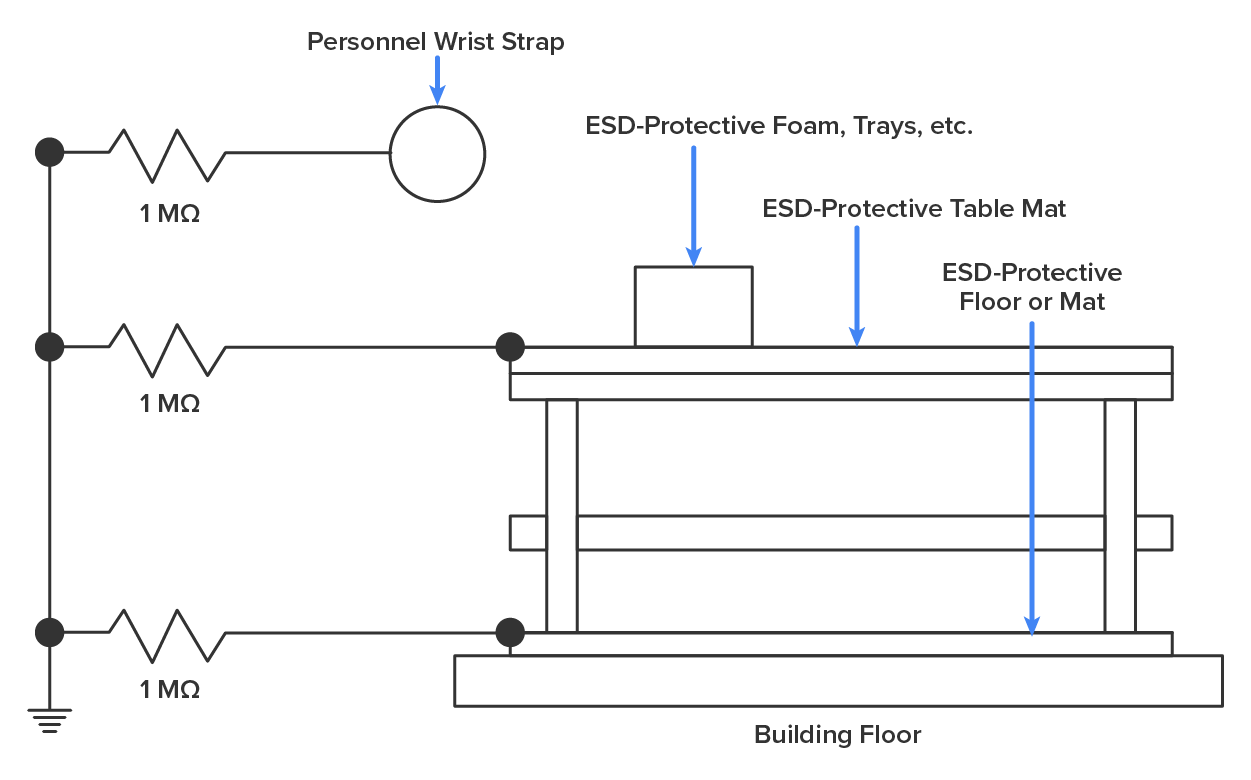
This is exactly why we ground both ourselves and the equipment—to prevent ESD damage. Always use mats and straps to prevent damage when working with computing equipment.
did you know
You can ground yourself in relation to the equipment and ground the equipment itself in relation to the ground. You can do these with either a grounding strap or a grounding mat. Either of these should be plugged into the ground of an electrical outlet. The way in which these devices are connected to ground is pictured below.

An E S D (electrostatic discharge) protective setup to prevent damage to sensitive electronic components from static electricity. The setup consists of several key components: On the left, a vertical line features three solid dots, each connected in series with a 1 MΩ resistor and grounded at the bottom through the line. The first resistor is connected to a circle on the right labeled ‘Personnel Wrist Strap’. A building floor is depicted on the right, with a protective floor mat labeled ‘E S D-Protective Floor or Mat’ connected to the third resistor. A table mat labeled ‘E S D-Protective Table Mat’ is placed on the work surface above the building floor, and a square-shaped equipment rack is mounted above the table mat, labeled ‘E S D-Protective Foam, Trays, etc.’ Both are connected to the second resistor.

hint
Humidity can also be a factor in ESD. Extremely dry conditions in the area where computers are utilized make ESD worse. This is why the humidity of the area must be controlled so that it’s not too humid, which causes corrosion of electrical connections, and not too dry, which causes static buildup and potential damage.

term to know
Electrostatic Discharge (ESD)
A static electric charge that results when objects (or people) with differing electrical charges touch.


2. Installation Safety

While protecting yourself from electrical injury is very important, it’s not the only safety issue you’ve got to take into consideration. Other types of injuries can also occur, ranging from a simple pulled muscle to a more serious incident requiring a trip to the hospital. The following topics discuss some safety issues to be aware of when installing or moving equipment.

2a. Lifting

Often when a piece of equipment is being installed, the time pressures involved and the rush to get things done can lead to improper lifting.

key concept
Always keep the following safe lifting techniques in mind:
  • Be careful not to twist when lifting. Keep the weight at the center of your body.
  • Keep objects as close to your body as possible and at waist level.
  • Lift with your legs, not your back. When you have to pick something up, bend at the knees, not at the waist. You want to maintain the natural curve of the back and spine when lifting.
  • Whenever possible, push instead of pulling.

2b. Installing Racks and Devices

There is a reason so many devices come “rack ready.” Racks not only make for a neat and clean server room or closet, but when combined with proper cable management and environmental control, they provide an environment that allows the devices to breathe and stay cool.

2c. HVAC Considerations

Computing equipment and infrastructure devices like routers and switches all generate heat as they operate, and that heat has to be dissipated somehow. Excessive heat can make chips overheat, shutting down the system. That’s why server rooms are often equipped with powerful air conditioning units and raised floors.

Humidity can also be an issue. High humidity can lead to corrosion on metal connectors, but low humidity encourages static electricity, which can damage equipment by shocking it.

big idea
The most important issue when placing devices is to ensure proper cooling and protection from moisture. It’s a good idea to align the racks and install your equipment in hot and cold aisles. The goal of a hot aisle/cold aisle configuration is to conserve energy and lower cooling costs by managing air flow.

As you learned earlier in this challenge, hot aisle/cold aisle design involves lining up racks in alternating rows with cold air intakes facing one way and hot air exhausts facing the other. The rows composed of rack fronts are called cold aisles. Typically, cold aisles face air conditioner output ducts. The rows the heated exhausts pour into are called hot aisles and face air conditioner return ducts. Moreover, all of the racks and the equipment they hold should never be on the floor. There should be a raised floor to provide protection against water. See the example in the image below.
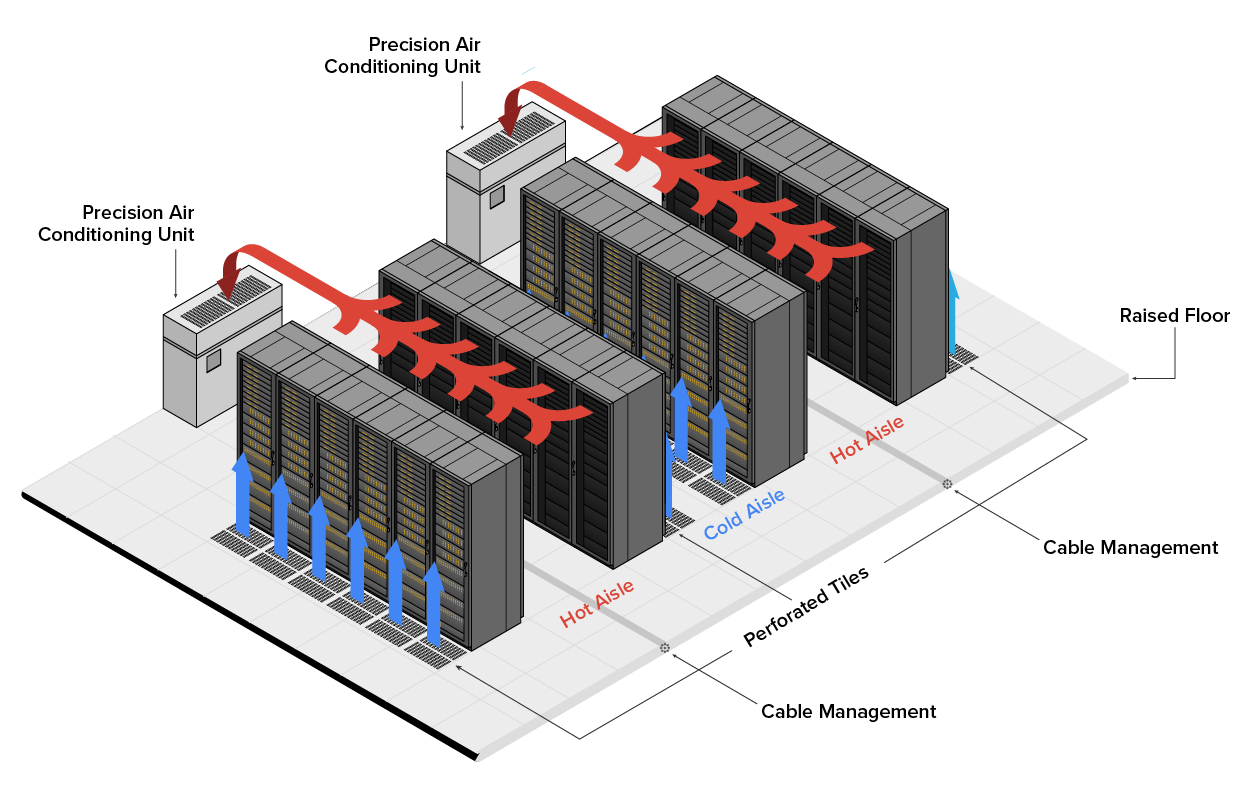
The data center’s cooling system is designed with a hot aisle and cold aisle containment layout. The key components of the system are labeled as follows: Server Racks: Three rows of server racks are arranged with alternating aisles labeled as ‘Cold Aisle’ and ‘Hot Aisle’. Each server rack consists of multiple rectangular units representing servers. The cold aisles are indicated by arrows on the sides of the server racks, while the hot aisles are positioned between the rows, exhausting hot air upward through overhead ducts toward the cooling units. The other key components of the system are as follows: 1) Precision Air Conditioning Units: Two units are positioned at the top left, one on either side of the server racks, connected to the server racks via multiple ducts on both sides. 2) Raised Floor: This is located beneath the server racks. 3) Cable Management: Two cables are routed through the raised floor and under the server racks to maintain organization and reduce clutter. 4) Hot Aisle/Cold Aisle: The hot aisle is between the server racks, exhausting hot air, while the cold aisle is on the opposite side, supplying cool air. 5) Perforated Tiles: They are placed on the raised floor.

Once your racks are placed, you can begin loading equipment into them. Before you start loading, make an inventory of all the equipment to be racked and strategically choose each item’s location. Draw a diagram of the overall plan.

hint
The following are some tips for racking equipment:
  • Use the correct installation tools. Common tools useful for rack mounting include a pencil, hammer, tape measure, flashlight, screwdrivers (Phillips and flat-head), and a level.
  • Measure each space and each piece of equipment to make sure things will fit. Adjust shelf heights as needed.
  • The rack itself must be grounded, and then, each item installed on the rack must be grounded to the rack. Follow the manufacturer’s recommendation for grounding.
  • Enable the anti-tilt bar on the rack before you start loading it.
  • Load equipment into a rack from the bottom up. Otherwise the rack might become top-heavy and tip over.
  • Do not attempt to load heavy equipment into the rack by yourself; enlist someone to help you.

term to know
Hot Aisle/Cold Aisle Design
A method of arranging racks in alternating rows with cold air intakes facing one way and hot air exhausts facing the other.

2c. Tool Safety

The first step in using tool safely is to make sure you’re properly grounded. Besides practicing tool safety for your own protection, you should do so to protect equipment. The table below has some specific guidelines to follow.

Guideline Description
Guidelines for protecting yourself when working inside a PC case or in a server rack
  • Roll up your long sleeves, or wear short-sleeved shirts, to avoid getting your sleeves caught.
  • Avoid wearing dangling jewelry that might get caught on hardware components.
  • Wear personal protective equipment (PPE) such as a mask and safety goggles when using compressed air to clean the dust out of a component.
  • Do not wear an antistatic wrist strap when working on a component that retains an electrical charge when unplugged, such as power supply.
Guidelines for protecting equipment
  • Avoid using pencils inside a computer. A pencil can act as an electrical conductor and cause damage.
  • Some screwdriver tips are magnetized to help pick up dropped screws, but be sure that the tools you are using inside electronic components have not been magnetized.
  • When using compressed air to clean inside the computer, blow the air around the components with a minimum distance of 4 in. (10 cm) from the nozzle.
  • Clean the contacts on components with isopropyl alcohol. Do not use rubbing alcohol.
  • Never use a standard vacuum cleaner inside a computer case. The plastic parts of the vacuum cleaner can build up static electricity and discharge it to the components. Use only vacuums that are approved for electronic components.

2d. Material Safety Data Sheets

In the course of installing, servicing, and repairing equipment, you’ll come in contact with many different types of materials. Some are safer than others. You can get all the information you need regarding the safe handling of materials by reviewing the material safety data sheet (MSDS).

Any type of chemical, equipment, or supply that has the potential to harm the environment or people must have an MSDS associated with it. These are traditionally created by the manufacturer and describe the boiling point, melting point, flash point, and potential health risks. You can obtain them from the manufacturer or from the Environmental Protection Agency.

term to know
Material Safety Data Sheet (MSDS)
A document that describes the risks involved in handling a material and recommends handling procedures to ensure safety.


3. Emergency Procedures

Every organization should be prepared for emergencies of all types. Here are some of the top considerations in emergency preparedness.

3a. Building Layout

Planning for emergencies can start with the layout of the facility. The following are some key considerations:

  • All walls should have a minimum 2-hour fire rating.
  • Doors must resist forcible entry.
  • The location and type of fire-suppression systems should be known.
  • Flooring in server rooms and wiring closets should be raised to help mitigate flooding damage.
  • Separate AC units must be dedicated to the information-processing facilities.
  • Backup and alternate power sources should exist.

3b. Emergency Exits

All facilities should have a plan that identifies the escape route in the event of a fire, an active shooter, or some other natural disaster or criminal threat. There should be a complete facility map showing the escape route for each section of the building, keeping in mind that it’s better to use multiple exits to move people out quickly. These diagrams should be placed in all areas.

All escape routes on the map should have the following characteristics:

  • Clearly marked and well lit
  • Wide enough to accommodate the expected number of people
  • Clear of obstructions

3c. Fail Open/Fail Close

Door systems that have electronic locks may lose power during a fire. When they do, they may lock automatically (fail close) or unlock automatically (fail open). While fail-close settings may enhance security during an electrical outage, you should consider the effect they will have during an evacuation and take steps to ensure that everyone can get out of the building when the time comes.

terms to know
Fail Close
A system that closes when it loses power or fails.
Fail Open
A system that opens when it loses power or fails.

3d. Emergency Alert System

All facilities should be equipped with a system to alert all employees when a fire or any other type of emergency occurs. It might be advisable to connect the facility to the Emergency Alert System (EAS), which is a national warning system in the United States. One of the functions of this system is to alert the public of local weather emergencies such as tornadoes and flash floods. EAS messages are transmitted via AM and FM radio, broadcast television, cable television, and the Land Mobile Radio Service as well as very high frequency (VHF), ultra high frequency (UHF), and fiber-optic service (FiOS) wireline video providers.

term to know
Emergency Alert System (EAS)
A national warning system in the United States.

3e. Fire-Suppression System

While fire extinguishers are important and should be placed throughout a facility, when large numbers of computing devices are present, it is worth the money to protect them with a fire-suppression system.

key concept
The following types of systems exist:
  • Wet-pipe systems use water contained in pipes to extinguish the fire.
  • Dry-pipe systems hold the water in a holding tank instead of in the pipes.
  • Preaction systems operate like a dry-pipe system except that the sprinkler head holds a thermal-fusible link that must melt before the water is released.
  • Deluge systems allow large amounts of water to be released into the room, which obviously doesn't make this a good choice where computing equipment will be located.

Today, many companies use a fire-suppressant such as halon. Halon is known as a clean agent; it’s an electrically non-conducting fire extinguisher that does not leave a residue upon evaporation. Leaving no residue means not rendering expensive networking equipment inoperative as water can do if released in a data center. It’s remarkably safe for human exposure, meaning that it won’t poison living things, and it will allow you to leave the area safely, returning only after the fire department gives the all clear. However, halon production is no longer legal because of environmental concerns, so when a halon-based system is discharged, purchasing more halon with which to recharge it may be difficult or expensive.

term to know
Clean Agent
A fire-extinguishing material that does not leave a residue where sprayed.

summary
In this lesson, you learned about electrical safety. This included considerations of protecting yourself from electrical injury and protecting equipment from electrical damage. You also learned about installation safety including lifting, installing racks and devices, tools safety, and material safety data sheets. Finally, you learned about preparing for emergencies. This included building layouts, emergency exits, fail open/fail close, emergency alert systems, and fire-suppression systems.

Source: This content and supplemental material has been adapted from CompTIA Network+ Study Guide: Exam N10-007, 4th Edition. Source Lammle: CompTIA Network+ Study Guide: Exam N10-007, 4th Edition - Instructor Companion Site (wiley.com)


Terms to Know
Clean Agent

A fire extinguishing material that does not leave a residue where sprayed.

Electrostatic Discharge (ESD)

A static electric charge that results when objects (or people) with differing electrical charges touch.

Emergency Alert System (EAS)

A national warning system in the United States.

Fail Close

A system that closes when it loses power or fails.

Fail Open

A system that opens when it loses power or fails.

Grounding

Providing a path for an electrical charge to follow to return to earth.

Hot Aisle/Cold Aisle Design

A method of arranging racks in alternating rows with cold air intakes facing one way and hot air exhausts facing the other.

Material Safety Data Sheet (MSDS)

A document that describes the risks involved in handling a material and recommends handling procedures to ensure safety.