Table of Contents |
In math, we tend to round numbers that are close to a whole number. If we had a grade of 89.56% in general, we would round that up to 90%, and the student would get an A rather than a B in the class. The ROUND function in SQL allows us to do this at a programmatic level so that we do not have to do this manually. The ROUND function helps control the precision of numeric values in SQL queries, allowing you to round values to a specific number of decimal places or digits as required by your application or reporting needs. This is important when working with numbers, science, and payroll data.
It would look like the following:
ROUND(numeric_expression, decimal_places).
The numeric_expression is the number to be rounded. This can be a fixed number, or it can be data in a column. The decimal_places is how many decimals we need. For example, if we work with currency or money, we always want two decimal places.
SELECT ROUND(3.14159, 2);
Output: 3.14
Explanation: The value 3.14159 is rounded to two decimal places, resulting in 3.14.
SELECT ROUND(15.678, 0);
Output: 16
Explanation: The value 15.678 is rounded to the nearest whole number, which is 16.
SELECT ROUND(1234.5678, -2);
Output: 1200
Explanation: The value 1234.5678 is rounded to the nearest hundred, resulting in 1200.
The number of decimal places specified can be positive or negative. A negative number in this parameter rounds the number to the left of the decimal point. For example, if you had a number 142, and you used a -2 for the decimal_places argument, the result would appear as 100.
Before we can do some rounding experiments with our sample database (in the next section of this lesson), we need to update our track table to have numbers to round. Below is a simple script to update tracks 1 through 6, so we can see how the ROUND function works.
UPDATE track SET unit_price = .49 WHERE track_id = 1;
UPDATE track SET unit_price = .51 WHERE track_id = 2;
UPDATE track SET unit_price = .55 WHERE track_id = 3;
UPDATE track SET unit_price = .01 WHERE track_id = 4;
UPDATE track SET unit_price = .91 WHERE track_id = 5;
UPDATE track SET unit_price = .95 WHERE track_id = 6;
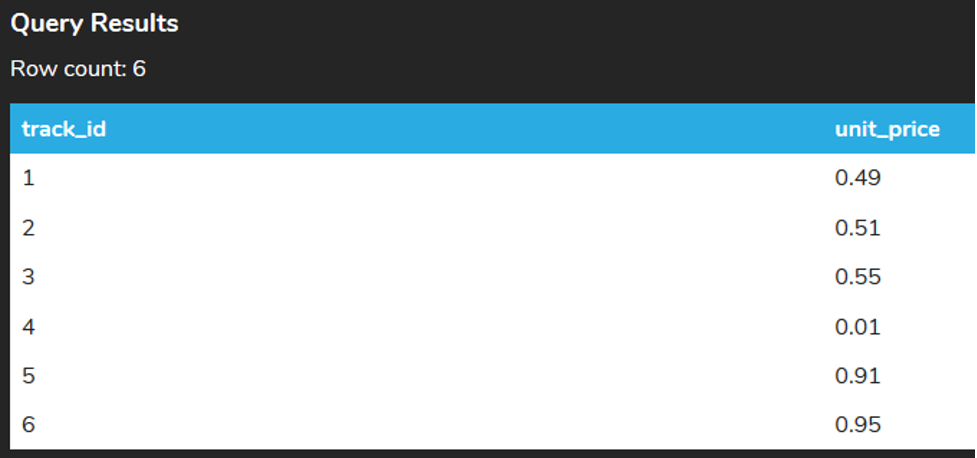
Once we’ve run our script above (copy and paste this into the command window), we can now see if the changes took correctly by checking what the prices are for those first six tracks. We can use the LIMIT command to SELECT the first six tracks, as that is all we are currently interested in.
SELECT track_id, unit_price
FROM track
ORDER BY track_id
LIMIT 6;
Let’s see how our results would change if we rounded based on various parameters. For this example, we will see the number of decimal_places by changing them for the same data column “unit_price.”
SELECT track_id, unit_price,
ROUND(unit_price),
ROUND(unit_price,1),
ROUND(unit_price,2),
ROUND(unit_price,3)
FROM track
ORDER BY track_id
LIMIT 6;
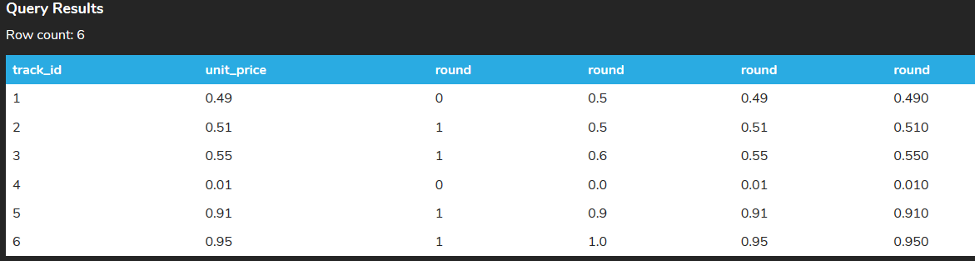
The first round of one decimal place takes the unit price to the closest integer. Remember the default round on the first ROUND(). If 0, it rounds the result to the number specified in the decimal_places argument. If there is another value than 0, it truncates the result to the number of decimals. The default value is 0. Any value of 0.50 or higher is rounded to 1, whereas any value less than 0.50 is rounded to 0. The second round of one decimal place takes the unit price to the closest tenth. Note how the 3rd and 6th rows round up. The third round of two decimal places takes the unit price to the nearest hundredth. No changes with the data appear here. The fourth round of three decimal places takes the nearest thousandth unit price.
The round can be useful within calculations that use the AVG function to simplify the data and make it easier to read or use in other programs. For example, if we want to get the average total of invoices for each customer, the query will look like the following:
SELECT customer_id, AVG(total)
FROM invoice
GROUP BY customer_id
ORDER BY customer_id;
Here is the result:
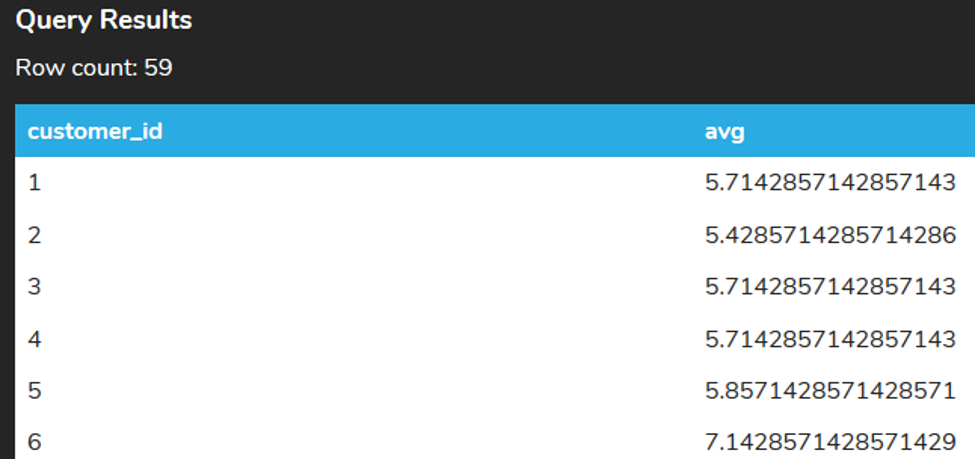
Since we're looking at currency, it makes sense to round it to the nearest cent (two decimal places). We could do that by adding the ROUND function around the AVG function.
SELECT customer_id, ROUND(AVG(total),2)
FROM invoice
GROUP BY customer_id
ORDER BY customer_id;

Source: THIS TUTORIAL WAS AUTHORED BY DR. VINCENT TRAN, PHD (2020) AND Faithe Wempen (2024) FOR SOPHIA LEARNING. PLEASE SEE OUR TERMS OF USE.



