Table of Contents |
A RIGHT JOIN is the complement of a LEFT JOIN. It uses the same command syntax and options, but the right (or second) table is the one from which all records are retrieved, whereas the left (or first) table is the one from which appears only matching records.
Most data analysis scenarios prioritize preserving data from the left table, so RIGHT JOINs are rarely used in practice. Just remember that they are available to you, in case you encounter a situation where you need to focus on the right-hand table due to the data structure or query requirements.
The structure of the query looks like this:
SELECT <columnlist>
FROM <table1>
RIGHT JOIN <table2>
ON <table1>.<table1column1> = <table2>.<table2column1>
Let's again revisit our data set with the representatives and departments:
CREATE TABLE representative ( representative_id INT PRIMARY KEY, first_name VARCHAR (30) NOT NULL, last_name VARCHAR (30) NOT NULL );
CREATE TABLE department (
department_id INT PRIMARY KEY,
department_name VARCHAR(100) NOT NULL,
manager_id INT,
CONSTRAINT fk_manager FOREIGN KEY (manager_id) REFERENCES representative(representative_id)
);
INSERT INTO representative (representative_id, first_name, last_name)
VALUES (1, 'Bob', 'Evans'), (2, 'Tango', 'Rushmore'), (3, 'Danika', 'Arkane'), (4, 'Mac', 'Anderson');
INSERT INTO department (department_id, department_name, manager_id)
VALUES (1, 'Sales', 1), (2, 'Marketing', 3), (3, 'IT', 4), (4, 'Finance', NULL), (5, 'Support', NULL);
Let's see what they would look like with the RIGHT JOIN:
SELECT *
FROM representative
RIGHT JOIN department ON representative.representative_id = department.manager_id;
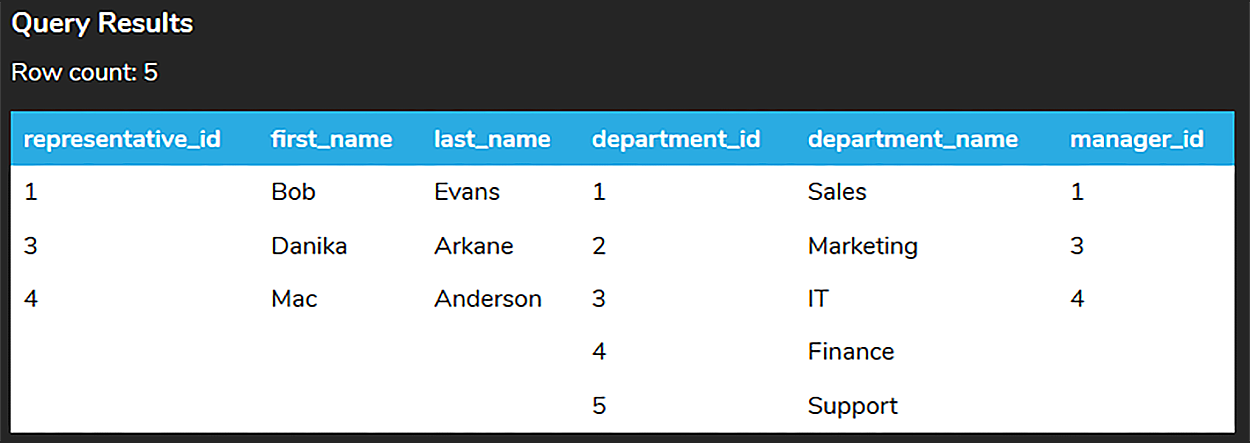
The query itself isn’t that different from the LEFT JOIN, other than specifying RIGHT instead of LEFT. Notice that the last two rows are from the department table, where there is not a match with the representative table.
Recall that the table listed in the FROM clause (representative) is considered to be the left table, and the table after the JOIN clause (department) is considered to be the right table. The RIGHT JOIN starts by selecting data from the right table (department). It compares the manager_id from the department table to the representative_id in the representative table. If those values are equal, the RIGHT JOIN creates a row containing both tables' columns and adds the new row in the result set. You can see that in the first three rows in the table. If the values are not equal, the RIGHT JOIN also creates a row containing the columns from both of the tables but fills the columns from the left table (representative) with NULL values.
The Venn diagram for the RIGHT JOIN looks like the following:
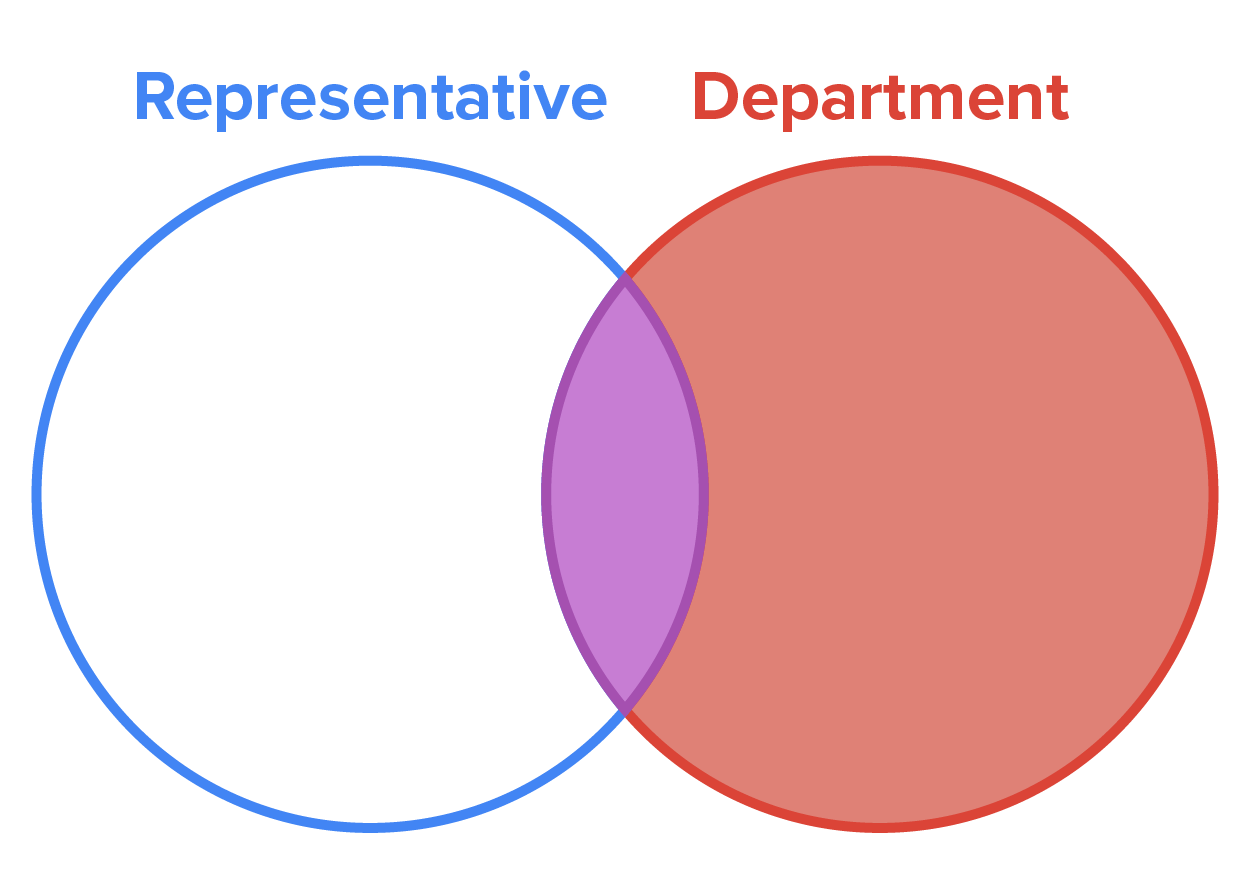
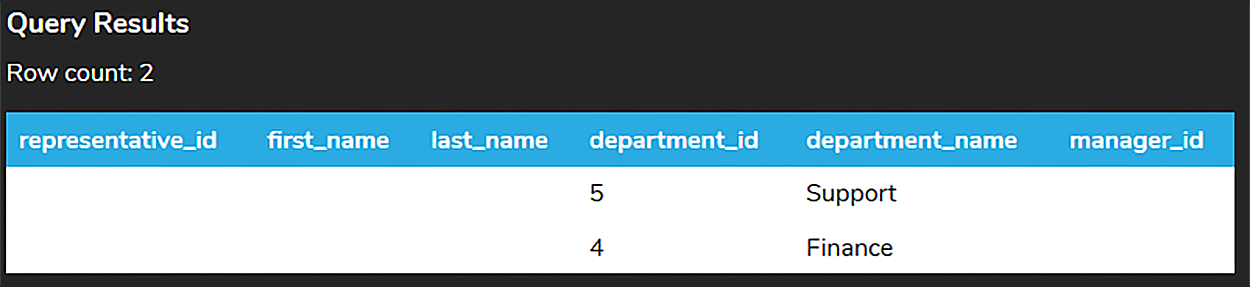
As with the LEFT JOIN in the previous lesson, you can add a WHERE clause to retrieve the rows from the right table that do not match any of the rows in the left table.
SELECT *
FROM representative
RIGHT JOIN department ON representative.representative_id = department.manager_id
WHERE manager_id IS NULL;
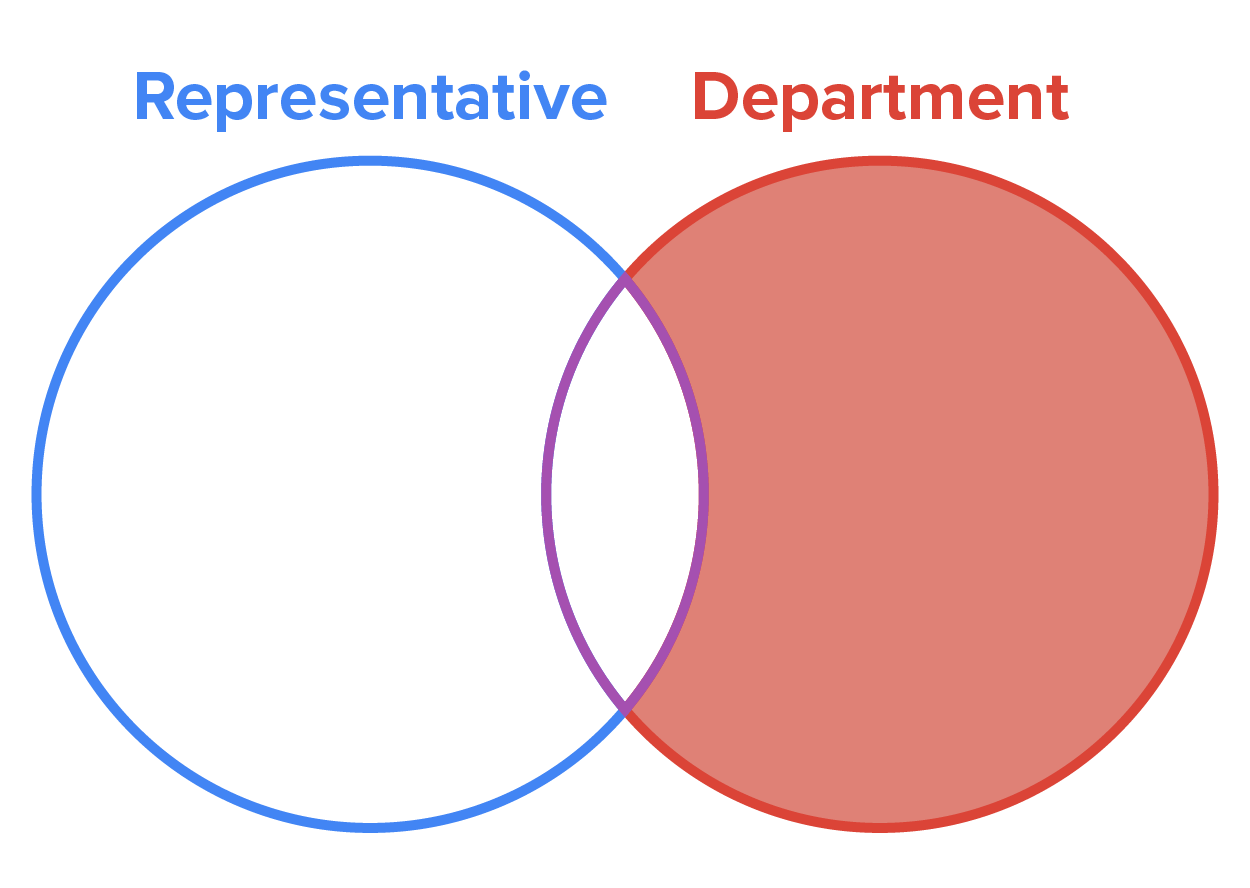
The following Venn diagram illustrates the result of the RIGHT JOIN with the WHERE clause that specifies only unmatched rows from the right-hand table should be included. This is sometimes called a RIGHT OUTER JOIN (including in this lesson's video below), but it's created using a WHERE clause; there is not a separate RIGHT OUTER JOIN clause in SQL.
Source: THIS TUTORIAL WAS AUTHORED BY DR. VINCENT TRAN, PHD (2020) AND FAITHE WEMPEN (2024) FOR SOPHIA LEARNING. PLEASE SEE OUR TERMS OF USE.



