Table of Contents |
Now that you’ve identified the resources needed and estimated how long you think the project will take, we can begin to look at how we schedule the project and sequence each of our activities. In other words, we can look at the order in which we need to do everything for our project.
One important thing to note: we are addressing this as a sequential process (work breakdown structure or WBS and schedule), but often, these tasks already have a head start because some of the work was done when the project charter was created. Also, many project managers might work on the scope management plan at the same time they create the WBS. So, while we present this as a linear process to help with learning the concepts, project management is rarely linear.
Now, we will be working on the scheduling aspect of the PMP.
| Planning Phase Component | Addresses | Document | Document Purpose |
|---|---|---|---|
| Scope and scope management | Defining exactly what work is required (and what is not) to deliver the project’s objectives | Scope management plan | Outlines how the project scope will be defined, validated, and controlled to prevent scope creep |
| Work breakdown structure (WBS) and scheduling | Breaking the project deliverables into smaller, manageable components and estimating the time needed to complete each activity | WBS and schedule | The WBS breaks the project scope into manageable components, serving as the foundation for planning, estimating, and assigning work |
| Identify the resources needed | Determining the people, equipment, and materials required to complete project activities | Resource Management Plan | Created to document the type, quantity, and timing of resources so they can be acquired and managed effectively |
| Determine costs | Estimating the costs associated with the resources needed for the project activities | Project Budget and Procurement Management Plan | The project budget documents the costs of the project. The Procurement Management Plan documents goods and resources needed to be obtained for the project |
| Communication | Determining how project information will be shared among stakeholders (remember, you identified stakeholders during the initiation phase!) | Communication Management Plan | Created to ensure the right information is delivered to the right people at the right time using the right methods |
| Risk assessment and management | Identifying potential events that could impact the project, analyzing their likelihood and impact, and planning responses | Risk Management Plan | Created to record identified risks, their characteristics, and planned responses so they can be monitored and managed throughout the project |
The important thing about scheduling a project is that some tasks must be done first before others can begin. This is referred to as sequencing tasks. Sequencing tasks is organizing tasks in order of their dependencies.
For example, in our spa app example, we must complete the development of the app before testing can begin. These are called predecessors. Let’s look at the different kinds.
EXAMPLE
If we were planning a wedding and one of the tasks we needed to complete was to decorate the reception hall, then we would need to ensure that the reception hall was ready and available for us before we could begin decorating. This might include checking that the space is clean and empty and that we have access (available). Therefore, decorating the reception hall depends on the hall being ready and available as an external predecessor.
EXAMPLE
In the wedding example, Steve and Susan want the bridesmaids to arrive at the reception before the couple arrives. There’s no necessity; it is just a matter of preference.Do you remember when we talked about the triple constraints on a project? Triple constraints consist of scope, time, and cost. Since time is an important part of project management (and can cost money if not done correctly!), there are a number of tools that can be used to track time (schedule). The goal of scheduling tools is to ensure there is a clear roadmap for the project team. Let’s take a look at those tools now.
One schedule optimizing tool many project managers use to determine the predecessors of a project is a Gantt chart. A Gantt chart is a type of bar chart, developed by Henry Gantt, that visually illustrates a project schedule. Gantt charts are easy to read and are commonly used to display scheduled activities. These charts display the start and finish dates of the terminal elements and summary elements of a project.
Some Gantt charts also show the dependency relationships (i.e., precedence network) between activities.
The advantage of a Gantt chart is that it allows you to see the following:
Let’s look at an example Gantt chart for our spa app project.
EXAMPLE
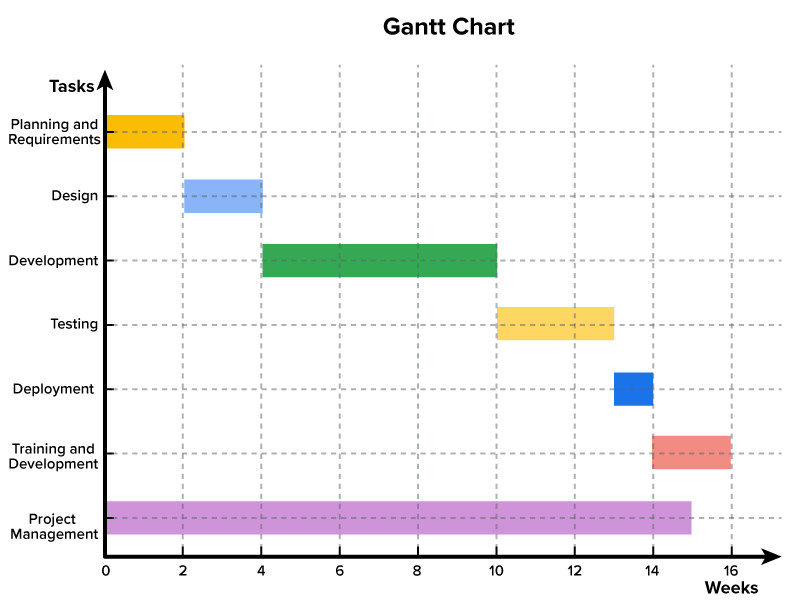
As you can see, the weeks are listed at the bottom of the chart. This is the duration we’ve already estimated the tasks will take.
“Design” (task 2) must be done after “Planning and Requirements” (task 1). Likewise, “Development” can’t be done until “Design” is done.
Do you remember our example in the last challenge on making a PB&J sandwich?
Let’s take a look at the WBS for that:
EXAMPLE
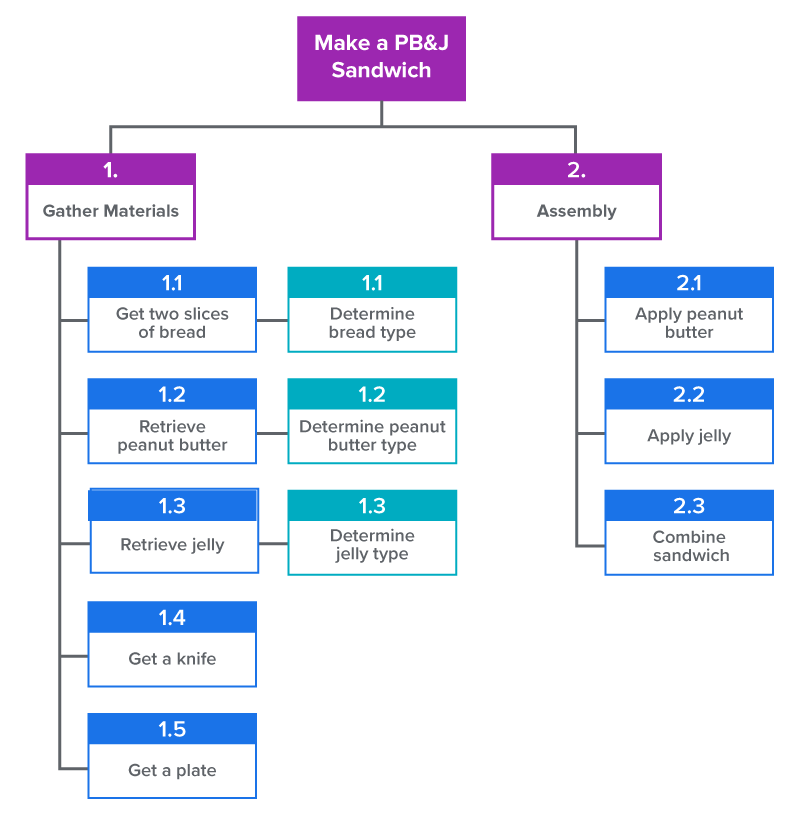
Identifying tasks that can be done at the same time saves time on the project schedule.
This process allows us to see visually, based on the activities and durations we’ve identified, how long a task will take.
Another way project managers can optimize a schedule is by using a network diagram. Many project managers use network diagrams when scheduling a project. The network diagram is a way to visualize the interrelationships and dependencies of project activities. Network diagrams provide a graphical view of the tasks and how they relate to one another. The tasks in the network are the work packages of the WBS. All of the WBS tasks must be included in the network because they have to be accounted for in the schedule. Leaving even one task out of the network could change the overall schedule duration, estimated costs, and resource allocation commitments.
The first step is to arrange the tasks from your WBS into a sequence. Some tasks can be accomplished at any time throughout the project, while other tasks depend on input from another task or are constrained by time or resources. Additionally, there are times when tasks can be done in parallel, as demonstrated below in the wedding project example.
EXAMPLE
Let’s look at a wedding planning project. In the image below, you can see that the arrows represent how the tasks are connected and the order in which they must be completed. In this case, the calligrapher must be picked before the invitations can be addressed, and both of those things must be done before the invitations can be sent. However, we can pick the calligrapher and pick the printer, design the invitations, and print the invitations at the same time (in parallel) but before the invitations are addressed.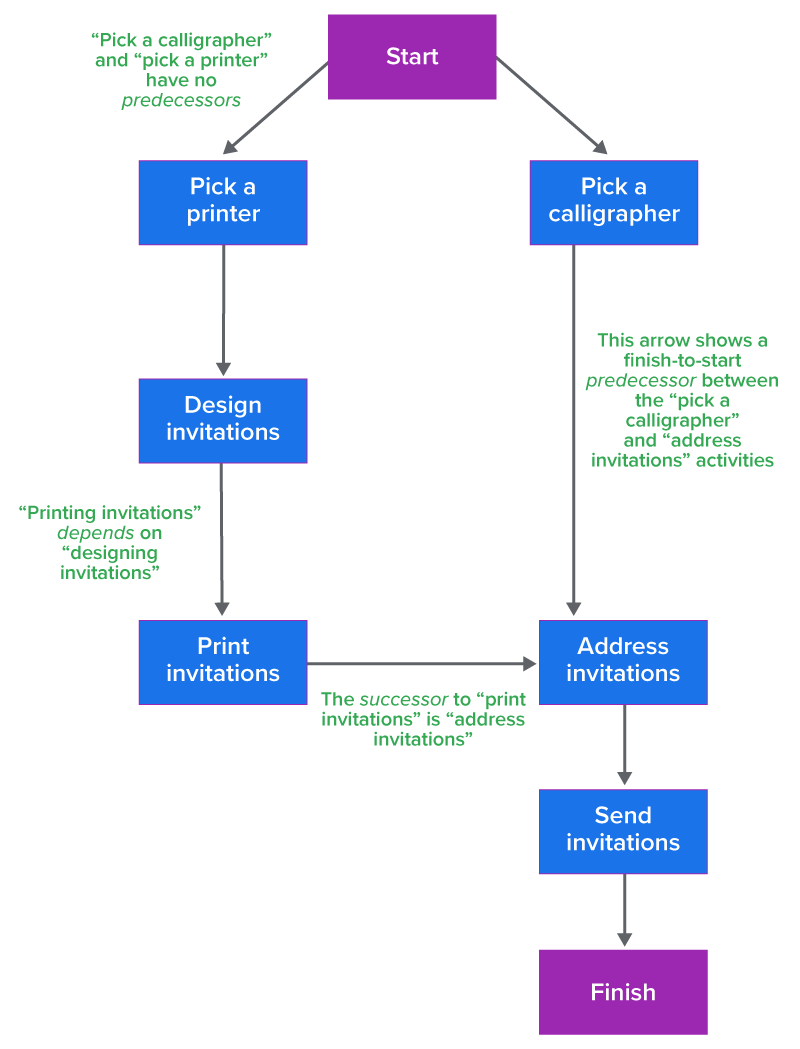
The network diagram provides important information for the project team. It provides information about how the tasks are related, where the risk points are in the schedule, how long it will take to finish the project, as currently planned, and when each task needs to begin and end.
In our wedding planner example, Sally would look for relationships between tasks and determine what can be done in parallel and what activities need to wait for others to complete.
The critical path (also referred to as the critical path method) is the longest path through the project, and any delays along it will delay the completion of the entire project. Identifying the critical path helps project managers prioritize resources and ensure they are monitoring progress on tasks that are time sensitive. There are a few other reasons why the critical path is important:
Project managers often use software such as Microsoft Project to determine the critical path, although it is possible to manually calculate it, which, however, is out of the scope of this course.
Another helpful element of calculating the critical path is that it allows you to determine slack time. Slack time is also called float; it is the amount of time tasks can be delayed without delaying the overall project.
Keep in mind that the goal of a project manager is to maintain the project schedule. Optimizing the schedule is important, and this can be done by understanding the critical path and slack time.
Activities such as developing the Gantt chart, network diagrams, and the critical path help us keep the schedule optimized. This allows us, as project managers, to see all of the activities and to not only stay on schedule but also save time when needed.
Much of the work related to scheduling, though, is done using software that helps us schedule and sequence our activities.
Project planning software usually does the following:
Source: THIS CONTENT HAS BEEN ADAPTED FROM PRESSBOOKS “NSCC PROJECT MANAGEMENT” BY ADRIENNE WATT. ACCESS FOR FREE AT https://pressbooks.atlanticoer-relatlantique.ca/projectmanagement/ LICENSE: CREATIVE COMMONS ATTRIBUTION 4.0 INTERNATIONAL



