Table of Contents |
There are not many output options for PHP. This is likely due to PHP being designed primarily as a server-side scripting engine and little else. Essentially, PHP contains two commands to return text data: the echo command and the print command. These two commands perform the same operation but with two slight differences. First, the print command will return a value of 1, whereas the echo command returns nothing. Second, the echo command has a slight performance benefit and thus is slightly faster than print.
Both echo and print can be used with or without parentheses.
EXAMPLE
Echo and print with and without parentheses
<?php
echo "Hi, welcome to the show";
echo("Hi, welcome to the show");

print "Hi, welcome to the show";
print("Hi, welcome to the show");
?>
All of the above commands are equivalent in their operation; the only difference is the performance of echo over print.
Remember that when returning data from a PHP script, the script is essentially building a text document by echoing or writing text to the document in place of the code. Once all of the PHP code has been executed, the finalized text document is then transmitted to the client. This is the same for webpages that are built using PHP, as well as stand-alone PHP scripts.
PHP can be used to write dynamic JavaScript code! For instance, what if we, as the developers, wanted to send data to the browser’s console to verify that the data is coming through as expected? While this capability is not native to PHP (i.e., there is no specific PHP function for sending data to the browser’s console), we can use PHP to write JavaScript that calls the console.log() function.
EXAMPLE
In the PHP code, we have the following:
<?php
$name = "John Doe";
echo "<script>console.log('" . $name . "');</script>";
EXAMPLE
When the page is rendered in the browser, the text is as follows:
"<script>console.log('" . $name . "');</script>"
gets updated to:
 "<script>console.log('John Doe');</script>"
?>
Next, the updated string gets echoed, that is, inserted into the webpage. The new JavaScript then gets executed by the browser, resulting in the PHP variable’s data being printed to the browser console.
EXAMPLE
Notice the new syntax that has been introduced:echo "<script>console.log('" . $name . "');</script>";
Before moving on, let us understand what is happening with the strings and quote marks in the echo command.
EXAMPLE
The final string of the HTML content that we want is as follows:"<script>console.log('John Doe');</script>"
Notice the use of single quotation marks around ‘John Doe’. This is required for the console.log() function to work properly. Furthermore, since this final HTML code consists of three concatenated parts (a string, a variable’s value, and another string), we need the final character of the first string (Part 1) to be a single quote and the first character of the second string (Part 3) to also be a single quote. This explains why you see what looks like three quotation marks around the . $name . portion.
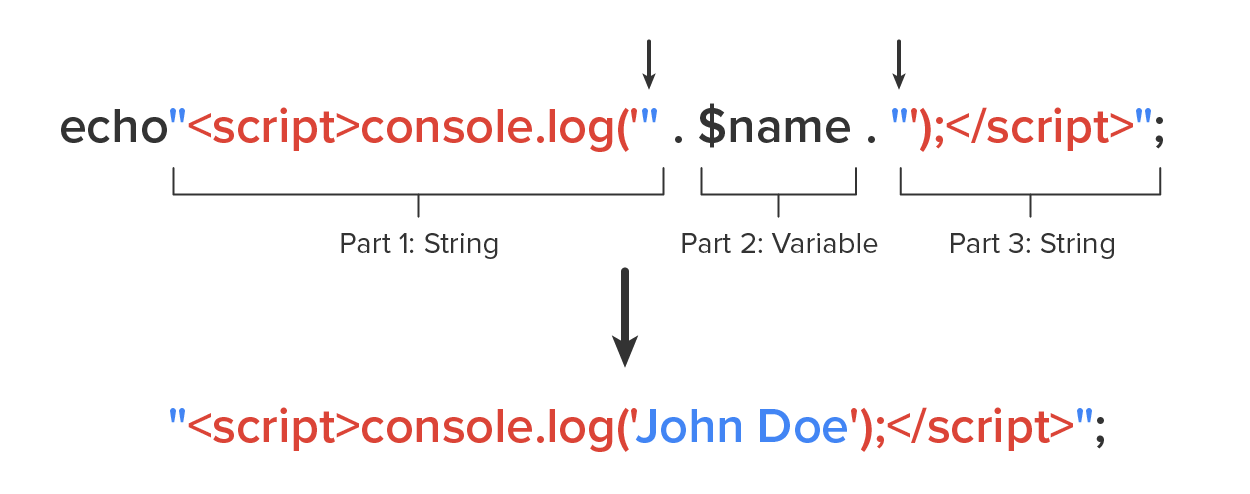
When you concatenate these parts using the . operator, you are essentially enclosing the value of the $name variable in single quotation marks within a string. For example, if $name contains “John Doe,” the result of the concatenation will be ('John Doe'). This can be useful when you want to include the value of a variable within a string, especially when dealing with SQL queries or generating JavaScript code, as in the example provided.
Echo
The PHP command that specifies what text content will be left in place of a PHP container of code. The echo command returns nothing and is slightly faster than the print command.
Print
The PHP command that specifies what text content will be left in place of a PHP container of code. The print command returns a value of 1 and is slightly slower than the echo command.
Stand-alone scripts are scripts that respond to a request; perform the needed operations; and return a value, a section of structured HTML content, or raw data. Stand-alone scripts can be triggered using the action attribute of an HTML form or by triggering some JavaScript code to make an AJAX call to the script file itself. When a request comes into the webserver, the PHP script can access the request through either the $_GET or the $_POST object, depending on which HTTP method was used. The information about the request itself, as well as any data, is contained within the appropriate object and can be used in the script to fulfill the request. For example, if the user submits a login request using the following form, we can access the username and password entered into the form using the key indicator. The key indicator works the same way as the index indicator of an array collection; the difference is that instead of providing an index number between the square brackets, you will provide the keyword as a string of text to access a specific value. Notice the key indicator in the PHP code below matches the value of the name attribute of the input tag.
<form action="loginHandler.php" method="POST">
<input type="text" name="username" />
<input type="password' name="pass" />
<input type="submit" value="Login" />
</form>
Content of the loginHandler.php file on the server:
<?php
$connection = getDBConnection();
$username = $_POST["username"];
$pass = $_POST["pass"];
$result = $connection.query("SELECT * FROM users WHERE userID = $username AND password = $pass");
if($result->num_rows == 0)
{
echo "false";
}
else
{
echo "true";
}
?>
The above example is a painfully oversimplified login process, but it illustrates how the data in the form can be accessed using the $_POST object. In this case, we were able to retrieve the user’s username and password from the form by using the form field’s name attributes as the PHP object key, using this: $_POST["username"].
Then, we pass those values from the form into the SQL query and send the query to the database to authenticate the user’s credentials. If the user is found in the database, the script returns a “true”; if the match is not found, the script returns a “false.”
IN CONTEXT
Do not use the above code for processing login requests. This is only a simplified illustration of processing a form submission using PHP.
Key Indicator
Similar to the index indicator of an array used to refer to an individual element within the array, the string-based value used to refer to an object’s attribute.
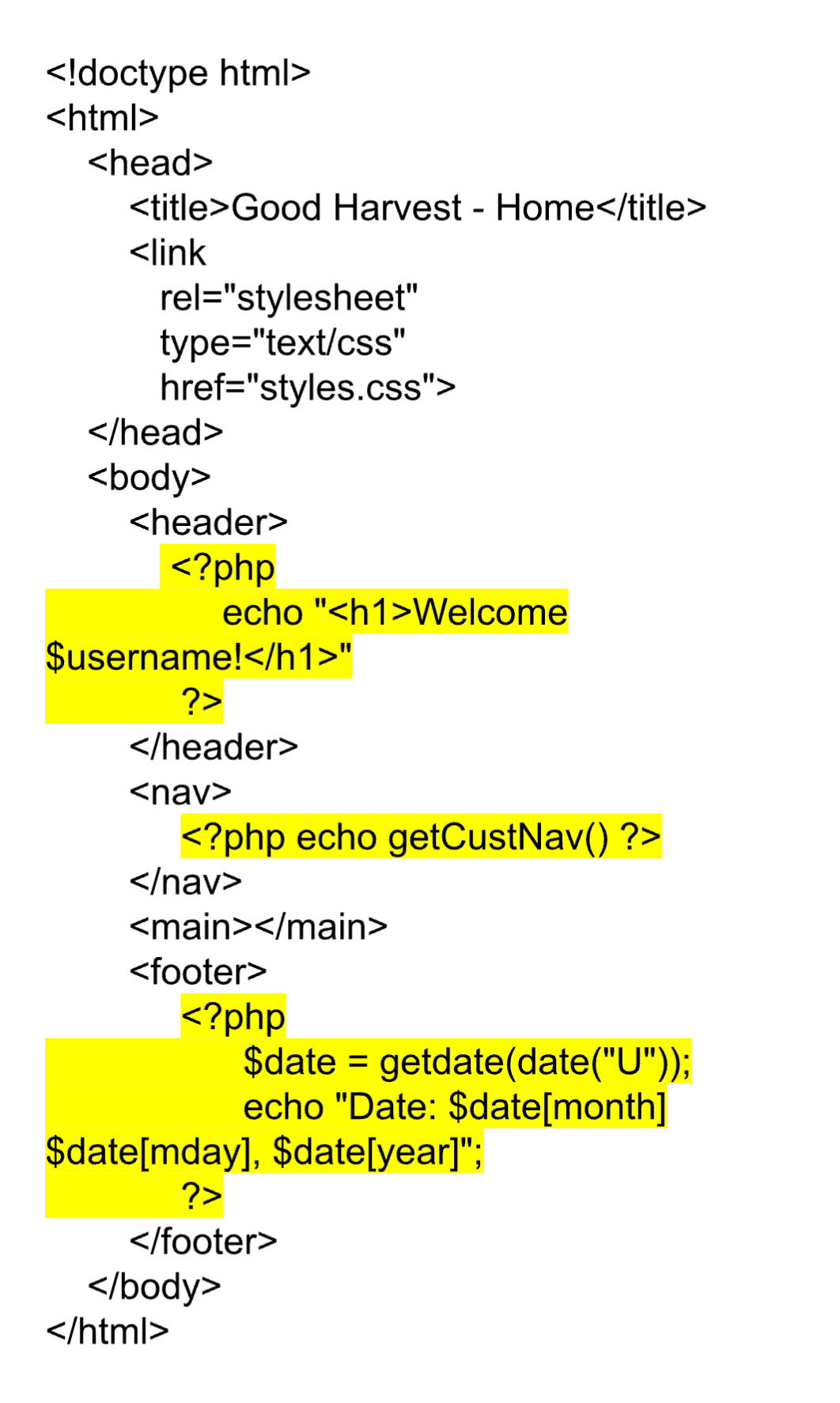
Webpages can also be created using just a PHP script. When we create webpages in PHP, we start with a basic webpage with all of the necessary HTML, CSS, and JavaScript; save it as a .php file; and then add the PHP containers and code throughout the page.
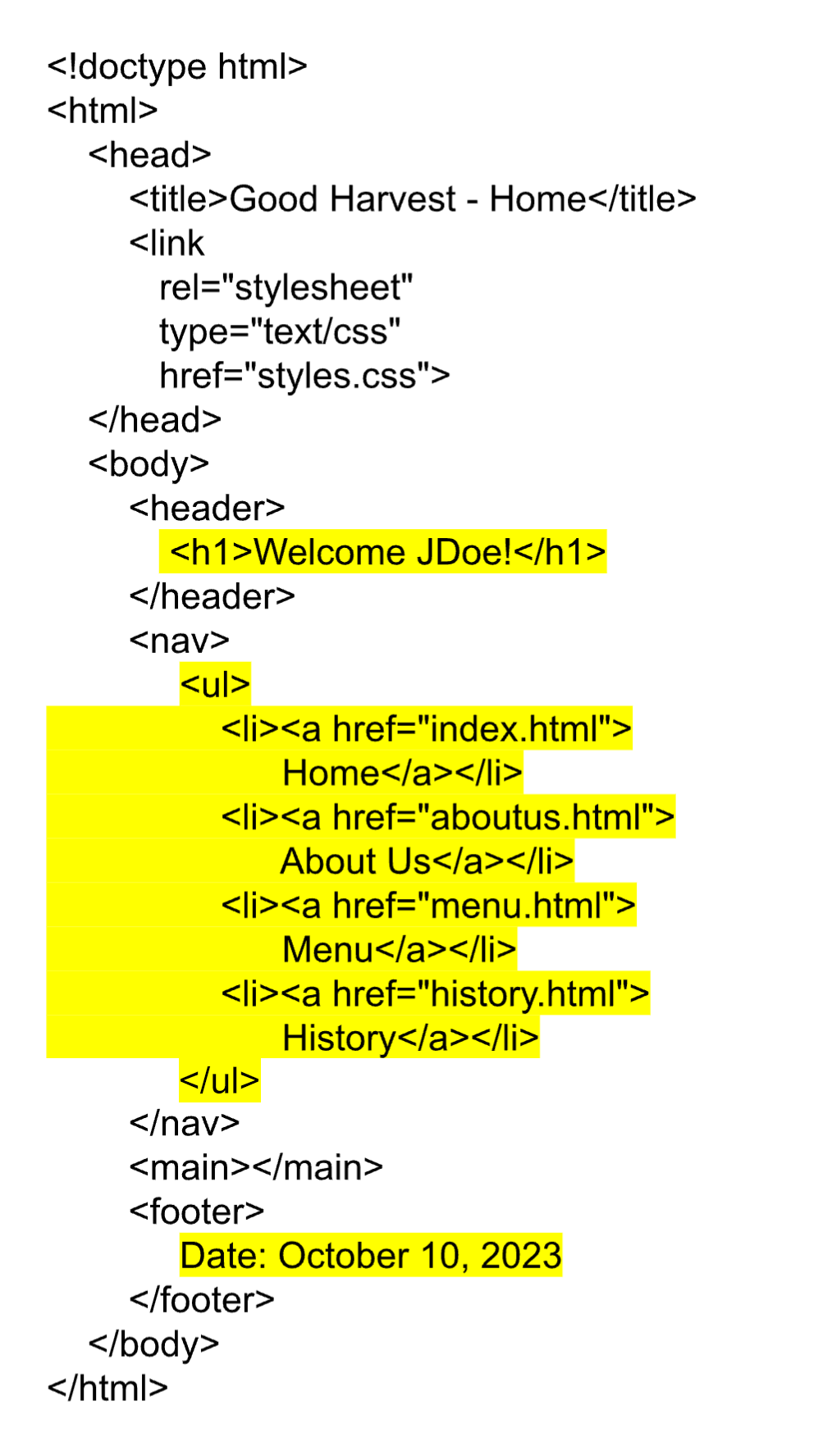
When that webpage is requested by a client, the page is processed by the scripting engine. Any of the HTML, CSS, and JavaScript code that is in the webpage will remain untouched by the scripting engine. However, when the PHP scripting engine encounters a container of PHP code, it will execute the code, remove the code, and replace it with any content that was echoed or printed by the PHP code. Once the entire page has been processed through the scripting engine, the page will only contain HTML, CSS, and JavaScript and will be transmitted to the requesting client.
| Original Code: index.php | Processed Code Sent To User |
|---|---|
|
|
In the above example, we see the original PHP code file on the left and the version that has been processed by the PHP scripting engine. The first PHP container echoes an H1 header and interpolates the “$username” variable into the message. (This is assuming the user had already registered with the site, and their username was retrieved from the database.) The next PHP container calls a custom-defined PHP function “getCustNav(),” which generates an HTML navigation menu for the site. Lastly, the final PHP container calls the PHP function getDate() to retrieve an array of the current date. It then interpolates the pieces of the date into a string, accessing each part of the date object using the key indicators to get the month, mday (which is the numeric day value), and year.
This process is the same whether the PHP file being requested is a stand-alone script or a whole webpage. In fact, any HTML, CSS, and JavaScript contained within the stand-alone PHP script will also be read/processed as normal content, just like a whole-page PHP script. This way, a stand-alone PHP script can consist of entire sections of HTML content with PHP commands throughout in order to customize the content as needed before sending it to the client.
So, how does creating a webpage in PHP differ from using pure HTML, CSS, and JavaScript? The answer is the dynamic nature of having code executed at the moment the page was requested. It allows the otherwise static content to always be up to date and use the latest information available. How do you see yourself using PHP to customize your webpage prior to it reaching the client’s system?
The downside of creating pages in PHP is minimal. While it does take less time to prepare and transmit a webpage built using pure HTML, CSS, and JavaScript, there is little performance overhead when using PHP to generate a webpage. Of all of the server-side programming languages, PHP tends to be the fastest at processing commands and preparing the final document for the client. Thus, when you need to create a webpage that incorporates dynamic, real-time content, building the page in PHP would provide the dynamic behavior without introducing much performance burden.
Source: This Tutorial has been adapted from "The Missing Link: An Introduction to Web Development and Programming " by Michael Mendez. Access for free at https://open.umn.edu/opentextbooks/textbooks/the-missing-link-an-introduction-to-web-development-and-programming. License: Creative Commons attribution: CC BY-NC-SA.



