Table of Contents |
Once you have data stored in variables, the next step is using that data to solve problems. JavaScript operators make this possible by allowing you to perform calculations and create new values. Arithmetic operators allow you to perform mathematical calculations in JavaScript. These operators work with numeric values and return numeric results, making them essential for tasks like calculating totals or computing scores.
JavaScript provides several arithmetic operators that allow you to perform calculations. Most of these operators work in a familiar way, similar to basic math.
Each operation combines two values, called operands, and produces a result. Consider this expression:
let total = 25 + 17;
Here, the values 25 and 17 are operands, and the + operator combines them to produce 42.
Other arithmetic operators follow this same pattern.
EXAMPLE
let difference = 100 - 37; // subtraction
let product = 12 * 8; // multiplication
let average = 240 / 4; // division
One operator that works a little differently is the modulus operator (%), which often causes confusion.
Instead of giving the result of division, modulus returns the remainder.
You may remember this from long division:


The modulus operator returns just that remainder.
JavaScript also provides shorthand operators for increasing or decreasing a value by one. These are useful when working with counters, such as tracking scores, loops, or quantities.
The increment operator (++) adds 1 to a variable, while the decrement operator (--) subtracts 1.
EXAMPLE
let count = 5;
count++; // count is now 6
let lives = 3;
lives--; // lives is now 2
These operators update the value directly, so you do not need to write expressions like count = count + 1. In most cases, you can place the operator after the variable, and it will behave as expected. However, the position of the operator can affect when the value is updated.
EXAMPLE
When the operator comes after the variable (postfix), JavaScript uses the current value first, then updates it.let x = 5;
let y = x++; // y is 5, then x becomes 6
let a = 5;
let b = ++a; // a becomes 6, then b is 6
let score = 10;
score++;
score++;
let result = score % 4;
++) and decrement (--) are shorthand operators that adjust a single variable by one, with prefix and postfix forms affecting when the update occurs.
++) that increases the value of a variable by 1. --) that decreases the value of a variable by 1.Comparison operators allow you to compare two values to determine how they relate to each other. Instead of producing a number, these comparisons return a Boolean value, which is either true or false. Comparison operators are essential for decision-making in JavaScript. They are commonly used in conditional statements, such as determining whether a user is old enough to access a feature or whether a score meets a required threshold.
true or false).Relational operators compare two values to determine their order. They answer questions such as “Is one value greater than another?” or “Does this value meet a minimum requirement?”
EXAMPLE
let isSmaller = 5 < 10; // true
let isGreater = 20 > 25; // false
let isAtLeast = 18 >= 18; // true
let isAtMost = 5 <= 5; // true
The operators < and > compare whether a value is less than or greater than another. The operators <= and >= include equality, meaning the values can be equal and still return true.
<) or greater than or equal to (>=), and returns a Boolean (true or false).While relational operators compare order, equality operators compare whether values are the same. JavaScript provides two ways to check whether values are equal: loose equality and strict equality. The key difference between them is how they handle data types. To understand this difference, recall how JavaScript handles type coercion.
The loose equality operator (==) compares values after automatically converting them to the same type, meaning the values may be changed before the comparison. This can lead to unexpected results.
EXAMPLE
In both cases, JavaScript changes one of the values before making the comparison.let result1 = 5 == "5"; // true (string converted to number)
let result2 = 0 == false; // true (false converted to 0)
The strict equality operator (===) compares both the value and the data type without making any conversions, so the values must already match exactly.
EXAMPLE
let result1 = 5 === "5"; // false (number vs string)
let result2 = 5 === 5; // true (same value and type)
The following diagram highlights the difference between loose and strict equality.
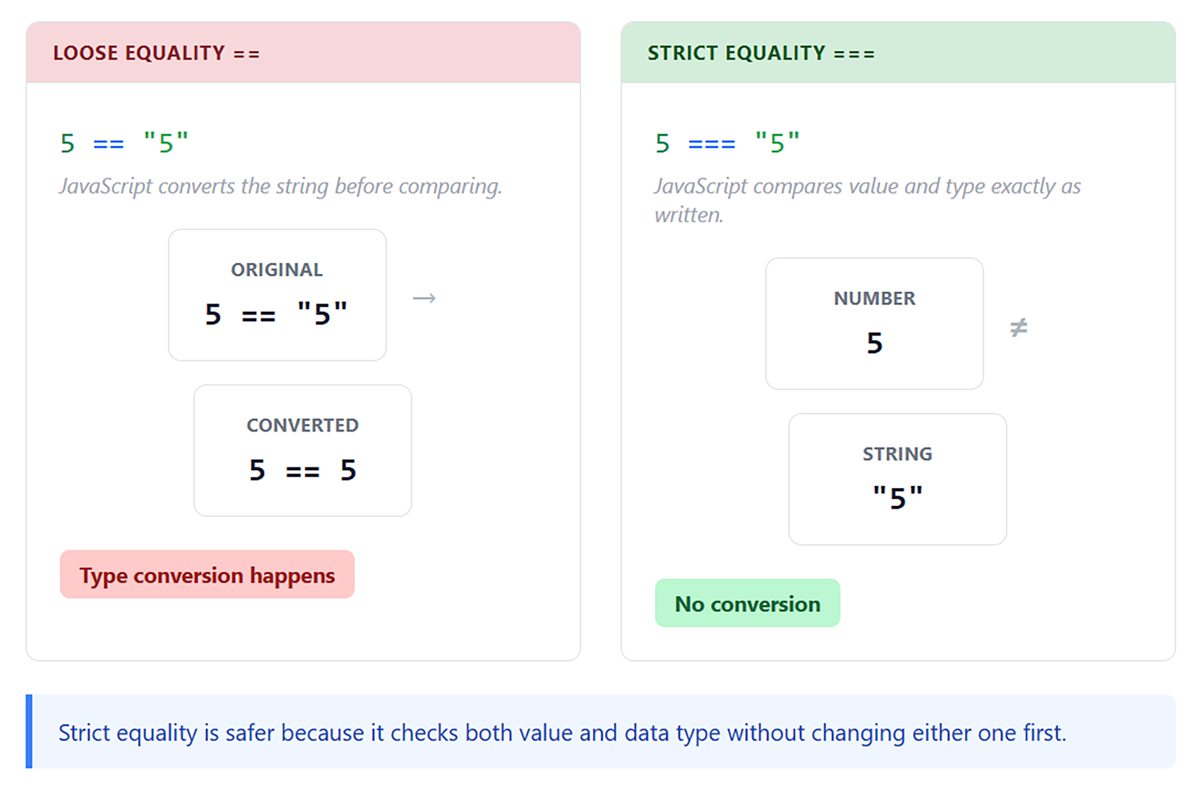
===) over the loose equality operator (==). Strict equality prevents unexpected type conversions that can cause bugs.
The inequality operators work similarly. The loose inequality operator (!=) returns true if values are not equal after a type conversion. The strict inequality operator (!==) returns true if values differ in value or type.
EXAMPLE
let notEqual1 = 5 != "5"; // false (equal after conversion)
let notEqual2 = 5 !== "5"; // true (different types)
index.html file in Codespaces.
<script> element:
let a = 10 === "10";let b = 15 > 15;let c = 20 <= 20;
console.log(a);console.log(b);console.log(c);
==) that compares two values after converting them to the same data type. ===) that compares two values for equality without converting their data types.Logical operators combine or modify Boolean values to create more complex conditions. Instead of evaluating a single comparison, they allow you to work with multiple conditions at once. You might want to check whether a user meets more than one requirement, such as being over a certain age and having a valid account. Logical operators make it possible to combine these checks into a single expression. Logical operators can also reverse a result. This allows you to take an existing condition and check for the opposite outcome. These operators are essential when building decision-making logic, especially in conditional statements where multiple criteria must be evaluated together. JavaScript provides three main logical operators: AND, OR, and NOT. Each one evaluates conditions in a different way.
The AND operator (&&) returns true only when all conditions are true.
EXAMPLE
let hasTicket = true;
let hasID = true;
let canEnter = hasTicket && hasID; // true
let isWeekend = false;
let isSunny = true;
let goPark = isWeekend && isSunny; // false
The OR operator (||) returns true when at least one operand is true.
EXAMPLE
let hasCash = false;
let hasCard = true;
let canPay = hasCash || hasCard; // true
The NOT operator (!) inverts a Boolean value.
EXAMPLE
let isLoggedIn = false;
let showLoginButton = !isLoggedIn; // true
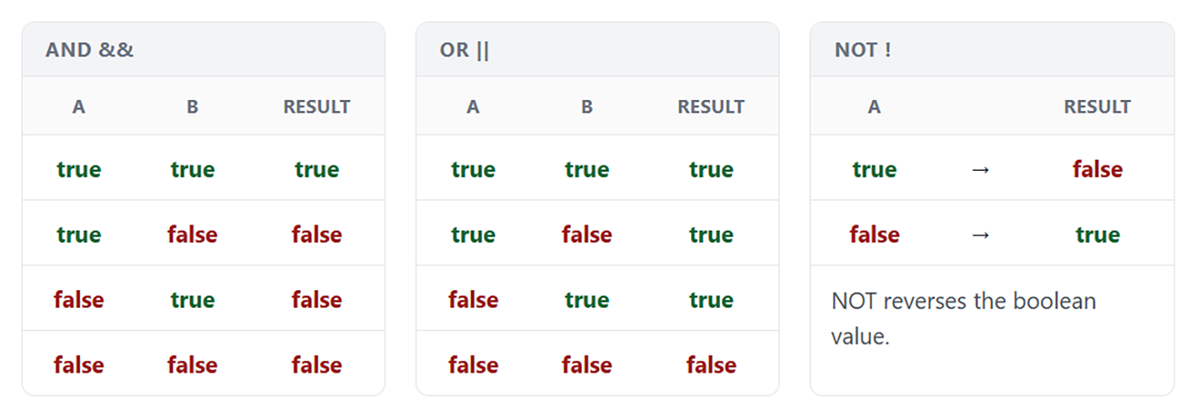
Logical operators are often used together to evaluate more complex conditions. For example, you might check whether a user meets multiple requirements at once.
EXAMPLE
let age = 25;
let hasLicense = true;
let hasInsurance = true;
let canRentCar = age >= 21 && hasLicense && hasInsurance; // true
When expressions like this include multiple conditions, JavaScript evaluates them step by step. In many cases, it does not need to evaluate every part of the expression before determining the result. This behavior is called short-circuit evaluation, which means JavaScript stops evaluating as soon as the result is known.
With AND (&&), if the first condition is false, the entire expression must be false, so JavaScript stops immediately.
With OR (||), if the first condition is true, the entire expression must be true, so JavaScript stops immediately.
EXAMPLE
let isActive = false;
let result = isActive && expensiveFunction(); // function never runs
let hasCachedData = true;
let data = hasCachedData || fetchFromServer(); // fetch never runs
index.html file in Codespaces.
<script> element near the bottom of the file.
<script> element:
let isAuthenticated = true;let isAdmin = false;let hasPermission = true;
let canProceed = isAuthenticated && (isAdmin || hasPermission);
console.log(canProceed);
&& operator affects the final result.
&&), OR (||), and NOT (!). An expression is a piece of code that combines values and operators to produce a result. Throughout this lesson, you have already been working with expressions when performing calculations, making comparisons, and combining conditions.
EXAMPLE
Each of the following is an expression:5 + 3
score >= 70
isAuthenticated && hasPermission
When an expression includes multiple operators, JavaScript must determine the order in which each part is evaluated. This process follows a set of rules called operator precedence.
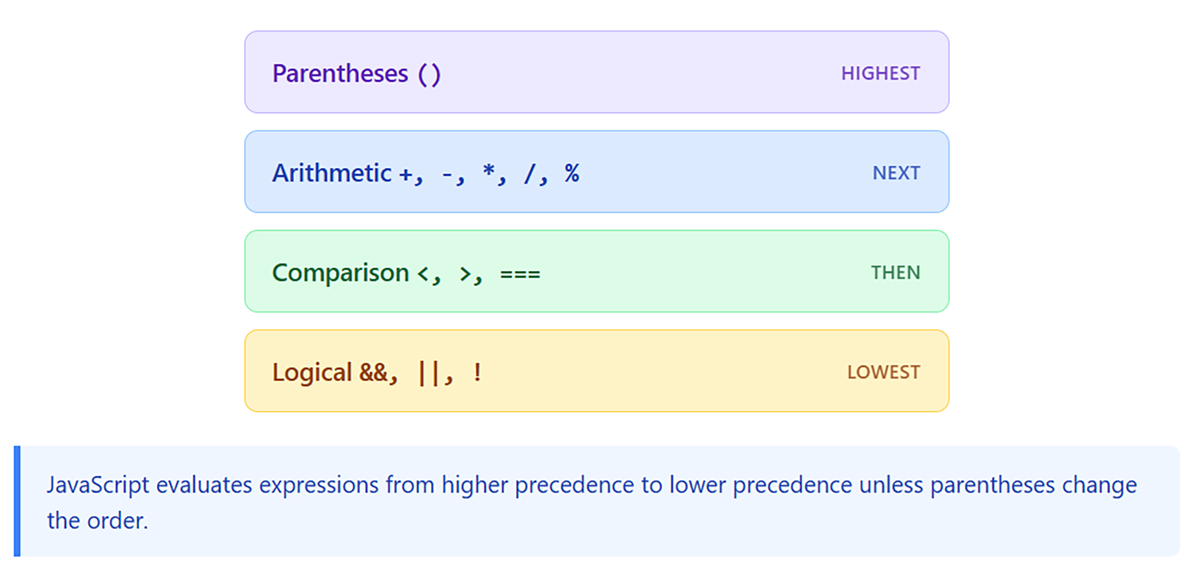
In general, JavaScript evaluates expressions in the following order:
() 
EXAMPLE
let result = 5 + 3 * 2; // 11
Multiplication is evaluated before addition, so 3 * 2 becomes 6, and then 5 is added to produce 11.
let result = (5 + 3) * 2; // 16
Here, the parentheses force JavaScript to evaluate 5 + 3 first.
When expressions include multiple types of operators, JavaScript evaluates them step by step.
EXAMPLE
let score = 85;
let bonus = 10;
let passingScore = 70;
let passed = score + bonus >= passingScore && score <= 100;
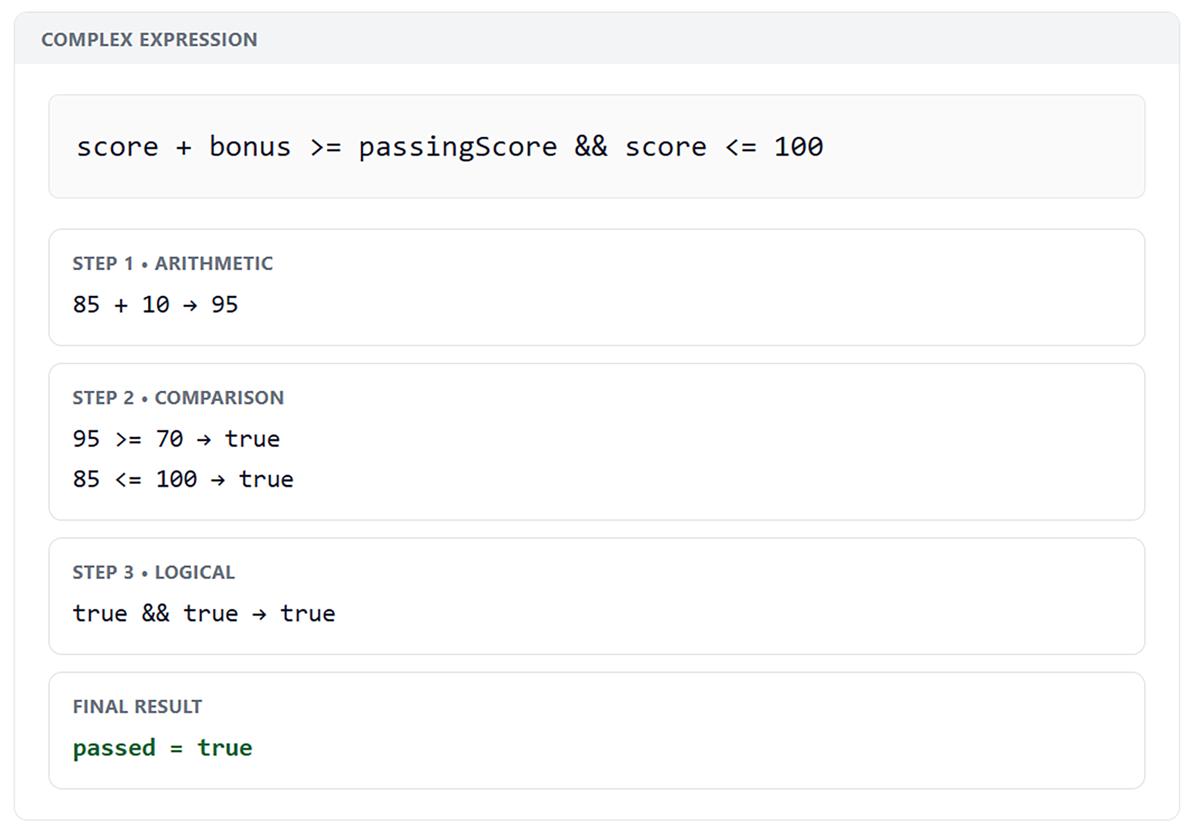
85 + 10 becomes 95. 95 >= 70 is true, and 85 <= 100 is true. true && true is true.<script> element in Codespaces:
let age = 17;let hasParentConsent = true;let minimumAge = 18;
let eligible = age >= minimumAge || (age >= 16 && hasParentConsent);
console.log(eligible);
Source: THIS TUTORIAL WAS AUTHORED BY SOPHIA LEARNING. PLEASE SEE OUR TERMS OF USE.
REFERENCES
Mozilla Developer Network. (n.d.). How the web works. developer.mozilla.org/en-US/docs/Learn/Getting_started_with_the_web/How_the_Web_works