In this lesson, you will be introduced to the basic hardware and processes that help computers connect to and send information over a network. You’ll be introduced to how devices connect and communicate in networks. You’ll explore network interfaces, NICs, MAC addresses, and how data is packaged via encapsulation into frames and packets. You’ll also learn how hubs, switches, and routers manage traffic. Specifically, this lesson will cover the following:
1. Interfaces and Addresses
A network interface is the part of a computer that allows it to connect to a network and exchange data with other devices. It combines both hardware, like a Wi-Fi card or Ethernet port, and software, such as drivers, to send and receive data. Think of it as the front door of your device that opens to the network. Without it, your device could not communicate beyond itself.
Network interfaces come in two main types: wired and wireless. A wired interface uses a physical connection, like plugging an Ethernet cable into a computer. A wireless interface connects using radio signals. Both types do the same job: converting internal data into signals that can travel across a network and translating incoming signals back into usable data.
These interfaces are essential for nearly everything modern devices do, whether you are streaming a video, joining a video call, or syncing a smartwatch. Without a functioning network interface, devices would be isolated and unable to participate in today’s connected world.
-
- Network Interface
- A hardware and software device that enables a computing device to connect to a network, so it can send and receive data.
1a. Network Interface Cards
A Network Interface Card (NIC), pronounced “nick,” is a part inside your computer that connects it to a network. It helps your device send and receive data to and from other computers. The NIC acts as a doorkeeper to your computer. It greets incoming data, checks if it’s for you, and sends your outgoing messages properly dressed for the trip.
A NIC usually includes:
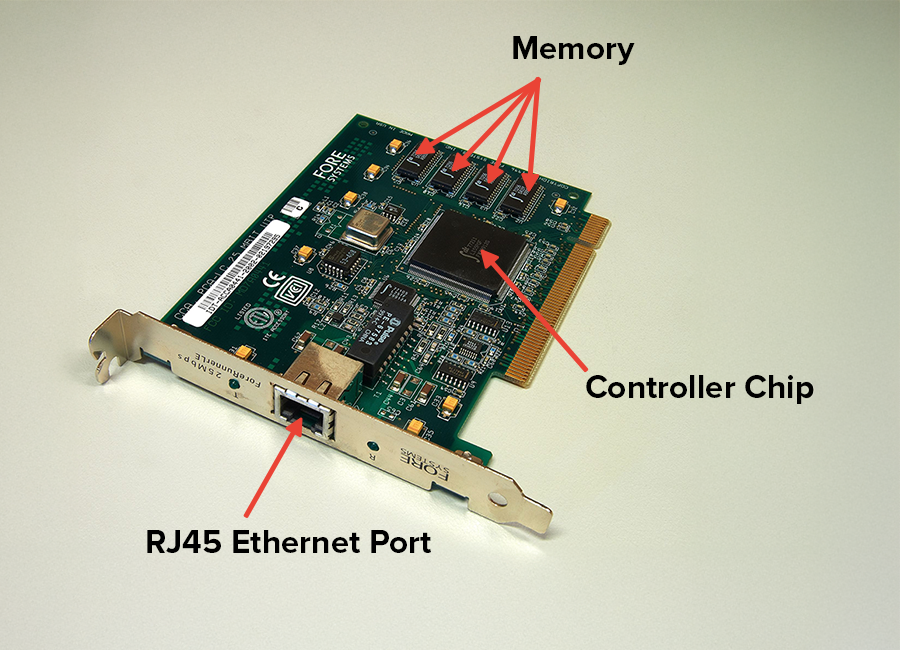
- A controller chip that changes data from your computer into a form that can travel across a network
- A port or antenna (not shown) that connects the device using a cable (Ethernet) or a wireless signal (Wi-Fi)
- Memory and firmware that help the NIC check for errors, follow network protocols, and manage data flow
NICs can be integrated into a computer’s motherboard or added as separate expansion cards, especially on desktops and servers. The following image shows a standalone NIC so you can clearly see its components.
NICs are also rated for different network speeds, such as 100 Mbps (megabits per second) or 1 Gbps (gigabits per second). Faster NICs are useful for streaming, online gaming, or transferring large files quickly. In simple terms, the NIC is the hardware that allows your device to talk to the network.
-
- Network Interface Card (NIC)
- A hardware component that allows a computer or device to connect to a network. Each has its own built-in MAC address.
1b. MAC Addresses
Every device on a network needs a unique identity. A Media Access Control address (MAC address) is a permanent, built-in code assigned to the NIC by the manufacturer. It acts like a local ID tag for your device on the network. MAC addresses are made up of 12 characters, usually written as six pairs separated by colons, for example, A8:A1:59:9E:A0:7B.
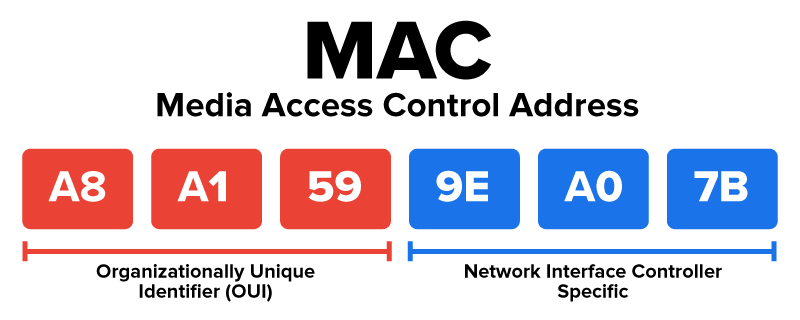
As shown in the image:
- The first half of the MAC address (
A8:A1:59) is the Organizationally Unique Identifier (OUI), which shows which company made the NIC.
- The second half (
9E:A0:7B) is the NIC-specific portion, which makes the address unique to that individual device.
MAC addresses are used inside local networks, like in your home, school, or office. They never change and do not travel across the internet. They are different from IP addresses, which can change and are used to identify your devices on the global internet.
Think of it this way:
- The MAC address is like your device’s name within the building (local network).
- The IP address is like your mailing address on the internet (global network).
Together, both addresses help data get to the right place, but they serve different roles.
-
Want to see your device’s MAC address in action? Follow the steps below based on your operating system:
On Windows:
- Open the Start menu and type “cmd”, and then press Enter to open the Command Prompt.
- Type
ipconfig /all and press Enter.
- Scroll through the results to find your active network adapter.
- Does not say “Media disconnected”
- Has a valid IPv4 Address (e.g., something like
192.168.x.x or 10.0.x.x)
- Has a Default Gateway listed (This usually means it’s currently connected to a network.)
- Look for the line labeled “
Physical Address”—that’s your MAC address.
On macOS:
- Open System Settings (or System Preferences on older versions).
- Click Network in the sidebar.
- Select your active connection (Wi-Fi or Ethernet).
- Click Details or Advanced, and then go to the Hardware or Wi-Fi tab.
- Look for the MAC address.
This unique address is how your device identifies itself on a local network.
-
- Media Access Control Address (MAC Address)
- A permanent, hardware-based identifier assigned to a device’s Network Interface Card (NIC) by the manufacturer. It is used to uniquely identify a device on a local network.
- Organizationally Unique Identifier (OUI)
- The first half of a MAC address, assigned by the IEEE to identify the manufacturer of the network device.
2. Data Encapsulation in Networking
Encapsulation is the process of preparing data for travel across a network. Before your device can send something like an email, video, or file, the raw data must be packaged with added information that helps guide it to the right place and ensures it arrives safely.
You can think of encapsulation like preparing a letter for the mail. If you send a loose sheet of paper, it could get lost or damaged. But if you place it in an envelope, add an address, and include delivery details, it can be sorted, routed, and delivered correctly. In networking, devices do something similar. They wrap your data with helpful instructions, so the network knows how to handle it.
These instructions are called headers and trailers. A header is added to the front of the data and includes details such as where the data came from, where it is going, and how it should be handled. A trailer is sometimes added to the end of the data and usually contains a check to confirm that nothing was damaged during transmission. Together, headers and trailers help ensure that the data moves through the network in the correct direction, arrives in order, and can be verified as accurate.
Each layer of the network adds its own header or trailer, turning the original data into a well-structured package. For example, one layer might add your IP address, another might number the pieces of the message, and another might include local device addresses.
Encapsulation helps organize and protect data as it moves through networks of cables, signals, and devices. At the receiving end, the process is reversed through decapsulation. Each layer removes its added information one step at a time until only the original data remains.
Without encapsulation, sending data would be like trying to deliver letters without envelopes, names, or addresses. It would be nearly impossible to send anything reliably.
-
- Encapsulation
- The process of wrapping raw data with added information, such as headers and trailers, to guide and protect it as it moves through a network.
- Header
- Information added to the front of a data unit that includes source and destination addresses and instructions for handling the data.
- Trailer
- Information sometimes added to the end of a data unit that helps detect errors and confirm that the data arrived correctly.
- Decapsulation
- The process of removing the headers and trailers from a data unit at the receiving end to recover the original data.
2a. The Encapsulation Process
Encapsulation happens in steps as the data moves through several layers of the network. Each layer adds its own instructions, including details like source and destination addresses, application ports, and error-checking codes. Each layer plays a different role, but all work together to turn your data into a complete, organized package that can travel across the network safely and accurately.
The steps below show how data moves from the application you are using down through the Network Layers. The data gains structure and guidance at each stage until it is ready to leave your device. After reviewing this process, you will take a closer look at the key building blocks of network communication, frames and packets, in more detail.
-
Step 1: Data Generation at the Application Layer
At the Application Layer, user-generated data such as an email, video stream, or photo is created through programs like Gmail, Zoom, or Instagram. This layer interacts directly with the user and prepares the data for network transmission. While it does not change the data itself, it ensures the data is formatted in a way that lower layers can handle effectively.
Step 2: Segmentation and Header Addition at the Transport Layer
The Transport Layer breaks the data into smaller chunks, each tagged with a
port number, a kind of address used to help identify which app or service should handle the data on the receiving device. For example, port 25 is commonly used for email. The Transport Layer also adds sequence numbers so the data can be reassembled in order and identifies whether to use TCP (for reliable delivery) or UDP (for faster, connectionless transfer).
Step 3: Packet Formation at the Network Layer
Segments become packets at the network layer. Each packet receives an IP header containing a source IP address that shows where the data came from and a destination IP address that shows where it is going. The header also includes a time-to-live value that limits how many routers the packet can pass through before being discarded and a protocol identifier that indicates which transport protocol is being used. This layer is responsible for global routing, guiding the packet across multiple networks to its final destination.
Step 4: Frame Creation at the Data Link Layer
Packets are wrapped into frames at the Data Link Layer, preparing the data for travel across the local network. This layer adds MAC addresses (physical device identifiers), frame type, and a
Cyclic Redundancy Check (CRC), which is a special code used to detect errors that may occur during transmission. If even a single bit is changed in transit, the CRC will not match, and the frame can be discarded or resent. This helps ensure accurate delivery over the physical link, such as your home Wi-Fi or Ethernet connection.
Once the data reaches its destination, the process is reversed. Each layer removes the information it added, one step at a time, until only the original message remains. This reversal, called decapsulation, ensures that what was sent is accurately delivered and understood. Just like unpacking a box layer by layer, decapsulation restores the data to its original form so it can be used by the receiving application.
-
- Port Number
- A numeric value used at the Transport Layer to identify specific applications or services on a device, helping to direct incoming and outgoing data to the correct software.
- Cyclic Redundancy Check (CRC)
- A mathematical checksum added to a frame’s trailer that allows the receiving device to detect errors that may have occurred during transmission.
2b. Frames
Frames are the basic data units used for communication within a local network, such as a home, school, or office LAN (local area network). Frames are created at the Data Link Layer during the encapsulation process. Their job is to carry data between devices on the same network segment.
A frame includes both a header and a trailer, which wrap around the actual data payload. The payload is the main content being sent and is the reason the data is being transmitted in the first place. The header and trailer do not contain the content itself but instead include important instructions that help deliver it correctly. Together, the header, payload, and trailer form a complete frame ready for transmission on a local network.
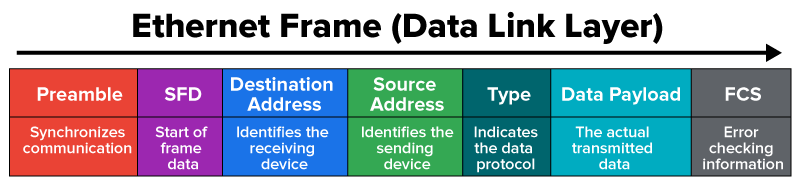
Let’s look at a simplified Ethernet frame structure:
Frame Components:
-
Preamble: This is a short pattern of data that helps devices recognize when a new frame is starting.
-
Start Frame Delimiter (SFD): This marks the official beginning of the frame’s actual data.
- Destination Address: This is the MAC address of the device the frame is intended for.
- Source Address: This is the MAC address of the device sending the frame.
- Type: This identifies the kind of data being carried (e.g., IPv4 or IPv6).
- Data Payload: This is the actual content being delivered, such as part of an email or web page. It’s the user data that needs to be delivered.
-
Frame Check Sequence (FCS): This is a special value used to detect errors. It is a type of checksum created by applying a mathematical formula called CRC to the contents of the frame. When the frame is received, the device runs the same calculation. If the result doesn’t match the original FCS, it knows the data was damaged during transmission. In that case, the frame is discarded.
When a device sends a frame, the NIC adds this structure automatically. Other devices on the network listen for frames, check if the destination MAC address matches their own, and accept or ignore the frame based on that check.
Frames are designed for efficient local delivery within a single network segment, like a home or office. However, in a shared network environment, problems can occur if two devices try to send data at the same time. When this happens, their signals can interfere with each other—this is called a collision. Collisions can cause data to become unreadable, which means the devices have to resend the frames, slowing down communication.
Modern networks avoid most collisions by using network switches. A switch is a device that connects multiple computers or devices and manages how frames move between them. Instead of letting all devices share the same communication space, the switch creates dedicated paths for each device-to-device communication. This means only the devices involved in a conversation are using that communication path, which greatly reduces the chance of collisions and keeps the network running smoothly.
A simpler, older device you might still encounter is a hub. Hubs work at the Physical Layer (Layer 1) and simply copy and send every frame they receive to all connected devices. This is like having a town crier yell the same message to every house—even if only one person needs to hear it. Hubs are inexpensive and were common in small networks, but because they broadcast indiscriminately, they can cause data collisions and slow down communication. Modern networks have mostly replaced hubs with switches for this reason.
-
- Frame
- The basic unit of data at the Data Link Layer used for communication within a local network segment.
- Data Payload
- The actual data content being transmitted, such as part of an email or web page.
- Preamble
- A short sequence that signals the arrival of a new frame.
- Start Frame Delimiter (SFD)
- A marker that indicates where the actual frame data begins.
- Frame Check Sequence (FCS)
- A value used to detect errors in a frame, calculated using a method called Cyclic Redundancy Check (CRC).
- Collision
- When two devices transmit data at the same time, causing signals to interfere and data to become corrupted.
- Switch
- A network device that connects multiple devices and manages frame delivery to reduce collisions by creating dedicated communication paths.
- Hub
- An older, simpler network device that broadcasts all incoming frames to every connected device, often causing collisions.
2c. Packets
Packets are the main units of data used when information needs to travel beyond a local network, reaching across cities, states, or even continents. Created at the Network Layer (Layer 3) during the encapsulation process, packets carry user data along with important routing details inside their headers.
While frames use MAC addresses to deliver data within a single network, packets rely on IP addresses to guide data between networks. This is where routers come in. A router is a device that connects different networks and operates at the Network Layer. It reads the destination IP address in each packet and decides the best next stop, like a checkpoint along a delivery route. As a packet moves across the internet, it may pass through many routers, each one forwarding it closer to its destination.
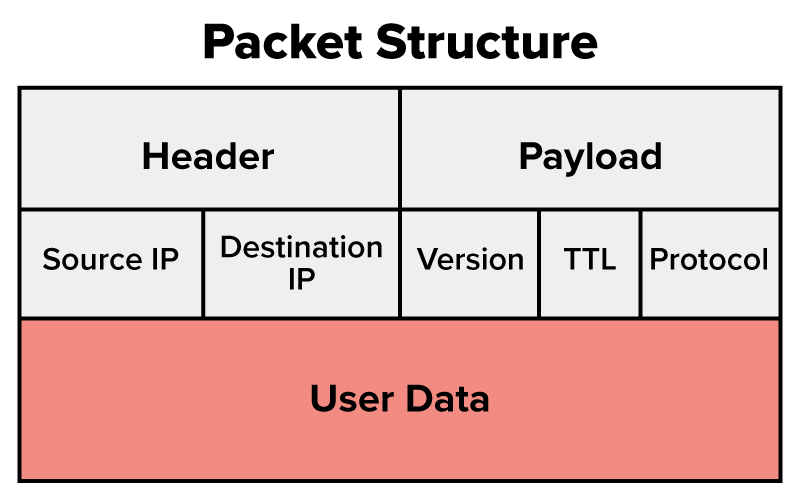
Let’s break down the key parts of a packet:
- Header: This is like the label on a shipping box. It includes the following:
- Source IP address: This is where the packet came from.
- Destination IP address: This indicates where the packet is going,
- Version: This refers to whether the packet uses IPv4 or IPv6.
-
Time to Live (TTL): This number prevents packets from getting stuck in endless loops between routers. Each time a packet hits a router, the TTL count goes down. If it hits zero, the packet is discarded. This keeps the internet running smoothly and avoids congestion.
- Protocol: This outlines how the data should be handled (e.g., TCP or UDP).
- Payload: This is the actual content being carried—such as a portion of a web page, video file, or email message.
- Routers read only the packet header. They don’t need to know what’s in the payload. They just look at the destination IP and send the packet to the next stop.
Frames and packets work together to deliver data across networks. Frames are built for local delivery, using MAC addresses to move data within a single network. Packets, on the other hand, use IP addresses to travel across multiple networks, hopping between routers on their way to a final destination.
As a packet travels, each router decapsulates the frame to inspect the IP header and then re-encapsulates it into a new frame for the next leg of the trip. This method provides flexibility and fault tolerance; if one route fails, routers can redirect the packet a different way.
Together, frames provide local accuracy, and packets provide long-range routing. This partnership is what makes complex, global communication possible.
-
- Packets
- A formatted data unit at the Network Layer, encapsulating a data segment with an IP header containing source and destination IP addresses, TTL, and protocol details for routing across multiple networks, such as the internet.
- Time to Live (TTL)
- A mechanism that limits the lifespan or lifetime of data in a computer or network; also known as hop limit.
In this lesson, you explored how devices connect and communicate through interfaces and addresses, using Network Interface Cards to bridge internal data with network signals. Each device’s MAC address provides a unique local identifier, enabling accurate communication on a shared network. You then examined data encapsulation in networking, where raw data is wrapped with instructions through the encapsulation process, preparing it for transmission. This process transforms the data into packets, which use IP addresses for long-distance routing, and frames, which rely on MAC addresses for local delivery. Together, these components ensure data moves efficiently and reliably across networks.



