Use Sophia to knock out your gen-ed requirements quickly and affordably. Learn more
×

Network Infrastructure Components

Author: Sophia

what's covered
In this lesson you will learn about hardware that forms a business network’s infrastructure, including frames and racks. You will learn about the different kinds of network infrastructure hardware, where to place them, and how to ensure their physical well-being.

Specifically, this lesson will cover the following:

Table of Contents

1. Selecting and Locating Network Infrastructure Components

When infrastructure equipment is purchased and deployed, the ultimate success of the deployment can depend on selecting the proper equipment, determining its proper location in the facility, and installing it correctly. Let’s look at some common data center or server room equipment and a few best practices for managing this equipment.

1a. Main and Intermediate Distribution Frames

The main distribution frame (MDF) connects equipment (inside the facility) to cables and subscriber carrier equipment (outside the facility). It also terminates cables that run to intermediate distribution frames distributed throughout the facility.

An intermediate distribution frame (IDF) serves as a distribution point for cables from the MDF to individual cables connected to equipment in areas remote from these frames. The relationship between IDFs and the MDF is shown in the figure below.
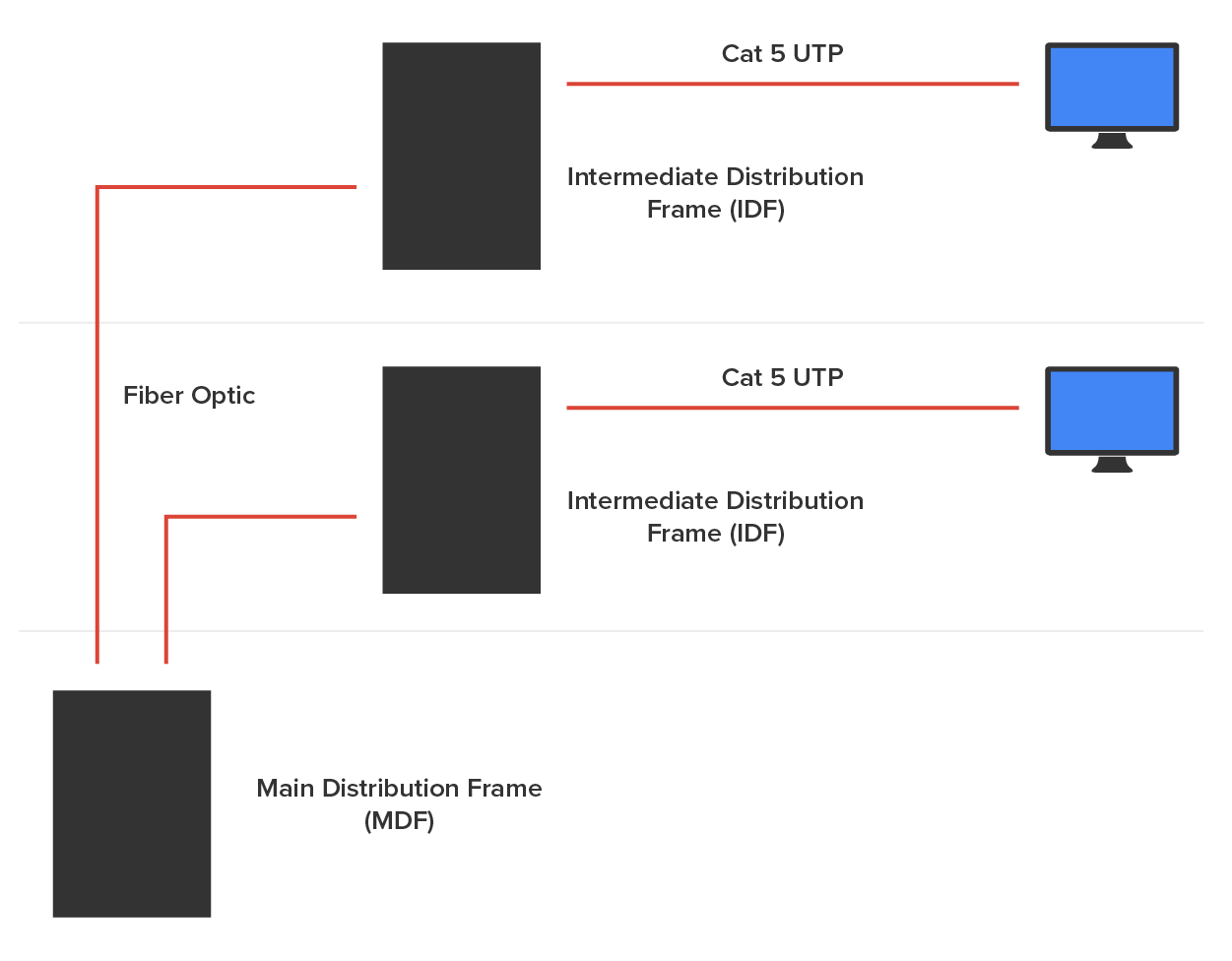
Two cables labeled ‘Fiber Optic’ connect the Main Distribution Frame (MDF) positioned at the bottom to two Intermediate Distribution Frames (I D F’s), stacked one above the other on the right. Each I D F is connected to a computer monitor by a cable labeled ‘Cat 5 U T P’.

terms to know
Main Distribution Frame (MDF)
A hardware system that connects equipment inside the facility to cables and equipment outside the facility.
Intermediate Distribution Frame (IDF)
A hardware system that serves as a distribution point for cables from the MDF to individual cables connected to equipment in areas remote from the frame.

1b. Cable Management Components

While some parts of your network may be wireless, the lion’s share of the network will be connected with cables. The cables come together in large numbers at distribution points where managing them becomes important both to protect the integrity of the cables and to prevent overheating of the infrastructure devices caused by masses of unruly cabling. The points of congestion typically occur at the patch panels.

Patch panels terminate cables from wall or data outlets. Masses of wire that emerge from the wall in a room will probably feed to the patch panel in a cable tray. Critical maintenance issues at the patch panel are to ensure that cabling from the patch panel to the switch is neat, that the patch cables are as short as possible without causing stress on the cables, and that the positioning of the cabling does not impede airflow to the devices, which can cause overheating.

Cable trays are metal trays used to organize the cabling neatly and keep it away from the areas where it can cause heat buildup. In the following figure, some examples of cable tray components are shown below. These are used to organize the cables and route them as needed.
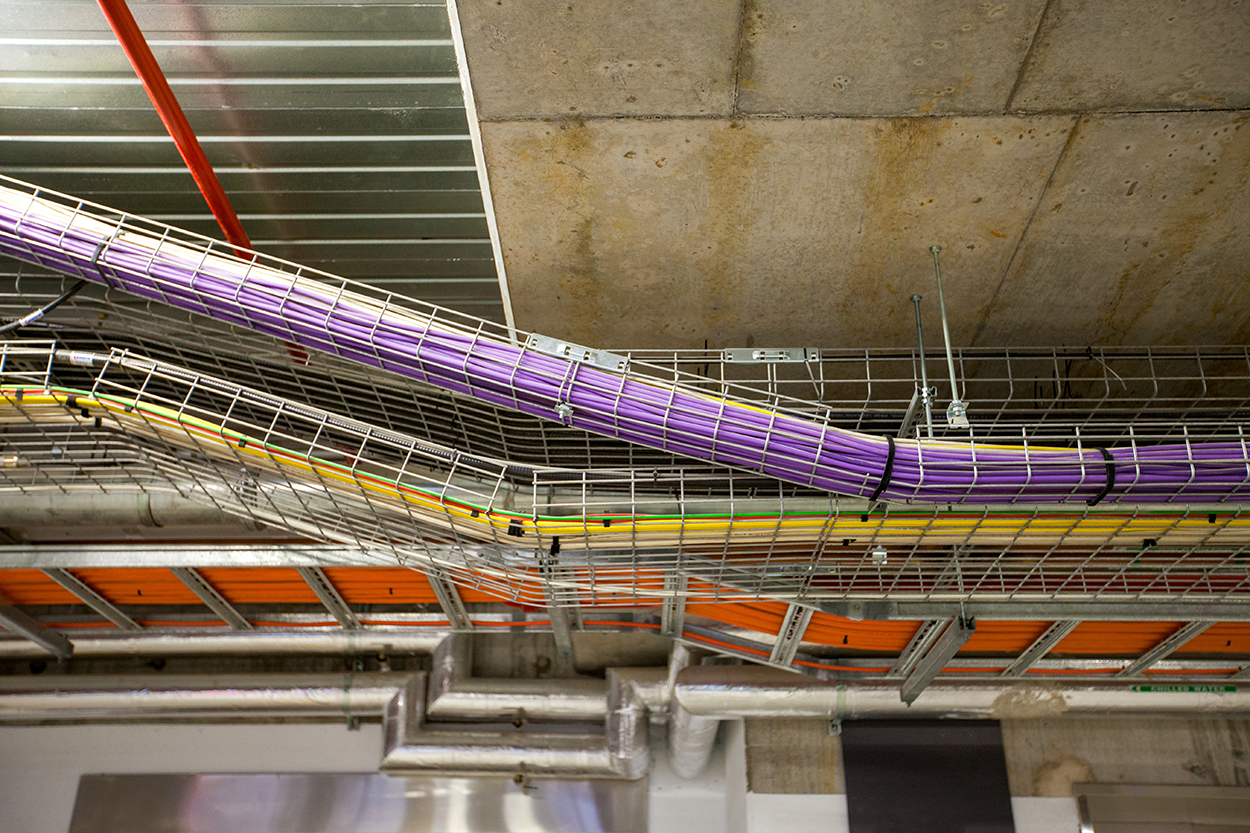
A complex network of cables and wires suspended from the building’s ceiling, with cables grouped into colorful bundles and fastened to metal racks or trays. These racks, which can be horizontal or sloping, are attached to the ceiling using metal brackets and wires, forming a grid-like framework.

term to know
Cable Trays
Metal trays used to organize the cabling neatly and keep it away from the areas where it can cause heat buildup.

1c. Power Management Components

Computing equipment of all types needs clean and constant power. Power fluctuations of any sort, especially complete outages and powerful surges, are a serious matter. In this section, we’ll look at power issues and devices that can be implemented to avoid or mitigate them.

Power Converters
Power conversion is the process of converting electric energy from one form to another. This conversion could take several forms:

  • AC to DC
  • From one voltage level to another
  • From one frequency to another
Power converters are devices that make these conversions. They are typically placed inline, where the energy flowing into one end is converted to another form when it exits the converter.

Circuits
In situations where high availability is required, it may be advisable to provision multiple power circuits to the facility. A circuit is a pathway from one point to another. This is sometimes called A+B or A/B power. To provision for A+B power, you should utilize a pair of identically sized circuits (e.g., 2 × 20 amperes). In the final analysis, even these systems can fail you in some natural disasters. So, you should always also have power generators as well as a final backup.

UPS
All infrastructure systems and servers should be connected to an uninterruptible power supply (UPS). A UPS can immediately supply power from a battery backup when a loss of power is detected. It provides power long enough for you to either shut the system down gracefully or turn on a power generator.

Inverters
A power inverter is a type of power converter that specifically converts DC to AC. It produces no power and must be connected to a DC source.

Power Redundancy
While the facility itself needs redundant power circuits and backup generators, a system can still fail if the power supply in the device fails. Mission-critical devices should be equipped with redundant power supplies, which can mitigate this issue.

terms to know
Power Converters
Devices that convert between AC and DC or between voltages or frequencies.
Circuits
Power pathways from one point to another.
Uninterruptible Power Supply (UPS)
A battery backup that replaces AC power when a loss of power is detected.
Inverter
A power converter that specifically converts DC to AC.

1d. Types of Rack Systems

Rack systems are used to hold and arrange servers, routers, switches, firewalls, and other rack-ready equipment. Rack devices are advertised in terms of Us. U is the standard unit of measure for designating the vertical usable space, or the height of racks. 1U is equal to 1.75 inches. For example, a rack designated as 20U has 20 rack spaces for equipment and has 35 (20 × 1.75) inches of vertical usable space.

You should be familiar with the following types of rack systems and components.

Server Rail Racks Server rail racks are used to hold servers in one of the types of racks described next. They are designed to hold the server while allowing the server to be slid out from the rack for maintenance.

Two-Post Racks A two-post rack is one in which only two posts run from the floor. These posts may reach the ceiling or they may not (freestanding). Several sizes of two-post racks are shown below.
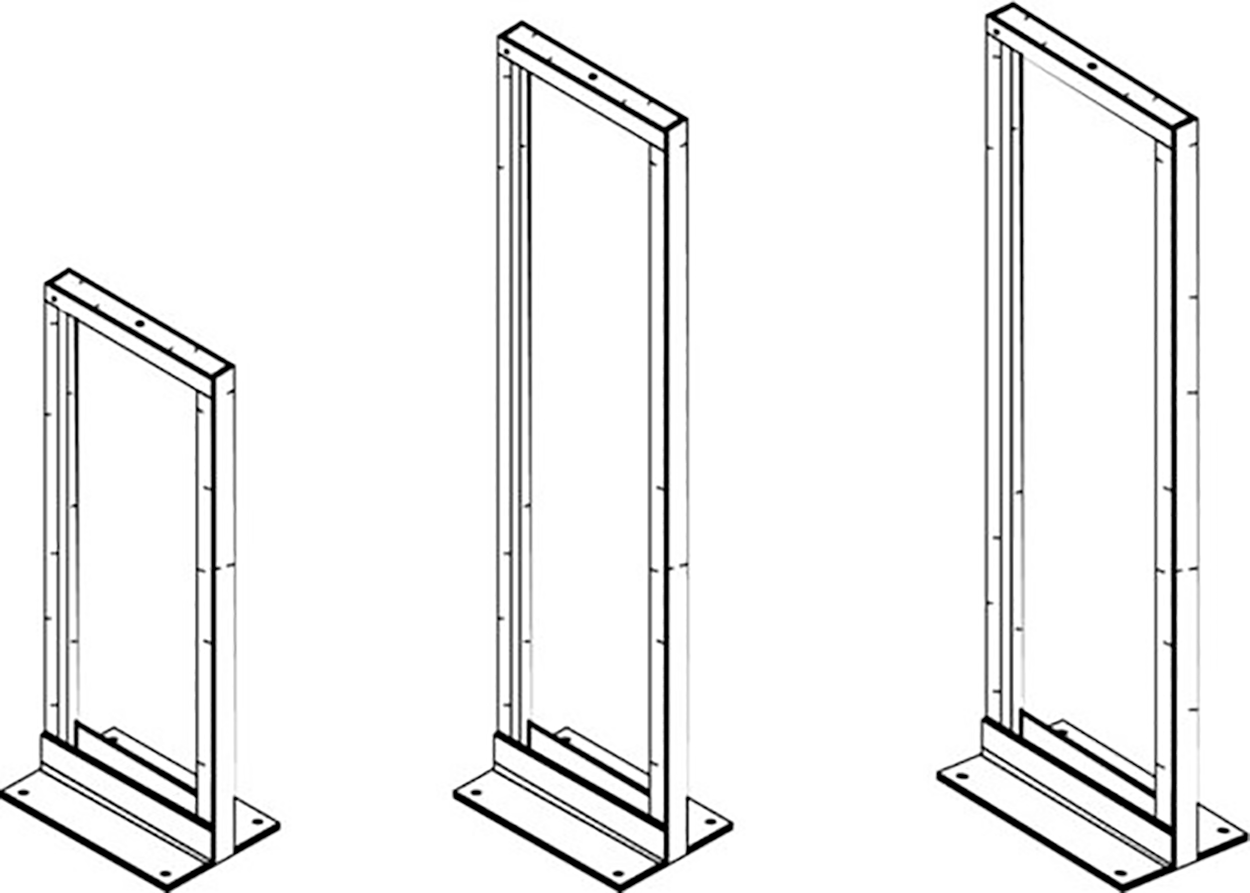
Three racks of increasing height are arranged in a row from left to right. The racks are rectangular and have a flat base with four holes, one at each corner. The racks consist of two vertical sides joined by a horizontal top piece, which also features attachment holes. The rack on the left is the shortest, the middle one is taller, and the rack on the right is the tallest.

Four-Post Racks As you would expect, these racks have four rails and can be either floor to ceiling or freestanding. A four-post rack is shown below.
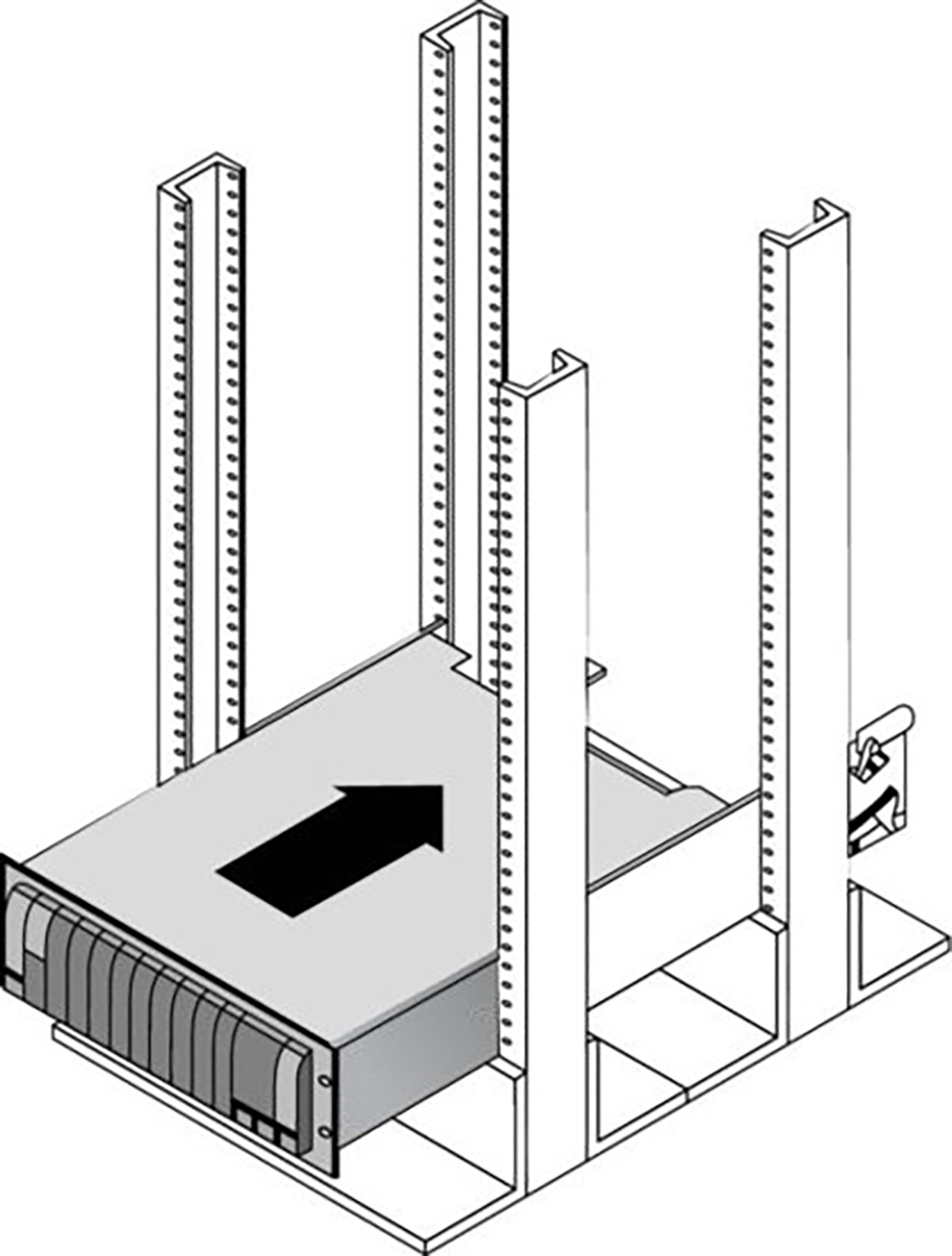
A rack consists of a flat base with four horizontal bars attached to it. Four vertical legs are positioned between these horizontal bars, with two legs on each side. These vertical legs feature multiple holes running from top to bottom. An electronic device with a rectangular shape and flat top and bottom surfaces is placed above the horizontal bars and nestled between the vertical legs by screws or clips. An arrow on the device’s top surface points to the right. The device’s front side has a series of vertical lines.

Freestanding Racks A freestanding rack is one that does not reach the ceiling and stands on its own. A four-post freestanding rack is shown below.
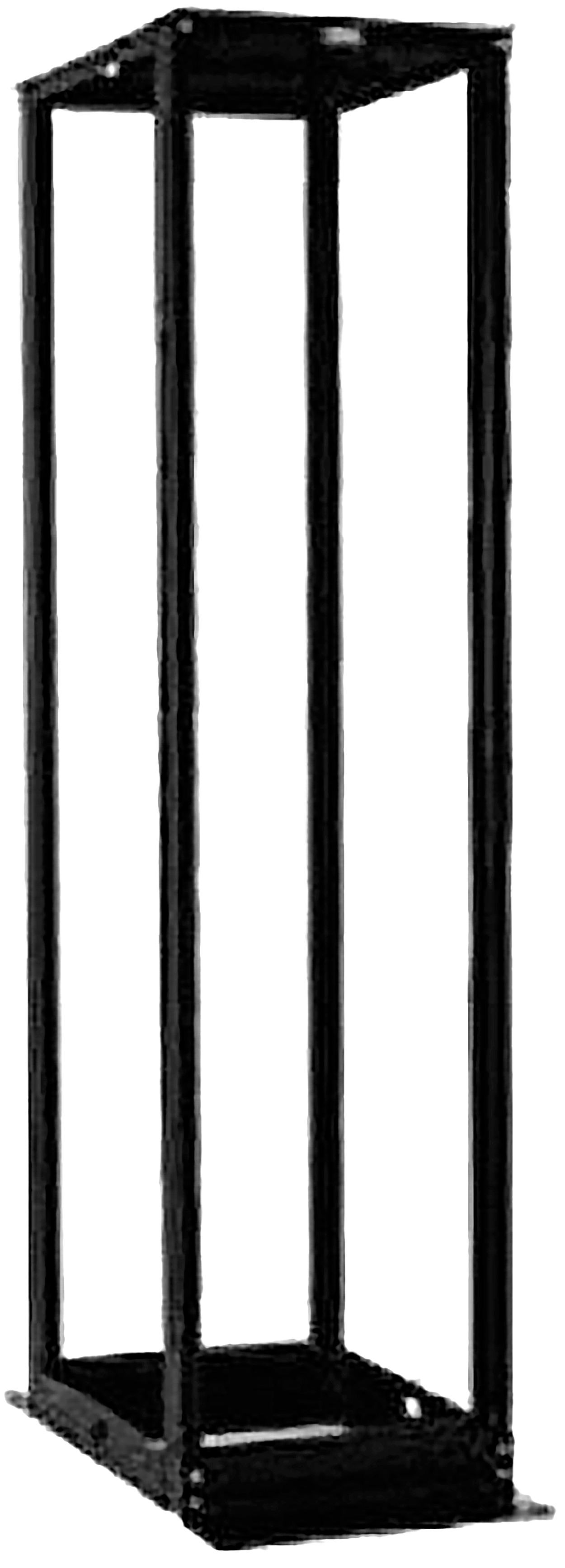
A rectangular rack with four vertical legs connected to a flat base at the bottom and a flat top above. Both the base and top are secured with four horizontal bars, one on each side. There are small holes at the top and bottom of each leg and on the horizontal bars.

terms to know
Rack System
A hardware structure that holds and arranges servers, routers, and other IT hardware.
Server Rail Racks
Rails used to hold servers in two-post or four-post racks.
Two-Post Racks
Server racks in which only two posts run from the floor. It may or may not reach the ceiling.
Four-Post Racks
Server racks in which four posts run from the floor. It may or may not reach the ceiling.
Freestanding Racks
Server racks that do not reach the ceiling and stand on their own.

1e. Placement Considerations

Equipment placement should be approached strategically to enable maximum performance and security. Consider the placement of components such as servers, MDF, IDF, and internet connections.

Security Considerations
You want to make sure that each piece of equipment is accessible to the personnel who will maintain and monitor it but inaccessible to unauthorized persons.

Air-Flow Considerations
Air flow around the equipment is crucial to keep devices running. When hot air is not removed from the area and replaced with cooler air, the devices overheat and start doing things like rebooting unexpectedly. Even if the situation doesn’t reach that point, the high heat will reduce the life of costly equipment.

One of the approaches that has been really successful is called hot/cold aisles. Hot aisle/cold aisle design involves lining up racks in alternating rows with cold air intakes facing one way and hot air exhausts facing the other. The rows composed of rack fronts are called cold aisles. Typically, cold aisles face air-conditioner output ducts. The rows the heated exhausts pour into are called hot aisles. They face air-conditioner return ducts. Moreover, all of the racks and the equipment they hold should never be on the floor. There should be a raised floor to provide some protection against water.

try it
Suppose you have been assigned the job of choosing locations for the following pieces of equipment in the network for maximum performance and security.
  • Firewall
  • Patch server
  • MDF
  • IDF
  • Public web server
Match the five pieces of equipment in the left column below with the optimal location in the right column.
Device Location
1. Firewall a. In the DMZ
2. Patch server b. Just after the internet router
3. MDF c. In the server room or closet on each floor of the building
4. IDF d. Inside the LAN
5. Public web server e. In the server room or closet that is connected to the service provider
Answer key: 1:b, 2:d, 3:e, 4:b, 5:a

terms to know
Hot Aisle/Cold Aisle Design
A rack arrangement that involves lining up racks in alternating rows with cold air intakes facing one way and hot air exhausts facing the other.
Cold Aisles
Rows of rack fronts, which typically face air-conditioner output ducts.
Hot Aisles
Rows of rack backs, where heated exhausts pour out. They typically face air-conditioner return ducts.


2. Monitoring and Securing Network Infrastructure Components

Next let’s look at some ways to effectively manage and secure infrastructure components.

2a. Rack Monitoring and Security

Racks should contain monitoring devices that can be operated remotely. These devices can be used to monitor the following issues:

  • Temperature
  • Humidity
  • Physical security (open doors)
  • Smoke
  • Water leaks
  • Vibration
Rack devices should also be secured from theft. There are several locking systems that can be used to facilitate this. These locks are typically implemented in the doors in the front of a rack cabinet:

  • Swing handle/wing knob locks with common key
  • Swing handle/wing knob locks with unique key
  • Swing handle with number and key lock
  • Electronic locks
  • Radio-frequency identification (RFID) card locks

2b. Labeling

In a data center, server room, or wiring closet, correct and updated labeling of ports, systems, circuits, and patch panels can prevent a lot of confusion and mistakes when configuration changes are made. Working with incorrect or incomplete (in some cases, nonexistent) labeling is somewhat like trying to locate a place with an incorrect or incomplete map.

hint
A naming system or convention guides and organizes labeling and ensures consistency. No matter what name or numbering system you use, be consistent.

The following are some important types of labeling you should include.

Port Labeling
Ports on switches, patch panels, and other systems should be properly labeled, and the wall outlets to which they lead should match. You should arrive at an agreement about the naming convention to use so that all technicians are operating from the same point of reference. They should also be updated when required changes are made.

System Labeling
Other systems that are installed in racks, such as servers, firewall appliances, and redundant power supplies, should also be labeled with IP addresses and DNS names that the devices possess.

Circuit Labeling
Circuits entering the facility should also be labeled. Label electrical receptacles, circuit breaker panels, and power distribution units. Include circuit information, voltage and amperage, the type of electrical receptacle, and where in the data center the conduit terminates.

Patch Panel Labeling
When labeling patch panels, it is important to ensure that they’re correct. Also, you need to make sure that the wall outlet they’re connected to is the same. The American National Standards Institute/Telecommunications Industry Association (ANSI/TIA) 606-B.1 Administration Standard for Telecommunications Infrastructure for identification and labeling approved in April 2012 provides clear specifications for labeling and administration best practices across all electrical and network systems premise classes, including large data centers.


terms to know
Port Labeling
Labeling the ports on switches, panels, and other systems.
System Labeling
Labeling the systems installed on racks.
Circuit Labeling
Labeling the electrical circuits entering the facility.
Patch Panel Labeling
Labeling the ports on a patch panel.

summary
In this lesson, you learned about selecting and locating network infrastructure components, as well as how to locate, monitor, and secure them. Within the structure of the MDF and IDF, you learned about cable management including cable trays, power management components, and types of rack systems. You learned about placement considerations for these components and issues to consider when monitoring and protecting them. Finally, you learned about monitoring and securing network infrastructure components. This included rack monitoring and security and labeling considerations.

Source: This content and supplemental material has been adapted from CompTIA Network+ Study Guide: Exam N10-007, 4th Edition. Source Lammle: CompTIA Network+ Study Guide: Exam N10-007, 4th Edition - Instructor Companion Site (wiley.com)


Terms to Know
Cable Trays

Metal trays used to organize the cabling neatly and keep it away from the areas where it can cause heat buildup.

Circuit Labeling

Labeling the electrical circuits entering the facility.

Circuits

Power pathways from one point to another.

Cold Aisles

Rows of rack fronts, which typically face air-conditioner output ducts.

Four-Post Racks

Server racks in which four posts run from the floor. It may or may not reach the ceiling.

Freestanding Racks

Server racks that do not reach the ceiling and stand on their own.

Hot Aisle/Cold Aisle Design

A rack arrangement that involves lining up racks in alternating rows with cold air intakes facing one way and hot air exhausts facing the other.

Hot Aisles

Rows of rack backs, where heated exhausts pour out. They typically face air-conditioner return ducts.

Intermediate Distribution Frame (IDF)

A hardware system that serves as a distribution point for cables from the MDF to individual cables connected to equipment in areas remote from the frame.

Inverter

A power converter that specifically converts DC to AC.

Main Distribution Frame (MDF)

A hardware system that connects equipment inside the facility to cables and equipment outside the facility.

Patch Panel Labeling

Labeling the ports on a patch panel.

Port Labeling

Labeling the ports on switches, panels, and other systems.

Power Converters

Devices that convert between AC and DC or between voltages or frequencies.

Rack System

A hardware structure that holds and arranges servers, routers, and other IT hardware.

Server Rail Racks

Rails used to hold servers in two-post or four-post racks.

System Labeling

Labeling the systems installed on racks.

Two-Post Racks

Server racks in which only two posts run from the floor. It may or may not reach the ceiling.

Uninterruptible Power Supply (UPS)

A battery backup that replaces AC power when a loss of power is detected.
