Table of Contents |
Nested functions are unique types of functions that are defined inside of other functions. In Python, a nested function has direct access to all of the variables that are defined in the enclosing (outer) function. One benefit of using nested functions is that they help hide our functions from external access. This feature of hiding a function from external access is also known as encapsulation. Encapsulation is an important part of programming where we try to bundle data and functions that belong to a specific topic into a single unit. We do this to restrict direct access to some parts of the function. We will cover more on the use of encapsulation in Unit 3.
Let’s take a look at how we can create those nested functions. You’ll find that the logic for creating them is quite easy. It would look something like the following.
EXAMPLE
def outer_func():
  def inner_func():
    print("Outputting from the inner function")
  inner_func() #call to the inner function

outer_func() #call to the outer function
Here is that output.
Outputting from the inner function
Let’s take a look at what this code does. In this simple nested example, we defined the inner_func() function within the outer_func() function. Within the body of the inner_func() function, we output the line of text “Outputting from the inner function” to the screen.
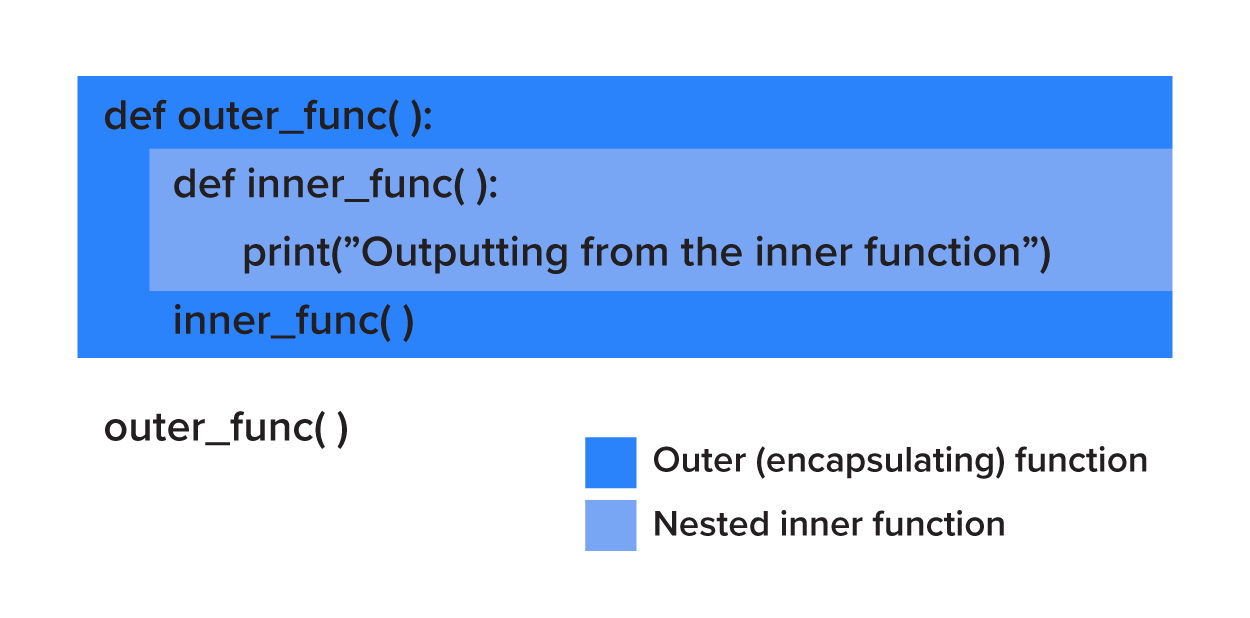
On the last line of the outer_func() function, a call is made to the inner_func(). Outside of the definition of the outer_func() function, we have a call to the outer_func() function. This is a very simple example of a nested function, but we’ll take a look at some other ways that we can make use of these nested functions.
Directions: Go ahead and try inputting this simple nested function into the IDE. Notice how important it is that the indentations are correct. That is how we tell Python which function is which.
One of the key features of using nested functions is that we have the ability to access variables and objects from the enclosing (outer) function even after the inner function has returned.
EXAMPLE
def outer_func(what):
  def inner_func():
    print("I like", what)
  inner_func()

outer_func("Python")
Here is that output.
I like Python
Here, we modified our code a little to have the ability to pass in an argument to the outer_func() function. In this case, the inner_func() function can access that argument through the name what. Notice that we don’t have to pass in that same variable to the inner_func() function but rather can access it directly.
Directions: Now try passing the variable what between the inner and outer functions.
Encapsulation
Encapsulation is an important part of programming where we try to bundle data and functions that belong to a specific topic into a single unit. We do this to restrict direct access to some parts of the function.
Another way that we typically use nested functions is for recursion. There are instances when we want to have functions call one another. With recursion, we have a function call itself with a base case to exit the recursive cycle. That may sound a bit odd to have a function call itself, but there are cases where the problem is handled most effectively through recursion. Typically, you can still solve these problems using traditional programming methods, but a recursive solution could be cleaner and more concise.
Let’s look at a simple example of a function that calls itself. With functionX() function, we have a call to itself within its body. So, each time it is called, it subsequently calls itself over and over without any of the calls ever returning.
EXAMPLE
def functionX():
    x = 10
    functionX()

functionX()
Here is that output.
Traceback (most recent call last):
  File "/home/main.py", line 5, in <module>
    functionX()
  File "/home/main.py", line 3, in functionX
    functionX()
  File "/home/main.py", line 3, in functionX
    functionX()
  File "/home/main.py", line 3, in functionX
    functionX()
  [Previous line repeated 996 more times]
RecursionError: maximum recursion depth exceeded
Python limits the maximum number of times a function can call itself recursively; this is why we end up getting the error above. Once it hits that limit, a RecursionError exception is raised. Think about some of the instructions you’ve seen on shampoo bottles where it says, “Lather, Rinse and Repeat.” If we followed those instructions, we’d shampoo our hair forever. However, other bottles say, “Lather, Rinse, and Repeat as necessary,” which gives us the chance to end shampooing if we find our hair is clean enough. In the same way, any function that calls itself recursively should have a plan to eventually end. This end is considered a base case. The base case is where the program no longer calls itself recursively and allows a recursive function to end.
Directions: Try this next example and see if you get the same RecursionError with this countdown program.
EXAMPLE
def countdown(n):
  print(n)
  if n == 0: #this is our base case, when n is equal to 0
    return
  else:
    countdown(n - 1)

countdown(10)
Look closely at the code. Do not type in n=0; if you do, there will be a syntax error. The variable n needs to use the equality comparison operator == and not the assignment operator =. You should see the following output screen.
10
9
8
7
6
5
4
3
2
1
0
Breaking down this program, we define the function countdown() with the parameter n. We call the function with an argument of 10 passed to our function’s parameter. Then in the body of the countdown() function, we first output the value of n to the screen. Then we define a base case, which is when the value of the variable n is equal to 0. In this case, the recursion stops by using the return statement. Otherwise, within the else statement, there is a recursive call to itself passing in the variable n minus 1. So, with each iterative call, we move closer to the base case as long as the value being passed in is greater than 0. It’s important to note that our function doesn’t check the argument to see if it’s valid or not, so if we pass in a non-integer value or a negative value, we’ll get that RecusionError exception because the base case is never reached.
Directions: Your turn. Try this recursive program, then try changing the argument's value to a non-integer, negative value, or a different number.
Recursion and Nesting Functions
Let’s now take a look at recursion with a nested function. A common approach is with the calculation of a factorial.
A factorial is a function in mathematics, represented with the exclamation point (!), that multiplies a number (usually represented by the letter n) by every number below it.
Using the calculation of a factorial is a common way to describe recursion, as the factorial is best calculated using recursion since the calculation uses the prior number from the recursive function.
The factorial of positive integer n is identified as n!. In math, this is defined as:
n! = 1 * 2 * …. * n
EXAMPLE
Some examples:
| n | n! | Broken out | Total |
|---|---|---|---|
| 0 | 0! | 0 | 1 |
| 1 | 1! | 1 | 1 |
| 2 | 2! | 2 * 1 | 2 |
| 3 | 3! | 3 * 2 * 1 | 6 |
| 10 | 10! | 10 * 9 * 8 * 7 * 6 * 5 * 4 * 3 * 2 * 1 | 3,628,800 |
Note: Even though 0! has nothing to multiply by, it still has a factorial of 1.
So basically, n! is the product of all of the integers between 1 and n including n. The factorial itself fits well with recursion because if the value of n is equal to 0 or 1, 1 is returned.
For all positive integers greater than 2, we can use this math formula: n! = n * (n – 1)!
This formula means the factorial of any number is that number multiplied by the factorial of that number minus 1. So, 10! = 10 * 9!,...
Let’s put this formula into code.
EXAMPLE
def factorial(number):
  if not isinstance(number, int):
    raise TypeError("Sorry. number must be an integer.")
  if number < 0:
     raise ValueError("Sorry. number must be zero or positive.")
  def inner_factorial(number): #nested function for calculation of factorial
     if number <= 1:
        return 1
     return number * inner_factorial(number - 1)
  return inner_factorial(number)

print(factorial(4))
This is the expected output.
24
So let’s break down this program.
We’ve first defined a function called factorial() that takes a parameter called number. Remember in our prior example, we did not have any checks for errors and exceptions for the arguments being passed into the parameter. Here, though, the factorial() function we’ve created checks to see if it is an integer using the built-in function called isinstance(). The isinstance() function takes in a variable and the data type as parameters and returns whether that variable is of that datatype or not. If the passed argument is not of the type expected (integer), we raise a TypeError exception. The raise statement allows the programmer to force a specified exception to occur when it is called. In this case, we raised a TypeError exception because we expected to have an integer passed in and if it is not an integer, we want the program to handle it.
Then we check if the value of the number is less than 0. If it is, we raise a ValueError exception. We then have our nested inner_factorial() function start the calculation of the factorial. If the number is less than or equal to 1, we simply return 1. If it’s larger than 1, we return the number multiplied by the inner_factorial of the number – 1 which is the same as what we’ve defined for our function. In our example, since we’re passing in 4, this is equal to 4 * 3 * 2 * 1, which is equal to 24.
The main advantage of using the nested function is that we can skip the error checking each time on the inner function and focus purely on the calculation. There’s no reason to have to check on the data type more than once or the number being 0 or positive more than once. If we have to do a check on it every single time, we would be wasting computing resources since we know that once the check for the value is already done at the start, any further call will always be an integer.
Directions: Try your hand on this factorial producing program. Try changing the argument’s number.
Recursion
With recursion, we have a function call itself with a base case to exit the recursive cycle.
Base Case
The base case is where the program no longer calls itself recursively and allows a recursive function to end.
isinstance()
The isinstance() function takes in a variable and the data type as parameters and returns if that variable is of that datatype or not.
raise
The raise statement allows the programmer to force a specified exception to occur when it is called.
Source: THIS CONTENT AND SUPPLEMENTAL MATERIAL HAS BEEN ADAPTED FROM “PYTHON FOR EVERYBODY” BY DR. CHARLES R. SEVERANCE ACCESS FOR FREE AT www.py4e.com/html3/ LICENSE: CREATIVE COMMONS ATTRIBUTION 3.0 UNPORTED.



