Use Sophia to knock out your gen-ed requirements quickly and affordably. Learn more
×

Monitoring Time

Author: Sophia

what's covered
In this lesson, you'll learn how a project manager monitors the time spent on a project. Specifically, you will focus on:

Table of Contents

1. Monitoring a Schedule

It is important that the project manager is frequently monitoring the schedule. A project schedule must be updated often and the status of the schedule must be reported to the stakeholders and the team.

For the project manager to gain the information they need on the project's progress, team members must report on the time or effort spent on assigned tasks. The project manager can then compare the project actuals, such as time spent, to the project estimates created during the planning phase.

EXAMPLE

Below is a time sheet report that shows the actual effort on a task to test email operations for a mobile email application, and the estimates on the task from the planned schedule.

Daily Time Sheet
Project Tasks Estimated Time Estimated Effort Actual Effort Percent Complete
Mobile Email Test Email Operations 2 weeks 40 hours 20 hours 60%

There are two ways a team member can record the actual time spent on a task.

  1. Record the actual time or efforts spent on the task, usually in hours or days.
  2. Record the percent complete on the task.
The most accurate way to gain knowledge on the schedule progress is to do both.

Reports on percentage complete can be highly subjective, though. Experienced workers will be able to estimate the amount of work done better than inexperienced workers, for example. It will be up to the project manager to account for these discrepancies.

To compensate for the subjectivity, the project manager can make the following comparisons:

  • Compare the actual percent complete for a task or deliverable to the overall task or deliverable. If a task is 90% complete, but the deliverable is not nearly ready for review, then that is an issue.
  • Compare the actual percent of effort used relative to the original effort estimate. If a task is 50% complete, but the hours spent on the task is already equal to the estimated effort for the task, then that is an issue.
  • Compare the actual percent of time used relative to the original timeline estimate. If two weeks have already been spent on the task, and the original estimate was three weeks, but the task is only 25% complete, then there is an issue.
Once a project manager has these details, they can then determine if these issues must be resolved by action on the part of the team, the project manager, or the stakeholders.

IN CONTEXT

Suppose a task was 50% complete, but the hours spent in effort were already equal to the hours estimated for the task.

Daily Time Sheet
Project Tasks Estimated Time Estimated Effort Actual Effort Percent Complete
Mobile Email Test Email Operations 2 weeks 40 hours 40 hours 50%

A solution might be resource realignment, which may result in a team member spending more time and effort on a task with the goal of meeting time and percentage check marks.

Another option is bringing on a new individual to help complete the task.

In some cases, scope may need to be reduced for the work. In that case, stakeholders would need to be involved in the decision.

Organizations will have different requirements for the frequency by which status on tasks are tracked, the methods used to track the schedule, and the frequency that status reports are created about the schedule. When a project is behind schedule, more frequent updates may be required.

terms to know
Monitoring Schedule
The process of continuously tracking schedule progress for all project activities against the baseline to ensure that a project is delivered as planned.
Project Actuals
The amount of time and/or effort spent completing each project task.
Project Estimates
Estimates relating to time, cost, and resources that will be needed to achieve project deliverables.


2. Monitoring and Updating the Critical Path

While monitoring a schedule, the project manager must always be aware of impacts to the critical path. The critical path is the longest chain of sequential dependent tasks on the project. This indicates how long a project will take to complete.

Since the critical path defines the end-date for the project, it's essential to monitor and manage the tasks on this path closely. Tracking the progress of project tasks to determine if actual completion is on target is known as task completion monitoring.

Tasks not on the path should also be managed, so as not to impact the tasks on the path.

IN CONTEXT

We have a project to develop a new customer complaint form for a website. The critical path diagram might look like this.
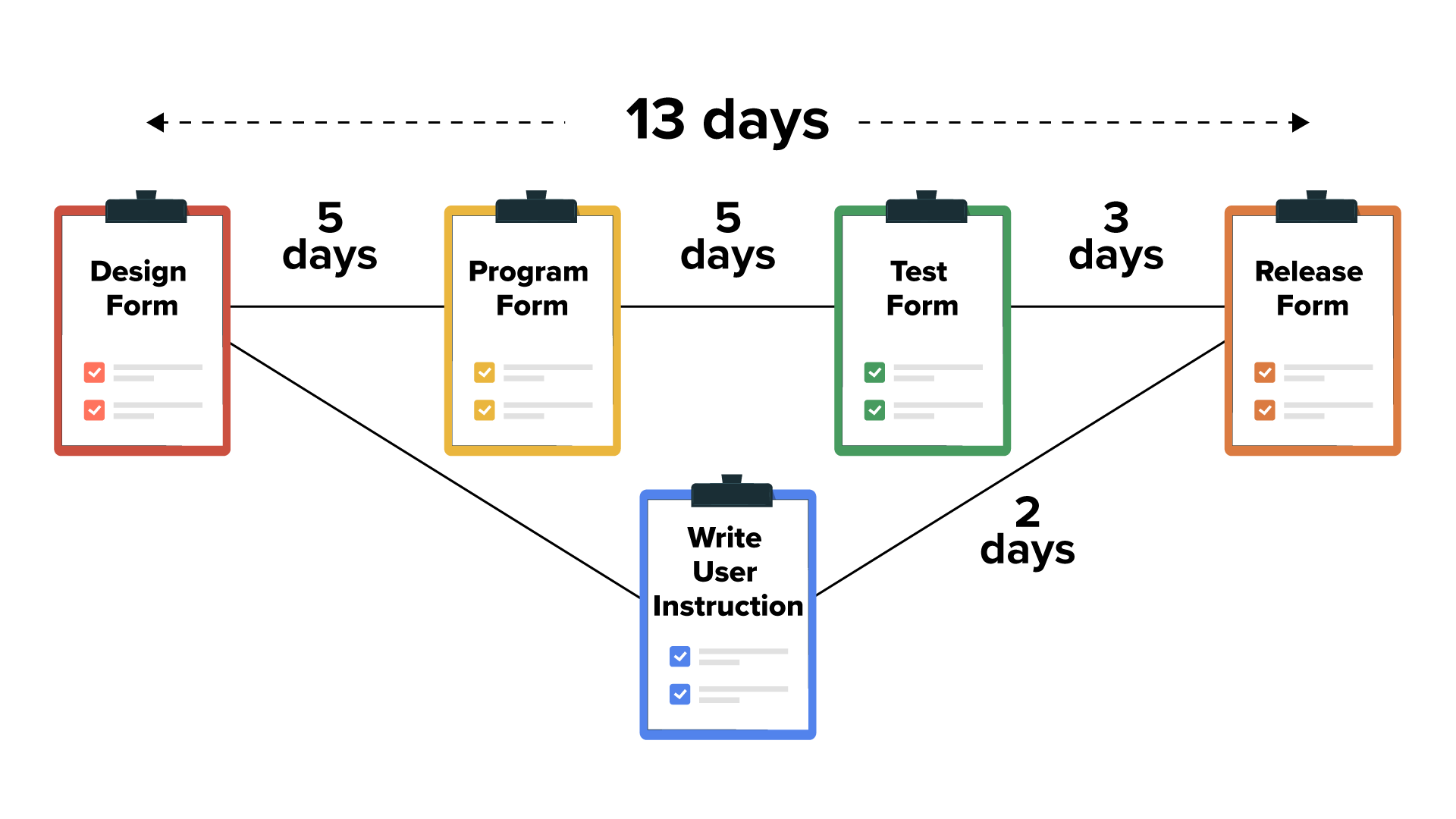
Five clipboard icons with labels are connected by lines that are labeled with time durations. From left to right horizontally, the following icons are connected: ‘Design Form’ to ‘Program Form’ labeled ‘5 days’, then to ‘Test Form’ labeled ‘5 days’, and to ‘Release Form’ labeled ‘3 days’. Below this, a clipboard labeled ‘Write User Instruction’ is connected to ‘Design Form’ and to ‘Release Form’ with the connecting line labeled ‘2 days’. A dashed arrow at the top shows the total duration as 13 days.

The longest sequential path through the project is 13 days. It's not a good idea to take resources from critical path tasks to assist with non-critical path tasks.

For example, unless the task of writing user instructions takes longer than 13 days, it will not impact the critical path. However, if the design form task takes seven days instead of five days though, the critical path is impacted and does increase by two days also.
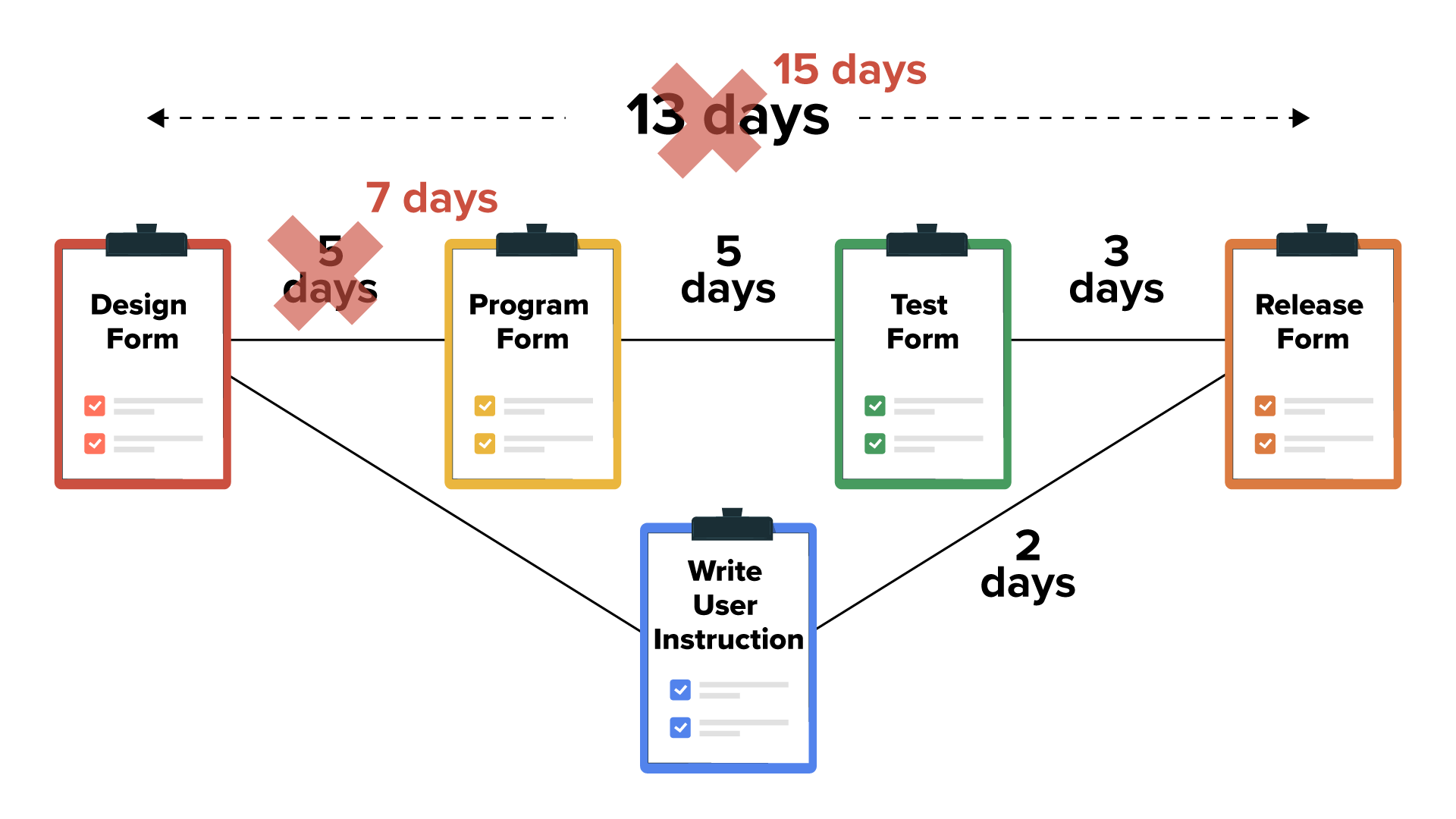
Five clipboard icons with labels are connected by lines that are labeled with time durations. From left to right horizontally, the following icons are connected: ‘Design Form’ to ‘Program Form’, which was originally labeled ‘5 days’ and is now labeled as ‘7 days’; then to ‘Test Form’ labeled ‘5 days’; and to ‘Release Form’ labeled ‘3 days’. Below this, a clipboard labeled ‘Write User Instruction’ is connected to ‘Design Form’ and to ‘Release Form’ with the connecting line labeled ‘2 days’. The total duration at the top of 13 days is crossed out in red and changed to 15 days.

Assume that you take action to bring the schedule back in line with the original overall time estimate. You do this by adding resources to the program form task to drop the time to complete the work to three days, instead of five days. The network diagram would then look like this, and we would be back to 13 days for our critical path and our overall project time.
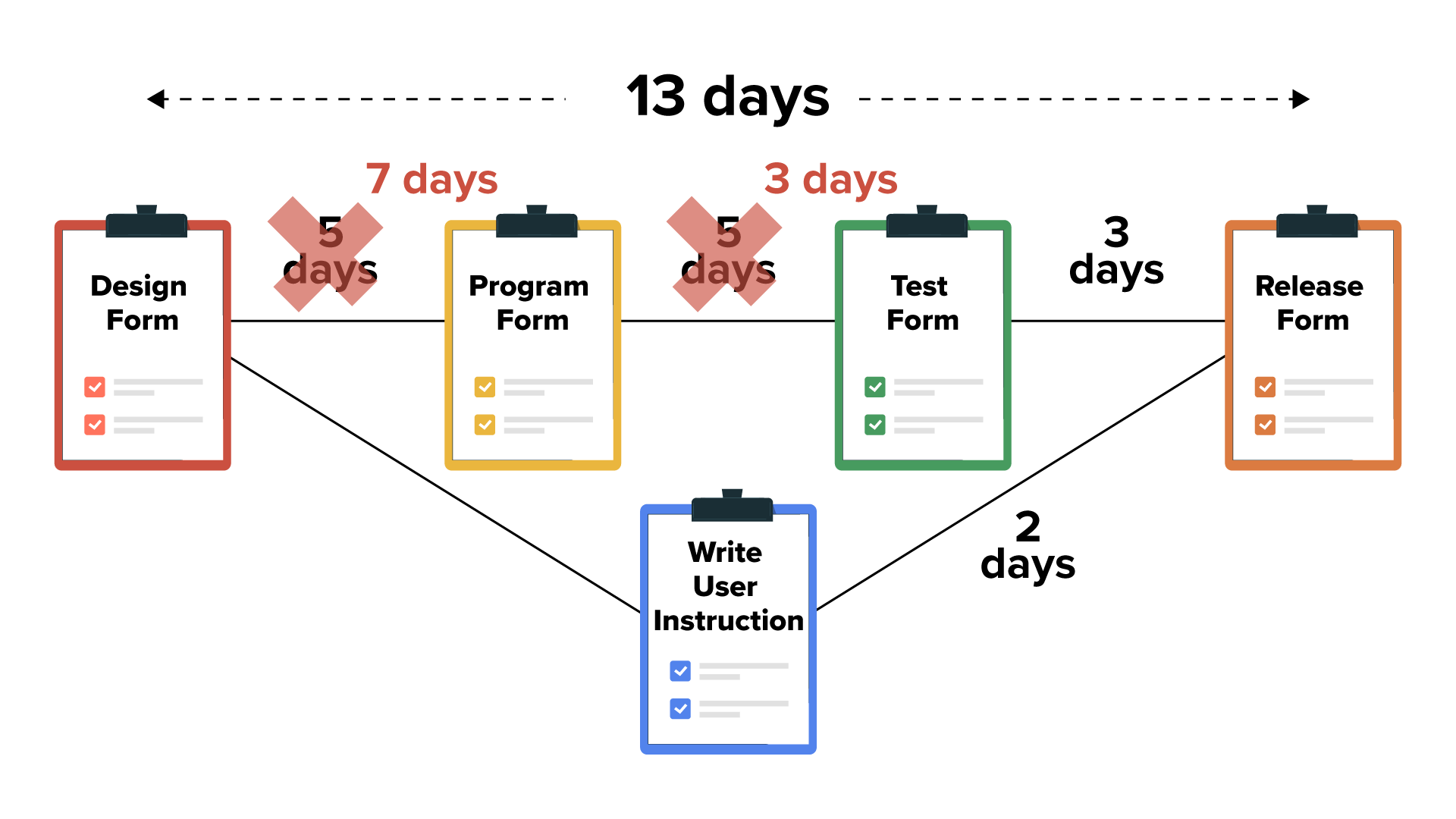
Five clipboard icons with labels are connected by lines that are labeled with time durations. From left to right horizontally, the following icons are connected: ‘Design Form’ to ‘Program Form’, which was originally labeled ‘5 days’ and is now labeled ‘7 days’, and then to ‘Test Form’, which was labeled ‘5 days’ and has been replaced with ‘3 days’. Then, it is connected to ‘Release Form’ and the line is labeled ‘3 days’. Below this, a clipboard labeled ‘Write User Instruction’ is connected to ‘Design Form’ and to ‘Release Form’ with the connecting line labeled ‘2 days’. A dashed arrow at the top shows the total duration as 13 days.

If project overruns continue to occur, a project manager might need to recommend changes to the project scope in order to bring the project back into alignment with the schedule. This is done through change management.

terms to know
Task Completion Monitoring
Tracking the progress of project tasks to determine if actual completion is on target.
Project Overruns
Increase to schedule or budget when project tasks take longer to complete or cost more to complete than projected.

summary
In this lesson, you learned how to monitor a project schedule and how to monitor and update the critical path.

Source: This work adapted from Sophia Author Jeff Carroll.

Terms to Know
Monitoring Schedule

The process of continuously tracking schedule progress for all project activities against the baseline to ensure that a project is delivered as planned.

Project Actuals

The amount of time and/or effort spent completing each project task.

Project Estimates

Estimates relating to time, cost, and resources that will be needed to achieve project deliverables.

Project Overruns

Increase to schedule or budget when project tasks take longer to complete or cost more to complete than projected.

Task Completion Monitoring

Tracking the progress of project tasks to determine if actual completion is on target.

