Table of Contents |
An INNER JOIN in SQL retrieves data from two or more related tables based on a specified condition. A USING clause is often used in conjunction with INNER JOIN to simplify the JOIN condition by specifying which column or columns should be used for the JOIN. Avoiding repetitive column names in the result set helps streamline the query syntax and reduce redundancy.
If the INNER JOIN clause is used with the USING clause, the database engine matches rows where the specified columns have equal values. This process eliminates nonmatching rows from the result set by including only the rows that match the condition. Although the USING clause can simplify the JOIN process, it is important to note that it restricts joining to columns with identical names. When columns have the same name but represent different data, or when joining conditions are more complex, using the ON clause might be a better approach. You will learn about the ON clause in the next lesson.
Let's take a look at the product and category tables that we created in the prior lesson, which had an issue with the NATURAL JOIN:
CREATE TABLE category ( category_id serial PRIMARY KEY, name VARCHAR (100) NOT NULL );
CREATE TABLE product ( product_id serial PRIMARY KEY, name VARCHAR (100) NOT NULL, category_id INT NOT NULL, FOREIGN KEY (category_id) REFERENCES category (category_id) );INSERT INTO category (name)
VALUES ('Game'), ('Movie'), ('CD');
INSERT INTO product (name, category_id)
VALUES ('Call of Duty', 1), ('Final Fantasy', 1), ('Wizard of Oz', 2), ('Jaws', 2), ('Great Hits', 3), ('Journey', 3);
Consider when we tried to run a NATURAL JOIN:
SELECT *
FROM product
NATURAL JOIN category;
We got the following result:

This was due to the fact that the tables had two common attributes. However, the name columns did not have values that matched between the two tables. The JOIN and USING clauses will help with this and enable us to pick which common attribute to join.
The syntax for the command looks like this:
SELECT <columnlist>
FROM <table1>
INNER JOIN <table2> USING (<commonattribute>);
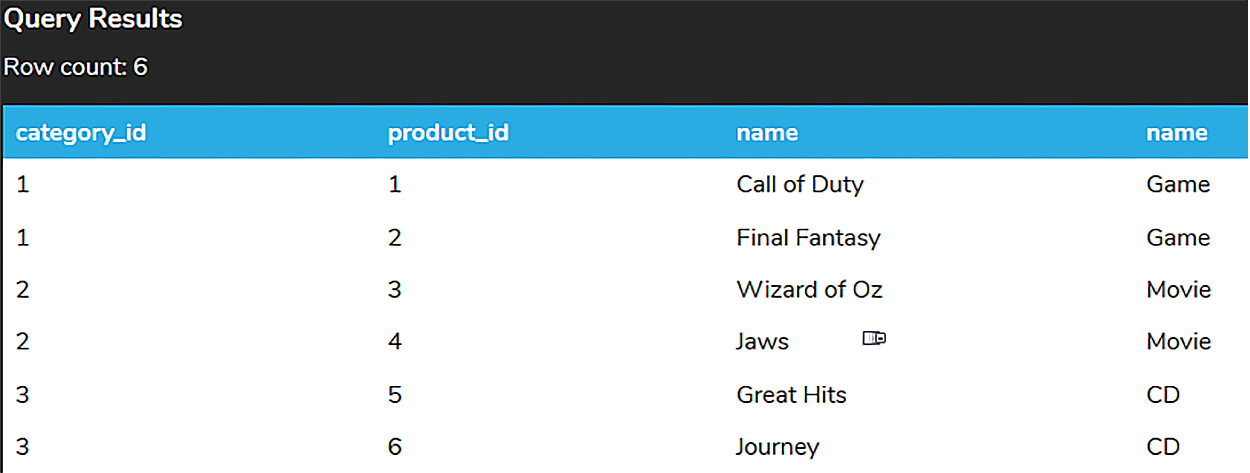
In our set of tables, we can use the JOIN and USING clauses to focus on category_id:
SELECT *
FROM product
INNER JOIN category USING (category_id);
Since “name” also exists in both tables, we can also use “name”:
SELECT *
FROM product
INNER JOIN category USING (name);

However, since none of the names between the tables match, no rows are returned.
Let us return to some of our other tables, like the album and artist table.

So far, we have only focused on each individual table. We don’t know which album has which artist unless we look up the artist_id. However, since the artist_id exists in both tables, we can use the JOIN and USING clause to join the tables on the artist_id:
SELECT *
FROM album
INNER JOIN artist USING (artist_id);
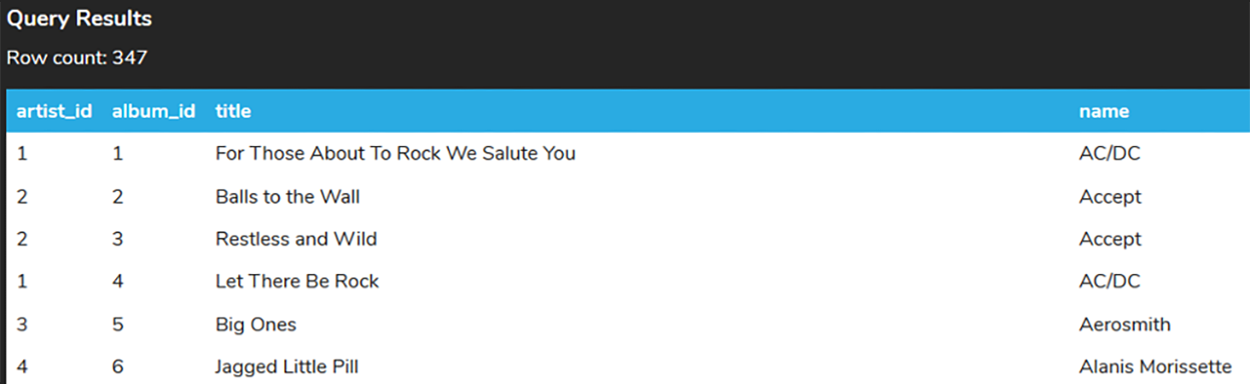
Now our data is starting to make a bit more sense, as we join it together.
We can join more than just two tables by adding additional INNER JOIN statements with USING. If we take the example of artist and album, we can also identify the tracks on each:
SELECT *
FROM track
INNER JOIN album USING (album_id)
INNER JOIN artist USING (artist_id);

As you can see, by using the * as we start to join more tables, we may have too many columns being returned. We can specify in the SELECT clause which columns should be returned. It is a best practice to use the format <tablename>.<columnname> when we list the columns. Otherwise, if a column name exists in multiple tables, the database does not know which column you want to display and returns an ambiguous error. For example, “name” exists in the track and artist table. Consider if we try to simply include the name column in the SELECT clause:
SELECT clause:
SELECT name
FROM track
INNER JOIN album USING (album_id)
INNER JOIN artist USING (artist_id);
We will get the following error message:

If a particular column name appears in only one of the tables involved, you can reference it by its name only, omitting the table name. For example, you could write the following statement where only certain columns have the table name as a prefix:
SELECT album_id, artist_id, track_id, album.title, artist.name, track.name
FROM track
INNER JOIN album USING (album_id)
INNER JOIN artist USING (artist_id)
ORDER BY album_id, artist_id, track_id;
However, this is not a good practice because at some point the table(s) or the query may be changed so that there are duplicate names. It is a better practice to use consistent naming, with all the table names explicitly specified, like this:
SELECT album.album_id, artist.artist_id, track.track_id, album.title, artist.name, track.name
FROM track
INNER JOIN album USING (album_id)
INNER JOIN artist USING (artist_id)
ORDER BY album.album_id, artist.artist_id, track.track_id;
Source: THIS TUTORIAL WAS AUTHORED BY DR. VINCENT TRAN, PHD (2020) AND FAITHE WEMPEN (2024) FOR SOPHIA LEARNING. PLEASE SEE OUR TERMS OF USE.



