Use Sophia to knock out your gen-ed requirements quickly and affordably. Learn more
×

IPv6 Addresses

Author: Sophia

what's covered
In this lesson, you will compare IPv6 to IPv4 and examine how IPv6 addresses are structured to support modern networking needs. You’ll learn how hexadecimal simplifies address formatting and how different types of IPv6 addresses are used in both local and global communication. Specifically, this lesson will cover the following:

Table of Contents

1. Hexadecimal

You’ve already learned how computers use the binary number system (base 2) and how each position in a binary number represents a power of 2. The decimal system you use every day is base 10, with powers of 10.

In networking, there’s one more number system that becomes important: hexadecimal, or hex for short.

Hex is base 16, which means each digit represents a power of 16, just like each digit in a decimal number represents a power of 10. To support 16 possible values in one digit, hex uses numbers 0 through 9, and then adds the letters A through F for values 10 through 15.

Hex Digit Decimal Value
0 0
1 1
2 2
... ...
9 9
A 10
B 11
C 12
D 13
E 14
F 15

To represent values higher than 9 using just one digit, hexadecimal adds the letters A through F. For example, A stands for 10, B for 11, and so on up to F for 15.

That’s why hexadecimal is so useful in networking: one hex digit equals exactly four binary digits. This makes it much easier to read and write long binary numbers. For example, the hex number 2A is just two characters, but its binary equivalent is 00101010—eight digits long.

A group of four binary digits is called a nibble, so each hex digit matches one nibble. And since a byte is eight bits, it equals two hex digits, or two nibbles.

Since hexadecimal is base 16, each digit’s value is based on a power of 16.

Power 16³ 16² 16¹ 16⁰
Value 4096 256 16 1

Let’s convert a hex number to decimal using these values.

EXAMPLE

Convert 2A to decimal.

  • Break it into two digits:
    • The first digit is 2 in the 16¹ place: 2 cross times 16 equals 32.
    • The second digit is A, which equals 10 in decimal, in the 16⁰ place: 10 cross times 1 equals 10.
  • Add them together: 10 plus 32 equals 42.
So, 2A (hex) = 42 (decimal).

In networking, hexadecimal is used to represent long addresses in a readable format. This becomes especially important in IPv6, which uses 128-bit addresses. These longer addresses are written in hexadecimal to keep them readable and compact.

term to know
Hexadecimal (Hex)
A base-16 number system that uses digits 0–9 and letters A–F to represent values.


2. IPv6

Every device that connects to a network needs a unique address. In earlier lessons, you learned about IPv4, which uses 32-bit addresses such as 192.168.1.1. A 32-bit address allows for about 4.3 billion unique combinations. That seemed like plenty when the internet was first developed.

However, today, billions of people use smartphones, tablets, laptops, smart TVs, and IoT devices. With so many devices connecting every day, the IPv4 address space became too small. In fact, it was officially exhausted in some regions more than a decade ago. To make IPv4 last longer, network administrators used techniques such as subnetting and private addressing to divide and reuse address space within local networks. While these strategies helped delay the problem, they also added complexity and required extra steps to connect devices to the wider internet. As networks grew, it became clear that a new solution was needed, one that could provide enough addresses for a global, always-connected world.

To solve this, IPv6 was developed. IPv6 stands for Internet Protocol Version 6, and it uses 128-bit addresses. That allows for about 340 undecillion unique combinations, a number so large it’s hard to imagine. This enormous range ensures that every device can have its own unique address, now and in the future. IPv6 also introduces a different way of writing and structuring addresses.

term to know
Internet Protocol Version 6 (IPv6)
A modern IP addressing system that uses 128-bit addresses to support a vast number of unique devices on a network.

2a. Structure and Format

IPv6 addresses are written very differently from IPv4. Instead of four decimal numbers separated by dots, IPv6 addresses use eight groups of four hexadecimal digits, separated by colons. Each group, called a hextet, contains four hexadecimal digits and represents 16 bits of the total 128-bit address.

Here’s an example of a full IPv6 address:

2001:0db8:85a3:0000:0000:8a2e:0370:7334

This format allows all 128 bits of the address to be shown in a compact and readable way. The total address includes eight hextets, each made up of four hexadecimal digits, which adds up to 32 hex characters in total.

An IPv6 address is usually divided into two equal halves.
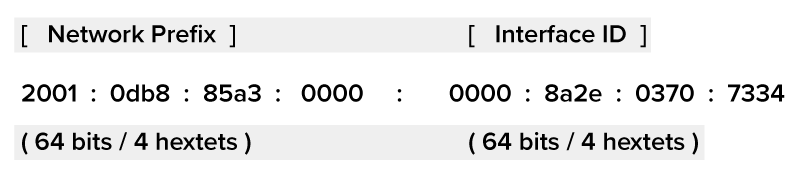
  • The network prefix (the first 64 bits, or first four hextets) identifies the network or subnet the device belongs to. This part is assigned by an organization or internet service provider (ISP).
  • The interface identifier (the last 64 bits, or last four hextets) identifies the specific device on that network. It’s often based on the device’s hardware or generated automatically.
IPv6 address 2001:0db8:85a3:0000:0000:8a2e:0370:7334 split into network prefix and interface ID, each 64 bits (4 hextets).

Together, these two parts allow IPv6 to scale across global and local networks while still giving each device a unique address. The network prefix is used for routing data to the correct destination network, while the interface ID identifies the specific device within that network.

Because many IPv6 addresses include groups of zeros, there are two rules that make them shorter and easier to work with:

  1. Remove leading zeros in each hextet.
    1. 0db8 becomes db8.
    2. 0001 becomes 1.
  2. Use a double colon (::) to replace one sequence of consecutive zero hextets.
    1. 2001:0db8:0000:0000:0000:0000:0000:0001 becomes 2001:db8::1.
You can only use :: once per address, or it would be unclear how many zeros it replaces.

EXAMPLE

Here is the compressed version: 2001:db8::8a2e:370

Step 1: Expand the double colon: 2001:db8:0000:0000:0000:0000:8a2e:0370.
Step 2: Add leading zeros to each group: 2001:0db8:0000:0000:0000:0000:8a2e:0370

try it
Consider this compressed IPv6 address: fe80::1
Write the full version of this compressed IPv6 address.
Full version: fe80:0000:0000:0000:0000:0000:0000:0001
(Seven groups of zeros are expanded in place of ::, and 1 becomes 0001.)

Now that you’ve seen how IPv6 addresses are written and structured, let’s compare them directly with IPv4.

Feature IPv4 IPv6
Address Length 32 bits 128 bits
Number of Addresses About 4.3 billion About 340 undecillion
Address Format Decimal (e.g., 192.168.1.1) Hexadecimal (e.g., 2001:db8::1)
Address Appearance Short and dotted Longer and colon separated
Address Availability Limited Extremely large and expandable

terms to know
Hextet
A group of four hexadecimal digits in an IPv6 address, representing 16 bits.
Network Prefix
The first part of an IPv6 address (typically the first 64 bits) used to identify the network or subnet.
Interface ID
The second part of an IPv6 address (typically the last 64 bits) used to identify the specific device on the network.

2b. Global, Link-Local, and Unique Local

IPv6 supports multiple types of addresses, each designed for a specific use. Just like IPv4 has public and private addresses, IPv6 includes address types for global communication, local device discovery, and internal networks. These address types help IPv6 work across large-scale internet systems and smaller local networks alike.

A global unicast address is the IPv6 equivalent of a public IPv4 address. It is globally unique, meaning no two devices on Earth share the same one, and it can be used to send and receive data across the internet.

These addresses usually start with a 2 or 3 in hexadecimal and fall under the 2000::/3 prefix range.

EXAMPLE

2001:0db8:85a3::8a2e:0370:7334

A device with a global unicast address can do the following:

  • Be reached from anywhere on the internet
  • Participate in two-way communication without needing address translation (such as NAT in IPv4)
  • Support services such as web hosting, video calls, or cloud access
If your home router supports IPv6, it may assign your laptop a global unicast address so it can access websites or services outside your local network. Unlike IPv4, which often reuses private addresses behind firewalls or routers, IPv6 is designed to give each device its own direct address. This simplifies communication and reduces the need for special routing workarounds.

think about it
Imagine your smartphone is assigned a global unicast IPv6 address. This means it could connect directly to another device, such as a friend’s phone, without going through extra layers. How might this simplify things such as gaming, video calls, or remote work compared to how IPv4 handles those connections?

A link-local address is used for communication between devices on the same local connection, called a link. A link is simply any network segment where devices can reach each other directly—for example, computers connected to the same switch, or devices on the same Wi-Fi network. No router is needed for this type of communication.

These addresses always begin with the prefix fe80::/10.

EXAMPLE

fe80::1c2b:fe2c:9a6e:8a1d

This is a valid link-local IPv6 address. It starts with fe80, which is required for all link-local addresses. The remaining parts are typically generated automatically based on the device’s hardware (like its MAC address). Because it’s created locally, this address is guaranteed to be unique on that particular link.

You’ll often see link-local addresses like this when checking a device’s network settings—for example, in a command line tool such as ipconfig.

Link-local addresses are automatically generated by each device as soon as it joins a network. No setup is required. Because these addresses only work within the same local connection, they are not routable—meaning they can’t be used to reach devices on other networks or the internet.

Devices use link-local addresses for important local tasks such as the following:

  • Discovering nearby devices
  • Assigning full IPv6 addresses
  • Sending messages during initial setup
For example, when your laptop joins a Wi-Fi network, it uses a link-local address to communicate with the router before getting a full IPv6 address.

big idea
Link-local addresses help devices talk to other devices nearby, on the same network link, without needing internet access.

A unique local address (ULA) is designed for private use within an organization, similar to private IPv4 ranges such as 192.168.x.x or 10.x.x.x. ULAs fall within the fc00::/7 block, and most begin with fd.

EXAMPLE

fd12:3456:789a::1

This is a ULA that starts with fd, which is common for ULAs. The rest of the address includes a randomly generated global ID (3456:789a) followed by the device-specific portion. This randomness helps ensure that even if two networks with ULAs are later connected (such as through a merger or VPN), their internal address ranges won’t conflict.

These addresses are not routed on the public internet. They are intended for communication inside a single company, school, or home network. They can also be used between internal systems that don’t need to connect to external websites or services.

One key feature of ULAs is that they are generated with a random 40-bit identifier, which helps avoid address conflicts when networks are merged or connected, something IPv4 private ranges don’t handle well.

ULAs are ideal in the following situations:

  • You want internal-only traffic (e.g., between printers and computers).
  • You need large private networks without worrying about overlaps.
  • You want future-proof internal addressing without using public space.
did you know
Many large companies use ULAs to run internal services such as payroll systems, inventory tools, or internal websites. For example, a retail chain might use ULAs to connect all its store locations to a central private database. Because ULAs aren’t routed on the public internet, these systems stay isolated and secure even if employees are using them across different regions.

Together, these three address types help IPv6 handle all kinds of networking needs from global communication to internal management and local device discovery.

terms to know
Global Unicast Address
An IPv6 address that is globally unique and routable across the internet. It is used for communication between devices on different networks.
Link-Local Address
An IPv6 address automatically assigned to a device for communication on the same local network segment. It cannot be routed beyond the link.
Unique Local Address (ULA)
An IPv6 address used for private communication within a single organization. It is not routed on the public internet and is similar in purpose to private IPv4 addresses.

2c. Multicast, Anycast, and Special Addresses

In addition to global and local communication, IPv6 supports several special address types that make networks more efficient and flexible. Each one plays a different role in how devices find each other, send data, and operate on both small and large networks.

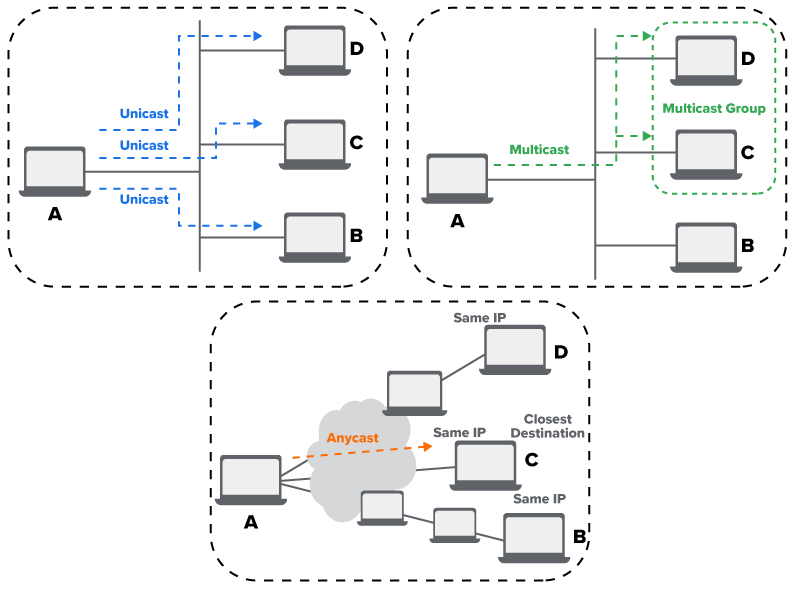
A multicast address is used to send a single packet of data to multiple devices at once, such as sending a message to a group instead of one person at a time. This is more efficient than broadcasting to everyone or sending separate messages to each recipient.

All multicast addresses in IPv6 start with the prefix ff00::/8.

EXAMPLE

ff02::1 sends data to all devices on the local network.

Multicast is commonly used for the following purposes:

  • Streaming (e.g., live video to multiple users)
  • Discovery protocols (e.g., devices announcing themselves to a group)
  • Network management tools (e.g., sending updates to all routers on a link)
Unlike IPv4, which uses both broadcast and multicast, IPv6 uses only multicast for group messaging. Broadcast has been removed to reduce unnecessary network traffic.

did you know
Platforms such as Zoom often use multicast technology within large networks such as universities or work environments to deliver video and audio to multiple users at once. Instead of sending separate copies of the same stream to every participant, Zoom can send one multicast stream to a group address. Devices that have joined that group receive the stream simultaneously, reducing bandwidth use and improving performance for everyone on the local network.

An anycast address is a special kind of IPv6 address that can be shared by multiple devices, usually in different locations. When data is sent to an anycast address, it is automatically delivered to the nearest device using that address, based on network distance, not physical location.

Anycast doesn’t have its own unique prefix. It looks just like a global unicast address, but the way it’s configured and used is what makes it different.

make the connection
Imagine you’re trying to reach a customer support page from your phone. The company has the same website hosted on servers in New York, London, and Tokyo, all using the same anycast address. When you visit the site, your request automatically goes to the nearest server, giving you a faster response without needing to know where that server is.

This setup helps websites and services for the following:
  • Respond faster by choosing the closest server
  • Share traffic evenly across multiple locations
  • Stay available, even if one server goes offline
Anycast is commonly used for services that need to be fast and reliable everywhere, such as websites, email systems, or DNS servers, but you don’t have to know any of that to benefit from it. It just works in the background to get you the fastest connection.

Diagram showing three types of IPv6 communication. In unicast, a blue arrow goes from one device directly to one other device. In multicast, a green arrow goes from one device to several devices in a group at the same time. In anycast, an orange arrow goes from one device to the nearest of several possible destination devices.

IPv6 also includes several special-purpose addresses that serve important roles during testing, setup, and compatibility with older systems. These addresses are not used to send data between devices on a network, but they support critical behind-the-scenes processes that help networks run smoothly.

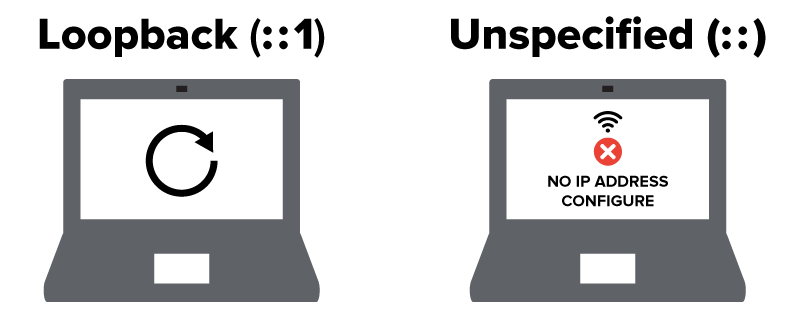
The loopback address, written as ::1, is used when a device needs to send a message to itself. This allows the operating system or applications to test the device’s internal networking functions without needing to connect to anything else. For example, if a developer or network technician wants to check whether a device’s network software is working, they can use the loopback address to “ping” the device locally. This is the IPv6 version of the IPv4 loopback address 127.0.0.1.

The unspecified address, written as ::, means that a device does not yet have an IP address. Devices use this address temporarily, such as when they first join a network and request configuration information. For example, a new device might send a message from :: to a router, asking for an address. Because :: means “no address,” it signals that the device is still waiting to be assigned one.
An IPv4-mapped IPv6 address allows IPv6-enabled systems to talk to IPv4-only systems. These addresses combine both formats by placing the IPv4 address inside an IPv6 structure. For example, ::ffff:192.168.1.1 is an IPv6 address that includes the IPv4 address 192.168.1.1. This helps systems that support IPv6 continue to communicate with older devices that haven’t yet been upgraded.

Each of these special addresses plays a background role in making IPv6 networks more flexible, testable, and compatible with the wider internet, especially during the ongoing transition from IPv4 to IPv6.

try it
Which address type would best fit each situation?
A video stream is sent from one server to multiple devices on a network.
Multicast: Multicast allows data to be sent to multiple devices at once using a single stream. It’s often used in streaming or live broadcasting.
A user’s request is automatically routed to the nearest available DNS server.
Anycast: Anycast sends a request to the nearest device that shares the same address, improving speed and efficiency for global services such as DNS.
A developer wants to test if their device can send and receive network traffic.
Loopback (Special Address): The loopback address (::1) is used to test a device’s own network interface without connecting to other devices.

Together, multicast, anycast, and special addresses help IPv6 networks run more efficiently and reliably. These address types support group communication, faster access to services, and important behind-the-scenes processes such as testing and setup. While they aren’t used in everyday browsing, they are key to keeping modern networks responsive, scalable, and well-organized. Overall, IPv6 provides the structure and flexibility needed to support a global internet with billions of connected devices, not only today but also well into the future.

terms to know
Multicast Address
An IPv6 address used to send a single packet of data to multiple devices that are part of a defined group. It always begins with ff.
Anycast Address
An IPv6 address that can be shared by multiple devices, with traffic delivered to the nearest one based on routing distance.
Loopback Address
A special IPv6 address (::1) used to test a device’s own network interface. It allows the device to send and receive data to itself.
Unspecified Address
An IPv6 address written as ::, indicating that the device does not yet have an assigned address. It is used during network setup or address requests.

summary
In this lesson, you explored the hexadecimal number system, which simplifies how we read and represent long binary sequences, especially in modern networking. This understanding laid the groundwork for working with IPv6 addresses, the next-generation IP format designed to overcome the limitations of IPv4. You examined the structure and format of IPv6, including its use of colons, hextets, and shorthand rules. The lesson also distinguished between global, link-local, and unique local addresses, explaining how each type serves different roles in communication. Finally, you learned about multicast, anycast, and special addresses, which enable more flexible data routing and device targeting in IPv6 networks.

Source: THIS TUTORIAL WAS AUTHORED BY SOPHIA LEARNING. PLEASE SEE OUR TERMS OF USE.

Terms to Know
Anycast Address

An IPv6 address that can be shared by multiple devices, with traffic delivered to the nearest one based on routing distance.

Global Unicast Address

An IPv6 address that is globally unique and routable across the internet. It is used for communication between devices on different networks.

Hexadecimal (Hex)

A base-16 number system that uses digits 0–9 and letters A–F to represent values.

Hextet

A group of four hexadecimal digits in an IPv6 address, representing 16 bits.

Interface ID

The second part of an IPv6 address (typically the last 64 bits), used to identify the specific device on the network.

Internet Protocol Version 6 (IPv6)

A modern IP addressing system that uses 128-bit addresses to support a vast number of unique devices on a network.

Link-Local Address

An IPv6 address automatically assigned to a device for communication on the same local network segment. It cannot be routed beyond the link.

Loopback Address

A special IPv6 address (::1) used to test a device’s own network interface. It allows the device to send and receive data to itself.

Multicast Address

An IPv6 address used to send a single packet of data to multiple devices that are part of a defined group. It always begins with ff.

Network Prefix

The first part of an IPv6 address (typically the first 64 bits), used to identify the network or subnet.

Unique Local Address (ULA)

An IPv6 address used for private communication within a single organization. It is not routed on the public internet and is similar in purpose to private IPv4 addresses.

Unspecified Address

An IPv6 address written as ::, indicating that the device does not yet have an assigned address. It is used during network setup or address requests.