Use Sophia to knock out your gen-ed requirements quickly and affordably. Learn more
×

IPv4 Addresses

Author: Sophia

what's covered
Imagine sending a letter. You need a correct address, so it arrives at the right place. The same is true for data on a network. Each device needs an address to connect with others. This lesson will explain how IPv4 addresses work, the math behind them, and their role in connecting the world. Specifically, this lesson will cover the following:

Table of Contents

1. The Binary Number System

When we work with numbers in everyday life, we use the decimal system, which is based on 10 digits: 0 through 9. Each position in a decimal number represents a power of 10. For example, the number 345 means 3 hundreds, 4 tens, and 5 ones.

Computers use a different system to store and process information. This system is called the binary number system, and it is based on just two digits: 0 and 1. Each digit in binary is called a bit, which is short for binary digit. Computers use binary because the digits 0 and 1 can easily represent electrical states—off and on.

Just like in decimal, each place in a binary number has a value based on its position. However, instead of powers of 10, binary uses powers of 2. From right to left, the values are as follows:

Position 2⁷ 2⁶ 2⁵ 2⁴ 2⁰
Value 128 64 32 16 8 4 2 1

This table shows the value of each bit in an 8-bit binary number. Eight bits is also called one byte. If all the bits are off (0), the total value is 0. If all the bits are on (1), the total value is 128 plus 64 plus 32 plus 16 plus 8 plus 4 plus 2 plus 1 equals 255.

So, an 8-bit binary number can represent any value from 0 to 255. You’ll see this range often in networking, especially when working with IP addresses.

EXAMPLE

Let’s look at the binary number 1010. This number has four bits, so we start with 2³ (which is 8) and go down from there.

  • 1 cross times 8 equals 8
  • 0 cross times 4 equals 0
  • 1 cross times 2 equals 2
  • 0 cross times 1 equals 0
Add the values: 8 plus 0 plus 2 plus 0 equals 10

So, the binary number 1010 equals 10 in decimal.

try it
What is the decimal value of the binary number 1101? This is also a 4-bit number, so start with the 1 on the left which has a value of 8 and move to the right.
1 cross times 8 plus 1 cross times 4 plus 0 cross times 2 plus 1 cross times 1 equals 13

This process of converting binary to decimal is essential for understanding how computers process and store information.

terms to know
Decimal System
A base-10 numbering system that uses ten digits, 0 through 9, where each position represents a power of 10.
Binary Number System
A numbering system that uses only two digits, 0 and 1, to represent numbers. It is base-2, unlike the decimal system, which is base-10.
Byte
A group of 8 bits.


2. IPv4

Recall that every network adapter has a MAC address, which is its physical address. To be part of a network, every device also needs a unique logical address. In the world of networking, these digital addresses are called IP addresses. Whereas MAC addresses are built into the adapter and do not change, like the street address of a property, IP addresses are logically assigned, like telephone numbers.
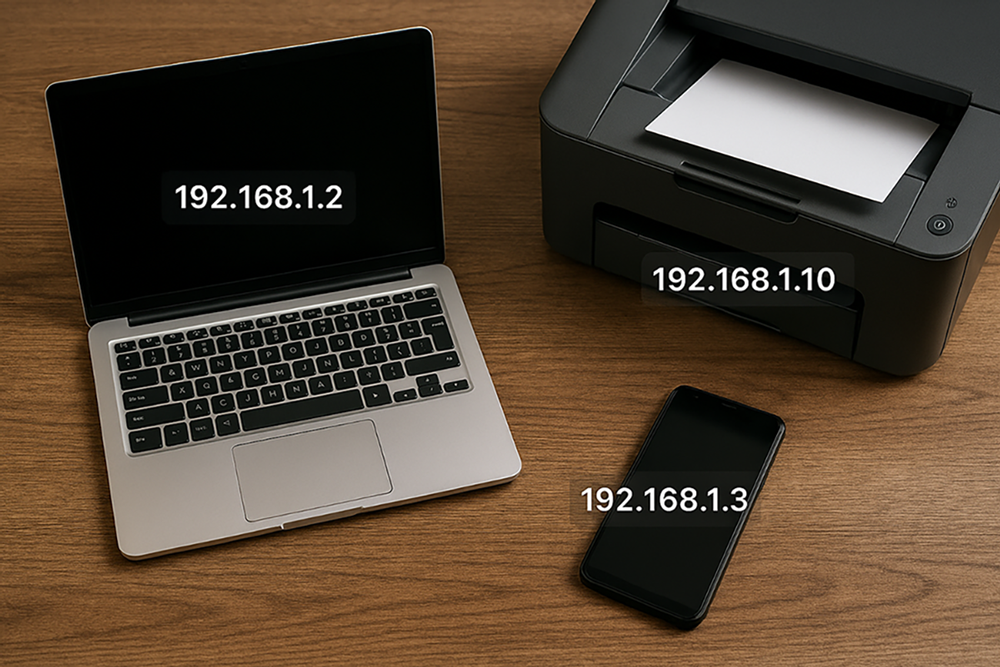
A realistic network diagram showing a laptop labeled with IP address 192.168.1.2, a printer labeled with IP address 192.168.1.10, and a cell phone connected to the same local network.

Internet Protocol Version 4, IPv4 short for, is the most widely used system for assigning these addresses. It plays a critical role in everyday activities, such as browsing websites, sending emails, streaming videos, and connecting smart devices.

Here’s why IPv4 is essential:

  • Routing: IP addresses help data packets find the correct path across networks, like GPS coordinates for information.
  • Identification: Every device connected to a network has a unique IPv4 address, which helps distinguish it from others.
  • Communication: IP addresses make it possible for devices to send and receive data, both within a local network and across the internet.
  • IPv4 uses 32-bit numeric addresses, which allows for just over 4 billion unique addresses. While this was more than enough in the early days of the internet, the growing number of devices, including phones, computers, smart TVs, and even refrigerators, has pushed IPv4 close to its limit.
key concept
IPv4 provides a unique address for each device, enabling accurate data delivery across local networks and the global internet.

term to know
Internet Protocol version 4 (IPv4)
A system used to assign unique 32-bit numeric addresses to devices on a network, allowing them to send, receive, and route data.

2a. Structure

IPv4 addresses are written in a format called dotted decimal notation, which looks like this: 192.168.1.1. This address is made up of four numbers separated by dots. Each number is called an octet, and each octet is made up of 8 binary digits, or bits. Since there are four octets, an IPv4 address contains 32 bits total.

Each octet can represent a number between 0 and 255. This is because 8 bits can create 256 different combinations, which makes this format both compact and powerful. For example, the IP address 192.168.1.1 would be written in binary as 11000000.10101000.00000001.00000001. This binary representation is essential for understanding how IP addresses are processed by computers. While devices such as routers work with binary, humans usually interact with the easier-to-read decimal version.

An IPv4 address is divided into two parts: the network portion and the host portion. The network portion identifies the overall network a device belongs to, while the host portion identifies the specific device (or “host”) within that network. The exact split between these two parts depends on how the address is structured, which was historically determined by a system of address classes. This system helped organize IP addresses into different categories based on the size of the network.

EXAMPLE

Here is an IP address: 192.168.10.25
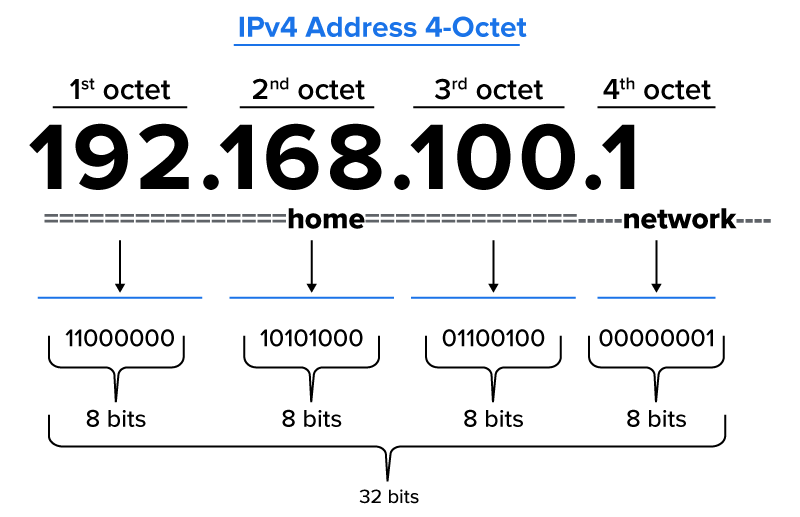
Breaking It Down:
  • Each octet can be any number from 0 to 255.
  • In binary, 192 is 11000000, 168 is 10101000, etc.
  • All four octets together make the complete address.
These four octets work together to form a unique address. However, an IP address is more than just a string of numbers—it is divided into two key parts:
  • The network portion, which identifies the overall network
  • The host portion, which identifies the specific device within that network
Diagram showing IPv4 address 192.168.100.1 split into four octets, each 8 bits in binary, totaling 32 bits, and indicating which bits are part of the home portion versus the network portion.

A subnet mask is binary code that identifies where the break occurs between network and host. Because it must match the IPv4 address bit for bit, the subnet mask is also 32 bits long. The mask lays over the IP address to show which bits belong to the network portion and which belong to the host portion. All the numbers on the left end are 1s, and all the numbers on the right end are 0s. For example, in the subnet mask 255.0.0.0 (11111111.00000000.00000000.00000000), the break occurs after the first octet. You’ll learn more about subnet masks later.

did you know
Look up the IP addresses of at least two of your own devices (such as your phone, laptop, or tablet). You’ll usually find them in the device’s network or Wi-Fi settings.

Now take a close look at the addresses you found. What patterns do you notice?
  • Do the IP addresses start with the same numbers?
  • Are they in the same range (such as 192.168.x.x or 10.x.x.x)?
  • What might this tell you about how your network assigns addresses?

terms to know
Dotted Decimal Notation
The format used to write IPv4 addresses as four decimal numbers separated by dots, such as 192.168.1.1.
Octet
One of the four 8-bit segments of an IPv4 address, written in decimal and separated by dots.
Network Portion
The part of an IP address that identifies the network a device belongs to.
Host Portion
The part of an IP address that identifies a specific device within the network.
Subnet Mask
A 32-bit binary number that identifies where the break occurs between network and host in an IPv4 address.

2b. Address Classes

In the early days of the internet, IPv4 addresses were grouped into fixed categories known as IP classes. These classes determined how much of the address was used for the network portion and how much was left for hosts.

Here’s a summary of the most commonly used classes.

Class Starting Range Default Subnet Mask Typical Use
A 1–126 255.0.0.0 (/8) Large organizations
B 128–191 255.255.0.0 (/16) Medium-sized networks
C 192–223 255.255.255.0 (/24) Small networks

Class D addresses (224 to 239) are used for multicasting, a special type of network communication where one device sends data to a group of devices at once. This is useful for things such as video conferencing or streaming media, where the same data needs to reach multiple recipients.

Class E addresses (240 to 255) are reserved for experimental use and are not assigned to regular devices. These are mostly used in research or development and are not part of everyday network configurations.

EXAMPLE

An address such as 10.50.23.5 is a Class A address because it begins with 10. That means the first 8 bits (one octet) represent the network, and the remaining 24 bits are used for hosts. This class structure was easy to apply but not very efficient as many networks ended up with more IP addresses than they needed.

term to know
IP Class
A historical system that categorized IPv4 addresses into five groups (A through E) based on the number of devices they could support and the range of their starting octets.


3. Private vs. Public IP Addresses

Not all IP addresses are visible to the public internet. Some are used only inside homes, schools, or businesses. These are known as private IP addresses. Others, called public IP addresses, are assigned to devices that communicate across the internet.

A private IP address is used within a local network to let devices such as phones, printers, or laptops communicate with each other. These addresses are not unique on the global internet, which means the same private address can be used in many different homes or offices without causing any problems.

A public IP address is used to identify a device or network on the internet. It is assigned by an internet service provider (ISP) and must be globally unique so that data sent across the internet reaches the correct destination.

You can picture it like this image of a house:
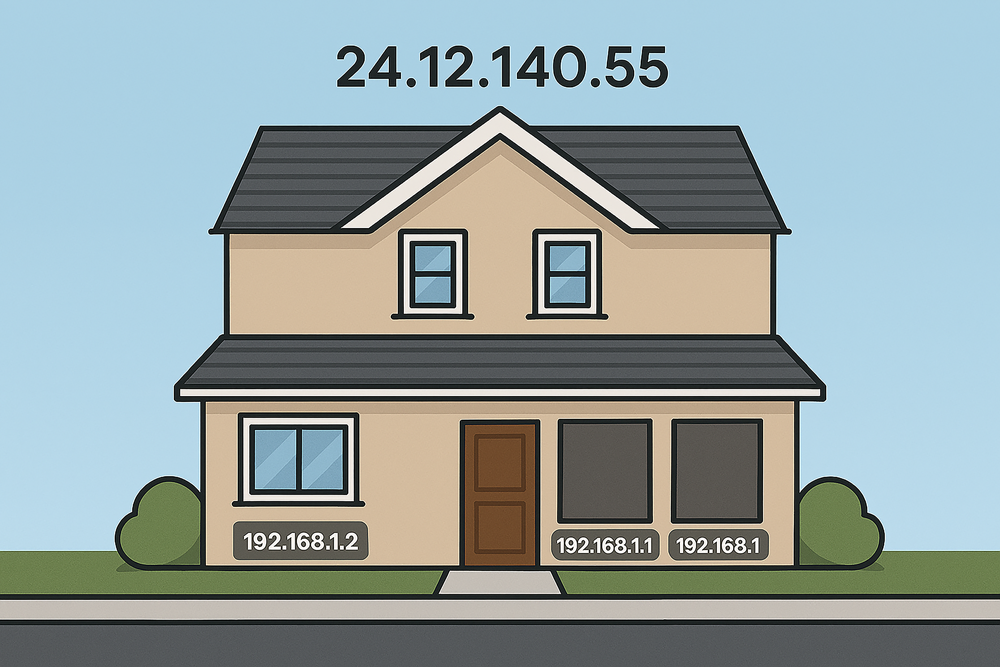
  • The street address on top (24.12.140.55) is the public IP. It’s how the outside world finds the house.
  • The room numbers inside the house (192.168.1.2, 192.168.1.1, etc.) are private IPs. They help people inside the house locate each other, but they aren’t visible to the rest of the neighborhood.
Illustration of a house labeled with one public IP address above the roof (24.12.140.55) and several private IP addresses on the rooms inside the house (192.168.1.2, 192.168.1.1, and 192.168.1). The image shows the public IP as the house’s street address and the private IPs as room numbers inside the house.

EXAMPLE

In your home network, your router might have a public IP address such as 73.141.22.8, while your personal laptop might have a private IP address such as 192.168.1.20. Devices in your home use private addresses to talk to each other. The router uses the public address to communicate with websites and services on the internet.

Some IP address ranges are reserved for private use. These include the following:

  • 10.0.0.0 to 10.255.255.255 (Class A range)
  • 172.16.0.0 to 172.31.255.255 (Class B range)
  • 192.168.0.0 to 192.168.255.255 (Class C range)
These ranges are never routed on the public internet. They are meant to stay within local or private networks.

Public IP Address Private IP Address
Scope Global/internet Local network only
Assigned by ISP Router or network admin
Example 8.8.8.8 (Google DNS) 192.168.1.5
Uniqueness Must be globally unique Can be reused in different networks
Security More exposed; requires tight controls More secure; “hidden” from the internet
Cost May carry a fee Always free

try it
Computers understand binary, but it’s much harder for humans to read long strings of 0s and 1s. That’s why we often convert binary values into decimal form. It’s easier for us to read, write, and remember.

Let’s practice with this IP address in binary:

11000000.10101000.00000001.00000001

Each group of 8 bits is called an octet. To convert this address into decimals, convert each octet separately and then put them together.

Step-by-Step:
  • 11000000 = 192
  • 10101000 = 168
  • 00000001 = 1
  • 00000001 = 1
Final Answer:
The binary IP address 11000000.10101000.00000001.00000001 equals 192.168.1.1 in decimal.

terms to know
Private IP Address
An IP address used within a local network that is not accessible from the internet and can be reused in different networks.
Public IP Address
An IP address assigned by an ISP that is used to communicate over the internet and must be globally unique.


4. Static vs. Dynamic IP Addresses

Every device on a network needs an IP address, but it does not always keep the same one. IP addresses can be assigned in two different ways.

A static IP address is manually configured and stays the same over time. It does not change, even when the device is restarted. Static IPs are often used for devices that need a consistent address, such as servers, printers, or security cameras. Because the address stays fixed, it is easier to find and manage these devices on a network.

A dynamic IP address, on the other hand, is assigned automatically by the network. Most home and office networks use dynamic addressing. When a device connects to the network, it receives an available IP address from a pool. This address might change the next time the device connects. Dynamic IPs are managed by the network to make sure no two devices use the same address at the same time.

Most laptops, smartphones, and tablets use dynamic IPs. This makes network setup easier and helps support many changing devices. Static IPs require more setup but offer reliability for devices that need to be reachable at a known address.

EXAMPLE

A company might assign a static IP address, such as 192.168.1.100, to its office printer so employees can always find it on the network. Meanwhile, an employee’s laptop might receive a dynamic IP address, such as 192.168.1.45, that could change the next day.

terms to know
Static IP Address
An IP address that is manually configured and does not change over time. Often used for devices that need to be consistently reachable, such as servers, printers, or security cameras.
Dynamic IP Address
An IP address that is automatically assigned from a pool of available addresses by the network, usually through DHCP. It may change each time the device connects to the network. Commonly used by laptops, smartphones, and tablets.

summary
In this lesson, you explored the concept of IPv4 addressing, which is crucial for enabling network communication. By understanding the binary number system, you gained insight into the structure of IP addresses, including how they’re divided into network and host portions. You also examined historical IP classes and learned the key differences between private vs. public IP addresses, as well as the distinctions between static vs. dynamic IP addresses, providing a strong foundation for future networking topics.

Source: THIS TUTORIAL WAS AUTHORED BY SOPHIA LEARNING. PLEASE SEE OUR TERMS OF USE.

Terms to Know
Binary Number System

A numbering system that uses only two digits, 0 and 1, to represent numbers. It is base-2, unlike the decimal system, which is base-10.

Byte

A group of 8 bits.

Decimal System

A base-10 numbering system that uses ten digits, 0 through 9, where each position represents a power of 10.

Dotted Decimal Notation

The format used to write IPv4 addresses as four decimal numbers separated by dots, such as 192.168.1.1.

Dynamic IP Address

An IP address that is automatically assigned from a pool of available addresses by the network, usually through DHCP. It may change each time the device connects to the network. Commonly used by laptops, smartphones, and tablets.

Host Portion

The part of an IP address that identifies a specific device within the network.

IP Class

A historical system that categorized IPv4 addresses into five groups (A through E) based on the number of devices they could support and the range of their starting octets.

Internet Protocol version 4 (IPv4)

A system used to assign unique 32-bit numeric addresses to devices on a network, allowing them to send, receive, and route data.

Network Portion

The part of an IP address that identifies the network a device belongs to.

Octet

One of the four 8-bit segments of an IPv4 address, written in decimal and separated by dots.

Private IP Address

An IP address used within a local network that is not accessible from the internet and can be reused in different networks.

Public IP Address

An IP address assigned by an ISP that is used to communicate over the internet and must be globally unique.

Static IP Address

An IP address that is manually configured and does not change over time. Often used for devices that need to be consistently reachable, such as servers, printers, or security cameras.



