Table of Contents |
You may recall JavaScript (JS) being mentioned throughout previous challenges and tutorials and how JavaScript is used to manipulate the elements and content of a webpage. JavaScript is an integral part of web development and goes hand in hand with HTML and CSS. The standard for JavaScript is maintained and developed by the European Computer Manufacturers Association (ECMA), and the current standard is ECMAScript 2023 (ES14).
JavaScript is transmitted to a user’s browser, just like HTML and CSS, and is then executed by the browser. Similar to how HTML uses the .html file extension, JavaScript files are text files that use the file extension .js (i.e., scripts.js). JavaScript code is placed within a JavaScript file or within the HTML file. The code is read, compiled, and executed each time the page is accessed. This makes it easier to transmit JS code and allows the code to be easily modified and updated by the developer.
In this challenge, we will explore the aspects of the JavaScript programming language and how it is used to manipulate the Document Object Model (DOM) and to enhance the functionality of a webpage. Recall that the DOM is the hierarchical and programmatic representation of an HTML webpage and its content, styles, and behaviors
European Computer Manufacturer Association (ECMA)
A nonprofit standards organization for information and communication systems.
ECMAScript 2023 (ES14)
The latest standard of JavaScript.
Document Object Model (DOM)
A programming interface in JavaScript that represents the structure and content of web documents, enabling the dynamic interaction and manipulation of webpage elements.
JavaScript code is executed by the browser as it is read by the browser’s JavaScript processing engine. JS code can be located in multiple places within a webpage or website.
JS code can be located in the following areas:
As such, it is important to understand how and when JS code is executed and how we can override this behavior by placing JS code within functions. JS commands that are not contained within a JS function definition are executed immediately, which forces us to pay attention to where the JS commands are located within the HTML code. By placing code within a JS function, we can decide when the commands contained within are executed.
Event Listener
A programming object that listens for a specific event to occur before triggering a function.
Function
A reusable block of code that performs a specific task or set of tasks and can be invoked or called to execute those tasks when needed.
The syntax for writing JS commands follows common programming language conventions. We will take a look at some of the general syntax. In the upcoming sections, we will review the syntax in greater detail.
Most programming languages provide the developer the ability to leave written comments within their code. These comments are ignored by the system and are only seen by the developer. In the case of JavaScript, a comment is created in one of two ways. The first method creates a single line of comment by placing a double forward slash “//” at the beginning. Everything that comes after the double forward slash on the same line will be a comment.
The second method creates a multiline block of comments. This is accomplished by starting the block using a forward slash and an asterisk “/*” and is terminated by using the opposite, an asterisk and forward slash “*/”. Everything between those sets of characters will be marked as a comment.
Commenting lines of code is also a great way to troubleshoot code problems. If you suspect a section or line of code is causing a problem, it is easy to simply comment the line out, which removes it from the application.
| Term | Command Description | Syntax |
|---|---|---|
| Terminating each command | Each command is terminated using a semicolon (although in JavaScript the semicolon is optional, it is a best practice to include it). |
let count = 6; console.log( count ); //Prints '6' to the browser console |
| Declaring variables | Variables are created with the keyword (var, let, const) followed by a name. |
const taxRate; let count; var GUID; |
| Assigning values to variables |
Variables are assigned a value using the assignment operator “=” with the variable’s name on the left and the value on the right.
JavaScript is loosely typed. This means that you do not specify what kind of data will be stored in variables; the value given determines the variable’s data type. The typeof operator can be used to discover or detect the variable’s type. Single and double quotes are treated the same. The loose equality (==) operator compares the two operands to see if their values are symmetric. |
taxRate = 0.7; count = count + 1; let fName = "nathan"; let age = 90; let myFunc = function(x) { return x * 2; }; typeof fName //return "string" typeof age //returns "number" typeof myFunc //returns "function" //check if fName is a string. if ( typeof fName == "string") { console.log("Hello, " + fName + "!");
|
| Scope/code blocks | Curly brackets are used to indicate scope, such as the body of a function definition, the definition of a class, decision structures, and loops. |
//IF-ELSE decision if ( a > b ) { console.log("A is larger than B");
else { console.log("B is larger than A");
//Function definition function myFunc(x) { return x * 2; |
| Arrays |
Collections of values can be grouped together under a single variable name. These types of multivalued variables are referred to as a JavaScript array.
A JS array’s elements data types are nonhomogeneous, which allows you to add numbers, strings, booleans, etc. within the same array. |
const fruits = [ "banana", "apple", "orange"];
const data = [fruits, "nathan", 36 ]; |
| Literal values | Literals are values written in the JS code that represent actual data values. When assigning a literal value to a variable, the format of the literal determines the data type of the variable. |
|
Variable
A named location in the computer’s memory where data can be stored and retrieved during the execution of a program.
var
The keyword for declaring a globally accessible, mutable, function-scoped variable in JavaScript.
let
The keyword for declaring a locally accessible, mutable, block-scoped variable in JavaScript.
const
The keyword for declaring a locally accessible, immutable, block-scoped variable in JavaScript.
Scope
The boundaries of a section of code, usually indicated with a set of curly brackets.
Nonhomogeneous
Elements of different types.
Literals
Specific syntax within code that defines an actual piece of data or a value.
Programming functions are one of the core building blocks of most programming languages. A function is simply a reusable named set of instructions that can accept data for processing, perform operations, and return a value upon completion. Keep in mind that any JavaScript commands not placed within a function will get executed once the browser reads it. By defining a function and placing commands within that function, you get to control when they are executed.
Furthermore, when developers write a function, they aim to make the function as generic and reusable as possible. This allows developers to call the function whenever its specific operations are needed, instead of having to write repetitive code throughout an application. For example, a function may be written to change the “src” attribute of an image element. If written properly, this function can be used throughout the navigation menu, as well as any images in the main section, to apply an image swap when the mouse hovers over a clickable button.
Functions can be called as many times as needed and can be used to call other functions. Functions terminate when they have completed the final command in the function’s body or when they reach a “return” command. Furthermore, we can use a variety of mechanisms to trigger a function call:
One of the easiest methods of adding an event listener to an element in the HTML is by including the event listener as an HTML attribute and giving it the value of a function you want it to call. If you want the element to respond to a left mouse click, you would add the onClick attribute and point it to a JavaScript function.
EXAMPLE
HTML event listener attribute<button onClick="myFunction()">Click Me</button>
Another method of adding event listeners to an element is to use JavaScript. For a website that has a lot of events to listen for, using JavaScript simplifies this by neatly organizing all of the page’s listeners in one location within the code file. To use JavaScript to add event listeners, we will call the addEventListener() function on the target element, but, first, we need to get a programming handle to the target element using the DOM function document.getElementById(). getElementById() accepts a string that matches an element’s id attribute value and will return the handle to the object.
EXAMPLE
Using JavaScript to add an event listener to a button element
<body>
   <button id="btnDemo">Click Me</button>

   <script>
   function myFunction()
   {  alert("Button Clicked!");  }

   let button = document.getElementById("btnDemo");
   button.addEventListener("click", myFunction );
   </script>
</body>
Notice in the example above that we started with a button element and we gave it an id value of “btnDemo.” Next, we defined a JavaScript function to call an Alert() function. Next, we get a handle to the button by using document.getElementById("btnDemo"), use the button’s id value as the argument, and store the handle in the button variable. Once we have the handle to the button element, we call the button’s addEventListener function to assign a listener for the click event. When using addEventListener, we first provide the string name of the event as the first argument without the “on” prefix (the “on” prefix is only used when assigning an event listener using the HTML attribute), and then the name of the function without parentheses. Parentheses cannot be included when setting up event listeners using addEventListener(), which means we cannot pass data in as an argument. To get around this, we can simply define a function to be triggered by the event listener, and in the body of the function, we make a call to a function that needs the argument.
EXAMPLE
Using JavaScript to add an event listener to a button element
<body>
   <input type="text" id="txtInput" />
   <button id="btnDemo">Click Me</button>

   <script>
   function myFunction()
   {
      let data = document.getElementById("txtInput").value;
      callAlert( data );
   }

   function callAlert( msg )
   {

      alert( msg )
   }

   let button = document.getElementById("btnDemo");
   button.addEventListener("click", myFunction );
   </script>
</body>
When troubleshooting JS code that fails to respond to an event trigger, the common sources of the problem are as follows:
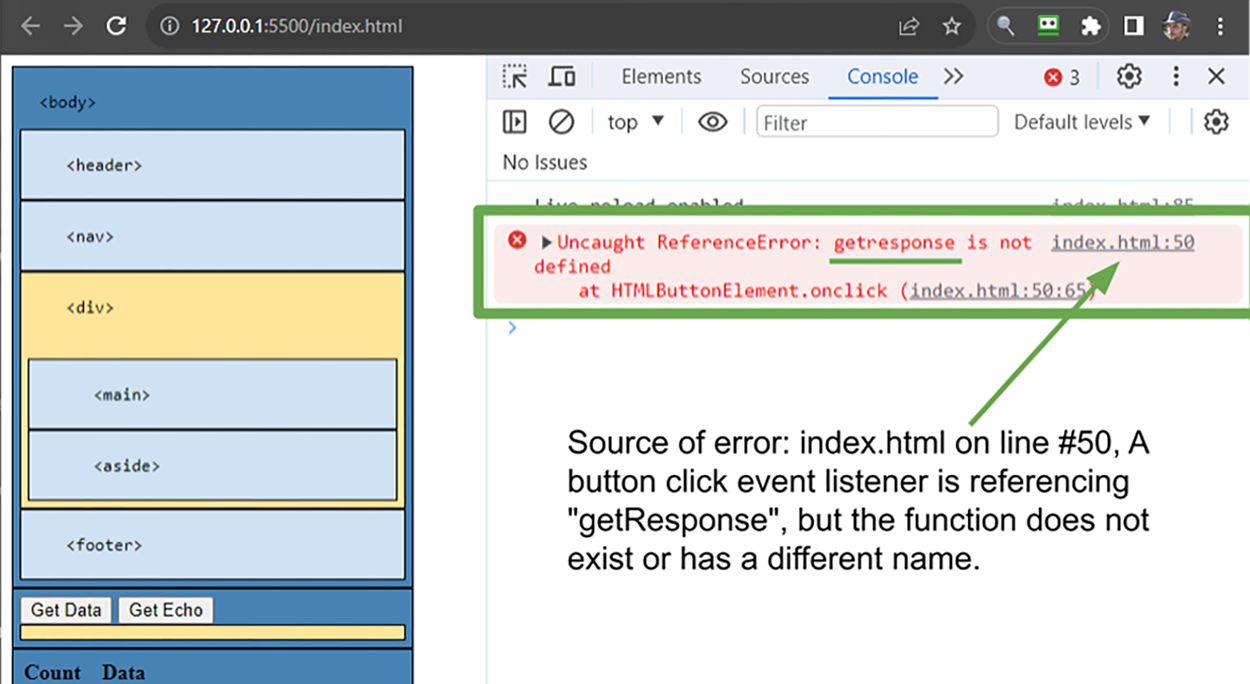
In the case illustrated in the image above, the “Get Data” button has an onClick event listener that references getResponse(); however, the function defined in the script.js was actually named getResponse().
A function is called into action by placing a set of parentheses after the function’s name. Some functions expect one or more values to be provided within the parentheses; these are called arguments and can be literal values or data from a variable, object, or function. Argument values are assigned to variables defined within the head of the function, called parameters, to be used within the function’s body of commands. The expected parameters of a function call are specified when the function is defined in the code. It is important to note that parameters only exist within the scope of the function. Once the function terminates, the parameters are wiped from memory.
While all objects contain a default set of specialized functions built in, developers are welcome to define their own custom functions. Functions can be defined using three different methods described in the following table.
| Name | Description |
|---|---|
| Function declaration |
Function declarations use a traditional method of defining a function. 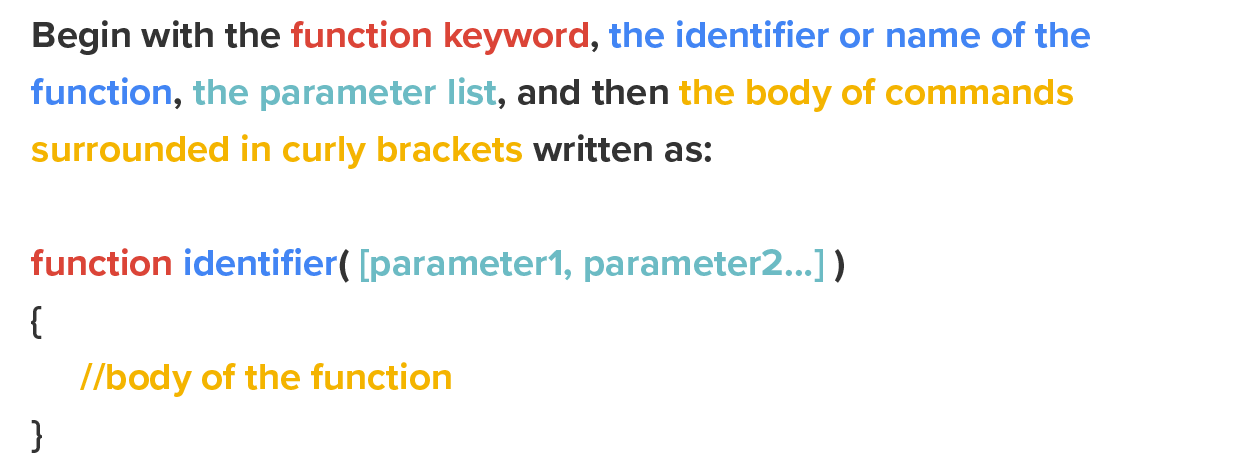
|
| Function expression |
Function expressions allow you to treat a function as if it were a variable. You create a variable using either let, const, or var, and set it equal to a function definition. The difference here is that the identifier is the variable name and the function definition simply omits the identifier.
EXAMPLE let identifier = function ( [parameter1, parameter2…] ) |
| Arrow function |
Arrow functions (sometimes referred to as anonymous functions) are functions that do not include the “function” keyword or an identifier. Since arrow functions do not contain an identifier, they are primarily used as a callback function for calls to other functions. In the example above, JavaScript arrays contain a function called “map,” which takes each element from the array and runs them through the callback function provided as an argument.
Notice the three different versions of the arrow function below. The first is the smallest shorthand, wherein the parentheses can be omitted when there is only one parameter. Since there is only one command in the body, the curly brackets and the return keyword can be omitted as the results of the operation will automatically be returned. EXAMPLE //version 1:array.map( x => x * 2 ); The second version requires the parentheses because it has multiple parameters. EXAMPLE //version 2:array.map( ( num1, num2 ) => num1 * num2 ); The third includes parentheses, curly brackets, and a return statement because it has multiple parameters and includes multiple steps in its body. EXAMPLE //version 3:array.map( ( num1, num2 ) => { |
One unique aspect of JavaScript is the ability to assign a function to a variable and treat it as if it were just any other variable. As a result, this also gives us the ability to pass those functions into another function as an argument.
Callback functions are functions that have been passed into another function as an argument. The host function that received the callback function will then have the ability to execute the callback function when it is ready. Callback functions can be declared functions, function expressions, or arrow functions.
When calling a function, you will reference the function’s identifier (i.e., its name) and include the parentheses. Also, if the function is expecting an argument, you must include that argument as well.
View the following video for more on JavaScript and HTML.
Event
A specific occurrence or user interaction, such as a user’s click, key press, or a system-generated change, that can trigger code execution or responses in a web application.
Function Call
The act of executing a function to perform its defined tasks or operations.
Arguments
In programming, arguments are values passed when functions are called; they are the values provided within the parentheses.
Parameters
The variables defined within the parentheses in the head of a function definition, which will receive the argument data and can be used within the body of the function.
Function Declaration
A traditional approach to defining a function that starts with the function keyword, the identifier of the function, the parameter list, and a block of commands.
Function Expression
A different approach to defining a function that starts with a variable declaration, which is assigned a function definition that begins with the function keyword, the parameter list, and the body of commands.
Arrow Function
A different approach to defining a function that does not contain a name or identifier instead is simply defined by including the parentheses, the arrow “=>”, and then a block of code.
Callback Function
A function that is provided to another function as an argument and then called within the body of the other function.
Source: This Tutorial has been adapted from "The Missing Link: An Introduction to Web Development and Programming " by Michael Mendez. Access for free at https://open.umn.edu/opentextbooks/textbooks/the-missing-link-an-introduction-to-web-development-and-programming. License: Creative Commons attribution: CC BY-NC-SA.