Table of Contents |
Before diving into specific tools, it helps to understand why version control exists in the first place. Every developer, whether working alone or on a team, faces common challenges when managing code files over time.
Imagine you are working on a website project. You have your HTML, CSS, and JavaScript files organized in a folder. As you make changes, you might run into several problems:
Version control is a system that records changes to files over time so you can recall specific versions later. Think of it as a detailed save history for your project that remembers not just the current state of your files but every change you have ever made.
A helpful analogy is to think of version control like the “Track Changes” feature in word processors but far more powerful. While Track Changes shows edits in a single document, version control tracks the complete history of every file in your entire project.
With version control, you can:
While many version control systems exist, Git has become the most widely used tool for tracking changes in software projects. Git is a distributed version control system that records snapshots of files over time, allowing developers to see what changed, restore earlier versions, and manage multiple lines of development safely.
Git is designed to support both individual work and collaboration. It tracks changes locally on a developer’s computer while also supporting shared workflows through remote repositories hosted on platforms such as GitHub. This combination has made Git the foundation of modern web development practices.
Understanding what Git does and how it fits into a GitHub-based workflow will help you see how developers manage code changes, experiment safely, and collaborate without overwriting each other’s work.
Git is a distributed version control system, which means every developer working on a project has a complete copy of the project and its history on their own computer. This allows developers to track changes, create commits, and work with branches even when they are not connected to the internet.
In Git, a project is stored in a repository. A repository contains all project files along with the complete history of changes. When you use Git, you typically have a local repository on your computer and a remote repository stored on a platform such as GitHub.
The local repository allows developers to work independently and commit changes as they go. The remote repository on GitHub acts as a shared version of the project that can be used for backup, collaboration, and access from multiple devices.
Think of Git as the system that records and organizes changes and repositories as the containers that hold those changes. GitHub provides a shared, online space where remote repositories are stored and accessed.
The distributed nature of Git provides several advantages:
To understand how Git is used in practice, it is important to become familiar with several core concepts that describe how changes are recorded and managed within a repository.
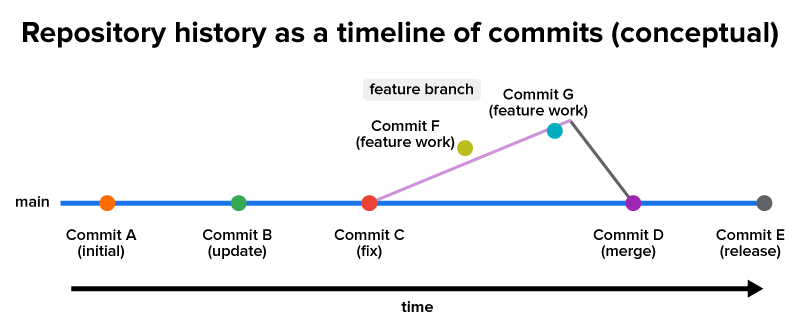
A commit is a snapshot of a project at a specific moment. Each commit records what changed and includes a message explaining why the change was made. Commits create a clear timeline that shows how a project evolves over time and allow developers to return to earlier versions if needed.
A branch is an independent line of development within a repository. The main branch typically contains stable, working code, while additional branches allow developers to work on new features or experiments without affecting the main version of the project.
A merge is the process of combining changes from one branch into another. When work on a branch is complete, merging incorporates those changes into the target branch so the project can move forward as a single, updated version.
When working with GitHub, developers share their work by sending changes from their local repository to the remote repository and receiving updates from others. This exchange keeps local and remote versions of a project synchronized and supports collaboration.
Understanding how Git tracks your work helps explain what happens behind the scenes when you save progress, experiment with new ideas, or share updates through GitHub. Git uses a structured system of states and workflows to manage changes intentionally rather than automatically.
Files in a Git repository can exist in three main states, and understanding these states helps clarify how Git manages your work.
The working directory is where you actually edit your files. This is your normal project folder where you write code, modify files, and delete things you do not need. Git watches this directory but does not automatically track every change you make.
The staging area (also called the “index”) is a preparation zone where you select which changes to include in your next commit. Think of it like packing a box before shipping—you choose exactly what goes in. This gives you control over your commits, allowing you to group related changes together logically.
The repository (specifically, the Git directory) is where Git permanently stores your committed snapshots. Once changes move from the staging area to the repository through a commit, they become part of your project’s permanent history.
An analogy might help. Imagine you are organizing photos from a vacation. Your working directory is like having all your photos spread out on a table. The staging area is like a photo album page where you are arranging which photos to keep. The repository is like your finished photo album on the shelf—a permanent record you can always look back at.
While this tutorial focuses on understanding concepts rather than specific commands, knowing the general workflow helps you see how the pieces fit together.
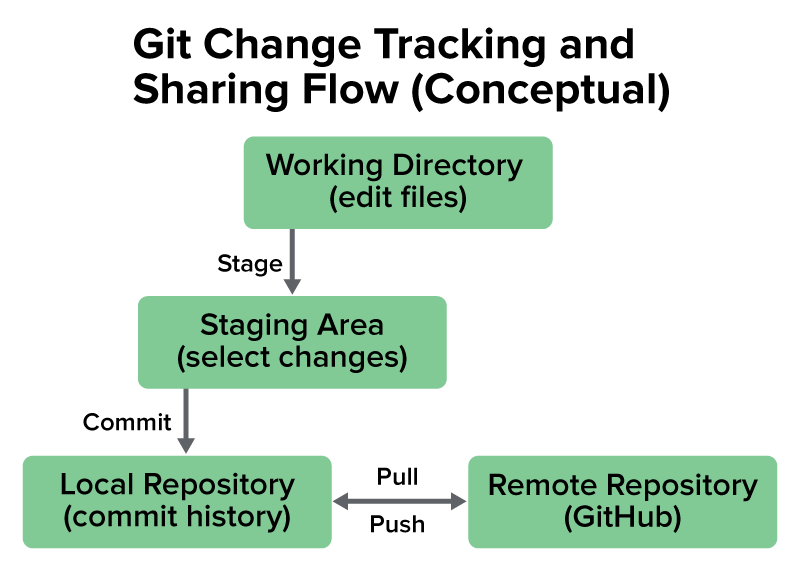
A typical Git workflow follows these steps:
This cycle of modify, stage, and commit creates a detailed history of your project. Each commit builds on the previous ones, forming a chain of snapshots that shows how the project evolved over time.
When working with branches, the workflow expands in this way:
When working with others or across multiple devices, developers pull updates from GitHub to retrieve the latest shared changes and keep their local repository up to date.
Now that you understand how Git tracks changes and how those changes are shared through GitHub, you can see why version control is a foundational practice in modern web development. These benefits apply whether you are working alone or as part of a team.
Version control provides meaningful advantages even when a developer is working independently. By using branches, developers can experiment with new ideas without risking their stable code. If an experiment does not work, the branch can simply be abandoned. If it succeeds, the changes can be merged into the main branch.
Each commit creates a permanent record of the project at a specific moment, forming a timeline of changes over time. This complete history makes it easier to understand how a project evolved and allows developers to review past decisions or restore earlier versions when needed.
Version control also makes it easier to recover from mistakes. If a file is accidentally deleted or a bug is introduced, developers can compare the current code with previous versions or return the project to a known working state.
Storing a remote repository on GitHub provides an additional layer of protection for individual work. By keeping a copy of the project online, developers can access their work from multiple devices and reduce the risk of data loss if a computer fails.
Modern web development often involves multiple developers working on the same project at the same time. Version control helps teams coordinate their work, organize contributions, and manage changes without overwriting one another’s progress. Instead of editing the same files directly, team members can create separate branches for their own tasks. This allows developers to work on new features, bug fixes, or design updates simultaneously without interfering with one another’s progress.
Git also tracks who made each change and when it was made. This shared history helps teams understand how the project evolved over time and makes communication easier during development.
When multiple developers modify the same part of a file, Git identifies the overlapping changes as a merge conflict. Team members can then review the differences and decide which changes should remain. This process helps prevent accidental overwrites and encourages intentional collaboration.
GitHub further supports teamwork by providing a shared online repository where developers can review code, discuss changes, and manage project updates in one place. Teams often use pull requests to review proposed changes before merging them into the main branch.
Source: THIS TUTORIAL WAS AUTHORED BY SOPHIA LEARNING. PLEASE SEE OUR TERMS OF USE.



