Table of Contents |
The term data refers to raw facts without context. Data can be quantitative data (numeric values from measurements, counts, or calculations) or qualitative data (descriptive details). For example, the number of cubic feet of trunk space in a 2025 Ford Focus is quantitative; the color of the car is qualitative.
On its own, data has limited value. It becomes useful when given context, transforming it into information. For example, if you read the numbers 15, 23, 14, 85 without explanation, it means little. But if you learn these numbers are the counts of students registered for specific classes, the data conveys meaning and becomes information.
Many information systems aim to turn data into information, which can then generate knowledge for better decision making. To do this, the system must place data in context and provide tools for searching, modifying, organizing, and removing it.
A database is designed for this purpose. It is an organized collection of related information, meaning each piece of data is described and connected to other data. All information in a database should be related in some way; unrelated information should be stored in separate databases. For example, a student database should not also store company stock prices.
Common examples of small databases include a phone book, a list of songs with their lengths, or student names with their birthdates. Databases also work behind websites and applications, such as a school’s database of student enrollment and attendance. At the enterprise level, very large databases manage the product inventory and ordering processes for huge online retailers like Amazon.
A database is essentially just a collection of stored data. For a database to be useful, there must be a way to add, remove, edit, and query the data. A database management system (DBMS) is software that stores, organizes, and manages data, providing tools that humans can use for data entry, retrieval, and security. A DBMS can be as small as a simple desktop app running on a single computer or as large as a multi-billion-dollar cloud-based network of interconnected servers and apps.
Databases are often classified according to the amount of structure they have—that is, the amount of consistency in how the data is stored.
A structured database stores data in a fixed, organized format, typically in tables with rows and columns, making it easy to search and manipulate.
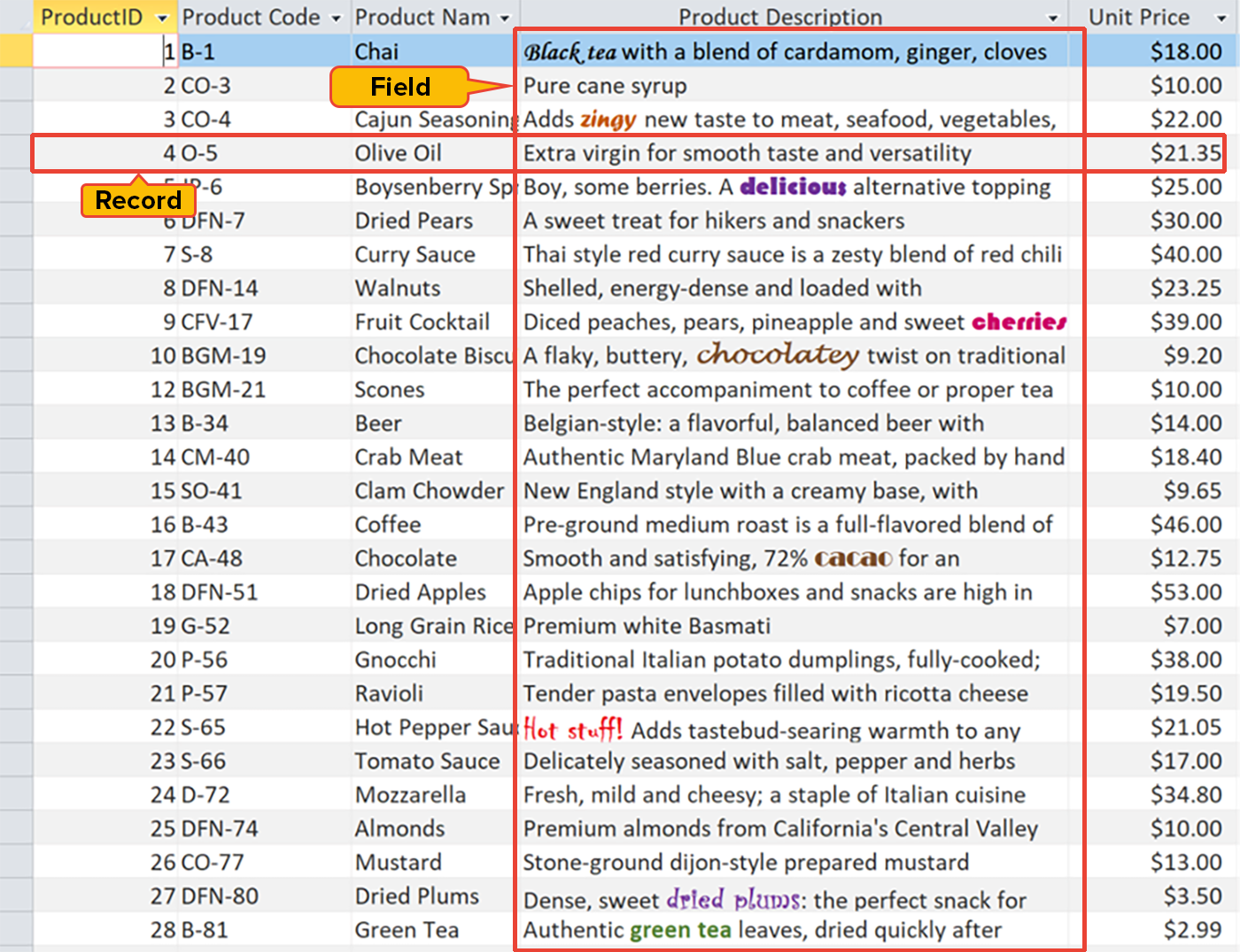
Structured databases store data in tables. A table (also called a relation) is a two-dimensional grid for organizing data in fields and records. Each column in a table represents a field (also called an attribute), which is a type of data such as Employee ID, Phone, or Email. Each row in a table represents a record (also called a tuple), which is a set of field data for one instance, such as an individual employee.
Structured databases can either be flat file or relational.
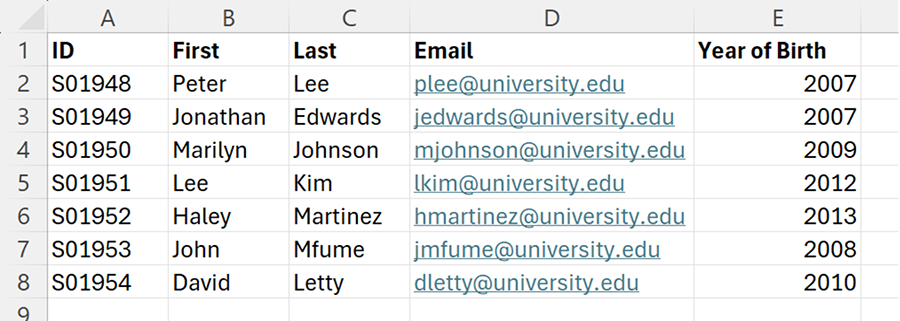
A flat file database consists of a single two-dimensional table with rows and columns, such as a class gradebook stored in a spreadsheet. Flat file databases work well for basic tasks such as storing, editing, printing, or displaying information. They can be created with spreadsheet software or even a plain text editor like Notepad, using commas to separate columns and paragraph breaks to separate rows.
A relational database contains multiple tables, with each table being related (connected) in some way to at least one other table. Most relational database management systems understand a standard set of commands known as Structured Query Language (SQL). Database administrators use SQL to create and manage tables, add and modify data in those tables, and retrieve data based on specific criteria to build useful reports.
In today’s complex data management environment, rigidly structured databases cannot meet every data storage need because not all information fits neatly into a consistent field-and-record format.
NoSQL is an umbrella term for database systems that do not follow the traditional relational model of fixed tables, rows, and columns. Many NoSQL databases are designed to handle unstructured or semi-structured data that does not fit neatly into rigid schemas.
An unstructured database holds data that does not follow a predefined format, such as text documents, images, videos, or social media posts. Unstructured databases require specialized tools and techniques for storage and retrieval.
A semi-structured database contains data that does not fit neatly into tables but still has some organizational structure. Such databases often use formats like JSON or XML, which include tags or keys to identify data elements while allowing flexibility in how the data is stored.
There are no rigid rules about how a NoSQL database management system should operate, but they generally break away from the strict table-and-row structure of relational databases to support more flexible ways of storing and retrieving data. For example, a document-oriented NoSQL database like MongoDB stores semi-structured data in flexible JSON-like documents, allowing each record to have different fields. A key-value store like Redis can handle unstructured data by associating arbitrary content with simple keys. Graph databases store data as nodes and relationships rather than in tables.
IN CONTEXT
Many large companies employ multiple database types to achieve their goals. For example, Amazon primarily uses structured databases to manage its product catalog, pricing, and inventory because this information fits well into organized tables with defined fields such as product ID, name, description, price, and stock level. However, Amazon also integrates unstructured and semi-structured databases to store related content like customer reviews (semi-structured text with ratings) and product images (unstructured).
A data model is an overall conceptual framework that defines how data is structured, related, and managed in a database. It describes the types of data, their relationships, and the rules for interacting with them. So far in this tutorial, you have learned about several different data models, including relational, document, key-value, and graph.
A schema is the specific implementation of a data model for a particular database. It defines the actual structure in detail, including table names, column names, data types, constraints, and relationships, based on the chosen data model. In other words, the data model is the theory, and the schema is the practice.
EXAMPLE
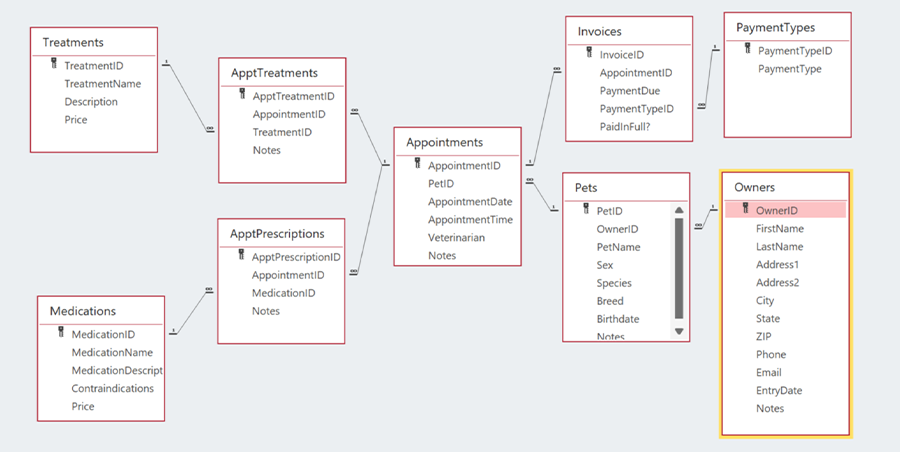
Suppose a veterinary practice has a database for keeping track of owners, pets, and their medical events. The data model for this database could be described as structured and relational.When a relational database designer is planning a database, part of the process is to create an entity-relationship diagram (ERD), which is a visual representation of the schema. The ERD shows each table in its own box, with lines drawn between the tables to indicate the relationships between them. The following ERD shows what the veterinary practice’s database might consist of.
Source: This tutorial was authored by Sophia Learning. Please see our Terms of Use.




