Table of Contents |
In PostgreSQL, SERIAL is a pseudo data type that automatically generates an integer column with an associated sequence when new rows are inserted into a table. It is commonly employed as a primary key or an identifier column, ensuring each row has a unique value assigned to it. The serial data type simplifies managing unique identifiers, automatically generating sequential values without manual intervention. This simplifies database development and enhances data integrity by preventing duplicate or conflicting values in the designated column.
PostgreSQL automatically assigns a unique integer value to the serial column when a new row is inserted into the table. You can optionally specify a certain type of integer for the data type, such as big integer or small integer. The assigned value starts at 1 for the first record and increments by 1 for each subsequent insertion.
For example, when creating a table to hold student grades, you might define the primary key column as an auto-incrementing value like this:
CREATE TABLE grades (
grade_id SERIAL PRIMARY KEY,
student_name VARCHAR(50),
grade VARCHAR(5),
comments VARCHAR(200)
);
The SERIAL data type is specific to PostgreSQL and not part of the SQL standard. As an alternative to using the SERIAL data type, we can use the IDENTITY property to define an auto-incrementing column. IDENTITY is part of the SQL standard, so it will work on any database platform. It also offers more flexibility and features, such as defining custom starting values, incrementing steps, and cycling options.
One of the options that IDENTITY provides is to control when the identity values are generated. You can specify GENERATED ALWAYS to always assign an incrementing value for each record, or GENERATED BY DEFAULT to assign an incrementing value only if a specific value is not entered for it.
Let's compare the use of IDENTITY to the use of SERIAL. To create the grades table referenced in the previous section, you would construct the statement like this:
CREATE TABLE grades (
grade_id INT GENERATED ALWAYS AS IDENTITY PRIMARY KEY,
student_name VARCHAR(50),
grade VARCHAR(5),
comments VARCHAR(200)
);
Another option available when using IDENTITY is cycling. When cycling is enabled, as soon as the column reaches its maximum value, it wraps around to its minimum value and continues incrementing. Cycling can be useful when reusing a limited range of values is necessary.
In the previous lesson, you learned how to use INSERT INTO to add a row into a table. Let's revisit that skill now in a table with an auto-incrementing column.
For this example, let's create a table using SERIAL to have an auto-incrementing column.
CREATE TABLE contact( contact_id SERIAL, username VARCHAR(50), password VARCHAR(50) );
The above code is fairly simple, but inside the database, some more complex operations are happening automatically:
CREATE SEQUENCE contact_contact_id_seq;
CREATE TABLE contact( contact_id integer NOT NULL DEFAULT nextval(contact_contact_id_seq), username VARCHAR(50), password VARCHAR(50) );
ALTER SEQUENCE contact_contact_id_seq
OWNED BY contact.contact_id
Notice that the sequence table has the table name, an underscore, the column name, an underscore, and then seq as the sequence name. Once the table is created, this sequence is automatically created.
Now let's insert a record into this new table:
INSERT INTO contact (contact_id,username,password)
VALUES (nextval('contact_contact_id_seq'),'sophia','Password1');
PostgreSQL, among other databases, uses sequences to generate unique values. NEXTVAL() is the value generated by the subsequent step in the sequence. Typically, you use the NEXTVAL() function in PostgreSQL to request the next value from a sequence.
For example, use PostgreSQL to retrieve the next value from a sequence named "my_sequence" using the NEXTVAL() function. Upon subsequent requests, this will return the next unique value from the sequence, incrementing its internal counter.
If we query the table, we should see this:
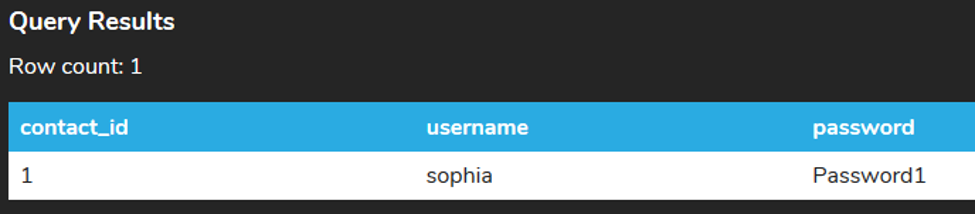
However, it can be quite cumbersome to always write out the entire function to get the next value. PostgreSQL will allow you to insert a row into the table without specifying the contact_id; the nextval function is automatically called. For example, if we ran the following insert statements:
INSERT INTO contact (username, password)
VALUES ('Mustang','Password3');
INSERT INTO contact (username,password)
VALUES ('roda','Password99');
Specific to PostgreSQL, you can also use the keyword DEFAULT for the value if you wanted to pass in the contact_id as well:
INSERT INTO contact (contact_id,username,password)
VALUES (DEFAULT,'Caloric','Password77');
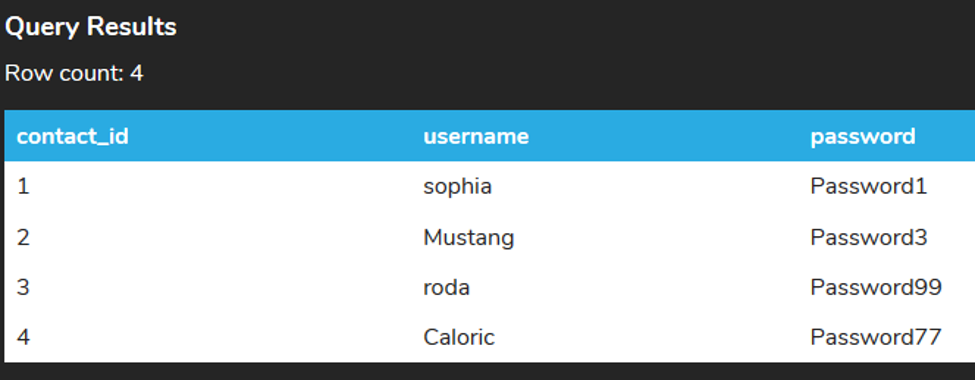
If you query the table using a SELECT clause you can see that the contact_id column has auto-incremented with each addition.
Source: THIS TUTORIAL WAS AUTHORED BY SOPHIA LEARNING. PLEASE SEE OUR TERMS OF USE.



