Table of Contents |
A function is a reusable block of code designed to perform a specific task. Functions help you organize your code, avoid repetition, and make programs easier to read and maintain. Instead of writing the same code multiple times, you can write it once inside a function and use it whenever needed.
Think of a function like a machine. You build the machine to perform a specific task, and each time you turn it on, it runs the same set of instructions.
Before you can use a function, you must first declare it. A function declaration defines the function’s name and the code it will execute.
Think of this as building the machine. You are setting up what the machine will do, but it will not run until you turn it on.
The basic syntax uses the function keyword, followed by a name, parentheses, and curly braces that contain the code to run.
EXAMPLE
Here is a simple function declaration:In this code,function greetUser() {
console.log("Welcome to our website!");}
greetUser is the function name. The parentheses () are required even when empty. The curly braces {} contain the function body, which holds the code that runs when the function is called.
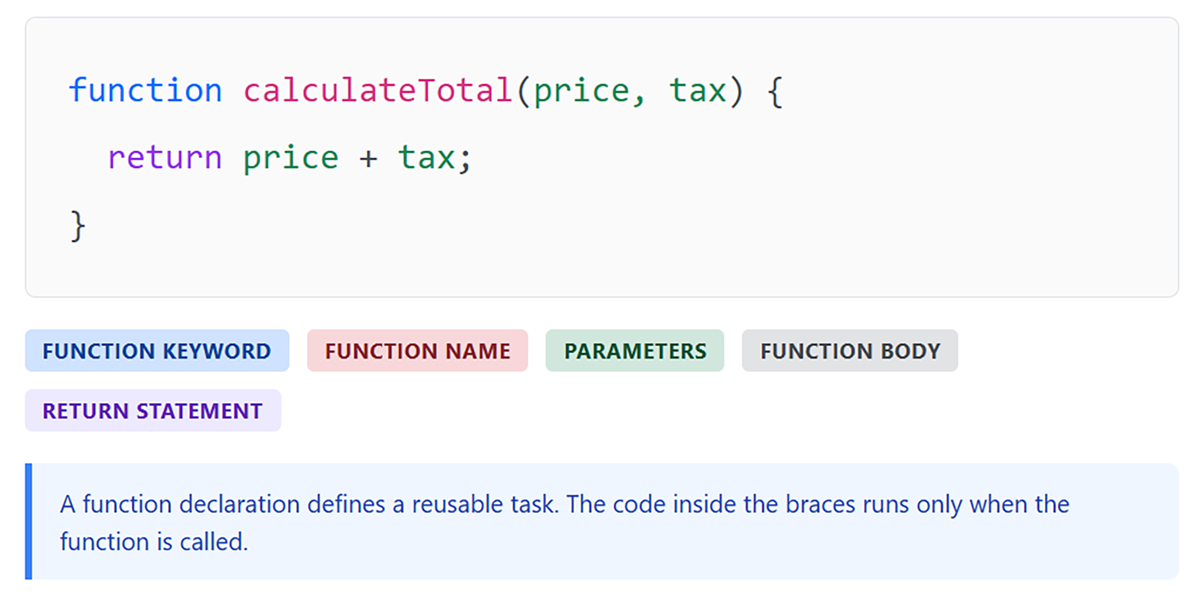
The following diagram shows the key parts of a function declaration.
When naming functions, follow these conventions:
calculateTotal, validateInput, displayMessage). function keyword, a name, parentheses, and curly braces containing the code to execute. The function does not run when declared; it only runs when called.
function keyword, name, parameters, and code block.Declaring a function does not execute its code. To run the code inside a function, you must call (or invoke) it. You call a function by writing its name followed by parentheses.
Calling a function is like turning on the machine. Each time you call it, the machine runs the instructions inside the function.
EXAMPLE
When JavaScript encountersfunction greetUser() {
console.log("Welcome to our website!");}
// Call the function
greetUser();
greetUser(), it executes the code inside the function and displays the message in the console. You can call the same function multiple times throughout your program.
index.html file.
<body> element, add a <script> element just before the closing </body> tag:
Functions become more powerful when they can accept information and produce a result. Parameters allow functions to receive information, and return values allow functions to send a result back.
Think of this as upgrading the machine from Section 1. Before, the machine always did the same thing every time you turned it on. Now, you can give the machine different information each time it runs. The machine uses that information to produce a result, which it can send back for you to use elsewhere in your program.
A parameter is a variable inside a function that receives a value when the function is called. Parameters act as placeholders for the data the function will use.
You can think of parameters as the information you feed into the machine.
EXAMPLE
In this code:function greetUser(name) {
console.log("Welcome, " + name + "!");}
greetUser("Alice"); // Output: Welcome, Alice!
greetUser("Bob"); // Output: Welcome, Bob!
name is the parameter inside the function"Alice" and "Bob" are the values passed into the function name = "Alice" name = "Bob" Functions can accept multiple parameters, separated by commas.
EXAMPLE
Each value is matched to a parameter based on its position:function calculateRectangleArea(width, height) {
console.log(width * height);}
calculateRectangleArea(5, 10); // Output: 50
calculateRectangleArea(3, 7); // Output: 21
width = 5, height = 10 width = 3, height = 7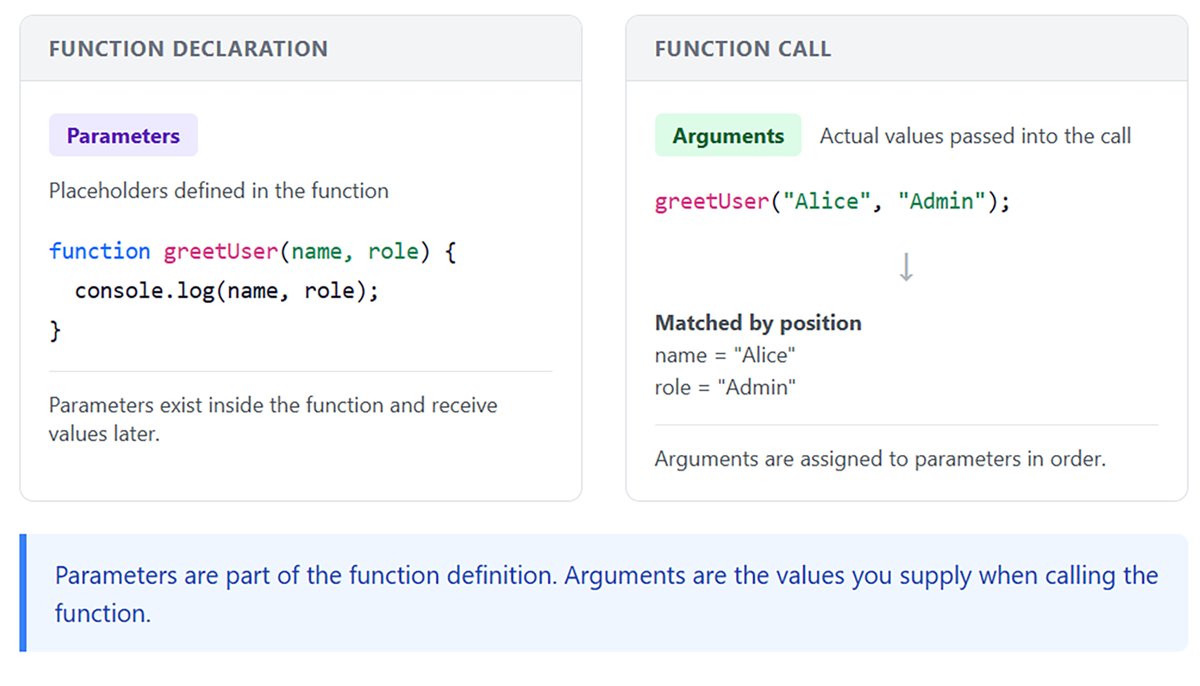
So far, your functions have displayed results using console.log(). However, functions can also send a value back to the code that called them.
The return statement specifies the value a function produces.
This is like the machine producing a result after processing the information it was given.
EXAMPLE
In this code:function calculateRectangleArea(width, height) {
return width * height;}
let area = calculateRectangleArea(5, 10);
console.log(area); // Output: 50
return statement sends that value backUnlike console.log(), which only displays a value in the console, return sends a value back to the code that called the function so it can be used elsewhere.
A value displayed with console.log() cannot be stored or reused. A value returned from a function can be saved in a variable, used in a calculation, or passed into another function.
When JavaScript encounters a return statement, it immediately stops running the function and sends back the value. Any code written after the return statement inside the function will not run.
EXAMPLE
In this code:function testReturn() {
console.log("Step 1");return "Done";console.log("Step 2");}
let result = testReturn();
console.log(result);
"Step 1" is displayed"Step 2" is never displayedreturn
"Done" is sent back and stored in result
The value that is sent back from a function using return is called a return value.
function keyword and a name.return followed by the value to send back.index.html file.
<script> element, add this:
function addNumbers(a, b) {
return a + b; }
let result = addNumbers(8, 12);console.log(result);
return statement.Scope determines where in your code a variable can be used. Some variables are available everywhere, while others only exist in specific parts of your program.
Think of this like the machine from earlier sections. Some information is available to the entire program, while other information exists only inside the machine while it is running. Once the machine stops, that information is no longer available.
Understanding scope is important because it helps you predict where variables can be used and prevents errors when you try to use a variable outside of where it exists.
Variables declared outside of any function have global scope, meaning they can be used anywhere in your code, including inside functions. Variables declared inside a function have local scope, meaning they only exist within that function and cannot be used outside of it.
Think of global variables as information available to the entire program, while local variables exist only inside the function while it is running.
EXAMPLE
The variablelet globalMessage = "I am global";
function showMessages() {
let localMessage = "I am local";console.log(globalMessage); // Works: global variableconsole.log(localMessage); // Works: local variable}
showMessages();console.log(globalMessage); // Works: global variableconsole.log(localMessage); // Error: localMessage is not defined
globalMessage is accessible everywhere. The variable localMessage exists only inside the function showMessages and cannot be accessed outside of it.
Local scope keeps variables inside their function, so they do not affect variables in other parts of your program.
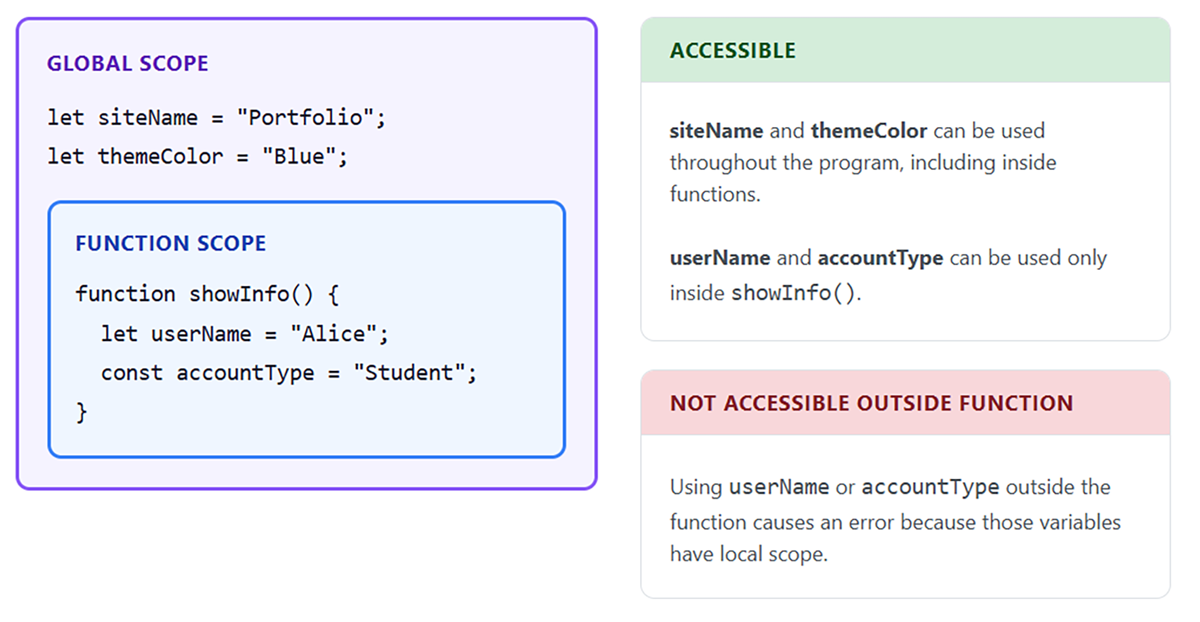
For example, two different functions can each have a variable with the same name, and they will not interfere with each other because each variable exists only within its own function.
EXAMPLE
In this code:function firstFunction() {
let count = 10;console.log(count); // Output: 10}
function secondFunction() {
let count = 50;console.log(count); // Output: 50}
firstFunction();
secondFunction();
count
count inside one function does not affect the otherJavaScript provides multiple ways to define functions. In addition to function declarations, you can also create a function and store it in a variable. This is called a function expression.
In this approach, the function becomes the value of the variable, and you use the variable name to call the function.
EXAMPLE
In this code:const calculateSum = function(a, b) {
return a + b;};
let total = calculateSum(5, 3);
console.log(total); // Output: 8
calculateSum Function expressions must be defined before they are called.
JavaScript also provides a shorter way to write function expressions called arrow functions. Arrow functions do the same thing as function expressions but use a more concise syntax. Instead of using the function keyword, they use the => symbol.
EXAMPLE
Both functions work identically, but the arrow function syntax is more concise.// Traditional function expression
const multiply = function(a, b) {
return a * b;};
// Arrow function equivalent
const multiplyArrow = (a, b) => {
return a * b;};
Arrow functions can be shortened further when the function body contains only a single expression. You can omit the curly braces and the return keyword.
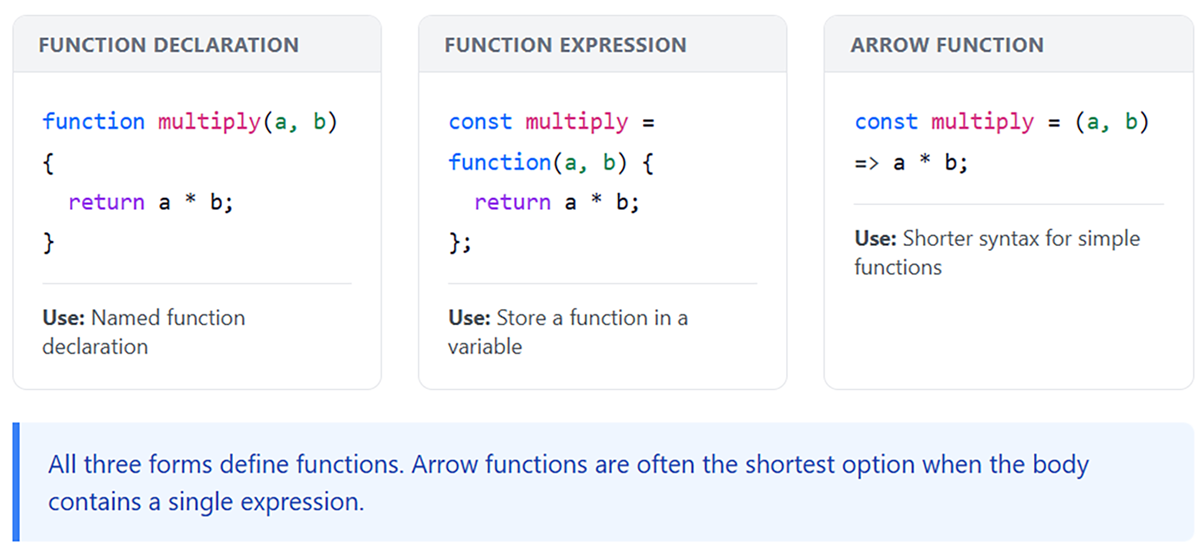
EXAMPLE
When an arrow function has exactly one parameter, you can also omit the parentheses around the parameter.// Arrow function with implicit return
const multiplyArrow = (a, b) => a * b;
console.log(multiplyArrow(4, 5)); // Output: 20
const double = x => x * 2;
console.log(double(7)); // Output: 14
function keyword.=> between the parameters and the opening curly brace.return keyword.const square = function(num) {
return num * num;};
=> symbol and provides shorter syntax for writing functions.Source: THIS TUTORIAL WAS AUTHORED BY SOPHIA LEARNING. PLEASE SEE OUR TERMS OF USE.
REFERENCES
Mozilla Developer Network. (n.d.). How the web works. developer.mozilla.org/en-US/docs/Learn/Getting_started_with_the_web/How_the_Web_works



