Use Sophia to knock out your gen-ed requirements quickly and affordably. Learn more
×

First Normal Form

Author: Sophia

what's covered
In this lesson, you will explore the first normal form (1NF) on an unnormalized data set, in two parts. Specifically, this lesson covers:

Table of Contents

1. Adding Relationships

Recall that in the first normal form (1NF), you can have only single values at the intersection of each row and column, meaning there should be no repeating groups. In order to manage this appropriately, you need to remove any repeating group by creating additional tables. The primary key in the original table will correspond to a foreign key in the new table that has been created expressly for the purpose of making the relationship.

Let's look at our movie ratings table to see how this works:

User Movie Title NumericRating Textual Rating Actor Genre ReleaseDate
Andy Joe Toy Story 5 Such a classic! Tom Hanks, Tim Allen Animation, Adventure, Comedy 1995
Andy Joe Titanic 4 Great movie! Leonardo DiCaprio, Kate Winslet, Billy Zane, Kathy Bates Drama 1997
Sophia McKenzie Terminator 2: Judgment Day 5 Loved this movie, definitely a must watch! Arnold Schwarzenegger, Linda Hamilton, Edward Furlong Action, Science Fiction 1991
James Wang Titanic 5 Best movie! Leonardo DiCaprio, Kate Winslet, Billy Zane, Kathy Bates Romance 1997
Barton Raftor Titanic 3 It was OK, could be shorter. Leonardo DiCaprio, Kate Winslet, Billy Zane, Kathy Bates Drama, Romance 1997
Barton Raftor Toy Story 4.5 Good movie! Watched a few times. Tom Hanks, Tim Allen, Don Rickles, Jim Varney, Annie Potts, John Morris Animation, Adventure, Comedy 1995

This table has the following attributes:

  • Movie (User, MovieTitle, NumericRating, TextualRating, Actor, Genre, ReleaseDate)
In reviewing the data, you do not have any attributes that uniquely identify each row. You will create a new primary key for the table called MovieId. Now our attributes include the following:

  • Movie (MovieId, User, MovieTitle, NumericRating, TextualRating, Actor, Genre, ReleaseDate)
You also have a few repeating groups in this table, including Actor and Genre. There can be many actors in a movie, which can belong to more than one genre. You will create a new table for each to remove the repeating groups for Actor and Genre. Now you have three tables:

  • Movie (MovieId, User, MovieTitle, NumericRating, TextualRating, ReleaseDate)
  • Actor (MovieId, ActorId, ActorName)
  • Genre (MovieId, GenreId, GenreName)
Notice that the Actor and Genre tables each have a MovieId attribute that exists to be the foreign key in the relationship. Each of them has its own primary key that is not part of the relationship.

The resulting ERD should look like the following:
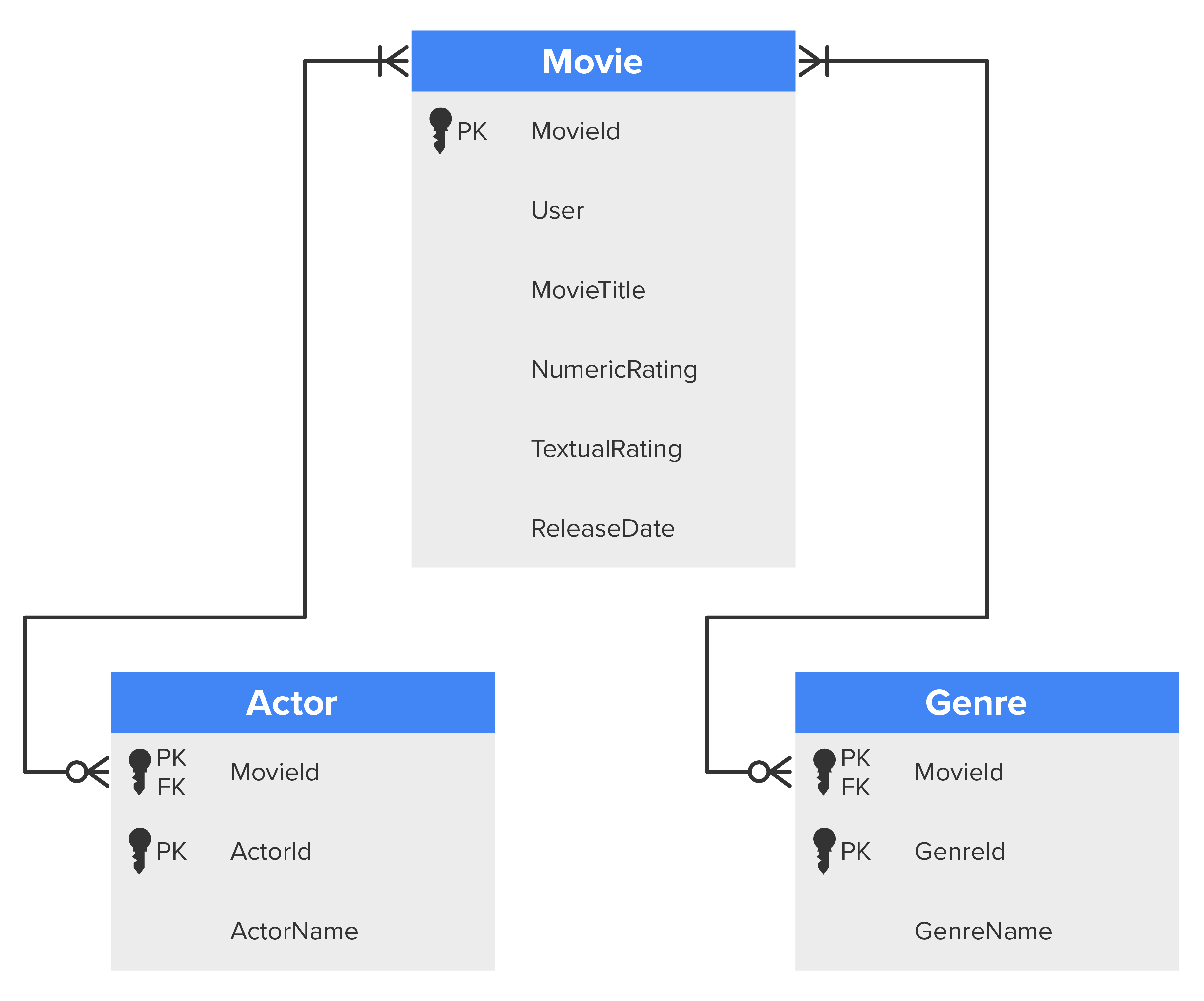

An E R D model showing three tables named Movie, Actor, and Genre. The attributes listed under the Movie table are MovieId, User, MovieTitle, NumericRating, TextualRating, and ReleaseDate. The attribute MovieId is a primary key. The attributes listed under the Actor table are MovieId, ActorId, and ActorName. The attribute MovieId and ActorId are primary keys. The attributes listed under the Genre table are MovieId, GenreId, and GenreName. The attribute MovieId and GenreId are primary keys. In the Actor and Genre tables, the MovieId attribute is the foreign key in the relationship. The Movie table is connected to the Actor and Genre tables with lines that have a crow’s foot symbol on both ends.

term to know
Repeating Group
A condition where an attribute contains multiple entries for a single record.

2. Splitting Column Data

By going through the first normal form (1NF), you have enforced atomicity by removing all the repeating groups (multiple entries for a single record). However, there can still be scenarios where you may have multiple values stored in a single column. For example, in the Actor table, the actor's full name appears in the ActorName attribute. This is another form of having two entries in a single field, so it must change. To accomplish this, you can split the ActorName attribute into two attributes: ActorFirstName and ActorLastName. Now our set of tables looks like this:
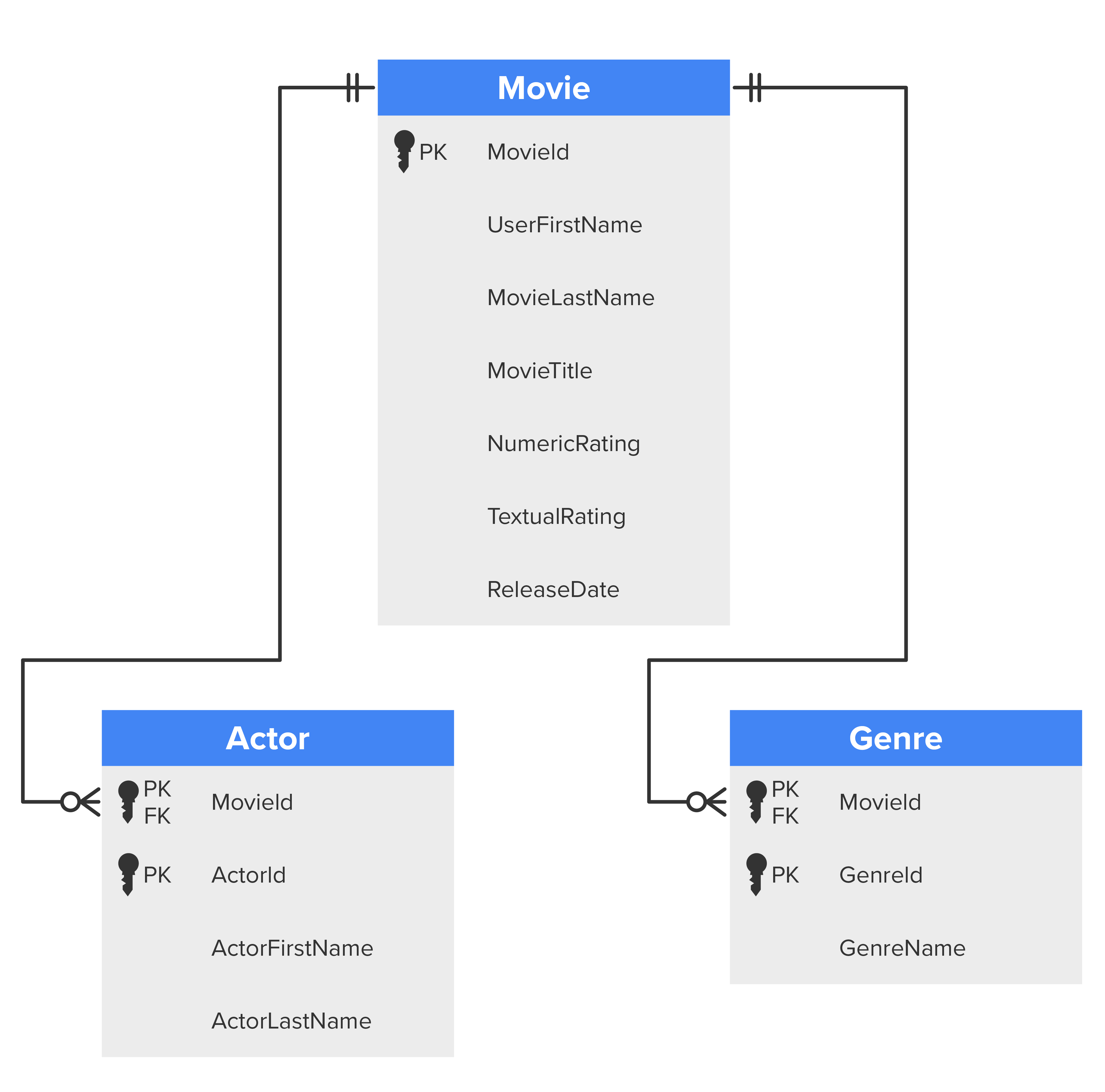
  • Movie (MovieId, UserFirstName, UserLastName, MovieTitle, NumericRating, TextualRating, ReleaseDate)
  • Actor (MovieId, ActorId, ActorFirstName, ActorLastName)
  • Genre (MovieId, GenreId, GenreName)
An E R D model showing three tables named Movie, Actor, and Genre. The attributes listed under the Movie table are MovieId, UserFirstName, UserLastName, MovieTitle, NumericRating, TextualRating, and ReleaseDate. The attribute MovieId is a primary key. The attributes listed under the Actor table are MovieId, ActorId, ActorFirstName, and ActorLastName. The attribute MovieId and ActorId are primary keys. The attributes listed under the Genre table are MovieId, GenreId, and GenreName. The attribute MovieId and GenreId are primary keys. In the Actor and Genre tables, the MovieId attribute is the foreign key in the relationship. The Movie table is connected to the Actor and Genre tables with lines that have a crow’s foot symbol on both ends.

This complete first normal form (1NF) is ready for us to move to the second normal form (2NF).

summary
In this lesson, you learned that since you can only have single values at the intersection of each row and column, you need to add relationships for any repeating group. Next, you learned that you need to split column data in scenarios where multiple values are stored in a single column. You examined an example of an ERD with relationships added and column data split, completing the first normal form (1NF).

Source: THIS TUTORIAL WAS AUTHORED BY DR. VINCENT TRAN, PHD (2020) AND Faithe Wempen (2024) FOR SOPHIA LEARNING. PLEASE SEE OUR TERMS OF USE.

Terms to Know
Repeating Group

A condition where an attribute contains multiple entries for a single record.

