Table of Contents |
The IEEE extended the 802.3 Committee to two new committees known as 802.3u (Fast Ethernet), 802.3ab (Gigabit Ethernet on Category 5+), and then finally to 802.3ae (10 Gbps over fiber and coax).
The diagram below shows the IEEE 802.3 and original Ethernet Physical layer specifications.
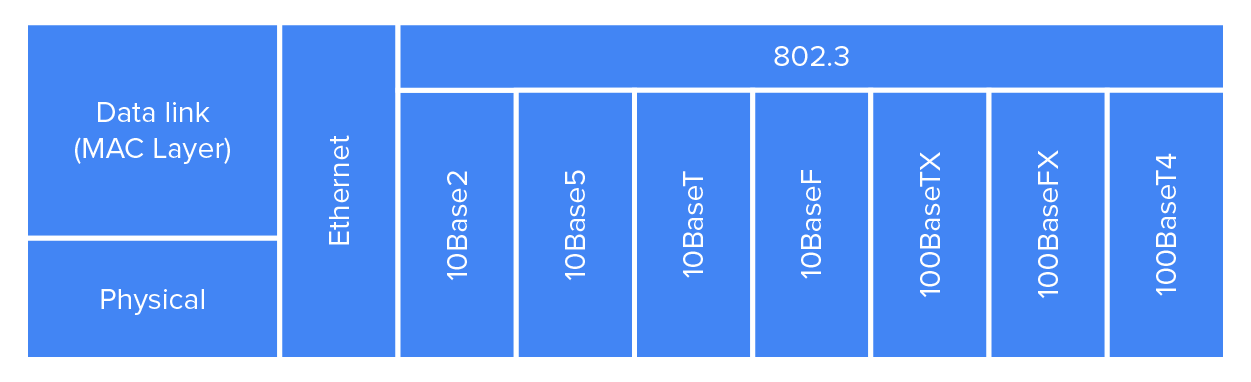
When designing your LAN, it is really important to understand the different types of Ethernet media available to you. Sure, it would be great to run Gigabit Ethernet to each desktop and 10 Gbps between switches, as well as to servers. Although this is just starting to happen, justifying the cost of that network today would be challenging for most companies. Instead, if you mix and match the different types of Ethernet media methods currently available, you can come up with a cost-effective network solution that works reliably.
Recall from a previous lesson that the Electronic Industries Association and the newer Telecommunications Industry Alliance (EIA/TIA) together form the standards body that creates the Physical Layer specifications for Ethernet. The EIA/TIA specifies that Ethernet uses a registered jack (RJ) connector on unshielded twisted-pair (UTP) cabling (RJ-45). However, the industry is calling this just an 8-pin modular connector.
Each Ethernet cable type that is specified by the EIA/TIA has something known as inherent attenuation, which is defined as the loss of signal strength as it travels the length of a cable and is measured in decibels (dB). The cabling used in corporate and home markets is measured in categories. A higher-quality cable will have a higher-rated category and lower attenuation. For example, Category 5 is better than Category 3 because Category 5 cables have more wire twists per foot and therefore less crosstalk. As discussed in a previous tutorial, crosstalk is the unwanted signal interference from adjacent pairs in the cable.
This is also known as Thinnet and can support up to 30 workstations on a single segment. It uses 10 Mbps of baseband technology, coaxes up to 185 meters in length, and a physical and logical bus with Attachment Unit Interface (AUI) connectors. The 10 means 10 Mbps, Base means baseband technology, which supports only one channel on the medium, and the 2 means almost 200 meters. 10Base2 Ethernet cards use BNC T-connectors to connect to a network. 10Base2 is a legacy network technology, which is an old system that may continue to be used because the owner does not want to replace or redesign it.
Also known as Thicknet, 10Base5 uses a physical and logical bus with AUI connectors, 10 Mbps baseband technology, and coaxes up to 500 meters in length. You can extend multiple cable segments up to a total of 2,500 meters by using repeaters and 1,024 users for all segments. 10Base5 is a legacy network technology.
This is 10 Mbps using Category 3 UTP or higher wiring. Unlike on 10Base2 and 10Base5 networks, each device must connect into a hub or switch, and you can have only one host per segment or wire. It uses an RJ-45 connector (8-pin modular connector) with a physical star topology and a logical bus. 10BaseT is a legacy network technology.
Fast Ethernet supports speeds of 100 Mbps and is compatible with 802.3 Ethernet because they share the same physical characteristics. Fast Ethernet and Ethernet use the same maximum transmission unit (MTU) and the same MAC mechanisms, and they both preserve the frame format that is used by 10BaseT Ethernet. Basically, Fast Ethernet is just based on an extension of the IEEE 802.3 specification, and because of that, it offers an increased speed that is 10 times that of 10BaseT.
100BaseTX, most commonly known as Fast Ethernet, uses EIA/TIA Category 5, 5e, or 6 and UTP two-pair wiring. It allows for one user per segment up to 100 meters long (328 feet) and uses an RJ-45 connector with a physical star topology and a logical bus.
Uses 62.5/125-micron multimode fiber cabling up to 412 meters long and point-to-point topology. It uses ST and SC connectors, which are media-interface connectors.
Copper twisted-pair called twinax (a balanced coaxial pair) that can run only up to 25 meters and uses a special 9-pin connector known as the High-Speed Serial Data Connector (HSSDC).
Category 5, four-pair UTP wiring, and up to 100 meters long (328 feet).
Category 5, two-pair UTP wiring up to 100 meters long (328 feet). Not used and has been replaced by Category 6 cabling.
The implementation of Gigabit Ethernet runs over multimode fiber-optic cable instead of copper twisted-pair cable and uses a short wavelength laser. Multimode fiber (MMF), using 62.5- and 50-micron cores, utilizes an 850 nanometer (nm) laser and can go up to 220 meters with 62.5-micron cores and 550 meters with 50-micron cores.
Single-mode fiber that uses a 9-micron core, 1,300 nm laser, and can go from 3 km up to 10 km.
10GBaseT is a standard created by the IEEE 802.3an committee to provide 10 Gbps connections over conventional UTP cables (Category 5e, 6, 6A, or 7 cables). 10GBaseT allows the conventional RJ-45 used for Ethernet LANs. It can support signal transmission at the full 100-meter distance specified for LAN wiring. If you need to implement a 10 Gbps link, this is the most economical choice.
An implementation of 10 Gigabit Ethernet that uses short-wavelength lasers at 850 nm over multimode fiber. It has a maximum transmission distance of between 2 and 300 meters (990 feet) depending on the size and quality of the fiber.
An implementation of 10 Gigabit Ethernet that uses long-wavelength lasers at 1310 nm over single-mode fiber. It also has a maximum transmission distance between 2 meters and 10 km, or 6 miles, depending on the size and quality of the fiber.
An implementation of 10 Gigabit Ethernet running over single-mode fiber that uses extra-long-wavelength lasers at 1,550 nm. It has the longest transmission distances possible of all the 10 Gigabit technologies: anywhere from 2 meters up to 40 km, again, depending on the size and quality of the fiber used.
10GBaseSW, as defined by IEEE 802.3ae, is a mode of 10GBaseS for MMF with an 850 nm laser transceiver and a bandwidth of 10 Gbps. It can support up to 300 meters of cable length.
10GBaseLW is a mode of 10GBaseL supporting a link length of 10 km on standard single-mode fiber (SMF) (G.652). This media type is also designed to connect to SONET equipment.
10GBaseEW is a mode of 10GBaseE supporting a link length of up to 40 km on SMF based on G.652 using optical-wavelength 1,550 nm. This is another media type designed to connect to SONET equipment.
EXAMPLE
The table below summarizes the cable types.| Ethernet Name | Cable Type | Maximum Speed | Minimum Transmission Distance | Notes |
|---|---|---|---|---|
| 10Base5 | Coax | 10 Mbps | 500 meters per segment | Also called Thicknet, this cable type uses vampire taps to connect devices to cable. |
| 10Base2 | Coax | 10 Mbps | 185 meters per segment | Popular implementation of Ethernet over coax. |
| 10BaseT | UTP | 10 Mbps | 100 meters per segment | One of the most popular network cabling schemes. |
| 100BaseTX | UTP, STP | 100 Mbps | 100 meters per segment | Two pairs of Category 5 UTP. |
| 100Base | Fiber | 10 Mbps | Varies (ranges from 500 to 2,000 meters) | Ethernet over fiber optics to the desktop. |
| 10BaseFL | MMF | 100 Mbps | 2,000 meters | Mbps Ethernet over fiber optics. |
| 100BaseFX | MMF | 1000 Mbps | 100 meters | Four pairs of Category 5 or higher. |
| 1000BaseT | UTP | 1000 Mbps | 100 meters | Two pairs of Category 6 or higher. |
| 1000BaseTX | MMP | 1000 Mbps | 550 meters | Uses SC fiber connectors; Max length depends on fiber size. |
| 1000BaseSX | Balance, shielded copper | 1000 Mbps | 25 meters | Uses a special connector, the HSSDC. |
| 1000BaseCX | MMF & SMF | 1000 Mbps | 550 meters multimode / 2,000 meters single mode | Uses a longer wavelength laser than 1000BaseSX. Uses SC and LC connectors. |
| 1000BaseLX | UTP | 10 Mbps | 100 meters | Connects to the network like a Fast Ethernet link using UTP. |
| 10GBaseT | UTP | 10 Mbps | 400 meters | 850 nm laser. Max length depends on fiber size and quality. |
| 10GBaseLR | SMF | 10 Mbps | 10 meters | 1,310 nm laser. Max length depends on fiber size and quality. |
| 10GBaseER | SMF | 10 Mbps | 40 meters | 1,550 nm laser. Max length depends on fiber size and quality. |
| 10GBaseSW | MMF | 10 Mbps | 400 meters | 850 nm laser transceiver. |
| 10GBaseLW | SMF | 10 Mbps | 10 meters | Typically used with SONET. |
| 10GBaseEW | SMF | 10 Mbps | 40 meters | 1,550 nm optical wavelength. |
IN CONTEXT
REAL WORLD SCENARIO
Deploy the Appropriate Wired Connectivity Standard
You have been tasked with installing wiring to handle the new networking technologies of 1000 Mbps to the desktop and Voice-over IP (VoIP). You will use 10 Gbps between the access switches and the core switches. What cabling do you consider installing in order to accomplish this in a cost-effective manner?
First, you need to verify your distances. As this will not include any wireless stations, you need to double-check the distances to each station and make sure the phone is within 100 meters (or closer) for connectivity to your access switches.
Once you have your distances verified at 100 meters or less, you can use UTP wiring to the stations and phones and possibly even connect the stations into the back of the phones. Most phones have switches included, so this means you only need to run one Category 5, or better, 1000BaseT, four-pair cable to each cubicle or office.
For your connections from your access switches to your core switches, you can use 10GbaseT if your runs are 100 meters or less, or you can use 10GbaseSR, which allows runs up to 400 meters using multimode fiber.
Source: This content and supplemental material has been adapted from CompTIA Network+ Study Guide: Exam N10-007, 4th Edition. Source Lammle: CompTIA Network+ Study Guide: Exam N10-007, 4th Edition - Instructor Companion Site (wiley.com)



