Table of Contents |
Web pages are complex organizations of HTML structures in a hierarchical form. Furthermore, those HTML structures contain multiple aspects such as their attributes, events, and their internal content. In order to keep track of and manage all the details of a webpage, browsers create what is called the Document Object Model or the DOM. The DOM is a hierarchical and programmatic representation of an HTML webpage and its content, styles, and behaviors. The DOM was originally developed as a standard by the W3C, when after 2004 the DOM development was taken over by the WHATWG (Web Hypertext Application Technology Working Group). While the WHATWG still manages the DOM standard as a living document, the W3C periodically publishes a snapshot of the WHATWG standard documents.
EXAMPLE
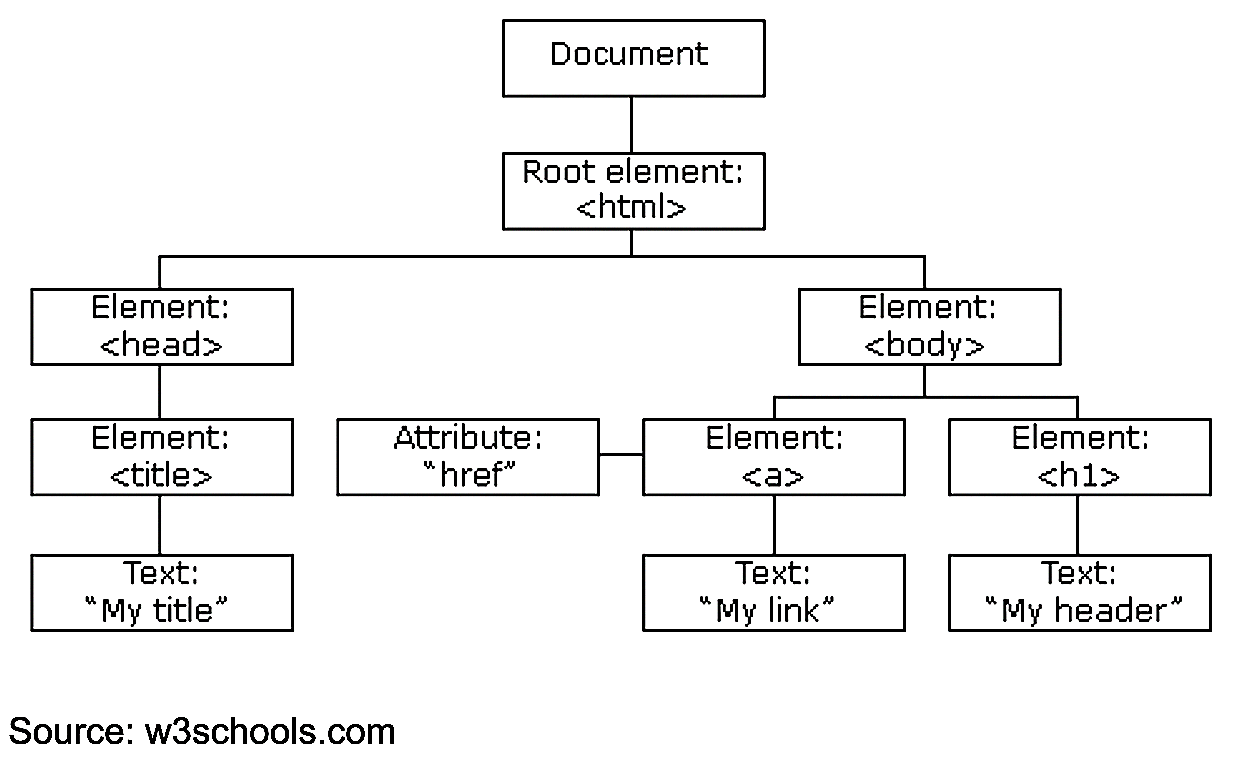
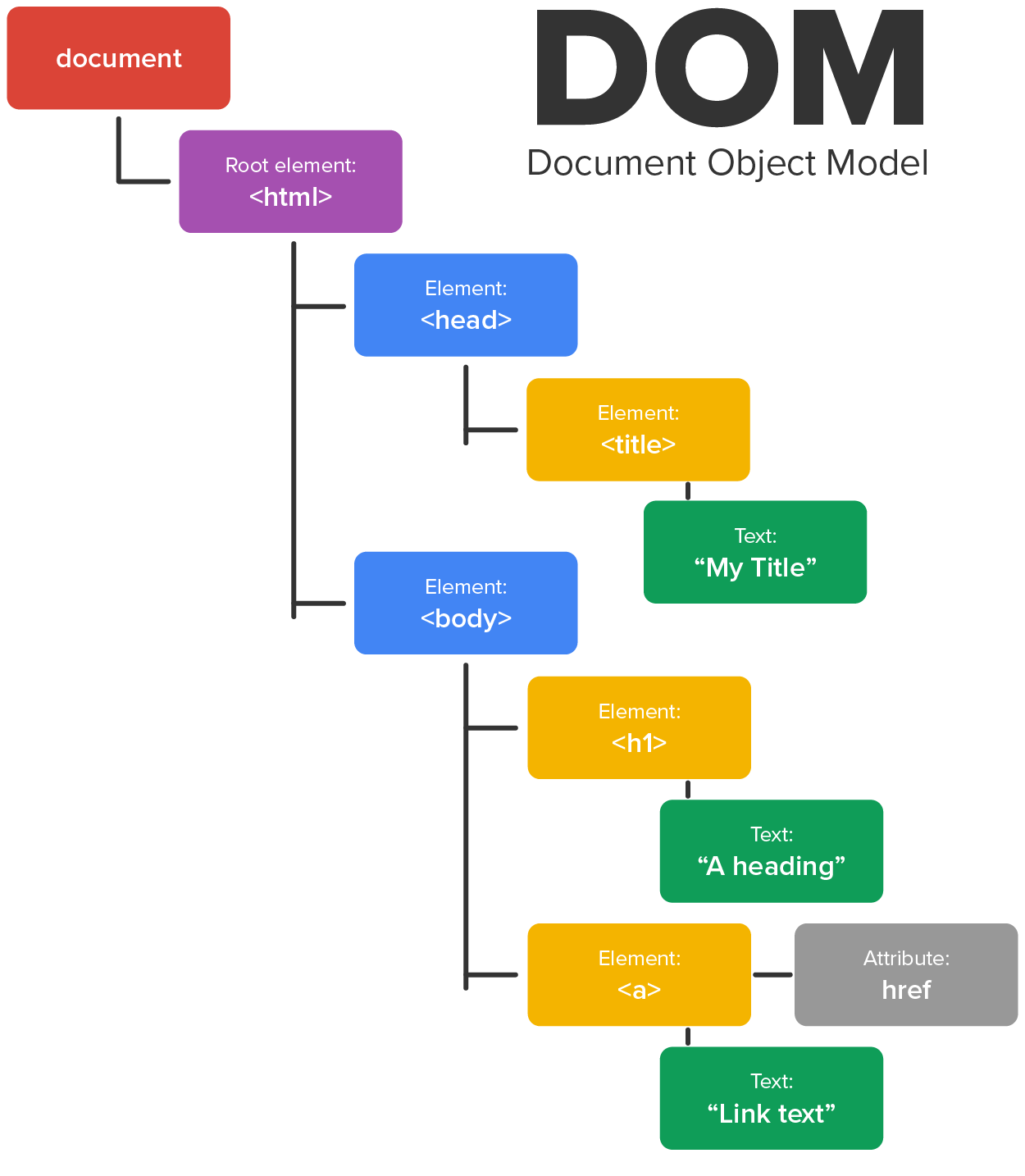
In this video, you will learn more about DOM.
Now that you have reviewed the Document Object Model, try drawing the diagram from memory to test your understanding.
Directions:
Keep in mind the structure and overall organization of the nodes within the DOM. This model does not change and is how you will eventually make sense of using JavaScript to manipulate the HTML and CSS content.
When discussing the DOM, each element within the DOM structure is referred to as a node. The <html> element, the <h1> element, even the text contained within the <a> element are all nodes. A DOM starts with the “document” object which is the main container or root node of the DOM. This object contains not only the page structure but also any attributes and characteristics of the page itself. Next is the root element of the page, the <html> node. This node represents the starting HTML tag in an HTML webpage and everything within. Next, you see that the <html> node also contains two child nodes, head and body. These represent the <head> and <body> sections of the webpage.
Within the <body> element, you can see that there are two child elements, an <a> anchor node and an <h1> node. The <a> node contains an attribute “href” which would hold a URL as its value. Also, the <a> node has a Text child node which represents the actual clickable text that was placed between the starting and end <a> tags.
Additionally, there are collection objects within the document object itself that contain references to all of the same element type, such as links, images, forms, etc. The document.images collection is an array containing information about all of the images in the page and makes it easier to manage just those resources.
As you can see, every “thing” on a webpage is represented within the DOM structure as a node and is accessible through that structure. Understanding the intricate details of the DOM is not critical to being a web developer, however it does help tremendously when you get involved with scripting using JavaScript and other scripting or programming languages. The DOM serves as a guide as to how we can access elements, their parents, their children, and their attributes. We can even access and manipulate an element’s style properties using JavaScript as each node in the DOM contains its own STYLE attribute.
Directions: Now that you know more about the DOM structure, it is time to take a look at a real-world example.
1. Open your Google Chrome browser and navigate to the Google homepage or any other public webpage.
2. Open the developer tools in the Google Chrome browser by pressing F12. Click on the HTML tag at the top of the document in the “Elements” tab.
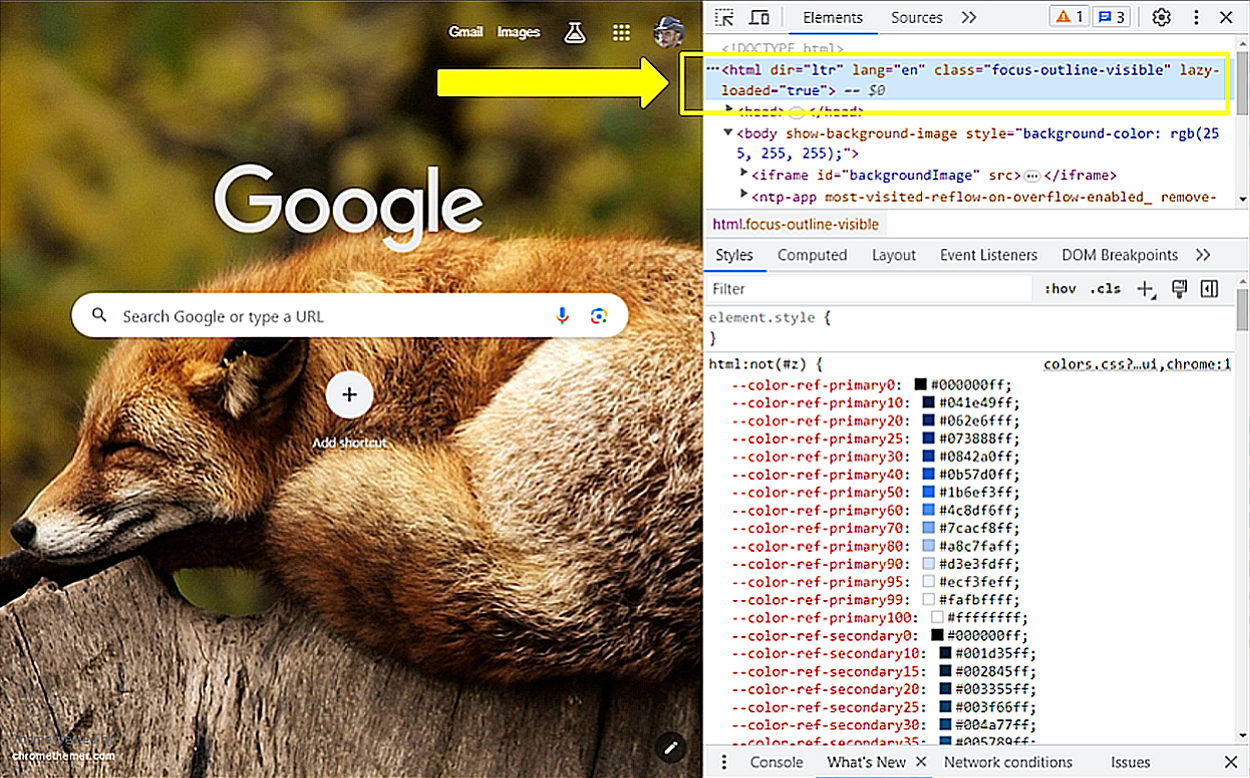
3. Next, locate and click on the “Properties” tab, which is often hiding in one of the chevrons.
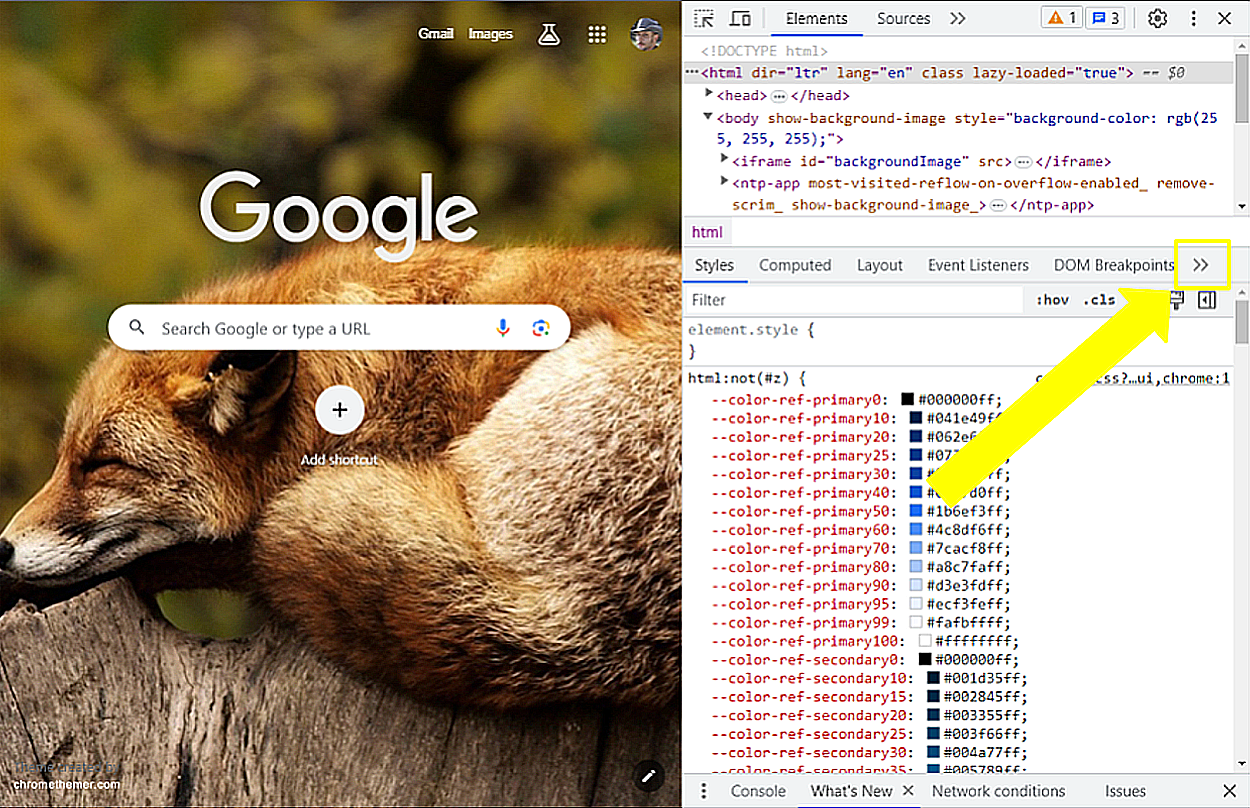
4. Once you locate and open the Properties tab, you will see all of the attributes and properties of the HTML node.
Notice that its “childNodes” is a collection list of 2 nodes, can you guess which two nodes? That's right, the <head> and <body>. Notice also that the firstChild is head and the lastChild is body.
5. Lastly, locate the parentNode of the HTML node and expand it. These are the properties of the “document” itself which contains the HTML element as a child node and one other child node.
Which is a sibling of the <html> tag?
Understanding the DOM structure and seeing examples of it in action will be a valuable knowledge base for you as you continue your journey to becoming a web developer.
Document Object Model (DOM)
A tree-like hierarchical data representation of the objects that are represented as nodes and that comprises the structure and content of a document on the web.
Root Node
The main container of the document object in the document object model.
Root Element
The <html> element represents the top-level element of an HTML document. All other elements must be descendants of this element. Also called, document element.
<HTML> Node
This node represents the starting HTML tag in an HTML webpage and everything within it.
Child Node
Any node that is a descendant of another node.
One of the key uses for the DOM is to provide a standardized framework to organize types of documents so that different types of systems can access and manipulate these resources. However, more often the DOM serves as a guide to accessing and managing elements programmatically through JavaScript.
To manage content programmatically means to use a scripting language to create, remove, and change content on the page as needed. This is where “dynamic content” comes from as content can be created, modified, and removed by JavaScript as the user interacts with the site. In fact, JavaScript can be used to add, change, or remove HTML elements as well as their attributes, CSS styles, and event handlers. With JavaScript, you can get a virtual handle to one of the nodes anywhere in the DOM and through it, access its attributes, child nodes, and parent nodes.
The DOM becomes particularly helpful when adding new content to a document using JavaScript as you will need to follow the same organizational structure as you create and add new elements to the DOM. This is particularly true when developing single page applications (SPA) wherein an entire web application is managed within a single webpage, wherein lots of content is dynamically created, added and removed, and made to be hidden or visible. Understanding where all of the content is located within the DOM and how to access and manipulate it is very useful knowledge and will allow you to “see” into the DOM as opposed to someone wherein the DOM is a mysterious black box.
The JavaScript functions and methods used to access and manipulate the DOM will be detailed in a later unit. Just know that JavaScript is the primary tool that we use to dynamically manage content within a DOM.
Single Page Applications (SPA)
An approach to development wherein a web-based application is completely contained within a single webpage.
Source: This Tutorial has been adapted from "The Missing Link: An Introduction to Web Development and Programming " by Michael Mendez. Access for free at https://open.umn.edu/opentextbooks/textbooks/the-missing-link-an-introduction-to-web-development-and-programming. License: Creative Commons attribution: CC BY-NC-SA.