Table of Contents |
When building web applications, you often need to represent real-world things like users, products, or settings. A JavaScript object lets you group related information about one thing into a single variable.
An object stores data as a collection of key–value pairs, where each key is a descriptive label and each value is the data it represents. For example, a user might have a name, email, and age, all stored together in one object.
An object uses curly braces {} to define a group of related data. Inside the braces, you list properties, which are key–value pairs separated by commas.
Each property has two parts:
EXAMPLE
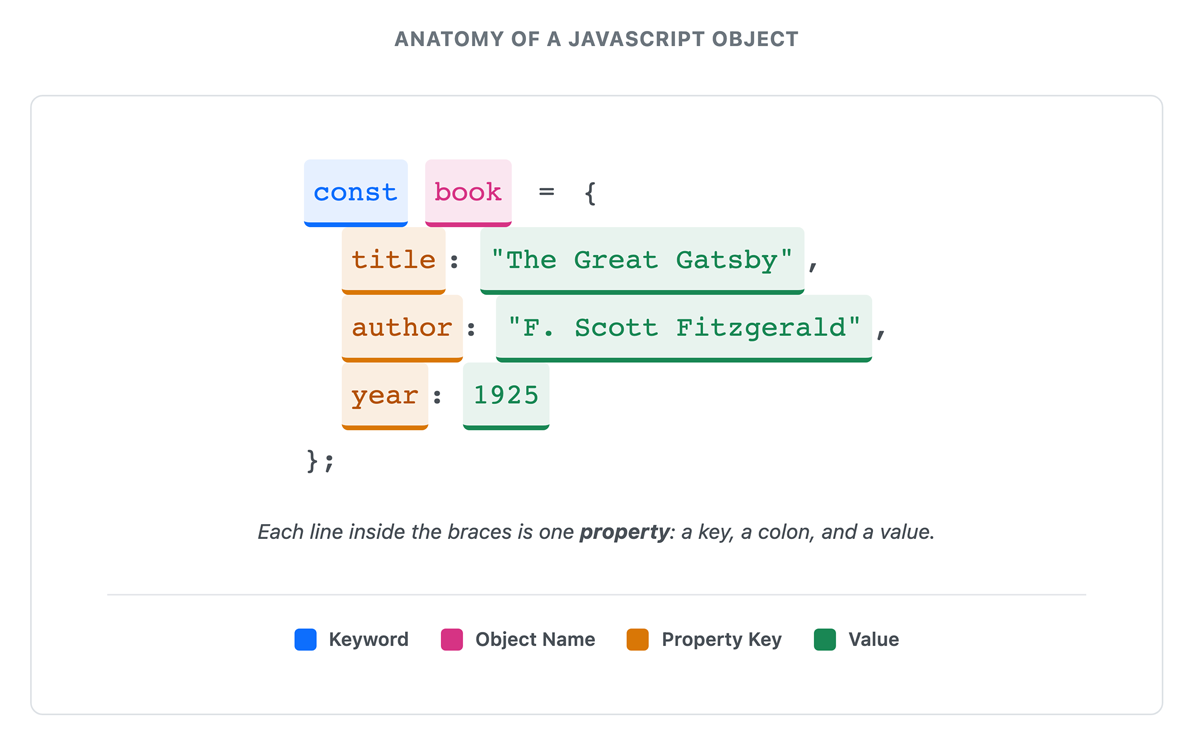
In this code:const book = {
title: "The Great Gatsby",author: "F. Scott Fitzgerald",year: 1925,isAvailable: true};
const book = creates a variable named book. {} contains the object’s data. title, author, year, and isAvailable are keys. :) and its value. Property keys should use clear, descriptive names that explain the data they represent. When writing keys without quotes, developers commonly use camel-case for names with multiple words.
JavaScript provides two ways to access an object’s properties: dot notation and bracket notation. Dot notation accesses a property by writing the object name, a period, and the property key, while bracket notation uses the key as a string inside square brackets. Both allow you to retrieve the value associated with a specific key, but they are used in different situations, such as when the property name is known in advance or stored in a variable.
EXAMPLE
In this code:const car = {
make: "Toyota",model: "Camry",year: 2023};
console.log(car.make); // Toyota
console.log(car["model"]); // Camry
car.make uses dot notation—the object name, a period, then the key. car["model"] uses bracket notation—the key as a string inside square brackets. Dot notation is more common when you know the exact property name. Bracket notation is useful when the property name is stored in a variable or includes special characters. You can also use dot notation to modify existing properties or add new ones.
EXAMPLE
Updating and adding properties:In this code:car.year = 2024; // Updates existing property
car.color = "blue"; // Adds a new property
delete car.color; // Removes the property
delete keyword removes a property completely.You can also create an empty object and add properties step by step. This is useful when data is collected or built over time.
EXAMPLE
Creating an object dynamically:In this code:const student = {};
student.name = "Maria";
student.grade = 95;
const student = {}; creates an empty object.
{ name: "Maria", grade: 95 }
const laptop = {
brand: "Dell",ram: 16,storage: 512};
Objects are used to represent a single entity with named properties, such as a user, product, or setting. Each property describes one aspect of that entity.
Arrays are used to store a collection of related items in a specific order. Each item in an array is called an element, and each element has a numbered position that determines how it is accessed. These positions are called indexes, and they start at 0 for the first element, then increase by one for each item.
An array uses square brackets [] to define a list of values, with each element separated by a comma and accessed by its position.
EXAMPLE
In this code:const colors = ["red", "green", "blue", "yellow"];
console.log(colors[0]); // red
console.log(colors[2]); // blue
console.log(colors.length); // 4
colors[0] returns the first element because indexing starts at zero. colors.length returns the count of elements in the array.Array indexing starts at zero, so the first element is at index 0, the second at index 1, and so on. Because of this, the last element is always one position less than the total number of elements. If an array has a length of 4, the last element is at index 3.
Arrays can hold any type of data, and you can even mix types:
EXAMPLE
const mixed = ["hello", 42, true, null];
In this code:
JavaScript provides built-in methods, which are functions that perform specific actions on an array. These methods make working with arrays easier by allowing you to add, remove, find, or change elements without writing complex code.
EXAMPLE
In this code:const fruits = ["apple", "banana"];
fruits.push("orange"); // ["apple", "banana", "orange"]
fruits.pop(); // ["apple", "banana"]
fruits.unshift("mango"); // ["mango", "apple", "banana"]
fruits.shift(); // ["apple", "banana"]
push() adds an element to the end of the array. pop() removes and returns the last element. unshift() adds an element to the beginning. shift() removes and returns the first element.JavaScript includes many array methods that follow similar patterns. Some add or remove elements, while others help you search or work with parts of an array.
Other useful array methods include the following:
| Method | What It Does |
|---|---|
indexOf()
|
Returns the position of a matching element, or −1 if not found |
includes()
|
Returns true if the array contains the value |
slice()
|
Returns a portion of the array without changing the original |
join()
|
Combines elements into a single string |
You do not need to memorize all of these methods, but it is helpful to recognize what they do and when to use them.
const numbers = [10, 20, 30, 40];
push(), pop(), and includes() simplify common operations, while zero-based indexing gives you precise control over element access.
Arrays often contain many elements. While you can access a single item using its index, you will often need to work with every element in the array.
A loop is a way to repeat the same set of instructions multiple times. JavaScript uses loops to move through an array one element at a time, applying the same action to each item.
EXAMPLE
Using a loop to access every element:In this code:const colors = ["red", "green", "blue"];
for (let i = 0; i < colors.length; i++) {
console.log(colors[i]);}
let i = 0 starts at the first index. i < colors.length continues until the end of the array. i++ moves to the next index each time. colors[i] accesses each element.This type of loop is called a for loop. It allows you to repeat the same action for every element in an array.
A for loop has three parts inside the parentheses:
let i = 0) i < array.length) that determines how long the loop runs i++) that moves to the next position each time JavaScript also provides other ways to work with arrays, such as the forEach() method, which you will see in later lessons.
const numbers = [5, 10, 15];
for (let i = 0; i < numbers.length; i++) {
console.log(numbers[i]);}
Real-world data is rarely flat. A customer has an address, which itself contains a street, city, and zip code. A shopping cart contains products, each with its own name, price, and quantity. JavaScript handles this complexity with nested data structures, where objects and arrays contain other objects and arrays.
An object property can hold another object as its value. This nesting creates hierarchical data that mirrors real-world relationships.
EXAMPLE
In this code:const user = {
name: "Sarah Johnson",email: "[email protected]",address: {
street: "123 Main St",city: "Portland",state: "OR",zip: "97201"}};
console.log(user.address.city); // Portland
user.address.city—reads from left to right, stepping deeper into the structure.A second common pattern combines arrays and objects: an array of objects represents a collection where each item has multiple properties.
EXAMPLE
In this code:const products = [
{ id: 1, name: "Laptop", price: 999.99 },{ id: 2, name: "Mouse", price: 29.99 },{ id: 3, name: "Keyboard", price: 79.99 }];
console.log(products[0].name); // Laptop
console.log(products[2].price); // 79.99
id, name, and price properties. products[0].name first selects the element at index 0, then reads its name property.User lists, blog posts, shopping carts, search results, and API responses all commonly use arrays of objects. Each object represents one item; the array holds the entire collection.
// products[1].name means:
// 1. Start with products array
// 2. Get the element at index 1 (the Mouse object)
// 3. Access its name property
Selecting the appropriate data structure improves code clarity and makes common operations easier. The choice depends on the nature of your data and how you plan to use it. Objects and arrays serve different purposes. The following comparison highlights when each structure is most useful.
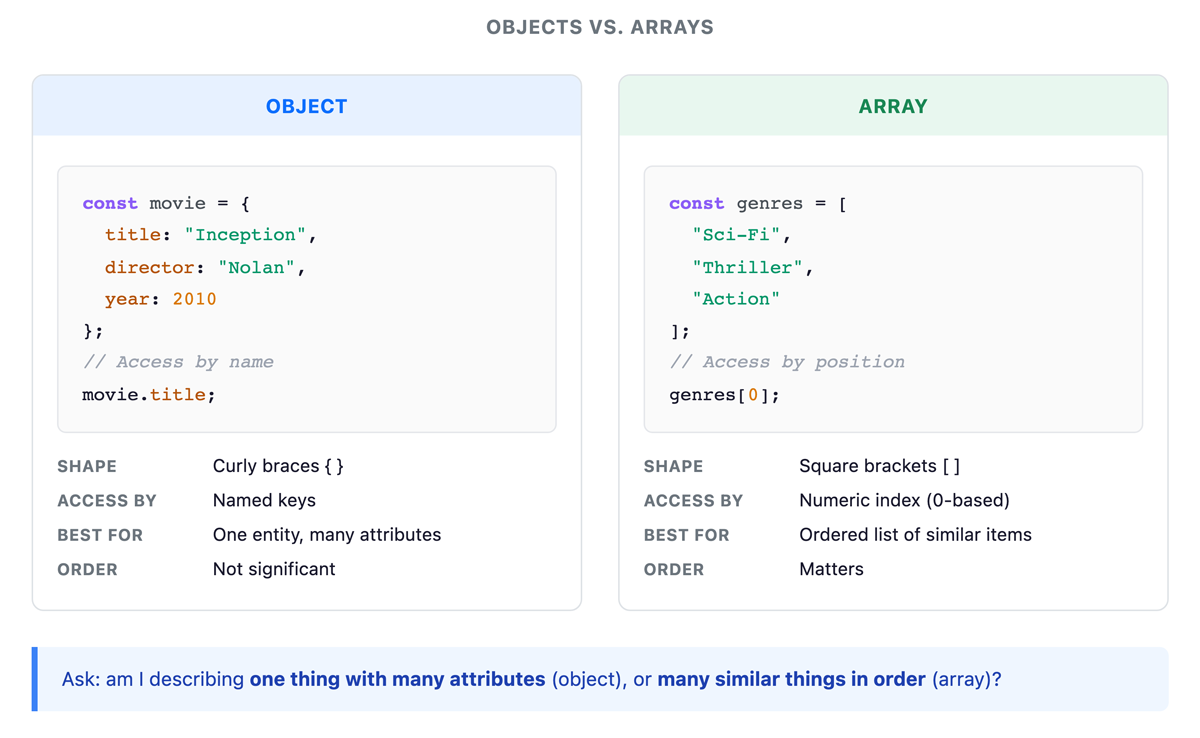
Choosing between an object and an array depends on whether you are describing one item with multiple attributes or managing a collection of items in order. Consider these guidelines when you reach for each structure.
Use an object when:
push() or filter(). Most real applications combine both objects and arrays. For example, a music playlist might store information about the playlist along with a list of songs, where each song has its own details.
EXAMPLE
In this code:const playlist = {
name: "Road Trip Mix",createdBy: "Alex",songs: [
{ title: "Bohemian Rhapsody", artist: "Queen", duration: 354 },{ title: "Hotel California", artist: "Eagles", duration: 391 },{ title: "Stairway to Heaven", artist: "Led Zeppelin", duration: 482 }]};
console.log(playlist.name); // Road Trip Mix
console.log(playlist.songs[0].title); // Bohemian Rhapsody
playlist.songs.push({
title: "Sweet Child O' Mine",artist: "Guns N' Roses",duration: 356});
name, createdBy) alongside the songs array. songs is its own object describing one track. playlist.songs[0].title reads left to right: the playlist, its songs array, the first element, then its title. push() adds a new song object to the array without disturbing the metadata.The following diagram shows how these layers fit together in a nested data structure.
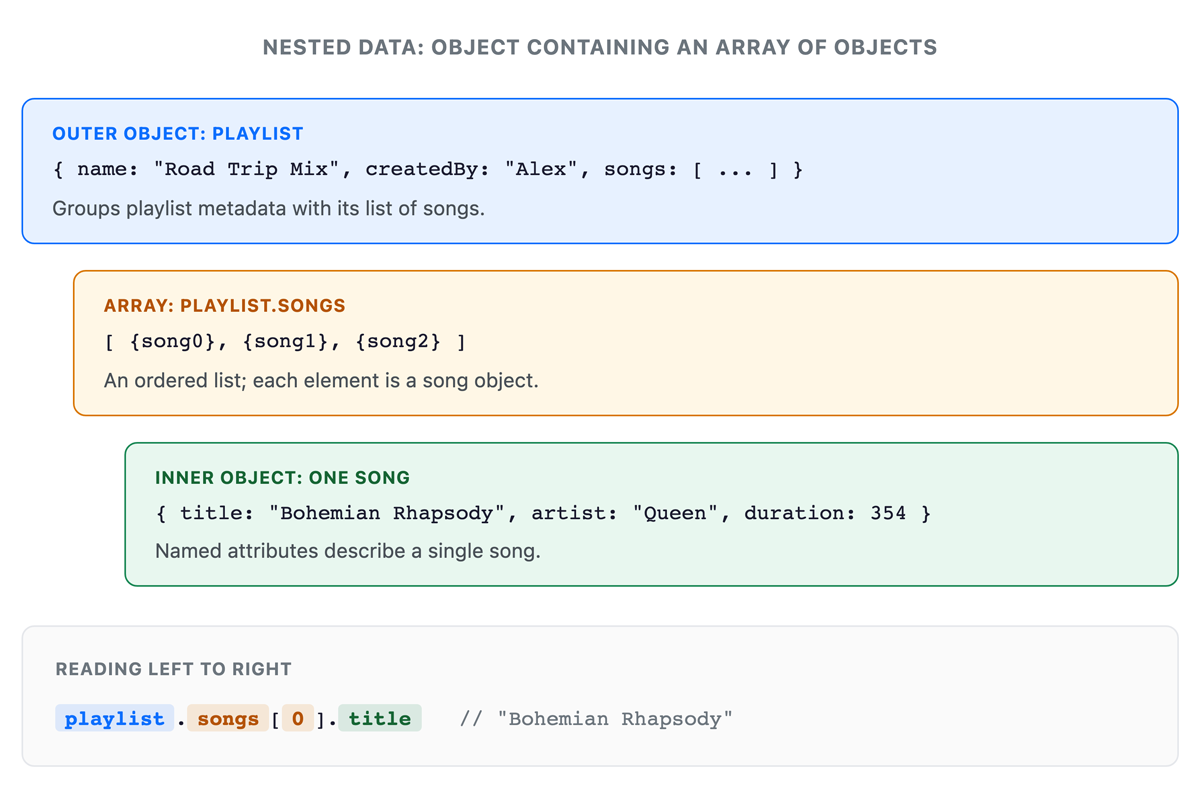
When accessing nested data, read the expression from left to right, moving step by step through the structure. This pattern scales well. You can add more playlist properties without changing the songs structure, and you can add more songs without affecting the metadata.
push() and pop() to manage elements, and working with multiple elements through loops to process entire collections. Building on these ideas, the tutorial introduced nested data structures, showing how objects and arrays can be combined to represent complex, real-world relationships. Finally, you considered choosing the right structure, understanding when to use objects for single entities with descriptive properties versus arrays for ordered lists, helping you organize data effectively in web applications.
Source: THIS TUTORIAL WAS AUTHORED BY SOPHIA LEARNING. PLEASE SEE OUR TERMS OF USE.
REFERENCES
Mozilla Developer Network. (n.d.). How the web works. developer.mozilla.org/en-US/docs/Learn/Getting_started_with_the_web/How_the_Web_works