Table of Contents |
Virtualization changed how organizations used hardware by allowing multiple VMs to run on a single physical computer. Each VM is a complete software-based emulation of a physical computer that runs its own operating system on top of virtualized hardware. While this improved efficiency, it still required every VM to maintain a separate operating system, which used significant system resources.
Containerization builds on the same idea but focuses on the application instead of the hardware. It packages an application and all its dependencies into a single lightweight unit called a container. Each container includes the code, libraries, and configuration files needed to run, ensuring the application behaves the same on a laptop, test server, or cloud platform.
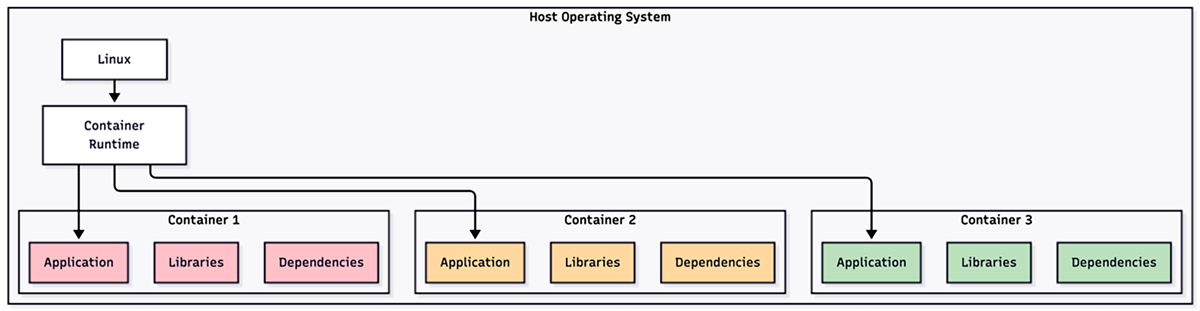
A helpful way to picture containers is to imagine an apartment building. Each apartment has its own rooms, locks, and utilities, yet all apartments share the same foundation, structure, and main systems. Containers work the same way. Each one runs independently with its own resources while sharing the host system’s operating system kernel, the core part of the operating system that manages hardware and software communication. This shared kernel allows hundreds of containers to run efficiently on the same hardware where only a few VMs might fit.
Containerization simplifies application deployment and maintenance. Developers can create a container once and run it anywhere without having to reinstall or reconfigure the application. This consistency eliminates the “it works on my machine” problem that often causes software to fail when moved between environments. Because containers are small, fast, and portable, they have become one of the most widely used tools in modern computing.
Containers achieve their efficiency by sharing the host’s operating system kernel instead of running their own. The operating system provides built-in features that isolate and manage resources so multiple containers can run side by side without interfering with one another.
Two main features make this possible. Namespaces give each container its own private view of the system, including processes, files, and network connections. From inside a container, it looks like it has the entire computer to itself. Control groups (cgroups) monitor and limit how much CPU time, memory, and storage space each container can use. This prevents one container from slowing down the others. Together, namespaces and cgroups create secure, lightweight environments that behave like independent systems but use only a small portion of the host’s resources.
When you start a container, a program called a container runtime follows a few key steps. First, it reads the container’s image, which contains the application and everything it needs to run. Next, it sets up the isolated environment using namespaces and cgroups. Then, it launches the application process inside this environment. The container begins running almost instantly because it uses the kernel that is already active on the host instead of booting its own operating system.
Most containers are managed with Docker, the most widely used runtime platform. Docker provides simple commands to build, start, and stop containers, as well as to connect them to networks. What once required setting up separate servers can now be done in seconds.
The container ecosystem consists of several key components working together. At the foundation is the container image, which is a read-only template that includes the application code, runtime, libraries, environment variables, and configuration files. Images are built in layers, and each image layer represents a specific change or addition to the filesystem. This layered structure enables efficient storage and distribution because shared layers only need to be stored once, even when multiple images use them.
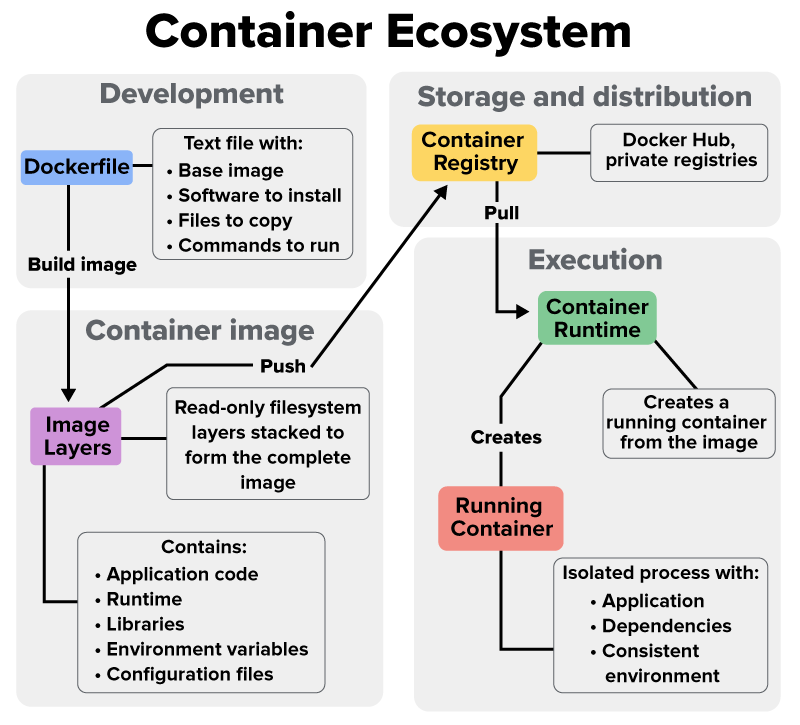
Container registries serve as repositories for storing and distributing container images. Docker Hub, the largest public registry, hosts millions of images for popular software such as databases, web servers, and development tools. Organizations often run private registries to store proprietary applications. When you need to run an application, you pull its image from a registry, and the container runtime creates a running container from that image.
The Dockerfile defines how to build a container image, specifying the base image, software to install, files to copy, and commands to run. Developers write Dockerfiles as simple text files with instructions such as “FROM ubuntu:20.04” to start with Ubuntu, “RUN apt-get install nginx” to install a web server, and “COPY app.html /var/www/” to add application files. This declarative approach ensures anyone can rebuild the exact same image from the Dockerfile, guaranteeing consistency across teams and environments.
Understanding when to use VMs versus containers starts with how each isolates applications. Both technologies separate workloads and manage resources, but they do so in very different ways. VMs virtualize hardware to run complete operating systems, while containers virtualize the operating system to run isolated applications. This design difference affects performance, efficiency, and flexibility across IT environments.
VMs require significant system resources because each VM runs its own operating system. A typical VM needs 1–2 GB of RAM just to operate, before even loading the application. Storage needs are also heavy, often 10–20 GB per VM. Running 10 VMs means duplicating the operating system 10 times, consuming large amounts of memory and disk space.
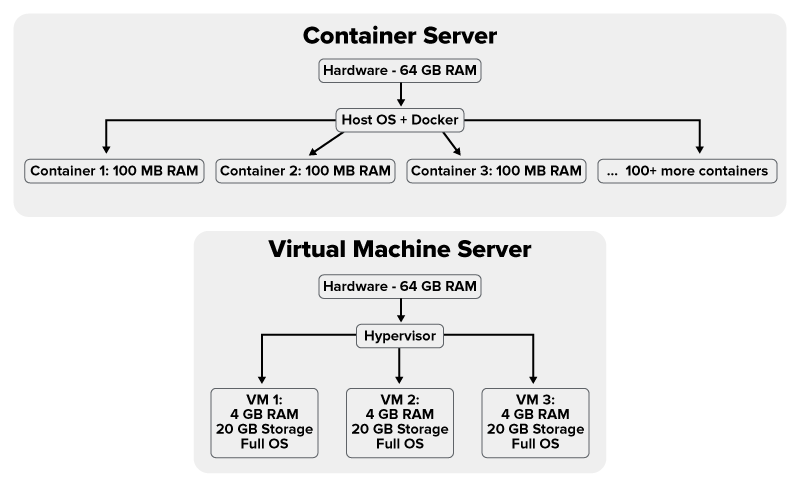
Containers eliminate this duplication by sharing the host’s operating system kernel. A container might use only 10–50 MB of RAM and a few hundred megabytes of storage. A physical server that struggles to run 10 VMs can often handle hundreds of containers. This efficiency allows organizations to host more applications on less hardware, saving money on equipment, power, and cooling.
Consider a web hosting scenario. Using VMs, a server with 64 GB of RAM might host 20–30 customer websites, allocating 2 GB per VM. With containers, the same server could host 200–300 websites, each using 100–200 MB of memory. This tenfold increase in density is one reason hosting providers have moved to container-based infrastructure.
EXAMPLE
Netflix uses containers to run thousands of microservices across its infrastructure. A single server that could run perhaps 10–20 VMs instead runs hundreds of containers, each handling a specific function like recommendation algorithms, user authentication, or video encoding. This efficiency allows Netflix to serve millions of concurrent users while optimizing infrastructure costs.The most dramatic difference between VMs and containers appears in start-up times. VMs must boot an entire operating system, initialize hardware drivers, start system services, and load applications. This process typically takes 30 s to several minutes, even on fast hardware. Containers start almost instantly—usually in less than a second—because there’s no operating system to boot. The application begins running immediately since the kernel is already running on the host.
This speed difference revolutionizes development workflows and scaling strategies. Developers can start and stop containers instantly while testing code changes, running dozens of test iterations in the time it would take to boot a single VM. In production, applications can scale instantly in response to traffic spikes, spinning up hundreds of containers in seconds. When traffic decreases, containers shut down just as quickly, freeing resources immediately.
Performance overhead also differs significantly. VMs introduce a hypervisor layer between applications and hardware, creating some performance penalty of typically 5–10% for CPU and memory operations. Containers run directly on the host kernel with near-zero overhead, achieving 95–98% of bare-metal performance. This efficiency matters for compute-intensive applications such as data processing, machine learning, or high-frequency trading where every millisecond counts.
VMs excel when you need complete isolation, different operating systems, or legacy application support. Running Windows applications on Linux servers requires VMs since containers share the host’s kernel. Security-critical applications might prefer VM isolation since compromising a container could potentially affect the host kernel, while VMs provide hardware-level isolation. Organizations with existing VM infrastructure and expertise might continue using VMs rather than retooling for containers.
Containers shine for microservices architectures, DevOps workflows, and cloud-native applications. Their lightweight nature makes them perfect for breaking applications into small, independent services that can be developed, deployed, and scaled separately. The consistency containers provide, running identically everywhere, solves the classic “works on my machine” problem that plagues software development. Modern continuous integration/continuous deployment (CI/CD) pipelines rely on containers to test and deploy code automatically.
Many organizations use both technologies together, running containers inside VMs to combine their benefits. Cloud providers often give customers VMs that run container orchestration platforms such as Kubernetes. This approach provides the security and isolation of VMs with the efficiency and agility of containers. The VM provides a security boundary and resource guarantee, while containers within the VM enable rapid deployment and scaling of applications.
The real power of containers emerges when solving practical problems that have frustrated developers and operations teams for decades. The promise of “write once, run anywhere” finally becomes reality with containers, eliminating environment-specific bugs and deployment failures. Organizations adopting containers report faster development cycles, more reliable deployments, and significant infrastructure cost savings.
Every developer has experienced the frustration of code working perfectly on their laptop but failing in production. These failures often stem from environmental differences: different library versions, missing dependencies, configuration variations, or operating system discrepancies. Containers solve this problem by packaging the application with its exact dependencies and configuration, creating an immutable artifact that runs identically everywhere.
When developers build a container image, they capture not just their code but the entire runtime environment. The Python version, installed packages, environment variables, and file system layout all become part of the image. This image runs the same way on a developer’s laptop, the test server, and the production cluster. If it works in development, it works in production—the environment travels with the application.
This consistency extends across different operating systems and cloud providers. A container built on a Mac laptop runs identically on Linux servers in AWS, Azure, or an on-premises data center. Development teams can work on Windows, Mac, or Linux machines while maintaining confidence that their applications will behave consistently. This portability prevents vendor lock-in and enables multicloud strategies where applications move freely between providers.
IN CONTEXT
Spotify’s engineering teams use containers to ensure their music streaming service works consistently across their global infrastructure. Developers write code on their laptops, test it in containers that match production exactly, then deploy the same containers to data centers worldwide. This consistency eliminated an entire class of deployment bugs that previously caused service disruptions. Now, if a feature works in development containers, engineers have confidence it will work for millions of users in production.
E-commerce platforms demonstrate containers’ value during traffic spikes. An online retailer might run 50 containers during normal operations, each handling specific functions: product catalog, shopping cart, payment processing, and order fulfillment. When Black Friday arrives, the platform automatically scales to 500 containers to handle 10x normal traffic. After the sale, it scales back down, paying only for resources actually used. This elasticity would be impossible with traditional servers or even VMs that take minutes to boot.
Software development teams use containers to standardize development environments. Instead of spending days setting up development machines with specific versions of databases, message queues, and other dependencies, new developers run a single command to download and start all required containers. The entire development environment launches in seconds, configured exactly like production. When switching between projects, developers simply stop one set of containers and start another, avoiding conflicts between different software versions.
Financial services firms use containers for risk calculations and trading systems where microseconds matter. Each trading algorithm runs in its own container, isolated from others to prevent interference. When market conditions change, new algorithm versions deploy instantly without affecting running trades. Containers’ near-zero overhead ensures maximum performance for time-critical calculations. The ability to run thousands of containers on a single server enables complex simulations that would be prohibitively expensive with VMs.
Media companies use containers for video processing pipelines. When users upload videos, containers automatically spin up to handle transcoding, or converting videos to different formats and resolutions. Each container processes one video segment, enabling parallel processing that completes in minutes rather than hours. As upload volumes fluctuate throughout the day, the system scales containers up and down automatically, optimizing resource usage and costs.
Source: THIS TUTORIAL WAS AUTHORED BY SOPHIA LEARNING. PLEASE SEE OUR TERMS OF USE.