Table of Contents |
Programs become truly powerful when they can make decisions. Without the ability to respond to different situations, your code would always do the exact same thing every time it runs. Conditional statements give your programs the ability to choose different paths based on the data they receive. The if statement is the most fundamental way to create a conditional statement in JavaScript. It evaluates a condition and executes code only when that condition is true.
The if statement follows a straightforward pattern: You provide a condition inside parentheses, and if that condition evaluates to true, the code inside the curly braces runs.
The condition inside the parentheses must be a Boolean expression, meaning an expression that evaluates to either true or false. You can use comparison operators like >, <, >=, <=, ===, and !== to create these expressions.
EXAMPLE
Here is the basic structure of anif statement:
In this code:let temperature = 95;
if (temperature > 90) {
console.log("It's hot outside!");}
temperature > 90 is a Boolean expression true because 95 is greater than 90 The following diagram shows how an if/else statement controls program flow.
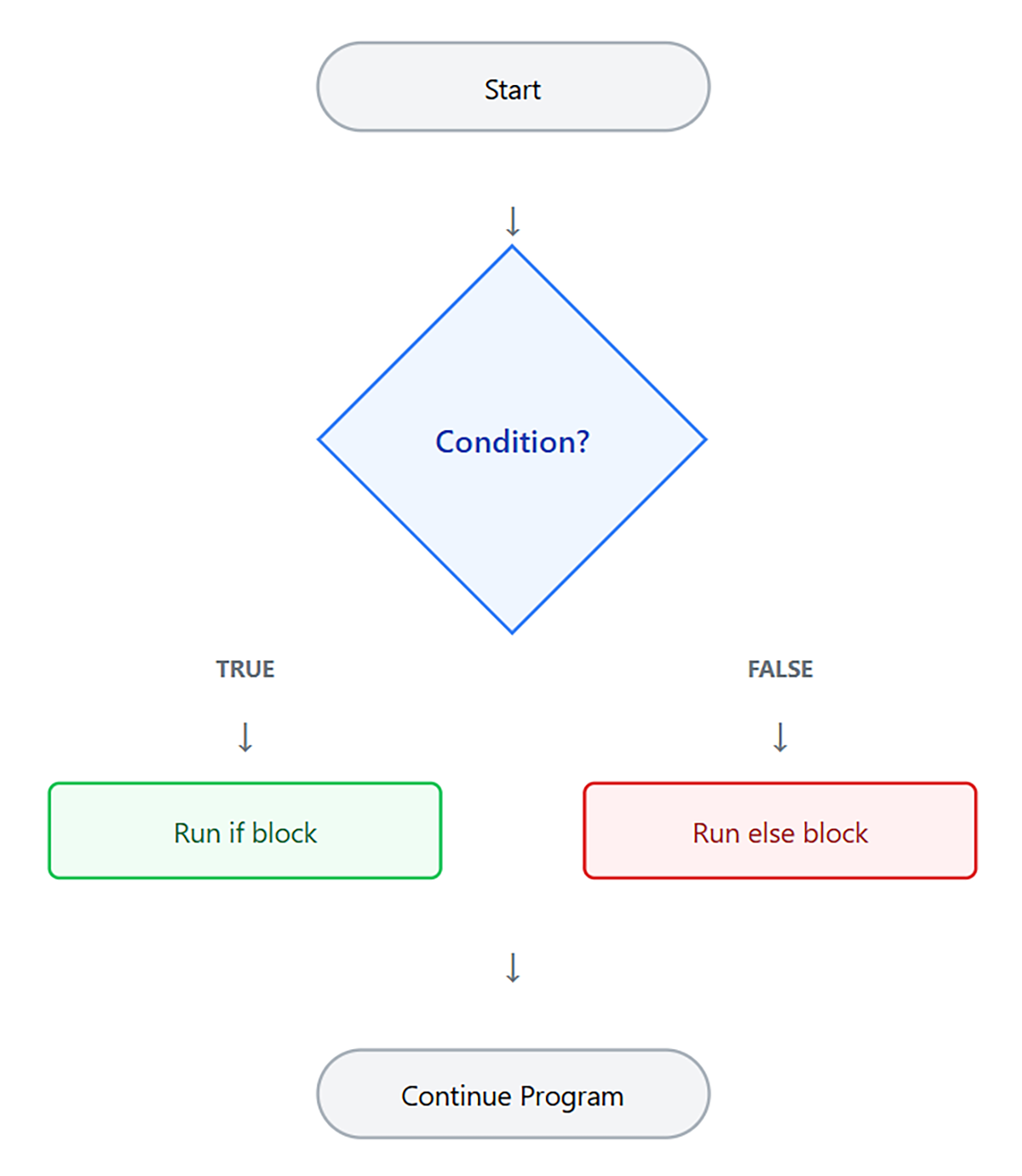
{ } of an if statement only executes when the condition evaluates to true. If the condition is false, JavaScript skips that block entirely and continues with the rest of the program.
let score = 75;
if (score >= 80) {
console.log("Great job!");}
console.log("Quiz complete.");
true or false, typically using comparison or logical operators.In a conditional statement, JavaScript needs a result that is either true or false in order to decide whether to run a block of code. While some conditions use Boolean values directly, JavaScript can also evaluate other types of values as either true or false.
Values that are treated as false in this situation are called falsy values. All other values are considered truthy values.
The falsy values in JavaScript are:
false 0 "" (empty string) null undefined NaN All other values are treated as true, including non-empty strings, nonzero numbers, arrays, and objects.
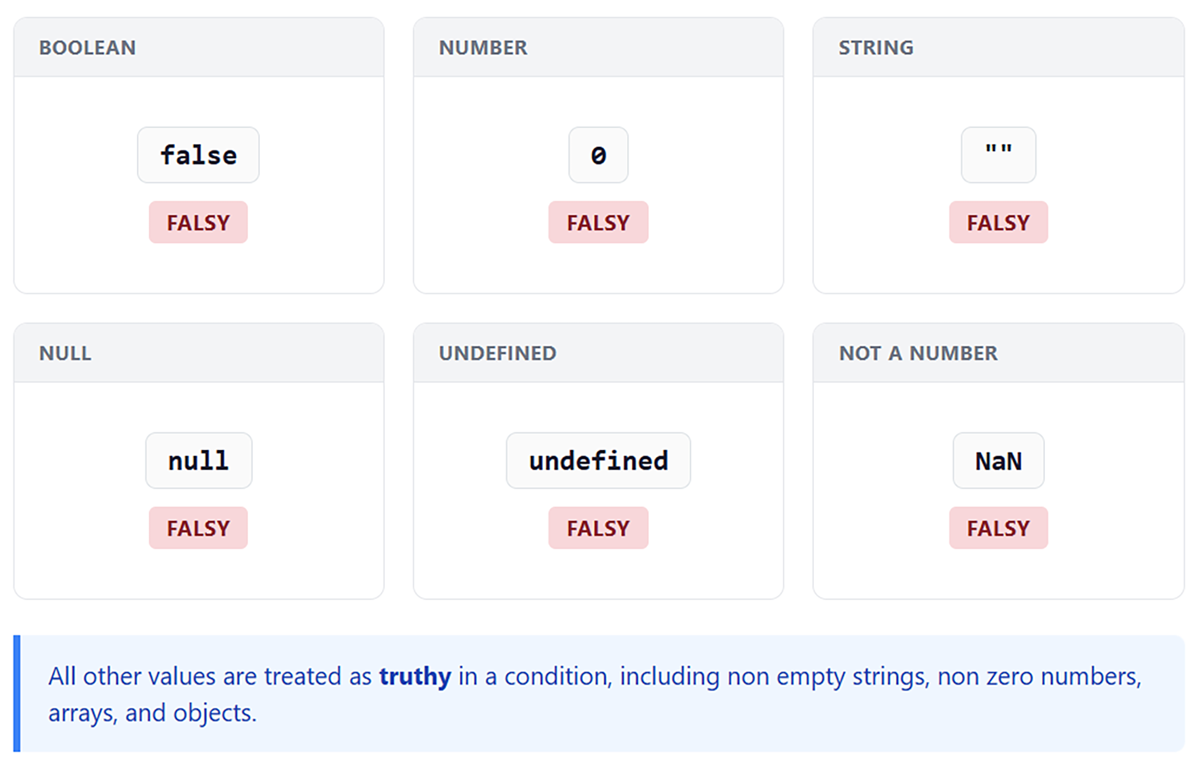
EXAMPLE
This code demonstrates how truthy and falsy values work.In this code:let username = "";
if (username) {
console.log("Welcome, " + username);}
username = "Alex";
if (username) {
console.log("Welcome, " + username);}
if statement, the username is an empty stringfalse
if statement, the username is "Alex"
true
Understanding truthy and falsy values helps you write cleaner conditions. Instead of writing if (username !== ""), you can write if (username) to check if a variable has a meaningful value.
false when evaluated in a Boolean context. true when evaluated in a Boolean context.So far, you have used the if statement to run code only when a condition is true. However, many situations require your program to take one action when a condition is true and a different action when it is false.
The else keyword provides an alternative code block that runs when the if condition is false. This allows your program to handle both possible outcomes: one when the condition is true and another when it is false. The else block does not have its own condition. It runs whenever the if condition is false, handling all remaining cases that did not meet the original condition.
EXAMPLE
This code responds differently based on a user’s age:Becauselet age = 16;
if (age >= 18) {
console.log("You can vote.");} else {
console.log("You cannot vote yet.");}
age is 16, the condition age >= 18 is false, so the else block executes, displaying “You cannot vote yet.”
if with else, exactly one of the two code blocks will always execute. If the condition is true, the if block runs. If the condition is false, the else block runs.
While the else statement allows you to handle two outcomes, many situations require more than two possible results.
In many situations, there are more than two possible outcomes. Instead of choosing between just true and false, your program may need to check several different conditions.
The else if keyword allows you to add additional conditions after an if statement. JavaScript checks each condition in order from top to bottom. As soon as it finds a condition that is true, it runs that block of code and skips the rest.
EXAMPLE
This grading system uses multiple conditions:In this code:let score = 85;
if (score >= 90) {
console.log("Grade: A");}
else if (score >= 80) {
console.log("Grade: B");}
else if (score >= 70) {
console.log("Grade: C");}
else if (score >= 60) {
console.log("Grade: D");}
else {
console.log("Grade: F");}
score >= 90 is false, so it moves to the next conditionscore >= 80 is trueelse if, order matters. Place more specific conditions before more general ones. If you checked score >= 60 first, everyone who passed would receive a D grade, even those who scored 95.
else keyword provides an alternative path when an if condition is false. The else if keyword allows you to test multiple conditions in sequence, executing only the first matching block.
When you need to compare a single value against several possible matches, a switch statement provides a more organized alternative to multiple else if conditions. Instead of checking many separate conditions, a switch statement evaluates one value and compares it to a list of possible matches.
EXAMPLE
Thisswitch statement responds to a day of the week:
In this code:let day = "Tuesday";
switch (day) {
case "Monday":
console.log("Start of the work week.");break;case "Tuesday":
console.log("Second day of the week.");break;case "Wednesday":
console.log("Midweek day.");break;case "Thursday":
console.log("Almost Friday!");break;case "Friday":
console.log("Weekend is near!");break;default:
console.log("It's the weekend!");}
day once"Tuesday"), it runs that block of codebreak statement stops the switch, so no other cases runA switch statement works by evaluating a single value and comparing it to each case. Each case represents a possible match. When a match is found, its code runs, and the break statement stops further comparisons.
Switch statements use strict comparison (===), meaning both the value and the type must match exactly. For example, the string "5" and the number 5 would not be considered equal.
If a break statement is missing, JavaScript continues to the next case even if it does not match. This behavior is called fall-through.
EXAMPLE
This code demonstrates fall-through whenbreak is omitted:
In this code:let fruit = "apple";
switch (fruit) {
case "apple":
console.log("Apples are red or green.");case "banana":
console.log("Bananas are yellow.");break;case "orange":
console.log("Oranges are orange.");break;}
"apple" matches the first casebreak, JavaScript continues to the next caseThe default case runs when none of the other cases match. It acts like the final else in an if/else if structure.
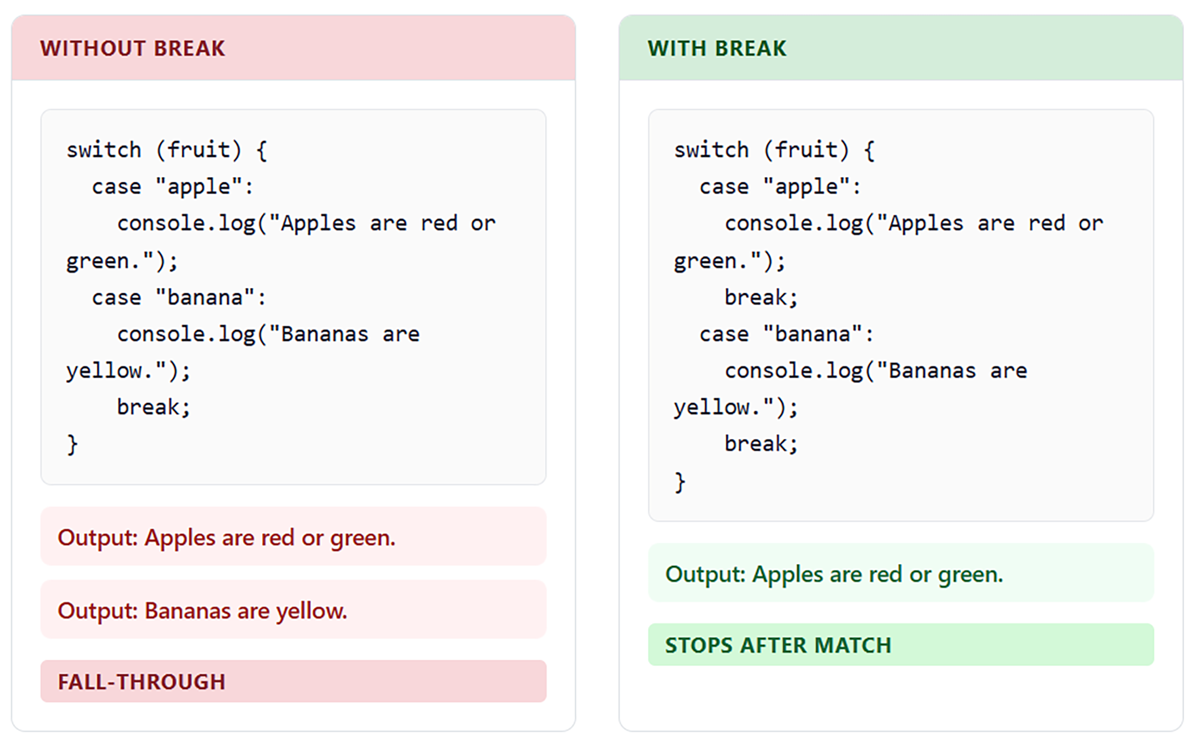
break statement prevents unintended fall-through, and the default case handles unmatched values.
switch statement where execution continues from one case into the next when a break statement is omitted.In earlier sections, you used conditional statements to check one condition at a time. However, many situations require evaluating multiple conditions together to make a decision.
You can do this by nesting conditional statements or by combining conditions using logical operators. A nested conditional places one if statement inside another. This allows your program to check a second condition only after the first condition is true.
EXAMPLE
This code uses nested conditionals to check membership status and purchase amount:In this code:let isMember = true;
let purchaseAmount = 150;
if (isMember) {
if (purchaseAmount > 100) {
console.log("You get a 20% discount!");} else {
console.log("You get a 10% discount.");}} else {
console.log("Join our membership for discounts!");}
While nesting is sometimes necessary, deeply nested conditionals can become difficult to read. When you find yourself nesting more than two or three levels deep, consider refactoring your logic. Logical operators allow you to combine multiple Boolean expressions into a single condition. The three main logical operators are:
&& (AND): True only if both conditions are true || (OR): True if at least one condition is true ! (NOT): Reverses a Boolean value EXAMPLE
This code uses logical operators to simplify the previous nested example:In this code:let isMember = true;
let purchaseAmount = 150;
if (isMember && purchaseAmount > 100) {
console.log("You get a 20% discount!");} else if (isMember) {
console.log("You get a 10% discount.");} else {
console.log("Join our membership for discounts!");}
isMember && purchaseAmount > 100 combines two checks 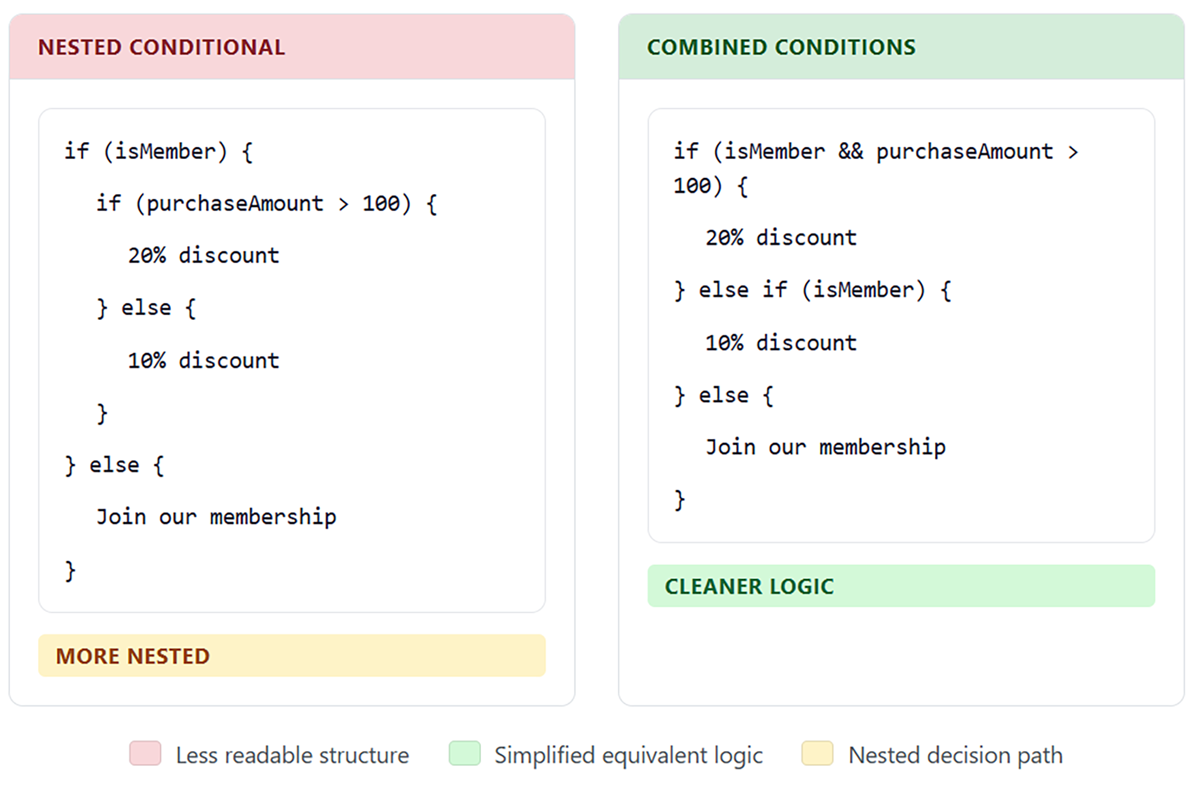
Logical operators allow you to express complex decisions more clearly without deeply nested structures.
let age = 25;
let hasLicense = false;
if (age >= 16 && hasLicense) {
console.log("You can drive.");} else {
console.log("You cannot drive.");}
&& and || allow you to combine multiple conditions into a single, more readable expression instead of deeply nested code. When combining conditions, using parentheses can make your logic clearer and easier to understand.
&& (AND), || (OR), and ! (NOT).else and else if, allowing programs to choose between different paths. You examined switch statements as a structured way to compare a single value against multiple exact matches. Finally, you learned combining conditions to build more complex decisions using nested conditionals and logical operators.
Source: THIS TUTORIAL WAS AUTHORED BY SOPHIA LEARNING. PLEASE SEE OUR TERMS OF USE.
REFERENCES
Mozilla Developer Network. (n.d.). How the web works. developer.mozilla.org/en-US/docs/Learn/Getting_started_with_the_web/How_the_Web_works