In this lesson, you’ll dive into the world of network cabling, which refers to the physical pathways that carry data from one place to another. We’ll explore the various types of cables used to build networks, ranging from the copper wires in your home’s internet setup to the glass fibers that form the backbone of the internet. You’ll also learn to identify the common connectors at the end of these cables. Specifically, this lesson will cover the following:
1. Copper Cables
Copper cabling has been the backbone of networking for decades. These cables transmit data as electrical signals and are still widely used in homes, offices, and enterprises. While fiber-optic cables dominate high-speed backbones, copper remains essential for local connections because it is flexible, inexpensive, and easy to install.
Several designs of copper cables exist, each with their own strengths and weaknesses. The most common design is twisted pair cabling, where copper wires are paired and twisted together to reduce electronic “noise” from surrounding equipment.
Before twisted pair became the standard, many networks used coaxial cables. You may recognize this type of cable from television hookups or cable internet.
A coaxial cable has a single copper conductor in the center, surrounded by layers: an insulator, a metallic shield, and a protective outer jacket. This design makes it very resistant to electromagnetic interference (EMI), which was one of its biggest advantages in early networking.
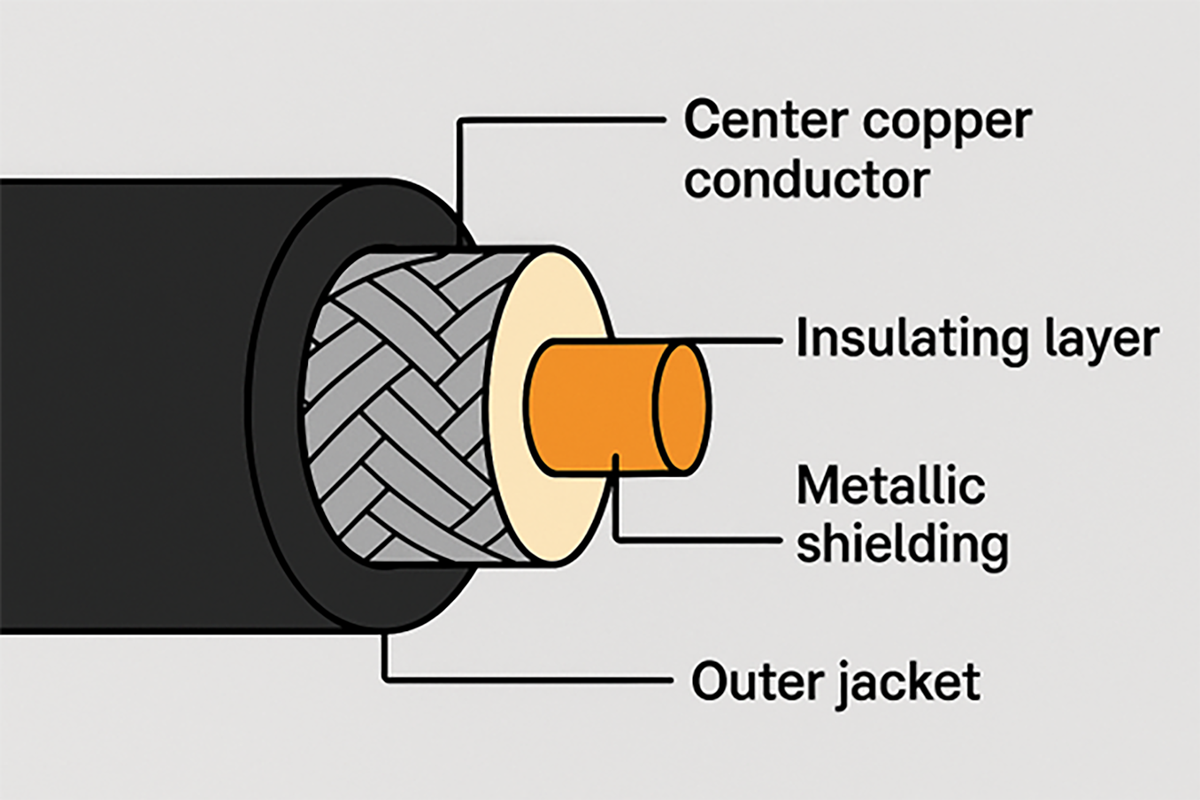
Although early Ethernet networks operating at a speed of 10 Mbps used coaxial cable, modern ones do not, due to its inability to carry network data at the high speeds needed today. It is also bulky and can be hard to bend around corners. For these reasons, twisted pair cables have largely replaced coaxial ones in modern networking. However, coaxial is still used in broadband internet and cable TV services, where its durability and shielding are beneficial.
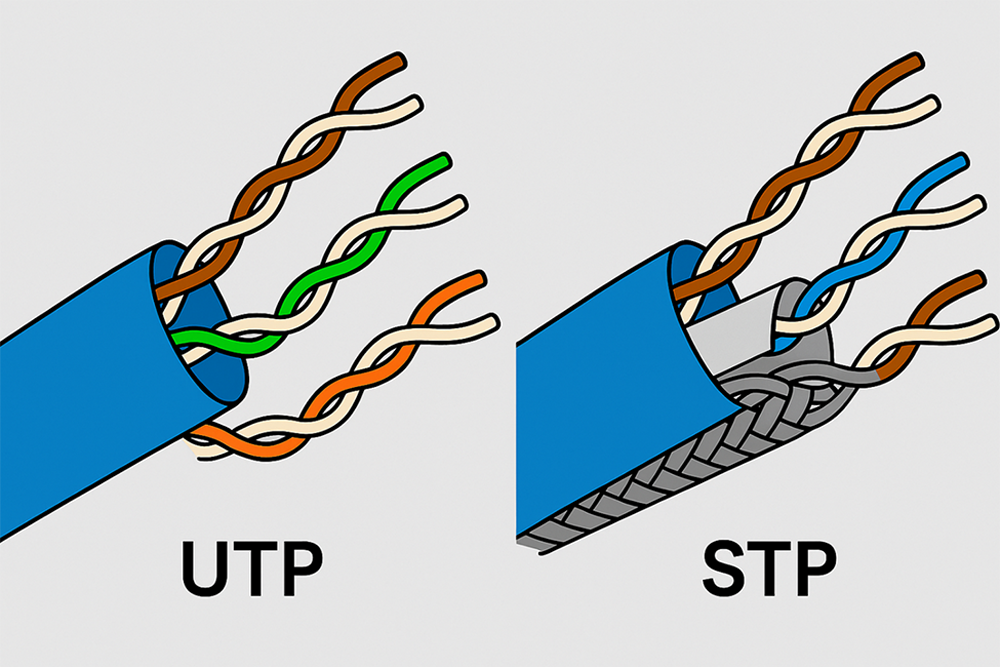
Within the twisted pair family, two main varieties dominate modern networking: unshielded twisted pair (UTP) and shielded twisted pair (STP).
- UTP: Found in nearly every home and office, UTP is cost effective, flexible, and easy to install. Its drawback is limited protection against EMI, which can cause errors in noisy environments.
- STP: Wrapped in foil or braided shielding, STP provides extra protection against EMI. It is often used in factories, hospitals, or other environments where interference is a problem. STP cables are thicker and less flexible than UTP, and usually more expensive.
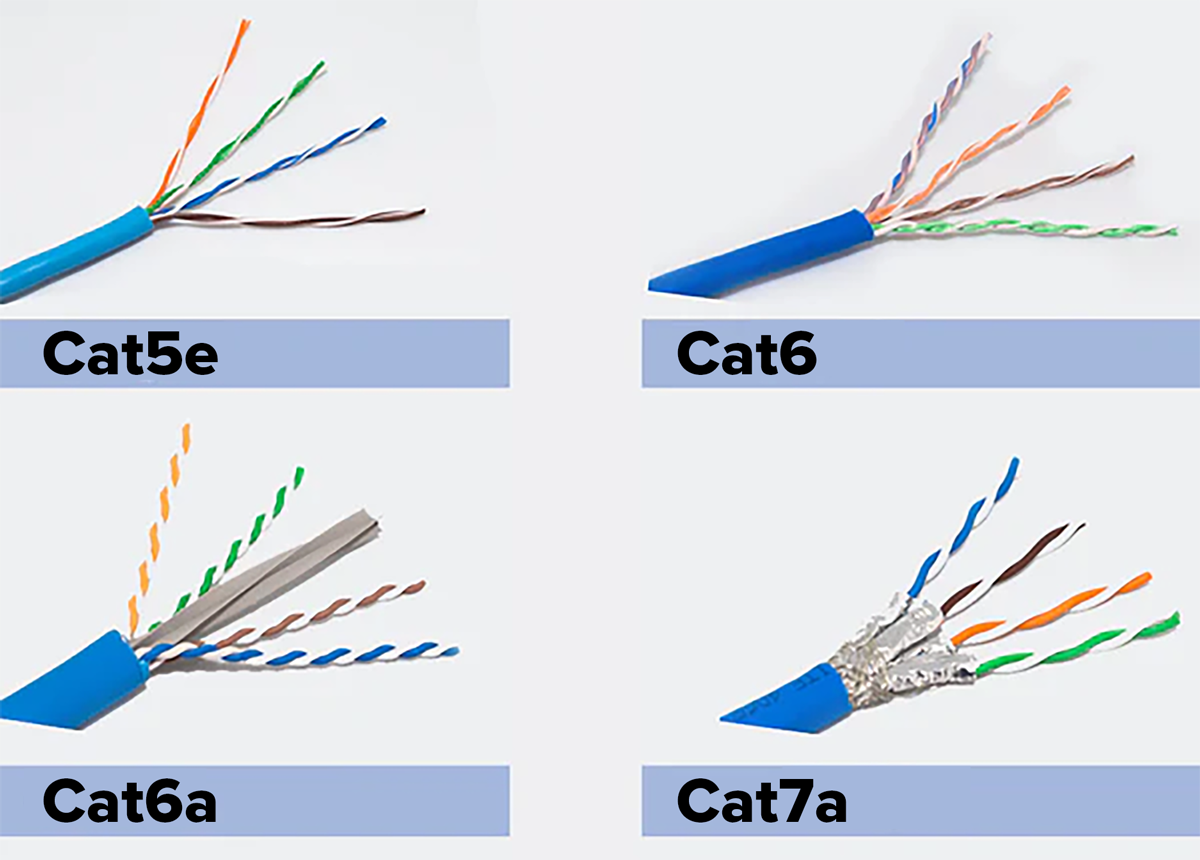
Twisted pair cables are also divided into categories that determine their maximum speed and the distance they can reliably carry data.
-
Category 5e (Cat5e): This supports speeds up to 1 gigabit per second (Gbps) at a distance of 100 m. It is still common in homes and small offices.
-
Category 6 (Cat6): This supports 1 Gbps at 100 m and up to 10 Gbps at shorter distances of about 55 m. It is often used in small businesses or networks that require higher speeds.
-
Category 6a (Cat6a): This supports 10 Gbps at 100 m. These cables are thicker and less flexible, but they are widely used in enterprises and data centers where higher performance is required.
- Newer categories such as Cat7 and Cat8 exist for specialized, high-performance environments, but they are less common in everyday networking.
|
Category
|
Max Speed
|
Max Distance
|
Common Use
|
|
Cat5e
|
1 Gbps
|
100 m
|
Homes and offices
|
|
Cat6
|
1–10 Gbps
|
55 m (10 Gbps)
|
Small businesses, short high-speed runs
|
|
Cat6a
|
10 Gbps
|
100 m
|
Enterprises and data centers
|
|
Cat7
|
10+ Gbps
|
100 m (with shielding)
|
Specialized high-performance
|
-
- Coaxial Cable
- A copper cable with a single conductor, insulation, shielding, and a protective jacket. Resistant to interference, but bulkier and less flexible than twisted pair.
- Unshielded Twisted Pair (UTP)
- A common copper cable made of paired wires twisted together without extra shielding. Flexible and inexpensive, but more vulnerable to interference.
- Shielded Twisted Pair (STP)
- A copper cable similar to UTP but with foil or braided shielding around the wires to reduce interference. Thicker, less flexible, and more costly.
- Category 5e (Cat5e)
- A twisted pair cable category that supports up to 1 Gbps at 100 m. Common in homes and small offices.
- Category 6 (Cat6)
- A twisted pair cable category that supports 1 Gbps at 100 m and up to 10 Gbps at shorter distances. Used in small businesses and high-speed applications.
- Category 6a (Cat6a)
- A twisted pair cable category that supports 10 Gbps at 100 m. Thicker and less flexible, suited for enterprises and data centers.
2. Fiber-Optic Cables
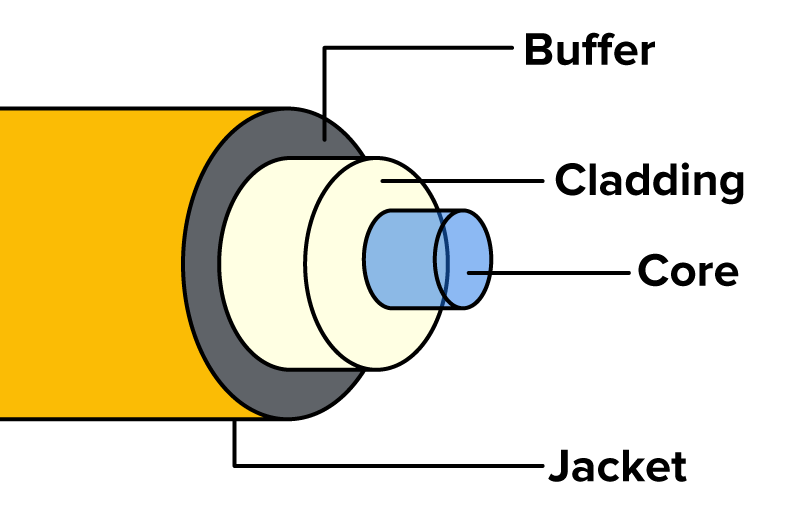
A fiber-optic cable is a networking cable that uses strands of glass to transmit data as pulses of light. Each strand is about the thickness of a human hair, but it can carry massive amounts of data over very long distances with very little loss. Because it uses light instead of electricity, fiber is completely immune to EMI.
A fiber-optic strand is made of four main parts (see the diagram below):
- Core: The thin glass center where the light signal travels
- Cladding: A layer that surrounds the core and reflects light back inside, keeping the signal contained
- Buffer: a protective coating around the cladding acts as a shock absorber and protective coating that shields the glass fiber from mechanical stress, bending damage, and temperature changes.
- Jacket: The tough outer layer that protects the cable from physical damage
This ability to move data quickly, reliably, and without interference makes fiber-optic cables the highest-performance option for modern networks. They are widely used in enterprise backbones, internet service provider connections, and even undersea to connect continents.
-
The primary advantage of a fiber-optic cable is its immunity to EMI and its ability to transmit data at higher speeds and over longer distances than any type of copper cable.
Not all fiber-optic cables are the same. The glass strands inside can be designed in different ways, which affects how far and fast data can travel. They look similar on the outside, but their performance and typical uses are very different.
-
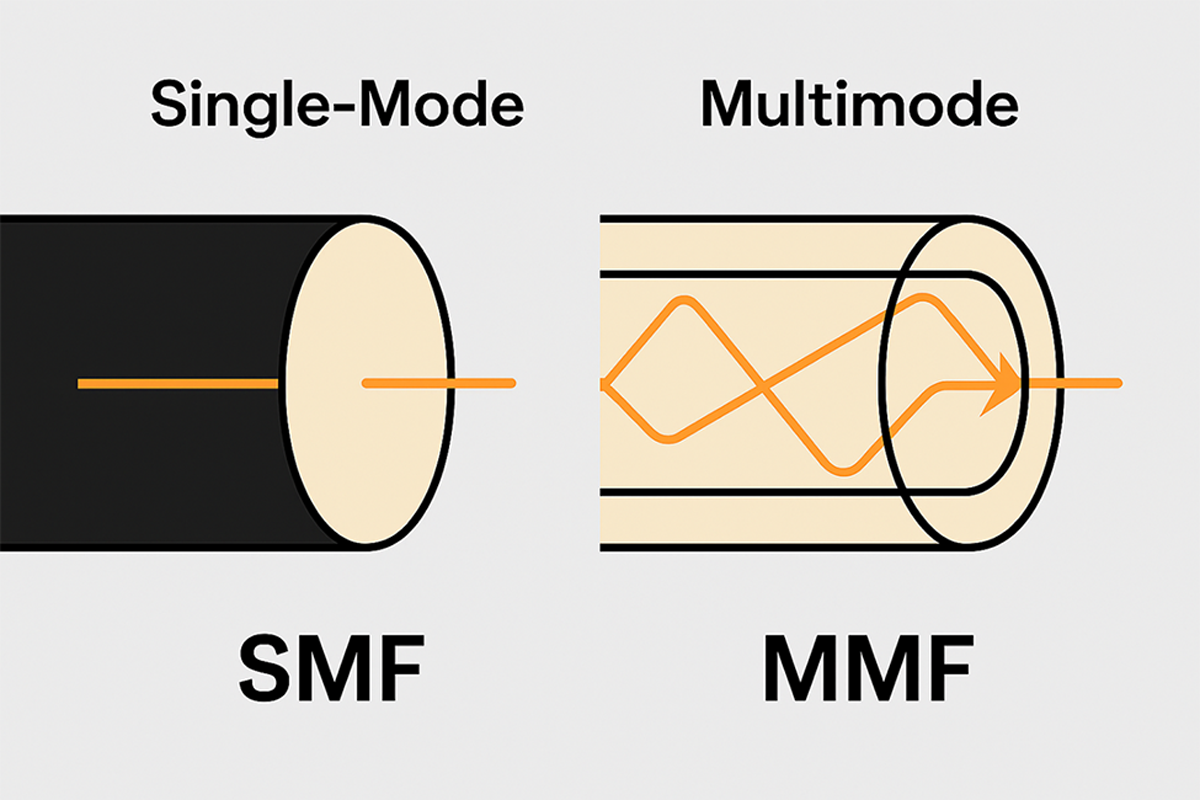
Single-Mode Fiber (SMF): This type of fiber has an extremely thin core that allows only one path, or mode, of light to travel through it. This focused path allows the signal to travel for dozens of miles without losing strength. SMF is used for long-distance connections, such as connecting cities or as undersea cables that form the internet’s global backbone.
-
Multimode Fiber (MMF): This type of fiber has a larger core that allows multiple paths of light to travel through it at the same time. This “dispersion” of light limits the cable’s effective distance to a few hundred meters. MMF is less expensive than SMF and is ideal for shorter-distance, high-speed connections within a single building, such as connecting servers in a data center or linking network closets on different floors.
|
Feature
|
Single-Mode Fiber (SMF)
|
Multimode Fiber (MMF)
|
|
Core Size
|
Very small (about 9 µm)
|
Larger (50–62.5 µm)
|
|
Light Paths
|
One focused path
|
Multiple paths
|
|
Distance
|
Dozens of miles
|
A few hundred meters
|
|
Speed
|
Very high, long-distance backbone
|
High, short-distance LAN connections
|
|
Jacket Color
|
Usually yellow
|
Usually orange or aqua
|
|
Common Uses
|
City-to-city links, undersea cables, ISP backbones
|
Data centers, campus networks, server rooms
|
-
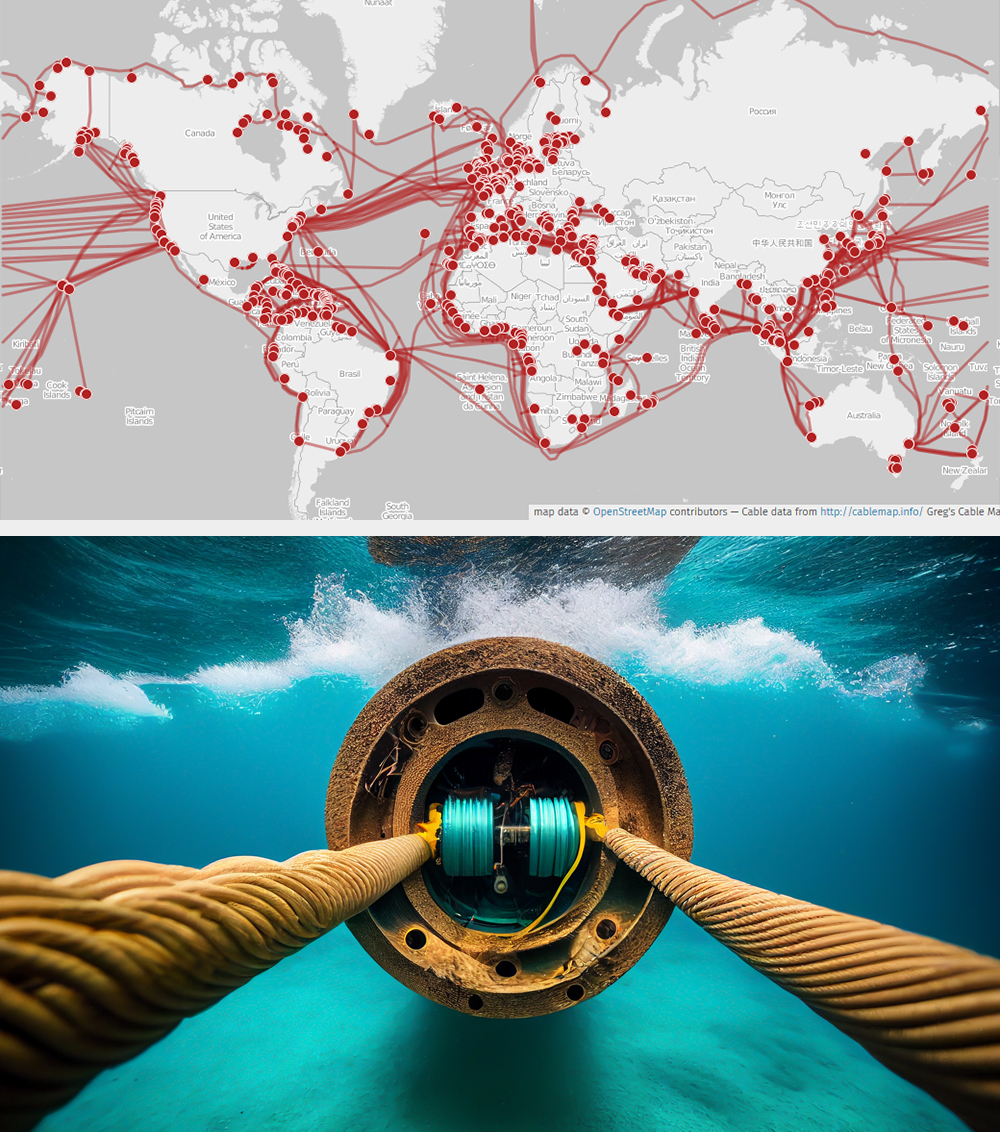
Over 95% of international internet traffic travels through fiber-optic submarine cables that run along the ocean floor. These hidden cables connect continents and make global communication possible. In one famous case, Google reported that sharks had bitten into undersea fiber cables, mistaking the electrical signals for prey. Engineers had to reinforce the cables with protective layers to prevent future “shark attacks.”
-
- Fiber-Optic Cable
- A networking cable that uses strands of glass to transmit data as pulses of light. It is immune to EMI and supports very high speeds over long distances.
- Single-Mode Fiber (SMF)
- A type of fiber-optic cable with a very small core that carries one focused light path. It supports long-distance, high-speed connections, such as city-to-city or undersea cables.
- Multimode Fiber (MMF)
- A type of fiber-optic cable with a larger core that carries multiple light paths. It is best for shorter, high-speed connections within buildings, such as in data centers.
3. Wiring Standards and Cable Types
Ethernet cables might look identical on the outside, but the order of the eight tiny wires inside the RJ45 connector determines whether a connection will work. These arrangements are known as wiring standards, and they ensure that data signals travel on the correct pairs of wires. The Telecommunications Industry Association (TIA) established two approved standards: T568A and T568B.
Each standard assigns the colored wire pairs to specific pin numbers in the connector.
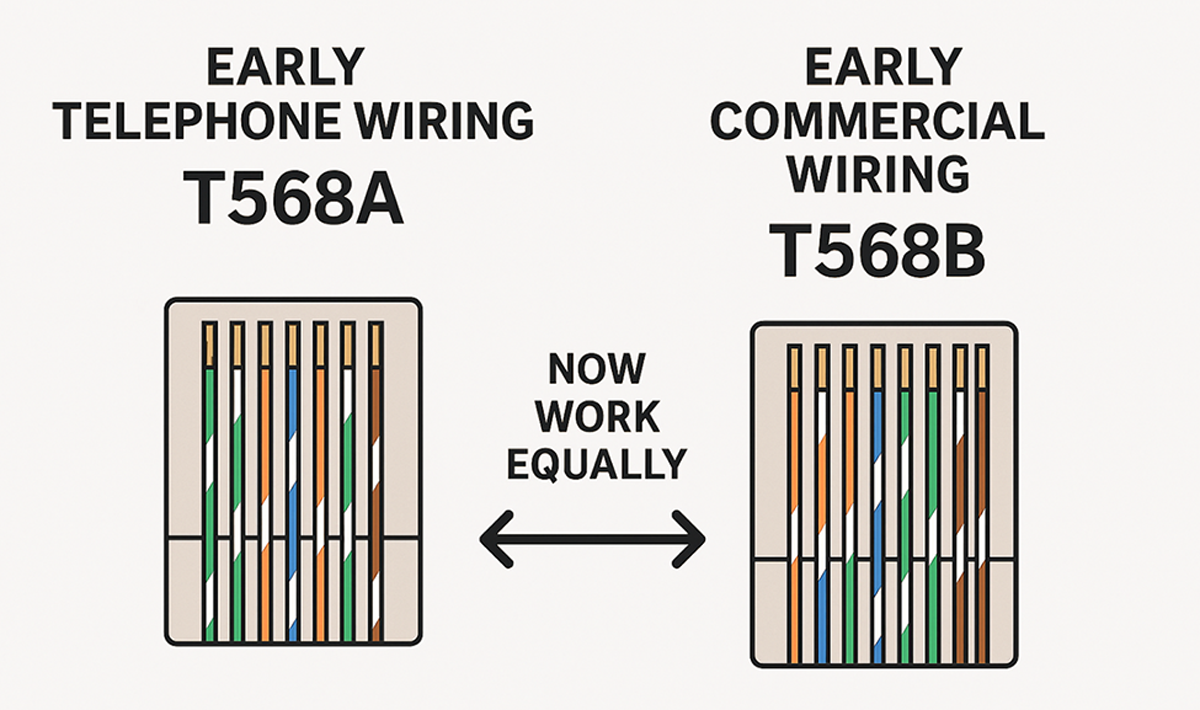
- T568A places the green pair on Pins 1 and 2 and the orange pair on Pins 3 and 6.
- T568B places the orange pair on Pins 1 and 2 and the green pair on Pins 3 and 6.
The blue and brown pairs remain in the same position for both. The two standards exist because Ethernet evolved from different wiring systems.
When T568A was developed, it matched older telephone wiring layouts used in government and residential buildings. Later, T568B became popular in commercial networks because it was compatible with the wiring methods used by AT&T and Bell Labs.
Both standards remain valid today. They perform identically, but organizations usually stick with whichever version matches their existing cabling for consistency. The key rule is to choose one standard and use it consistently across all terminations.
-
The rivalry between T568A and T568B is sometimes jokingly referred to as the “Mac versus PC” debate of network cabling. Both work perfectly fine, but each camp has loyal followers.
In the 1980s, the TIA was developing the first Ethernet wiring standards. The government had already adopted a green-first layout based on older telephone wiring, which became known as T568A. Meanwhile, AT&T’s 258A wiring scheme—used widely in private businesses—was adopted as T568B. When both became part of the same TIA standard, technicians suddenly had two “official” ways to wire the same cable.
Ever since, network installers have playfully argued over which one is “right.” The truth? They’re electrically identical—the only real danger is mixing them up on the same cable.
Now that you understand how T568A and T568B define wire order, let’s look at how those patterns are applied to create different types of Ethernet cables.
Depending on which standard is used on each end, an Ethernet cable can serve different purposes.
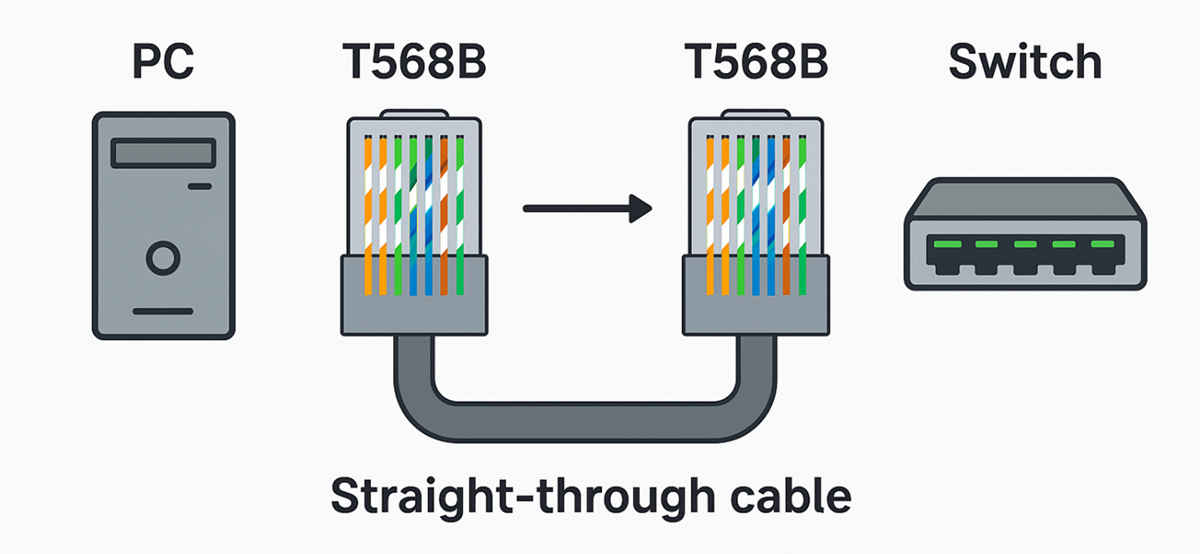
A straight-through cable uses the same standard (T568A or T568B) on both ends. It connects different device types, such as a computer to a switch or a router to a switch.
Even though T568A and T568B carry signals in the same way, the choice of standard on each end changes how the transmit and receive wires are lined up.
When both ends use the same standard, the cable connects different device types, such as a computer to a switch. But if both devices are the same type, for example, two switches or two computers, their transmit and receive pins align incorrectly. In that case, using T568A on one end and T568B on the other swaps those pins, allowing the devices to communicate directly. A crossover cable uses T568A on one end and T568B on the other. This swaps the transmit and receive pairs so that similar devices can communicate directly. This is often used for the following:
- Connecting two switches
- Connecting two computers
- Connecting two routers
Modern equipment often includes
auto-MDIX, which automatically adjusts for crossover, but understanding the difference remains essential for troubleshooting.

A rolled cable, also known as a rollover cable, completely reverses the wire order from one end to the other. Pin 1 connects to Pin 8, Pin 2 connects to Pin 7, and so on. This is not used for Ethernet data transmission, but rather to connect a computer to a network device’s console port for setup or troubleshooting.
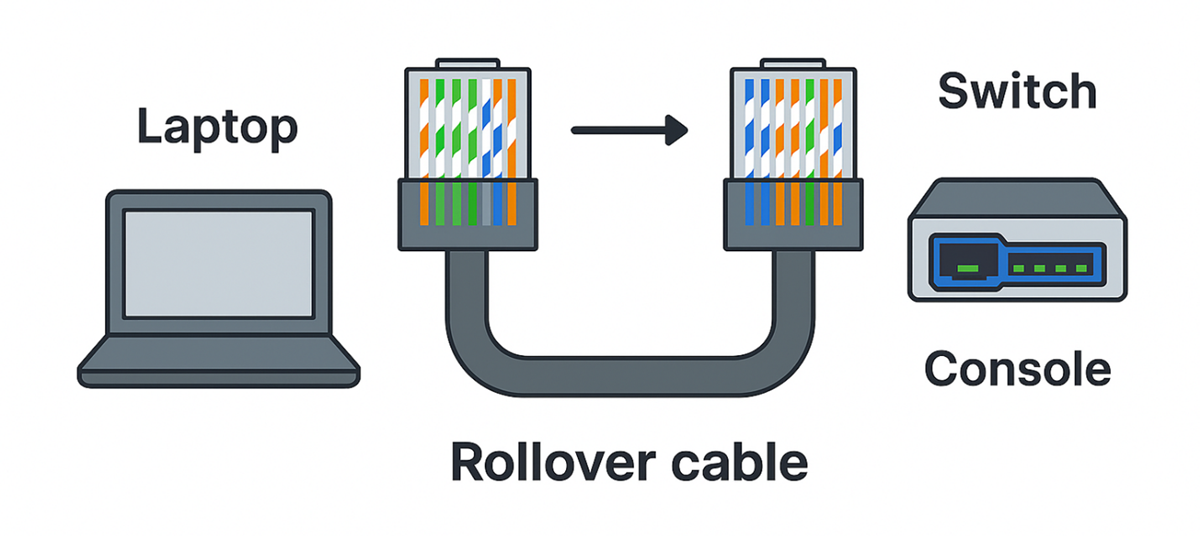
Each cable type serves a specific purpose, and understanding how wiring standards affect signal flow helps ensure reliable connections and easier troubleshooting.
-
- Wiring Standard
- A defined color-coded arrangement of wires inside an Ethernet connector that ensures signals travel correctly between devices.
- T568A
- An Ethernet wiring standard that places the green wire pair on Pins 1 and 2 and the orange pair on Pins 3 and 6.
- T568B
- An Ethernet wiring standard that places the orange wire pair on Pins 1 and 2 and the green pair on Pins 3 and 6.
- Straight-Through Cable
- An Ethernet cable that uses the same wiring standard (T568A or T568B) on both ends to connect different device types, such as a computer and a switch.
- Crossover Cable
- An Ethernet cable that uses T568A on one end and T568B on the other so that transmit and receive pairs are swapped, allowing similar devices to communicate directly.
- Rolled (Rollover) Cable
- A cable that completely reverses pin order from one end to the other; used to connect a computer to a network device’s console port for configuration or troubleshooting.
- Auto-MDIX
- A feature in modern network devices that automatically detects and adjusts for straight-through or crossover cable types.
4. Common Connectors
Every cable needs a connector, which is the physical plug that attaches it to a device or another cable. Without the correct connector, even the best cable cannot complete a network link. Connectors come in many forms, but a few appear so often that every technician should be able to recognize them.
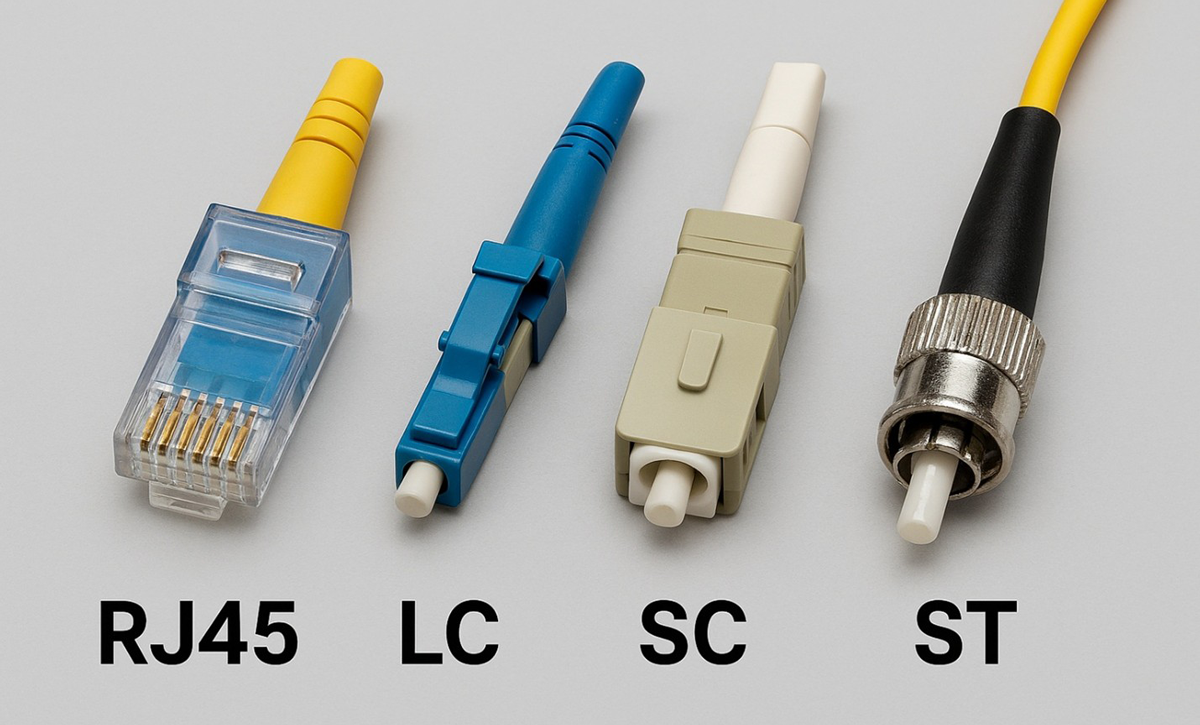
The most familiar is the RJ45 connector—the standard plug used on Ethernet cables. If you have ever plugged a computer into a router or wall jack, you have used one. It looks like a wide telephone jack with eight metal pins that line up with the eight copper wires inside the cable. RJ45 works on both UTP and STP cables, making it the everyday connector of wired networks.
Fiber-optic cables use different connectors because their tiny glass cores must be aligned with precision. The LC connector is the most common in modern data centers. It is compact, easy to clip in place, and allows many connections to fit into a small patch panel. The SC connector is larger and clicks securely when it is plugged in. It is valued for its reliability and is common in enterprise and telecom settings. An older style, the ST connector, uses a round, twist-and-lock design. It is sturdy but is being replaced by LC and SC in most new installations.
A helpful way to remember these is to think of RJ45 as the universal key of copper networking. LC and SC are like specialized keys designed for the precision of fiber optics, where an exact fit makes all the difference.
|
Connector
|
Cable Type
|
Size
|
Common Use
|
|
RJ45
|
Copper (UTP or STP)
|
Medium
|
Ethernet connections in homes, offices, and schools
|
|
LC
|
Fiber
|
Small
|
High-density data centers
|
|
SC
|
Fiber
|
Medium
|
Enterprise and telecom networks
|
|
ST
|
Fiber
|
Large and round
|
Older fiber networks
|
-
Imagine you are designing a network for a new two-story office building. You need to connect 50 computers on each floor to a central network closet on that same floor. Then, you need to connect the two network closets. What combination of cable and connector types would you use for the different parts of this network, and why?
-
- RJ45 Connector
- The standard connector for Ethernet cables. It resembles a wide telephone jack and has eight pins that connect to the eight wires inside a twisted pair cable.
- LC Connector
- A compact fiber-optic connector often used in data centers. Its small size allows many connections to fit into high-density equipment.
- SC Connector
- A square-shaped fiber-optic connector that clicks into place. It is reliable and widely used in enterprise and telecom networks.
- ST Connector
- An older fiber-optic connector with a round, twist-and-lock design. It is sturdy but is being replaced by LC and SC in most new installations.
5. Real-World Use Cases
Different types of cables and connectors appear in different environments. At home, UTP cables with RJ45 connectors are the most common. These flexible cables are inexpensive, easy to run through walls, and fast enough for everyday activities such as streaming videos or online gaming. Coaxial cables are still widely used for cable modems and TV connections, while fiber-optic services are becoming more available in residential areas for very high-speed internet.
In businesses and schools, the choices are more complex. STP cables may be used in buildings filled with electronic equipment where EMI is a concern. MMF cables with LC or SC connectors often link different floors or departments, allowing for fast, reliable communication across larger spaces. The goal is to balance cost with performance so that video calls, file sharing, and cloud access remain smooth for many users at once.
Data centers push these technologies to the limit. SMF cables with LC connectors are common for long-distance, high-capacity backbone connections, often carrying data at 100 Gbps or more. Within server racks, high-category twisted pair cables or STP handle dense electronic environments where reliability is critical. These choices allow data centers to scale up and support massive workloads, such as artificial intelligence processing or global cloud storage.
-
Consider a time when you experienced slow internet or a dropped connection at home or in the office. Could the issue have been related to the type of cable? How might upgrading to a different cable or connector have helped?
-
List as many everyday scenarios as you can where poor cable choices might cause network problems, such as in a crowded office or a home with smart devices. How can switching to STP or fiber solve these issues?
In this lesson, you learned how copper cables use twisted pairs of wires to send data with electricity, making them reliable for most everyday network connections. You explored how fiber-optic cables transmit data as light through thin glass strands, allowing for faster speeds and longer distances without interference. You discovered how wiring standards and cable types, such as T568A and T568B, define the order of wires inside Ethernet connectors and how those patterns create straight-through, crossover, and rollover cables for different connectivity needs. You also examined common connectors used with copper and fiber cables and saw real-world use cases that showed how technicians choose the right cable and connector based on distance, environment, and network design.