In this lesson, you will learn how to develop a WBS (work breakdown structure) and look at a case study of a WBS created based on the scope management plan.
Specifically, this lesson will cover the following:
Now that you’ve learned about the basics of WBS, we will apply what you’ve learned and create a WBS.
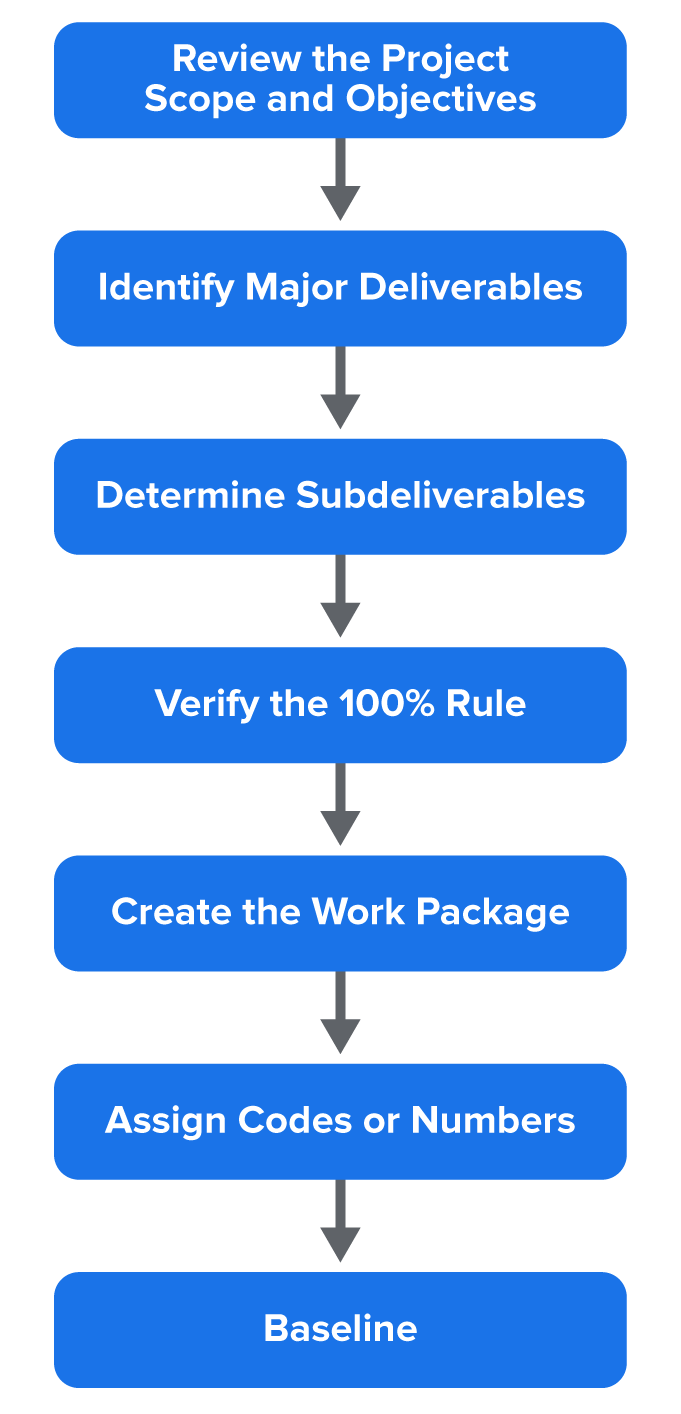
Here are the steps you’ll take to complete the WBS.
step by step
1. Review the scope and objectives of the project.
You’ve already created these documents using the project charter and scope management plan. So, the first step is to review to make sure you are clear on all elements that need to be completed for the project.
2. Identify your major deliverables.
These are the high-level items you must complete, usually outlined in the scope statement.
There are also many ways you can organize the major deliverables in the WBS.
EXAMPLE
It can be organized by either deliverable or phase, where work will be completed. The major deliverables of the project are used as the first level in the WBS.
3. Break the deliverables into smaller components (subdeliverables).
For each of your major deliverables, consider the subdeliverables that need to be done in order to complete the larger deliverables.
EXAMPLE
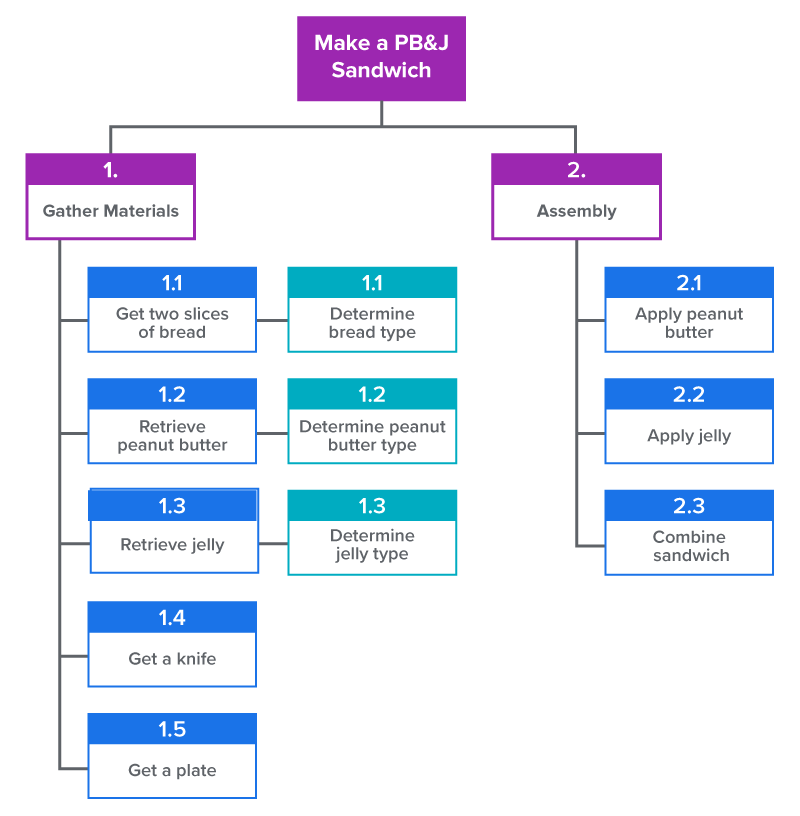
If my main deliverable is to make a peanut butter and jelly sandwich, my subdeliverables might be to get the peanut butter out, get the jelly out, get the bread out, open the jars, get a knife, spread the peanut butter and jelly on the bread, and put the pieces of bread together.
Although this is a simple example, you can see all of the steps that need to be completed, no matter how small. In project management, we get into this level of detail too, so we can be accurate with our schedule, resources needed, and budgets, which we’ll be addressing in later lessons.
4. Verify the 100% rule.
The 100% rule in project management says that the WBS must contain all the work necessary to complete the project (based on the project scope, nothing more and nothing less). So, in this step, you will focus on double-checking to make sure all of your major deliverables have detailed subdeliverables.
5. Create the work package.
A work package is the groupings of project work. So, a work package would be one major deliverable, with all of the subdeliverables. The project manager is free to determine the number of levels in the WBS based on the complexity of the project. You need to include enough levels to estimate project time and costs accurately, but not so many levels that it is difficult to distinguish between components.
EXAMPLE
For our spa app example, a work package might be a user login feature. This package might include all of the subtasks that need to be accomplished, including a backend authentication system, integration with the calendar and database, and testing of the login.
Another thing to keep in mind is that work packages should be easily assigned to one person or a team of people, with clear accountability and responsibility for completing the assignment.
6. Assign codes or numbers.
So that we can better manage and reference the project, we will assign numbers or codes to each deliverable based on the hierarchy of that item. For example, a major deliverable might be 1.0, and a subdeliverable would be 1.1. This helps the project manager to organize and reference tasks more easily, such as when managing the project budget.
You’ll notice in the image given that each element at each level of the WBS in both figures is assigned a unique identifier. Review with stakeholders.
By breaking the deliverable down to lower-level tasks, we are able to apply costs to each individual task. For example, in our Gather Materials tasks, we could place a cost on the peanut butter, jelly, and bread, independent of each other. The same is true for the labor costs under the Assembly task and subtasks.
big idea
Remember when you created the stakeholder register? Since you already have your list of stakeholders, where appropriate, you’ll want to review the WBS to make sure everything is covered. It is important for this document to be accurate and complete, and by having other people, such as your project team, review, you can uncover any areas that are missing.
7. Baseline the WBS.
Baselining is a fixed, agreed-upon reference point for a project. It is used to track and measure progress. Once the WBS is baselined, it becomes the basis for the entire project, and any scope changes or deviations have to follow a formal process for change. Additionally, as we move forward with the project work, the baseline will allow us to measure project completion against both the schedule and the budget.
A few notes on creating the WBS: It is very important to note that we do not worry about the sequence in which the work is performed or any dependencies between the tasks when we do a WBS. That will be worked out when we develop the schedule.
If you were to create a WBS for building a house, there are certainly some steps that need to occur before others. For example, the concrete foundation must be poured before framing can begin. When we create the WBS, we don’t worry so much about the order of tasks or the dependency of tasks, as we’ll do that work later. The important thing about the WBS is to get every deliverable and subdeliverable down.
The main idea of creating a WBS is to capture all of the tasks, irrespective of their order. So, if you find yourself and other members of your team thinking sequentially, don’t be too concerned, but don’t get hung up on trying to diagram the sequence, or you will slow down the process of task identification. A WBS can be structured in any way that makes sense to you and your project. In practice, the chart structure is used quite often, but it can be composed in outline form as well.
Clean Room
1.0
Mop Floor
1.1 Get mop out of the closet.
1.2 Mix cleaner with water in a bucket.
1.3 Rinse out the bucket and mop.
2.0
Dust
2.1 Coffee table
2.2 Blinds
3.0
Vacuum
3.1 Get the vacuum out of the closet.
3.2 Vacuum the carpet.
3.3 Empty the bag.
3.4 Connect the hose and plug.
4.0
Pick Up Floor
4.1 Toys
4.1.1 Put the toys in the toy box.
4.2 Clothes
4.2.1 Hang up in the closet.
5.0
Clean Curtains
5.1 Remove the curtains.
5.2 Take to the cleaners.
5.3 Hang the curtains.
EXAMPLE
Under 3.0 Vacuum, it would be obvious that 3.2 Vacuum the carpet would be performed after 3.4 Connect the hose and plug! However, you will probably find yourself thinking sequentially, as it seems to be human nature to do so.
hint
The best way to think about WBS is this: It is essentially a to-do list that is organized like a family tree. You start with the project at the top, break it into smaller chunks, then break those items into even smaller chunks to give you a clear picture of everything that needs to be done to meet the deliverables and requirements.
terms to know
100% Rule
States that the WBS must contain all of the work necessary to complete the project, nothing more and nothing less.
Work Package
The groupings of project work, usually defined by a major deliverable and its subdeliverables.
Baselining
A fixed, agreed-upon reference point for a project.
2. WBS Case Study
Let’s take a look at a real-world example, using the day spa we’ve focused on. Previously, we created the scope for the day spa when we created the charter. Now we can combine that information with scope management information to create a complete scope management plan.
Let’s take a look at the scope management plan again to be reminded of our project, so we can create the WBS.
IN CONTEXT
Spa Scheduling App Scope Management Plan
Project Name:
Spa Scheduling App
Project Purpose and Objective
The spa wants to develop a mobile (iOS & Android) and web-based scheduling app that allows clients to book, reschedule, or cancel appointments 24/7. The goal is to reduce phone traffic, increase appointment bookings by 25%, and improve overall client satisfaction within 1 year.
Deliverables
Mobile app (iOS & Android) and web portal for clients
Admin dashboard for staff to manage appointments and view reports
Automated email/SMS confirmations and reminders
Integration with existing payment and client management systems
Requirements
Clients can view available services, staff, and times.
Clients can book, reschedule, or cancel appointments at any time.
Staff time spent on phone scheduling should be reduced by at least 30%.
Overall client satisfaction with appointment booking convenience should be increased.
Constraints
Budget: $50,000 maximum for design, development, and deployment
Timeline: Must launch within 6 months
Technology: Must integrate with current spa management software and payment processors
Assumptions
Staff and client feedback will be available during the design and testing phases.
Internet access will be stable for cloud-based app functionality.
Third-party integrations (payment processors, management software) will remain compatible.
Exclusions (Out of Scope)
Marketing or promotion of the app
Development of loyalty/reward program features
Hardware provisioning for clients (phones or tablets)
Acceptance Criteria
Clients can successfully book, reschedule, or cancel appointments via the app or web portal.
Staff can manage appointments through the dashboard without issues.
The system processes payments securely and sends accurate notifications.
Booking traffic increases by 25% and phone scheduling time drops by 30% within 6 months after the launch.
Scope Validation
Deliverables will be reviewed with key stakeholders at milestones.
App design mockups approved by management and staff
Functional testing completed with a pilot group of clients
Final acceptance after successful integration and user testing
Scope Control
Any proposed change to the scope must be submitted as a Change Request, including description and impact on budget, schedule, and resources. Change Requests must be approved by the project sponsor before implementation. All changes are logged in a Scope Change Log.
Roles and Responsibilities
Project Manager: Oversees scope definition, validation, and control
Project Sponsor: Approves major scope changes and validates deliverables
Development Team: Ensures technical requirements are implemented according to scope
Stakeholders (Staff & Clients): Provide feedback during testing and validation phases
Note: A Change Request is a formal proposal to modify some aspects of a project. A Scope Change Log is the formal document used to track change requests. You will see these two terms in more detail in a later lesson.
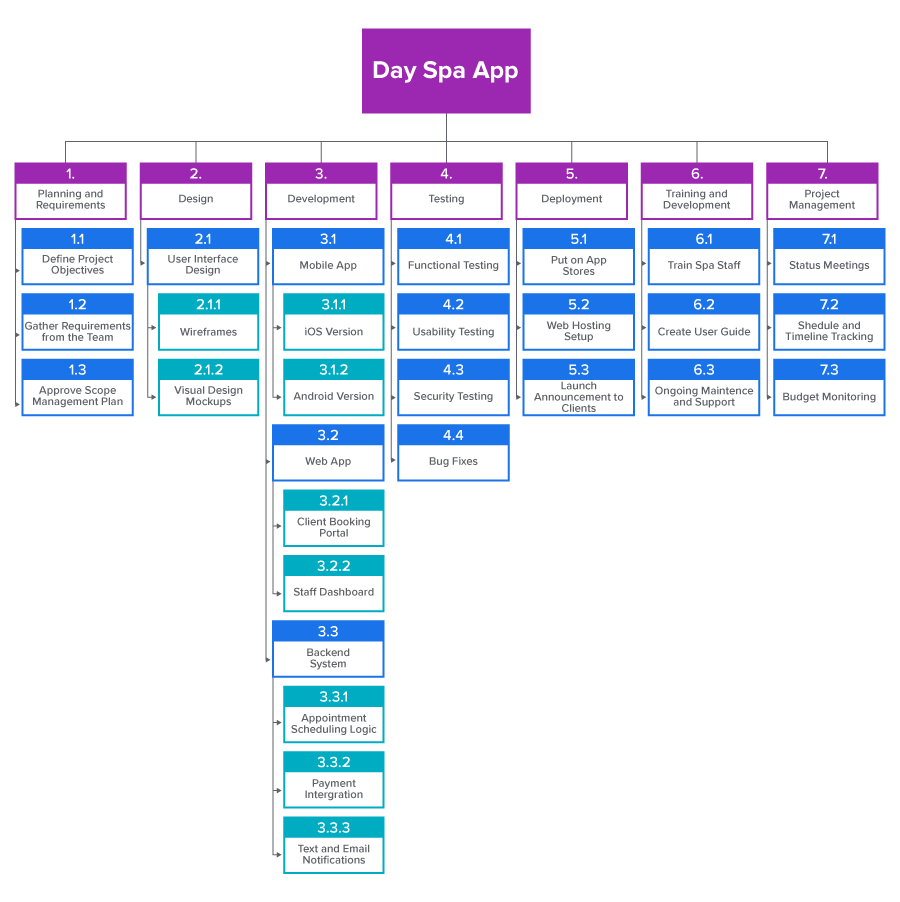
Based on the scope of this project, the project manager decided to create the WBS based on the main categories of work that are needed to complete the deliverables:
Planning & Requirements
Design
Development
Testing
Deployment
Training & Support
Project Management
Note that depending on the type of project, a project manager might use different categories than the ones listed. Then, based on these categories, the project manager and project team brainstorm all of the tasks that need to be completed in each main category, and they begin filling in the WBS. Remember, we go through this process for a few reasons. It allows us to estimate costs, understand what resources are needed, and create an accurate schedule.
You can see from this WBS that the project manager divided the tasks into categories but then further divided them into specific tasks within that category. Some, such as the development category, are divided into tasks, but also into subtasks.
try it
Based on this Spa App WBS, let’s see if you can answer these questions.
Q1: Which elements are part of the Training and Development work package?
Q2: What aspects need to be done in order to complete the project management work package?
Q3: What is task 3.3.3?
Answers:
Answer to Q1 6.1 Train Spa Staff, 6.2 Create User Guide, and 6.3 Ongoing Maintenance and Support
Answer to Q2 7.1 Status Meetings, 7.2 Schedule and Timeline Tracking, and 7.3 Budget Monitoring
Answer to Q3: 3.3.3 is the task: Text and Email Notifications.
try it
Your turn!
Using the WBS provided, try answering these questions before reviewing the answers. Once you determine your answer, select the plus icon to see if you were correct.
Now that you know how to create a WBS, in the next challenge, we will address how you can apply this WBS to estimate resources, costs, and schedule—our next step in the project planning phase.
summary
In this lesson, you learned the steps to create the WBS, starting with reviewing the project scope and identifying major deliverables, then breaking them into subdeliverables, applying the 100% rule, forming work packages, assigning codes, and finally baselining the structure. You saw how this process ensures that all project work is captured and organized in a way that makes costs, resources, and schedules easier to manage. You then explored a WBS case study using the spa scheduling app, where the work was divided into categories such as planning, design, development, testing, deployment, training, and project management, each broken into tasks and subtasks. By the end, you understood how a WBS provides a complete roadmap of project work that guides planning and execution.