Computers are the technological core of most information systems. Computers consist of hardware and software working together to provide users with the ability to manipulate data. Computer software belongs to one of two categories based on how it functions: operating systems or application software. In this lesson, you will take a closer look at computer operating systems. Specifically, this lesson will cover:
What is an Operating System?
Coordinating Functions
Establishing Priorities
Types of Operating Systems
Characteristics of Operating Systems
User Interface
Multitasking
Multi-User
Open-Source vs. Commercial Operating Systems
Summary of Characteristics
1. What Is An Operating System
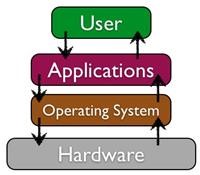
An operating system (OS) is software that performs tasks required to keep a computer system running, and it provides the main user interface. The interface is the means through which you, the computer user, interact with your computer. The operating system enables the computer’s hardware to communicate with and control its software, while providing the user with a way to interact with both. All computing devices (desktop PCs, notebook PCs, tablet PCs, smartphones, etc.) run an operating system. Without the operating system, a computer would not work properly.
terms to know
Operating System
System software that manages a computer's hardware and creates the interface between the hardware and the user.
User Interface
The means by which humans and machines interact; for example, an operating interface allows a user to interact with the files and software on a computer.
1a. Coordinating Functions
The operating system controls several essential functions, including managing the hardware resources of the computer, providing the user-interface components, and giving a platform for software developers to write applications. The user interface is what allows a user to interact with the files and software on a computer. Typically, when a computer is in operation, multiple programs are running concurrently. All running software must have access to the computer’s resources, such as CPU, memory, and storage, in order to function properly. The operating system is what coordinates access to the hardware (CPU, memory, and storage) to ensure that each software application gets the resources it needs.
Operating systems facilitate communication between the user and the computer’s resources. When a user interacts with applications, the operating system manages access to the computer's resources, such as CPU, memory and storage, and peripheral devices.
did you know
Devices that are not strictly classified as computers, such as a car or an ATM machine, also have operating systems installed. For example, your car can display your average miles per gallon or tire inflation pressure. This type of capability means there is an OS running in the background to provide the displayed data.
Operating systems usually operate in special areas of the computer’s memory and control the processor. The operating system is able to take input from a source (possibly from a keyboard, mouse, or pointer) and perform one or more operations on that input. The OS then presents the results to the user.
term to know
Platform
An environment in which a piece of software gets executed (carried out).
1b. Establishing Priorities
A priority is something that is given importance over other things. When we give a task priority, we typically do that task first based on our limited resources. Let’s pause to reflect on how priorities relate to our productivity skill.
Productivity: Skill Reflect
To stay productive, we must often prioritize important tasks over menial ones. This is a choice that we must make due to limited resources such as time, money, or availability of labor. Think of a time when you had to prioritize something at home, school, or work. Which tasks were involved? What was the limited resource that guided your decision?
Computers must establish priorities involving processing in order to complete tasks, because their memory is not infinite and having priorities contributes to their performance. A computer’s processor gives priority to the operating system to complete its tasks first. Afterward, the processor can give control back to you, the user. There are certain operations that the operating system can execute to alter this sequence of priorities. For example, the operating system can take control back from a process that might be out of control or negatively affecting the devices’ performance. In such cases, the user can regain control of the operating system through certain sequences of key strokes.
When you simultaneously hold down the CTRL-ALT-DEL keys on a Microsoft Windows operating system, you will open the Task Manager. Inside Task Manager, you can prompt the operating system to interrupt any processes that may be running. Every computer system has tools that are designed to help it control the tasks that are being executed. Task Manager is a utility tool included with the Microsoft Windows OS.
try it
If you’re working on a computer, try to locate the Task Manager:
If you’re on a device running a Windows OS, simultaneously hold down CTRL+ALT+DEL (for macOS, hold down CMD+ALT+ESC).
Select the Task Manager option.
In a popup window, you should see applications and background processes that are running on your computer.
For each active app and process, you should see a utilization report expressed as a percentage.
Here’s one possible answer for the Try It exercise: Active apps and processes are utilizing 81% of my computer’s memory.
Note: Be sure to close the Task Manager popup window when you’re through by clicking [X].
term to know
Task Manager
A utility program that reports the status of applications that are running and allows the user limited control over them.
2. Types of Operating Systems
In most cases, when you purchase a computer, it will come loaded with an operating system. Most people use the operating system that comes with the computer. For personal computers, the most popular operating systems are Microsoft’s Windows, Apple’s OS X, and different versions of Linux. These standard operating systems are typically only found on desktop or laptop computers. Mobile operating systems such as Apple’s iOS, Google’s Android, Microsoft’s Windows Mobile, and Blackberry are found on smartphones and tablets. All operating systems have different characteristics. Here are several:
Graphical User Interface (GUI)
Multitask capabilities
Multi-user capabilities
Classified as commercial or open-source
We will examine these characteristics in more detail in the next sections.
3. Characteristics of Operating Systems
Early operating systems for computers were simple by today’s standards. For example, they did not provide the ability to perform more than one task at a time. Early operating systems also required the user to exclusively type commands to initiate an action. However, as computers have evolved, so have the characteristics of their operating systems.
3a. User Interface
The user interface of a computer is the means by which an operating system lets you, the user, communicate with the computer. Each of these actions takes place at the user interface:
Typing a command
Accessing software
Inputting data
Receiving output or feedback
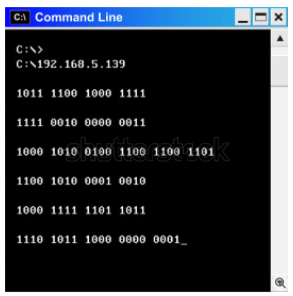
A user interface can be either graphical or command line. A command line interface provides users with a prompt to type text commands. Examples of operating systems that fall into this category are Linux and UNIX. The command window in Windows and macOS can also provide a command line interface for those types of computers.
PLACEHOLDER IMAGE ONLY
In a command line interface, users enter text that the computer is able to recognize.
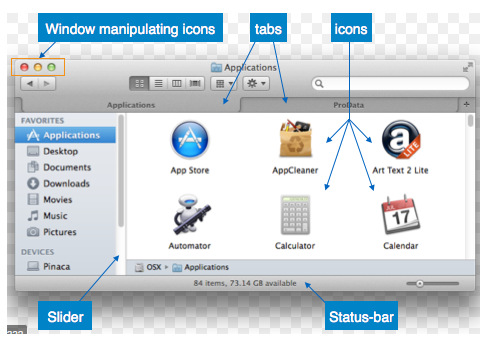
Most operating systems today, however, provide a graphical user interface (GUI). A GUI provides a more visual interface that allows the user to issue commands, run programs, and manage files by using a mouse and/or keyboard input. Linux and UNIX also offer GUI capability. MS Windows and macOS are the most common GUI- based operating systems. The GUI shown here is probably more familiar to you than the command line interface above.
PLACEHOLDER IMAGE ONLY
In a graphical user interface (GUI), the computer user is primarily guided by visual elements on the screen.
think about it
Consider the device that you’re working on right now. Does it primarily use a command line interface or a graphical user interface (GUI)? How do you know?
terms to know
Command Line Interface
A user interface that provides a prompt for typing text commands.
Graphical User Interface (GUI)
A user interface that provides graphics and icons for navigating with a mouse, pointer, or other input device.
3b. Multitasking
Early operating systems could only run one program at a time. Today, all operating systems can multitask. Multitasking refers to the capability of an operating system to run multiple software processes at the same time. Examples of operating systems that fit this category are Linux, Windows, UNIX, and macOS.
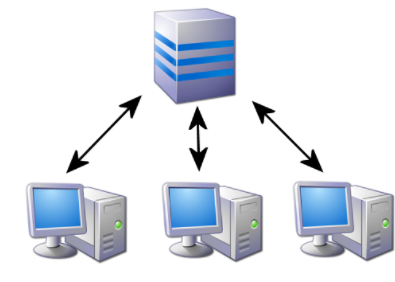
Operating systems tend to be designed for single users, especially when it comes to personal computers. Since there is only one keyboard, one mouse, and one monitor, there is no need to allow multiple people to control the computer at once. Multi-user refers to the operating system's ability to allow more than one person to use the same computer at the same time. In the image below, several people are accessing the operating system simultaneously. Examples of operating systems that fall into this category are Linux and UNIX.
PLACEHOLDER IMAGE ONLY
term to know
Multi-User
An operating system’s ability to allow more than one person to use the same computer either simultaneously or at different times.
3d. Open-Source vs. Commercial Operating Systems
Early computers were difficult to program and required great attention to detail. However, after the invention of the microprocessor, personal-computer enthusiasts banded together to start building applications and solving problems. Most of these computer enthusiasts were happy to share any programs they built, as well as any solutions to problems they found. This collaboration enabled them to more quickly innovate and fix problems. Open-source software is free software that makes the source code available for anyone to copy and use. This encourages others to contribute to the future development and improvement of the software. The open-source movement has led to the development of some of the most useful software in the world, including the Firefox browser, the Linux operating system, the Apache web server, FreeBSD, and GNU.
As software started to become a for-profit business, this idea of sharing everything fell out of favor, at least with some. This led to a new business model of restrictive software licensing, which required payment for software, a model that is still dominant today. This model is sometimes referred to as commercial (closed-source), as the source code is not made available to others. Examples of commercial operating systems are Microsoft Windows and Apple OSX.
There are legitimate arguments to both the commercial and open-source approaches for developing software. The table below explains some benefits for open-source and closed-source operating systems.
Open-Source
Commercial (Closed-Source)
The software is available for free.
The software source code is available; it can be examined and reviewed before it is installed.
The large community of programmers who work on open-source projects leads to quick bug fixes and feature additions.
By providing financial incentive for software development, some of the brightest minds have chosen software development as a career.
Technical support is available from the company that developed the software.
terms to know
Open-Source
A type of software that is free to users, giving them open access to the source code and encouraging them to modify it.
Source Code
A set of instructions written in computer programming language.
Commercial (Closed-Source)
A type of software that is pay-for-use where the source code is proprietary and not made available to all users.
4. Summary of Characteristics
The table below lists today’s most common operating systems, and summarizes their user interface, multitasking, and multi-user characteristics. The table also indicates whether the operating system is open-source or commercial (closed-source).
Operating System
User Interface
Multitasking
Multi-User
Open-Source or Commercial
MS Windows
GUI/Command Line
Yes
No
Commercial
Linux
GUI/Command Line
Yes
Yes
Open-Source
UNIX
GUI/Command Line
Yes
Yes
Commercial
macOS
GUI
Yes
No
Commercial
MS DOS
Command Line
No
No
Commercial
Windows Mobile
GUI
No
No
Commercial
Apple iOS
GUI
No
No
Commercial
Android
GUI
Yes (up to two applications at once)
No
Commercial
summary
In this lesson, you learned how a computer’s operating system (OS) has the ability to coordinate functions, like managing hardware and providing a user interface. You also saw how an OS establishes priorities during processing. There are different types of operating systems with Microsoft Windows and macOS representing two of the most popular systems for personal computers. Each operating system has characteristics that make them unique. This includes the user interface, whether they can multitask, and whether multiple users can access the same OS simultaneously. Finally, you learned that system software for operating systems is developed either as open-source code (available to all) or commercial code (closed and proprietary). Open-source operating systems encourage collaboration while commercial OS tend to provide stronger technical support from its developers.
Source: THIS CONTENT HAS BEEN ADAPTED FROM SOPHIA LEARNING’S INTRODUCTION TO IT COURSE, TUTORIAL 2.1.1, OPERATING SYSTEMS.
Terms to Know
Command Line Interface
A user interface that provides a prompt for typing text commands.
Commercial (Closed-Source)
A type of software that is pay-for-use where the source code is proprietary and not made available to all users.
Graphical User Interface (GUI)
A user interface that provides graphics and icons for navigating with a mouse, pointer, or other input device.
Multi-User
An operating system’s ability to allow more than one person to use the same computer either simultaneously or at different times.
A type of software that is free to users, giving them open access to the source code and encouraging them to modify it.
Operating System
System software that manages a computer's hardware and creates the interface between the hardware and the user.
Platform
An environment in which a piece of software gets executed (carried out).
Source Code
A set of instructions written in computer programming language.
Task Manager
A utility program that reports the status of applications that are running and allows the user limited control over them.
User Interface
The means by which humans and machines interact; for example, an operating interface allows a user to interact with the files and software on a computer.