Table of Contents |
Imagine that an organization’s marketing intern accidentally deletes a shared folder containing client files. The intern didn’t mean to cause harm, but their account had full access to shared drives instead of limited permissions. In another case, an employee leaves the company but their log-in credentials remain active, giving them continued access to confidential documents. Both situations highlight the same problem: the organization failed to control who can do what inside the network.
In the previous lesson, you learned how VPNs and encryption protect data as it travels across public networks. Once that data arrives, it still needs protection within the organization’s internal systems. This is where access control comes in. Access control is the process of managing which users, devices, or processes can access specific resources and perform certain actions. It defines what each person is allowed to view, modify, or share within a network.
Strong access control ensures that employees can complete their tasks efficiently while preventing unauthorized activity. Without it, even trusted users can unintentionally expose sensitive information or make changes that put systems at risk. Effective access control balances usability—making sure people can do their jobs—with security, which limits potential damage from accidents or malicious actions.
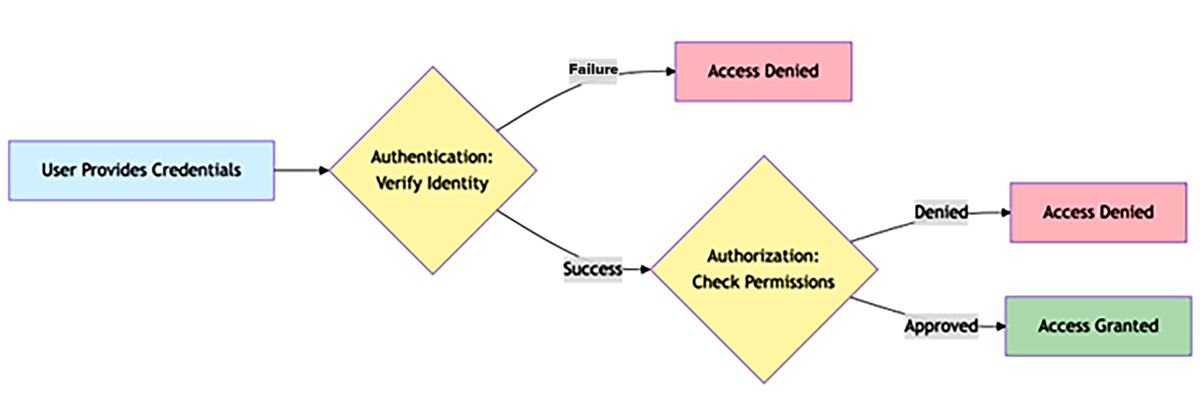
Before a system can decide what a user is allowed to do, it first needs to know who that user is. This first step is called authentication, which verifies identity using credentials such as a username, password, digital certificate, or token. You learned in the previous lesson that authentication protects the network by allowing only trusted users or devices to connect securely.
Once authentication is complete, the next step is authorization. Authorization determines what actions or resources an authenticated user is permitted to access. For example, after logging in, a network administrator may be authorized to install software or view system logs, while a regular employee can only access shared documents. Both users are authenticated, but their authorization levels are very different.
If authentication fails, access is denied altogether. But if authorization is misconfigured, authenticated users might gain access to resources they shouldn’t. Imagine an HR intern who logs in successfully but can also view payroll data meant only for managers. The log-in worked correctly, but the authorization settings failed to limit permissions appropriately.
When combined, authentication and authorization form a layered defense. Authentication ensures users are who they claim to be, and authorization ensures they can only do what they are permitted to do. Together, they protect systems from both external intrusions and internal mistakes. The following diagram summarizes the difference between authentication, which verifies identity, and authorization, which determines what an authenticated user can do.
One fundamental concept underlying all access control models is the principle of least privilege. This principle states that users, systems, and applications should only have the minimum access necessary to perform their specific tasks, no more and no less.
Every user or system account is assigned a set of privileges, which are the specific actions that account is allowed to perform. Privileges might include viewing files, editing data, installing software, or changing system settings. Managing these privileges carefully prevents both mistakes and misuse of network resources.
Applying this principle limits the potential damage caused by mistakes or attacks. If an account with limited privileges is compromised, the attacker’s access will also be limited. It also prevents users from accidentally changing or deleting important system files that they do not need for their work. The following diagram illustrates how the principle of least privilege limits access to only what each role or user needs to perform their specific job duties.
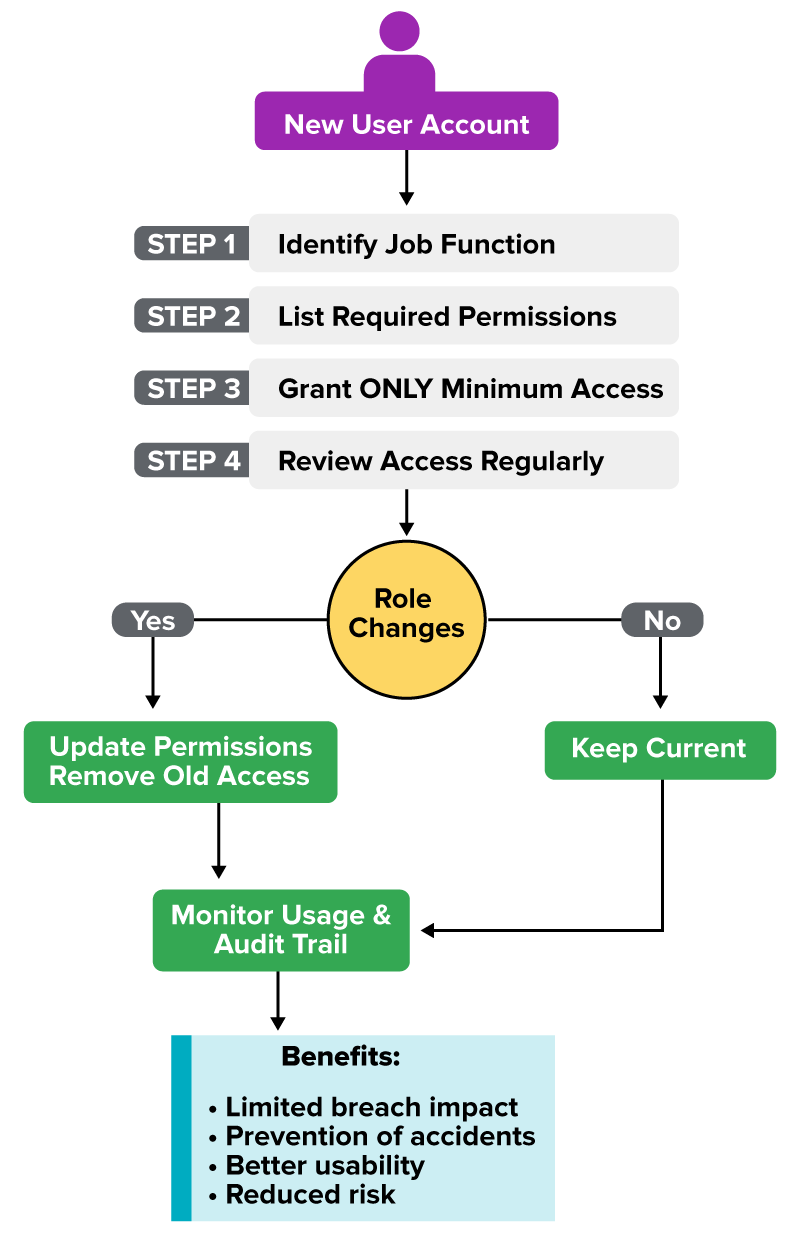
Imagine a customer service representative who needs to update customer contact information but does not need to change account balances. Granting that employee access to financial records would go beyond what their job requires. By assigning only the permissions necessary for their responsibilities, the company reduces both the risk of data loss and the chance of human error.
The principle of least privilege improves both security and efficiency. When employees only see the tools and data relevant to their work, systems become simpler to navigate and easier to protect.
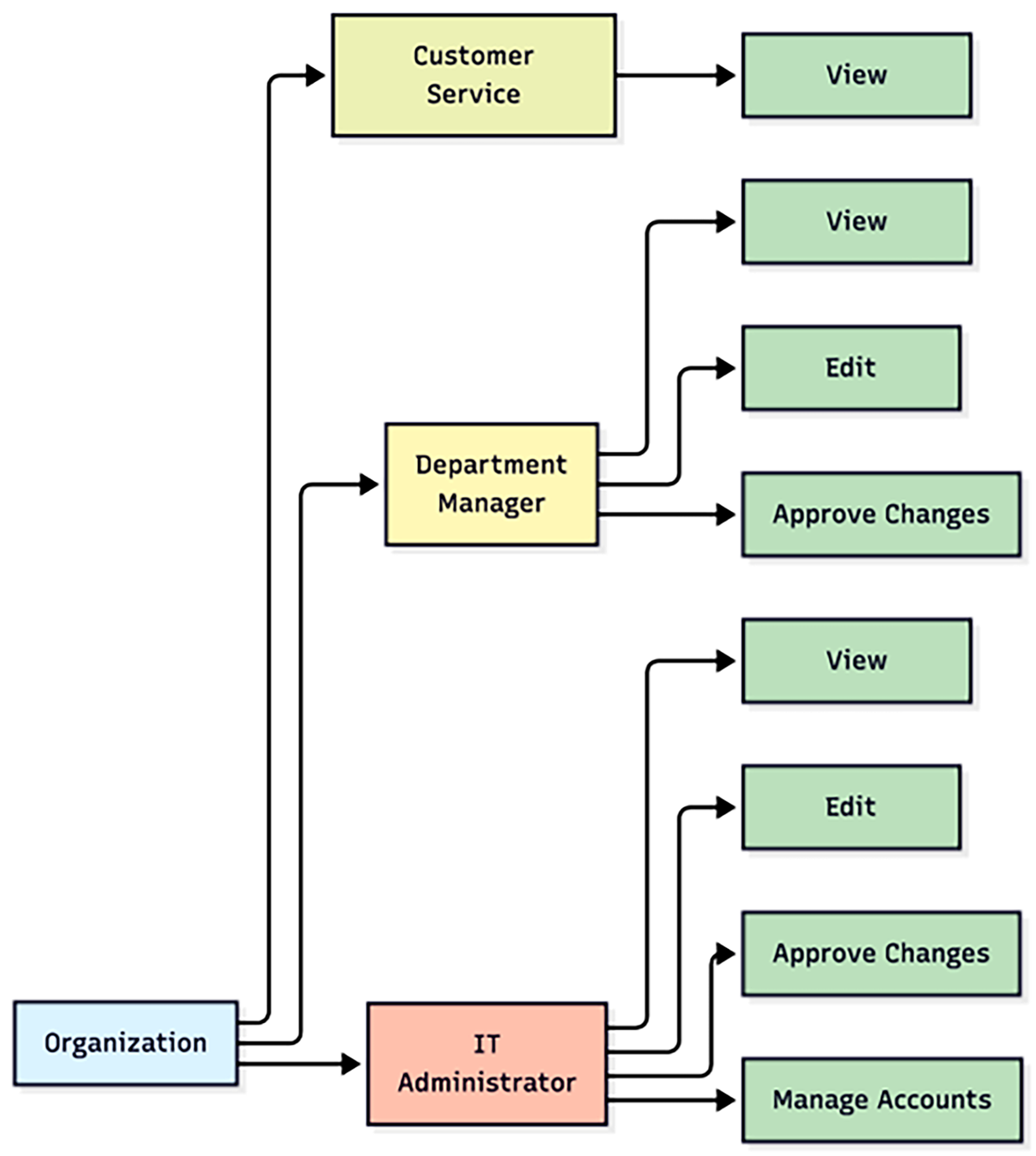
Managing access for every individual user can quickly become complicated. RBAC simplifies this process by assigning permissions to roles rather than to each person. A role represents a job function within an organization, and each role has specific privileges that match its responsibilities. Users are then added to one or more roles, automatically inheriting all the permissions that those roles provide.
The following table shows how permissions might be organized across different roles in a company. Each role includes only the access needed for its specific duties.
| Example of Roles and Permissions | View Records | Edit Records | Approve Changes | Manage Accounts |
|---|---|---|---|---|
| Customer Service Representative | X | |||
| Department Manager | X | X | X | |
| IT Administrator | X | X | X | X |
This structure allows administrators to manage access efficiently and consistently. When an employee joins the organization, changes roles, or leaves, administrators only need to update their assigned role instead of modifying multiple permissions manually. RBAC also supports the principle of least privilege because each role contains only the access necessary for its specific job function. The following diagram shows how RBAC organizes users, roles, and permissions to simplify management and maintain security.
EXAMPLE
Consider an IT employee named Alex who handles both network administration and database management. Alex is assigned two roles: Network Admin and Database Manager. The Network Admin role includes permissions to configure routers, manage firewalls, and set up VPNs. The Database Manager role provides access to perform data backups, manage security, and facilitate database migration. If Alex transitions into cybersecurity, the administrator can simply remove the Network Admin role and assign a Security Operations role. This adjustment automatically updates Alex’s permissions without requiring individual changes to dozens of settings.EXAMPLE
To see how RBAC works in practice, imagine you are setting up access for three employees in a company network. Each employee’s responsibilities require a different level of access to company data and systems.Source: THIS TUTORIAL WAS AUTHORED BY SOPHIA LEARNING. PLEASE SEE OUR TERMS OF USE.