Table of Contents |
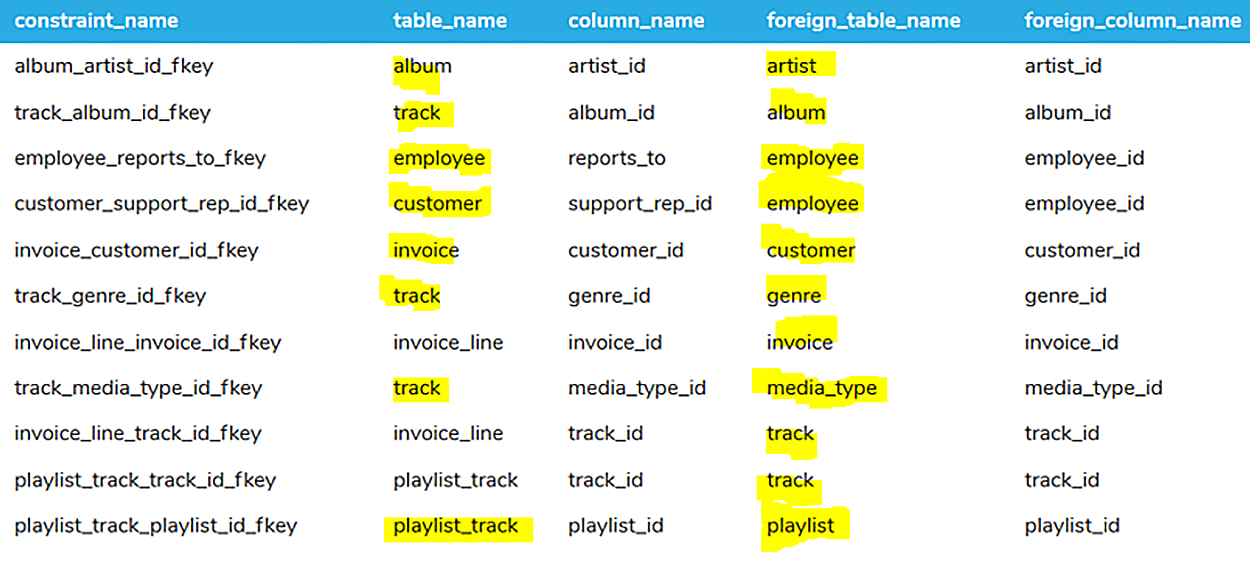
When it comes to foreign keys, it can be challenging to determine the order in which data must be inserted into tables, especially when we have multiple tables that relate to one another. In the example PostgreSQL database we have been working with so far in this course, we have the following foreign keys in place across the various tables:
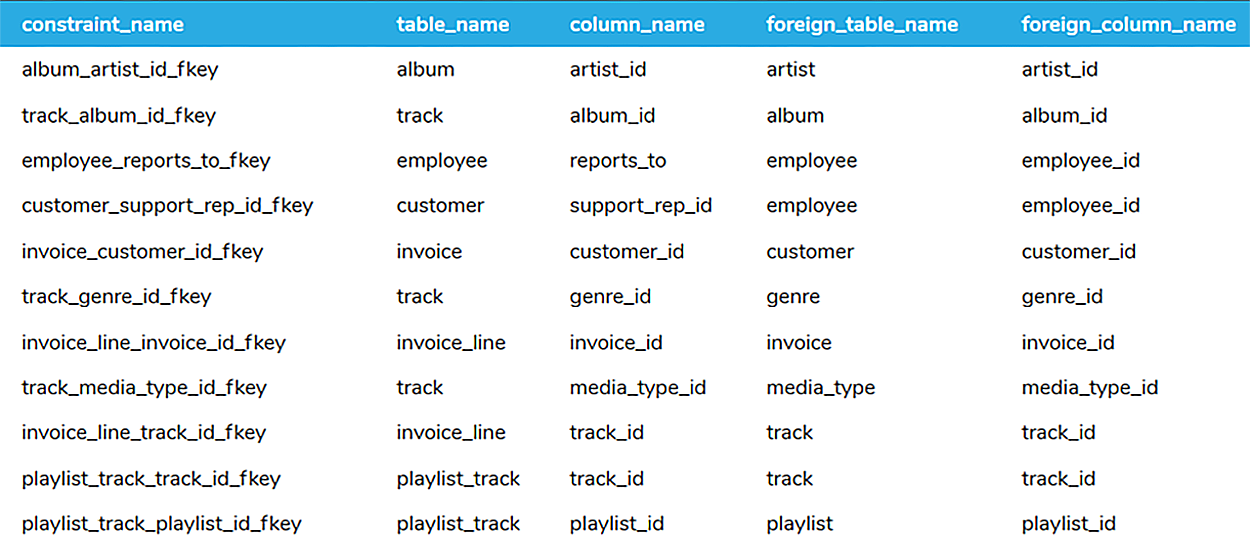
In the above list, the first column contains the constraint name. Notice that the default naming scheme for foreign key constraints is the following:
The second and third columns contain the information about the child table with a foreign key. The fourth and fifth columns show information about the parent table and the primary key that the child is referencing.
At first glance, this seems backwards, given the column headings: You would think that the child table would be the one with "foreign" in the column headings, but it is the reverse of that. Think of it this way: The first column lists the foreign key, and the second and third columns list the table and attribute that contain that foreign key.
Now, let's say that we want to insert records into both the parent and child tables. The order in which these insert operations occur is important. We must begin by inserting records into the tables that do NOT have foreign keys to other tables. If we look at the set of table constraints, we can see that those tables are artist, genre, media_type, playlist, and employee, as shown below. These are the tables that are not referenced in any of the constraints in the first column.
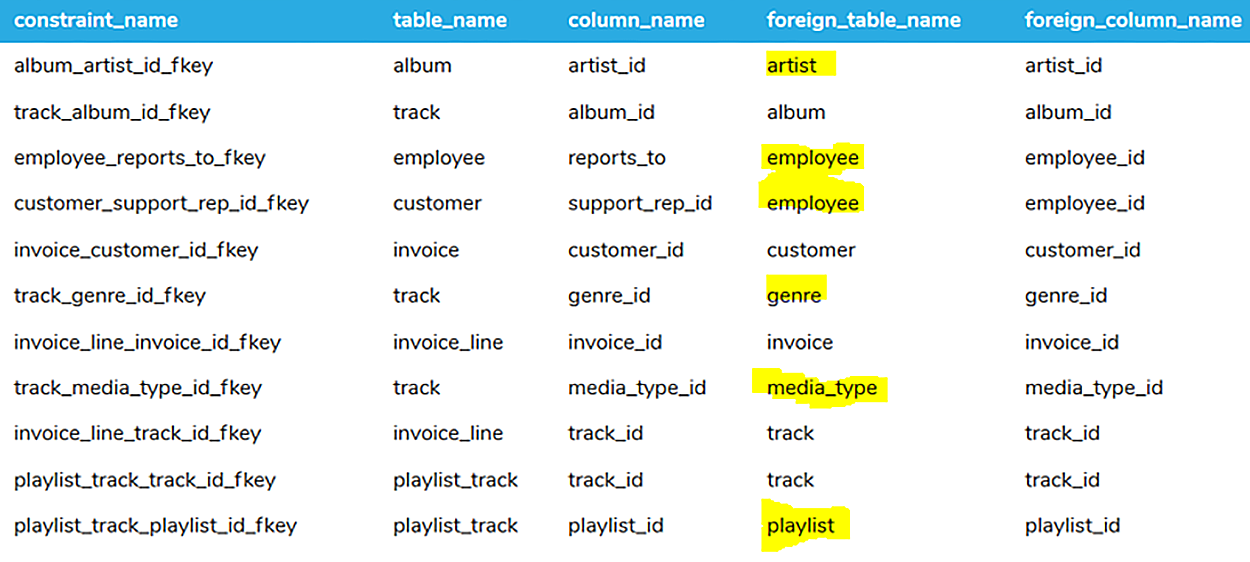
Note that the employee table links to itself, as the manager is linked using the reports_to column in the same table. So, the first five tables that we would insert records into are:
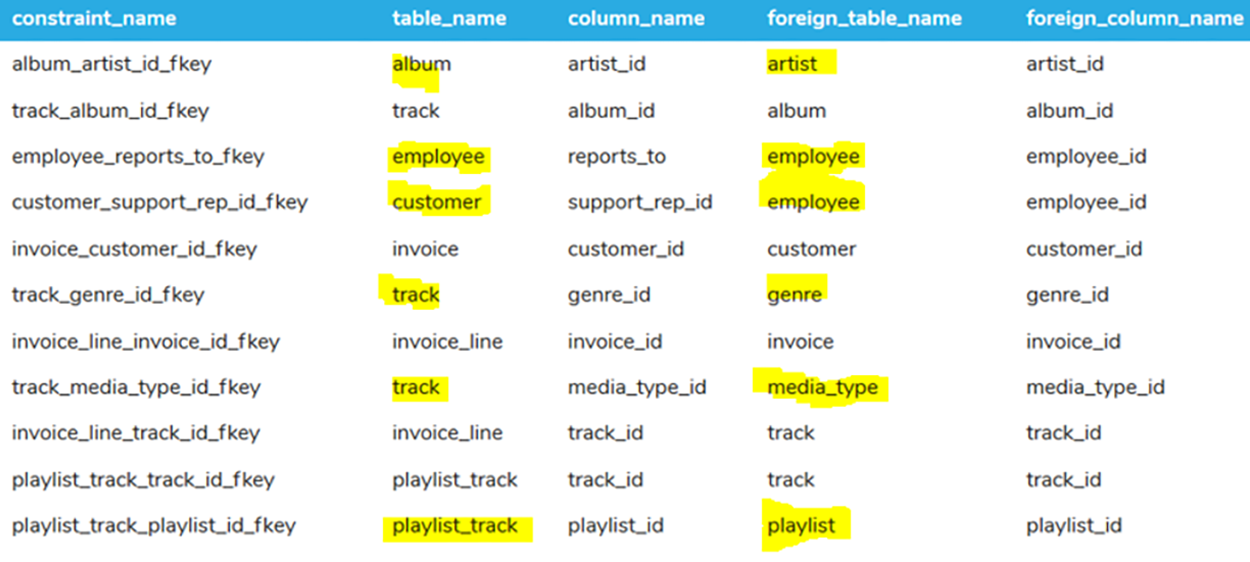
Here we have the album, employee, customer, playlist_track, and track table. However, if we look at the second row, we see that the track table also has a foreign key to the album_id in the album table. The album table was not in the first set of tables, so the track table has yet to be added. Likewise, in the last row, the playlist_track has a link to the track table, which isn’t available yet. So, the next set of tables that can be inserted into is:
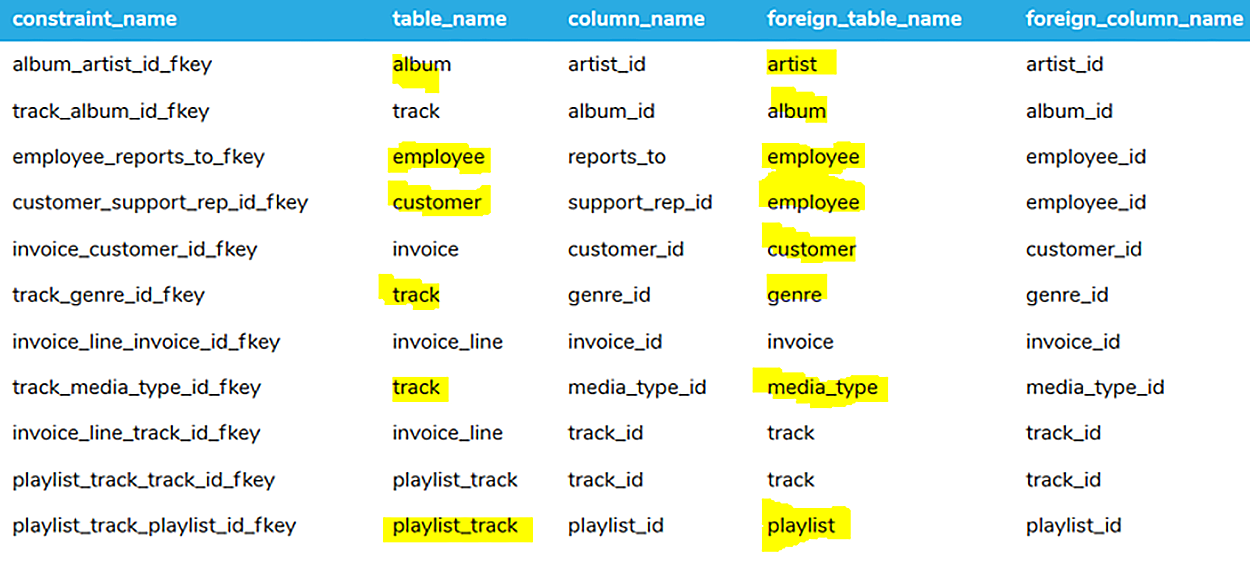
Now that we have added the records to the album table, we can add each album's tracks to the track table. The invoice table depends only on the customer table, so invoices can also be entered at this point. So, on the third level, we can insert records into the track and invoice tables, in any order.
Then, on the final level, we can now insert into invoice_line and playlist_track, as all dependencies have been accounted for.
In review, we would have to insert into any grouping of the following levels of tables:
Level 1
When deleting records, it's also important to do so in the right order. It's the same order as when inserting—but backwards. We want to delete the items at the lowest level first, and work upward.
As you learned in the previous lesson, there are options you can set for foreign keys that can ensure that deleted data does not lead to a data integrity problem.
A foreign key constraint that specifies the ON DELETE CASCADE option will automatically delete all rows that depend on the referenced table when a row is deleted in the referenced table. The purpose of this is to prevent orphaned records from being left behind.
The ON DELETE SET NULL option sets NULL the foreign key values in the referencing table when a row is deleted in the referenced table. When the deletion of data shouldn't lead to data loss but rather nullify the relationship, it might be appropriate to do this.
Most database systems set ON DELETE NO ACTION as the default, which prevents the referenced row from being deleted if it has dependent rows in the referencing table. As a result, the relationships between the data are maintained. The ON DELETE RESTRICT option is very similar to ON DELETE NO ACTION, and in most cases, it does the same thing—it restricts the referenced row from being deleted.
In our sample database, the tables do not have ON DELETE CASCADE options set up for the foreign keys, so NO ACTION is the default. That means our delete operations will fail unless we delete the records in the correct order: the opposite direction from when we inserted. In other words, we must delete the child rows before the parent rows.
Records from the tables would have to be deleted in the following order by level:
Level 4
Source: THIS TUTORIAL WAS AUTHORED BY DR. VINCENT TRAN, PHD (2020) AND FAITHE WEMPEN (2024) FOR SOPHIA LEARNING. PLEASE SEE OUR TERMS OF USE.



